編輯:關於Android編程
Android 客戶端基礎框架做個筆記
/**
* 藍牙通信基礎客戶端框架
* BluetoothBaseClient
*/
public class BBC {
private static final UUID MY_UUID_SECURE = UUID.fromString("fa87c0d0-afac-11de-8a39-0800200c9a66");
//private static final UUID MY_UUID_INSECURE = UUID.fromString("00001101-0000-1000-8000-00805F9B34FB");
private static final UUID MY_UUID_INSECURE = UUID.fromString("8ce255c0-200a-11e0-ac64-0800200c9a66");
private static final int MSG_BLUETOOTH_START = 0; //藍牙開始
private static final int MSG_BLUETOOTH_CONNECT = 1; //藍牙連接
private static final int MSG_BLUETOOTH_CONNECTED = 2; //藍牙連接成功
private static final int MSG_BLUETOOTH_CONNECT_TIMEOUT = 3; //藍牙連接超時
private static final int MSG_BLUETOOTH_CLOSE = 4; //藍牙連接關閉
private final BluetoothAdapter mBluetoothAdapter;
private ConnectManagerThread mConnectManagerThread;
private BluetoothStatusChangeHandler mBluetoothStatusChangeHandler;
private BluetoothReadHandler mBluetoothReadHandler;
private volatile ConnectedHandler mConnectedHandler;
private BluetoothDevice device;
public BBC() {
mBluetoothAdapter = BluetoothAdapter.getDefaultAdapter();
HandlerThread handlerThread1 = new HandlerThread("BluetoothStatusChangeHandler");
handlerThread1.start();
mBluetoothStatusChangeHandler = new BluetoothStatusChangeHandler(handlerThread1.getLooper());
HandlerThread handlerThread2 = new HandlerThread("BluetoothReadHandler");
handlerThread2.start();
mBluetoothReadHandler = new BluetoothReadHandler(handlerThread2.getLooper());
}
/**
* 設置設備
*/
public synchronized void switchDevice(BluetoothDevice device){
this.device = device;
}
private class BluetoothReadHandler extends Handler{
private AtomicBoolean isOpen = new AtomicBoolean(false);
BluetoothReadHandler(Looper looper){
super(looper);
}
@Override
public void handleMessage(Message msg) {
if(isOpen.get() && onPushListener != null){
LogUtils.bluetooth("讀取流....");
try{
if(mConnectedHandler != null){
mConnectedHandler.read();
}
sendEmptyMessage(0);
}catch (Exception e){
e.printStackTrace();
if(mConnectedHandler != null){
mConnectedHandler.cancel();
}
close();
bluetoothErrorHandler(ERROR_BLUETOOTH_READ, e);
}
}
}
public void open(){
isOpen.set(true);
sendEmptyMessage(0);
}
public void close(){
isOpen.set(false);
removeMessages(0);
}
}
private class BluetoothStatusChangeHandler extends Handler{
private int BBCmsg;
BluetoothStatusChangeHandler(Looper looper){
super(looper);
}
@Override
public void handleMessage(Message msg) {
int what = msg.what;
switch (what){
case MSG_BLUETOOTH_START:
closeBluetoothDeviceHandler();
boolean openSucess = openBluetoothDeviceHandler();
if(openSucess){
BBCmsg = MSG_BLUETOOTH_START; //設置狀態為藍牙打開
bluetoothStatusChangeHandler(STATUS_BLUETOOTH_OPEN, "藍牙打開!");
sendEmptyMessage(MSG_BLUETOOTH_CONNECT);
}else {
bluetoothErrorHandler(ERROR_BLUETOOTH_UNABLE, new RuntimeException("藍牙不可用!"));
}
break;
case MSG_BLUETOOTH_CONNECT:
if(BBCmsg == MSG_BLUETOOTH_START){
BBCmsg = MSG_BLUETOOTH_CONNECT;
connectBluetoothDeviceHandler();
bluetoothStatusChangeHandler(STATUS_BLUETOOTH_CONNECTING, "藍牙正在建立連接!");
}else {
LogUtils.bluetooth("狀態不符合,不做處理:" + BBCmsg);
}
break;
case MSG_BLUETOOTH_CONNECTED:
//開始建立流
if(BBCmsg == MSG_BLUETOOTH_CONNECT){
Object o = msg.obj;
if(o != null){
BluetoothSocket mmSocket = (BluetoothSocket) o;
mConnectedHandler = new ConnectedHandler(mmSocket);
if(mConnectedHandler.connectedSuccess()){
//打開讀數據
mBluetoothReadHandler.open();
BBCmsg = MSG_BLUETOOTH_CONNECTED;
bluetoothStatusChangeHandler(STATUS_BLUETOOTH_CONNECTED, "藍牙連接成功!");
}else {
bluetoothErrorHandler(ERROR_BLUETOOTH_CONNECT, new RuntimeException("藍牙連接異常!"));
}
}else {
bluetoothErrorHandler(ERROR_BLUETOOTH_CONNECT, new RuntimeException("藍牙連接異常!"));
}
}else {
LogUtils.bluetooth("狀態不符合,不做處理:" + BBCmsg);
}
break;
case MSG_BLUETOOTH_CONNECT_TIMEOUT:
break;
case MSG_BLUETOOTH_CLOSE:
closeBluetoothDeviceHandler();
BBCmsg = MSG_BLUETOOTH_CLOSE;
bluetoothStatusChangeHandler(STATUS_BLUETOOTH_CLOSE, "藍牙關閉!");
break;
}
}
}
/**
* 打開藍牙
*/
private boolean openBluetoothDeviceHandler() {
if (mBluetoothAdapter == null) {
//藍牙模塊不可用
return false;
}
//確保藍牙打開
if (!mBluetoothAdapter.isEnabled()) {
mBluetoothAdapter.enable();
int MAX_COUNT = 10;
int tryCount = 0;
boolean enable = false;
while(!enable){
//檢查是否打開完成
enable = mBluetoothAdapter.isEnabled();
if(tryCount > MAX_COUNT){
return false;
}
try {
tryCount++;
Thread.sleep(500);
} catch (InterruptedException e) {
e.printStackTrace();
}
}
}
return true;
}
/**
* 關閉藍牙
*/
public void closeBluetoothDeviceHandler() {
LogUtils.bluetooth("停止藍牙連接服務");
if (mConnectedHandler != null) {
mConnectedHandler.cancel();
mConnectedHandler = null;
}
if (mConnectManagerThread != null) {
mConnectManagerThread.cancel();
mConnectManagerThread = null;
}
//打開讀數據
mBluetoothReadHandler.close();
}
/**
* 連接遠程藍牙設備
*/
public synchronized void connectBluetoothDeviceHandler() {
closeBluetoothDeviceHandler();
mConnectManagerThread = new ConnectManagerThread();
mConnectManagerThread.start();
}
/**
* 打開
*/
public void open(){
mBluetoothStatusChangeHandler.sendEmptyMessage(MSG_BLUETOOTH_START);
}
/**
* 關閉
*/
public void close(){
mBluetoothStatusChangeHandler.sendEmptyMessage(MSG_BLUETOOTH_CLOSE);
}
private class ConnectManagerThread extends Thread{
private final ConnectThread mSecureThread;
private final ConnectThread mInSecureThread;
ConnectManagerThread(){
mSecureThread = new ConnectThread(device, true);
mInSecureThread = new ConnectThread(device, false);
}
public void cancel(){
mSecureThread.cancel();
mInSecureThread.cancel();
}
@Override
public void run() {
Future f1 = pool.submit(mSecureThread);
Future f2 = pool.submit(mInSecureThread);
try {
BluetoothSocket socket1 = f1.get();
BluetoothSocket socket2 = f2.get();
LogUtils.bluetooth("獲得SOCKET");
if(socket1 != null || socket2 != null){
//啟動鏈接流程
Message message = Message.obtain();
if(f1.get() != null){
message.obj = f1.get();
}else {
message.obj = f2.get();
}
message.what = MSG_BLUETOOTH_CONNECTED;
mBluetoothStatusChangeHandler.sendMessage(message);
}else {
bluetoothErrorHandler(ERROR_BLUETOOTH_CONNECT, new RuntimeException("藍牙服務建立失敗!"));
}
} catch (Exception e) {
e.printStackTrace();
bluetoothErrorHandler(ERROR_BLUETOOTH_CONNECT, e);
}
}
}
private static final ExecutorService pool = Executors.newFixedThreadPool(2);
private class ConnectThread implements Callable {
private final BluetoothSocket mmSocket;
private String mSocketType;
public ConnectThread(BluetoothDevice device, boolean secure) {
BluetoothSocket tmp = null;
mSocketType = secure ? "Secure" : "Insecure";
try {
if (secure) {
tmp = device.createRfcommSocketToServiceRecord(MY_UUID_SECURE);
} else {
tmp = device.createInsecureRfcommSocketToServiceRecord(MY_UUID_INSECURE);
}
} catch (IOException e) {
LogUtils.bluetooth("Socket Type: " + mSocketType + "create() failed " + e);
}
mmSocket = tmp;
}
public void cancel() {
try {
mmSocket.close();
} catch (IOException e) {
LogUtils.bluetooth("close error :" + e.getMessage());
bluetoothErrorHandler(ERROR_BLUETOOTH_CLOSE, e);
}
}
@Override
public BluetoothSocket call() throws Exception {
mBluetoothAdapter.cancelDiscovery();
try {
LogUtils.bluetooth("等待服務端響應 mmSocket :" + mmSocket);
//開始連接
mmSocket.connect();
LogUtils.bluetooth("收到服務端響應");
return mmSocket;
} catch (IOException e) {
e.printStackTrace();
LogUtils.bluetoothError(e);
cancel();
return null;
}
}
}
private class ConnectedHandler {
private static final int READ_MAX = 256;
private final byte[] bytes = new byte[READ_MAX];
private final BluetoothSocket mmSocket;
private final InputStream mmInStream;
private final OutputStream mmOutStream;
private final String mmDevice;
public ConnectedHandler(BluetoothSocket socket) {
mmSocket = socket;
mmDevice = socket.getRemoteDevice().getName();
InputStream tmpIn = null;
OutputStream tmpOut = null;
try {
tmpIn = socket.getInputStream();
tmpOut = socket.getOutputStream();
} catch (Exception e) {
e.printStackTrace();
}
mmInStream = tmpIn;
mmOutStream = tmpOut;
}
public boolean connectedSuccess(){
return mmInStream != null && mmOutStream != null;
}
public void read() throws Exception {
int readCount = mmInStream.read(bytes);
if(onPushListener != null){
byte[] datas = new byte[readCount];
System.arraycopy(bytes, 0, datas, 0, readCount);
onPushListener.onDecode(datas);
}
}
public void write(byte[] buffer) throws Exception {
mmOutStream.write(buffer);
if(onBluetoothStatusChangeListener != null) {
onBluetoothStatusChangeListener.bluetoothSendSuccess(buffer);
}
}
public void cancel() {
try {
mmOutStream.close();
mmInStream.close();
mmSocket.close();
} catch (Exception e) {
e.printStackTrace();
bluetoothErrorHandler(ERROR_BLUETOOTH_CLOSE, e);
}
}
public String getMmDevice() {
return mmDevice;
}
}
/**
* 發送消息
*/
public void write(byte[] out) {
try{
if(mConnectedHandler != null) {
mConnectedHandler.write(out);
}
}catch (Exception e){
e.printStackTrace();
if(mConnectedHandler != null) {
mConnectedHandler.cancel();
}
bluetoothErrorHandler(ERROR_BLUETOOTH_WRITE, e);
}
}
/**
* 藍牙狀態變化
*/
private static final int ERROR_BLUETOOTH_UNABLE = 1; //藍牙不可用異常
private static final int ERROR_BLUETOOTH_CLOSE = 2; //藍牙關閉異常
private static final int ERROR_BLUETOOTH_READ = 3; //藍牙讀取異常
private static final int ERROR_BLUETOOTH_WRITE = 4; //藍牙寫異常
private static final int ERROR_BLUETOOTH_CONNECT = 5; //藍牙連接異常
private void bluetoothErrorHandler(int statusCount, Exception e){
switch (statusCount){
case ERROR_BLUETOOTH_UNABLE:
if(onBluetoothErrorListener != null){
onBluetoothErrorListener.bluetoothUnableError(e);
}
break;
case ERROR_BLUETOOTH_CONNECT:
if(onBluetoothErrorListener != null){
onBluetoothErrorListener.bluetoothConnectError(e);
}
break;
case ERROR_BLUETOOTH_READ:
if(onBluetoothErrorListener != null){
onBluetoothErrorListener.bluetoothReadError(e);
}
break;
case ERROR_BLUETOOTH_WRITE:
if(onBluetoothErrorListener != null){
onBluetoothErrorListener.bluetoothWriteError(e);
}
break;
case ERROR_BLUETOOTH_CLOSE:
if(onBluetoothErrorListener != null){
onBluetoothErrorListener.bluetoothCloseError(e);
}
break;
default:
break;
}
}
private static final int STATUS_BLUETOOTH_OPEN = 6; //藍牙打開
private static final int STATUS_BLUETOOTH_CONNECTING = 7; //藍牙正在建立連接
private static final int STATUS_BLUETOOTH_CONNECTED = 8; //藍牙連接建立
private static final int STATUS_BLUETOOTH_CLOSE = 9; //藍牙關閉
private void bluetoothStatusChangeHandler(int statusCount, String statusMessage){
LogUtils.bluetooth(statusMessage + " 狀態號: " + statusCount);
switch (statusCount){
case STATUS_BLUETOOTH_OPEN:
if(onBluetoothStatusChangeListener != null){
//獲取本機藍牙信息
String localAddress = mBluetoothAdapter.getAddress();
String localName = mBluetoothAdapter.getName();
LogUtils.bluetooth("本機藍牙信息[address:" + localAddress + ",name:" + localName);
onBluetoothStatusChangeListener.bluetoothOpened(statusMessage, localAddress, localName);
}
break;
case STATUS_BLUETOOTH_CONNECTED:
if(onBluetoothStatusChangeListener != null){
LogUtils.bluetooth("藍牙建立連接:" + mConnectedHandler.getMmDevice());
onBluetoothStatusChangeListener.bluetoothConnected(mConnectedHandler.getMmDevice());
}
break;
case STATUS_BLUETOOTH_CLOSE:
if(onBluetoothStatusChangeListener != null){
onBluetoothStatusChangeListener.bluetoothClosed(statusMessage);
}
break;
default:
break;
}
}
public void setOnBluetoothStatusChangeListener(OnBluetoothStatusChangeListener onBluetoothStatusChangeListener) {
this.onBluetoothStatusChangeListener = onBluetoothStatusChangeListener;
}
private volatile OnBluetoothStatusChangeListener onBluetoothStatusChangeListener;
interface OnBluetoothStatusChangeListener {
void bluetoothOpened(String message, String localAddress, String localName);
void bluetoothConnected(String message);
void bluetoothClosed(String message);
void bluetoothSendSuccess(byte[] b);
}
public void setOnBluetoothErrorListener(OnBluetoothErrorListener onBluetoothErrorListener) {
this.onBluetoothErrorListener = onBluetoothErrorListener;
}
private volatile OnBluetoothErrorListener onBluetoothErrorListener;
interface OnBluetoothErrorListener{
void bluetoothUnableError(Exception error);
void bluetoothConnectError(Exception error);
void bluetoothReadError(Exception error);
void bluetoothWriteError(Exception error);
void bluetoothCloseError(Exception error);
}
public void setOnPushListener(OnPushListener onPushListener) {
this.onPushListener = onPushListener;
}
private volatile OnPushListener onPushListener;
public interface OnPushListener{
void onDecode(byte[] datas);
}
}
public class BBCCommander implements
        BBC.OnBluetoothStatusChangeListener,
        BBC.OnBluetoothErrorListener,
        BBC.OnPushListener{

    private static final BBC BBC = new BBC();

    @Override
    public void bluetoothUnableError(Exception error) {
        LogUtils.bluetooth("藍牙不能使用!");
        if(onBluetoothStatusChangeListener != null){
            onBluetoothStatusChangeListener.bluetoothUnable(error);
        }
    }

    @Override
    public void bluetoothConnectError(Exception error) {
        LogUtils.bluetooth(error + "藍牙連接異常!:" + onBluetoothStatusChangeListener);
        if(onBluetoothStatusChangeListener != null){
            onBluetoothStatusChangeListener.bluetoothError(error);
        }
    }

    @Override
    public void bluetoothReadError(Exception error) {
        LogUtils.bluetooth(error + "藍牙讀異常!");
        if(onBluetoothStatusChangeListener != null){
            onBluetoothStatusChangeListener.bluetoothError(error);
        }
    }

    @Override
    public void bluetoothWriteError(Exception error) {
        LogUtils.bluetooth(error + "藍牙寫異常!");
        if(onBluetoothStatusChangeListener != null){
            onBluetoothStatusChangeListener.bluetoothError(error);
        }
    }

    @Override
    public void bluetoothCloseError(Exception error) {
        LogUtils.bluetooth("藍牙關閉異常!");
        if(onBluetoothStatusChangeListener != null){
            onBluetoothStatusChangeListener.bluetoothError(error);
        }
    }

    private static class SingletonInstance {
        private static final BBCCommander mInstance = new BBCCommander();
    }

    public static BBCCommander getInstance(){
        return SingletonInstance.mInstance;
    }

    @Override
    public void bluetoothOpened(String message, String localAddress, String localName) {
        LogUtils.bluetooth("藍牙打開!");
        if(onBluetoothStatusChangeListener != null){
            onBluetoothStatusChangeListener.bluetoothOpened(message);
        }
    }

    @Override
    public void bluetoothConnected(String device) {
        LogUtils.bluetooth("藍牙建立連接!");
        if(onBluetoothStatusChangeListener != null){
            onBluetoothStatusChangeListener.bluetoothConnected(device);
        }
    }

    @Override
    public void bluetoothClosed(String message) {
        LogUtils.bluetooth("藍牙關閉!");
        if(onBluetoothStatusChangeListener != null){
            onBluetoothStatusChangeListener.bluetoothClosed(message);
        }
    }

    @Override
    public void bluetoothSendSuccess(byte[] b) {
        LogUtils.bluetooth("藍牙發送成功!");
        if(onBluetoothStatusChangeListener != null){
            onBluetoothStatusChangeListener.bluetoothSendSuccess(b);
        }
    }

    public void switchDevice(BluetoothDevice device){
        BBC.switchDevice(device);
    }

    public void init(){
        BBC.setOnBluetoothStatusChangeListener(this);
        BBC.setOnBluetoothErrorListener(this);
        BBC.setOnPushListener(this);
    }

    public void open(){
        BBC.open();
    }

    public void close(){
        BBC.close();
    }

    public void write(byte[] bytes){
        BBC.write(bytes);
    }

    @Override
    public void onDecode(byte[] datas) {
        if(mOnDecoder != null){
            mOnDecoder.onDecode(datas);
        }
    }

    public void setOnBluetoothStatusChangeListener(OnBluetoothStatusChangeListener onBluetoothStatusChangeListener) {
        this.onBluetoothStatusChangeListener = onBluetoothStatusChangeListener;
    }

    private volatile OnBluetoothStatusChangeListener onBluetoothStatusChangeListener;
    public interface OnBluetoothStatusChangeListener{
        void bluetoothUnable(Exception e);
        void bluetoothError(Exception e);
        void bluetoothOpened(String message);
        void bluetoothConnected(String message);
        void bluetoothClosed(String message);
        void bluetoothSendSuccess(byte[] b);
    }

    private volatile OnDecoder mOnDecoder;
    public void setOnDecoder(OnDecoder mOnDecoder) {
        this.mOnDecoder = mOnDecoder;
    }

    public interface OnDecoder {
        void onDecode(byte[] bytes);
    }
}
 藍牙防丟器原理、實現與Android BLE接口編程
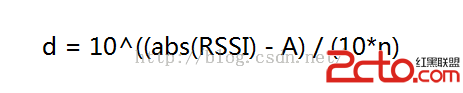
本文是對已實現的藍牙防丟器項目的總結,闡述藍牙防丟器的原理、實現與android客戶端的藍牙BLE接口編程。在這裡重點關注如何利用BLE接口來進行工程實現,對於BLE的協
 詳解Android自定義控件屬性TypedArray以及attrs
最近在研究android自定義控件屬性,學到了TypedArray以及attrs。大家也可以結合《理解Android中的自定義屬性》這篇文章進行學習,後續一篇還有應用。1
 Android編程滑動效果之Gallery仿圖像集浏覽實現方法
本文實例講述了Android編程滑動效果之Gallery仿圖像集浏覽實現方法。分享給大家供大家參考,具體如下:Android系統自帶一個Gallery浏覽圖片的應用,通過
 Android繪圖機制與處理技巧(四)——Android圖像處理之畫筆特效處理
除了常用的畫筆屬性,比如普通的畫筆(Paint),帶邊框、填充的style,顏色(Color),寬度(StrokeWidth),抗鋸齒(ANTI_ALIAS_FLAG)等