編輯:關於Android編程
最近需要在服務器上用Jenkins自動打包Android app,從google官網上下載的Linux版本sdk結果發現裡面就只有一個tools目錄有文件,其他的都沒有。。。
無奈,服務器是沒有界面的,之前都習慣用IDE去安裝更新,現在嘗試用命令行下載更新了。
從google的官網下載最新Linux版本SDK,由於dl.google.com域名一直沒有被牆,所以才可以直接從官網下了。這點不錯~
$ wget https://dl.google.com/android/android-sdk_r24.4.1-linux.tgz

解壓
$ tar zxvf android-sdk_r24.4.1-linux.tgz
前面說到了,我們下載的這個包其實只有tools目錄下才有東西。既然google給了我們這個,表示這裡面肯定有可以更新SDK的工具啦。
其實就是tools/android這個文件
$ cd android-sdk-linux/tools

查看命令幫助
$ ./android --help
       Usage:
       android [global options] action [action options]
       Global options:
  -s --silent     : Silent mode, shows errors only.
  -v --verbose    : Verbose mode, shows errors, warnings and all messages.
     --clear-cache: Clear the SDK Manager repository manifest cache.
  -h --help       : Help on a specific command.

                                                                    Valid
                                                                    actions
                                                                    are
                                                                    composed
                                                                    of a verb
                                                                    and an
                                                                    optional
                                                                    direct
                                                                    object:
-    sdk              : Displays the SDK Manager window.
-    avd              : Displays the AVD Manager window.
-   list              : Lists existing targets or virtual devices.
-   list avd          : Lists existing Android Virtual Devices.
-   list target       : Lists existing targets.
-   list device       : Lists existing devices.
-   list sdk          : Lists remote SDK repository.
- create avd          : Creates a new Android Virtual Device.
-   move avd          : Moves or renames an Android Virtual Device.
- delete avd          : Deletes an Android Virtual Device.
- update avd          : Updates an Android Virtual Device to match the folders
                        of a new SDK.
- create project      : Creates a new Android project.
- update project      : Updates an Android project (must already have an
                        AndroidManifest.xml).
- create test-project : Creates a new Android project for a test package.
- update test-project : Updates the Android project for a test package (must
                        already have an AndroidManifest.xml).
- create lib-project  : Creates a new Android library project.
- update lib-project  : Updates an Android library project (must already have
                        an AndroidManifest.xml).
- create uitest-project: Creates a new UI test project.
- update adb          : Updates adb to support the USB devices declared in the
                        SDK add-ons.
- update sdk          : Updates the SDK by suggesting new platforms to install
                        if available.
我們需要關注 list 和 update 。
查看當前可安裝的SDK版本
$ ./android list sdk

Refresh Sources:
  Fetching https://dl.google.com/android/repository/addons_list-2.xml
  Validate XML
  Parse XML
  Fetched Add-ons List successfully
  Refresh Sources
  Fetching URL: https://dl.google.com/android/repository/repository-11.xml
  Validate XML: https://dl.google.com/android/repository/repository-11.xml
  Parse XML:    https://dl.google.com/android/repository/repository-11.xml
  Fetching URL: https://dl.google.com/android/repository/addon.xml
  Validate XML: https://dl.google.com/android/repository/addon.xml
  Parse XML:    https://dl.google.com/android/repository/addon.xml
  Fetching URL: https://dl.google.com/android/repository/glass/addon.xml
  Validate XML: https://dl.google.com/android/repository/glass/addon.xml
  Parse XML:    https://dl.google.com/android/repository/glass/addon.xml
  Fetching URL: https://dl.google.com/android/repository/extras/intel/addon.xml
  Validate XML: https://dl.google.com/android/repository/extras/intel/addon.xml
  Parse XML:    https://dl.google.com/android/repository/extras/intel/addon.xml
  Fetching URL: https://dl.google.com/android/repository/sys-img/android/sys-img.xml
  Validate XML: https://dl.google.com/android/repository/sys-img/android/sys-img.xml
  Parse XML:    https://dl.google.com/android/repository/sys-img/android/sys-img.xml
  Fetching URL: https://dl.google.com/android/repository/sys-img/android-wear/sys-img.xml
  Validate XML: https://dl.google.com/android/repository/sys-img/android-wear/sys-img.xml
  Parse XML:    https://dl.google.com/android/repository/sys-img/android-wear/sys-img.xml
  Fetching URL: https://dl.google.com/android/repository/sys-img/android-tv/sys-img.xml
  Validate XML: https://dl.google.com/android/repository/sys-img/android-tv/sys-img.xml
  Parse XML:    https://dl.google.com/android/repository/sys-img/android-tv/sys-img.xml
  Fetching URL: https://dl.google.com/android/repository/sys-img/google_apis/sys-img.xml
  Validate XML: https://dl.google.com/android/repository/sys-img/google_apis/sys-img.xml
  Parse XML:    https://dl.google.com/android/repository/sys-img/google_apis/sys-img.xml
Packages available for installation or update: 41
   1- Android SDK Tools, revision 25.2.2
   2- Android SDK Platform-tools, revision 24.0.4
   3- Android SDK Build-tools, revision 24.0.3
   4- Documentation for Android SDK, API 24, revision 1
   5- SDK Platform Android 7.0, API 24, revision 2
   6- SDK Platform Android 6.0, API 23, revision 3
   7- SDK Platform Android 5.1.1, API 22, revision 2
   8- SDK Platform Android 5.0.1, API 21, revision 2
   9- SDK Platform Android 4.4W.2, API 20, revision 2
  10- SDK Platform Android 4.4.2, API 19, revision 4
  11- SDK Platform Android 4.3.1, API 18, revision 3
  12- SDK Platform Android 4.2.2, API 17, revision 3
  13- SDK Platform Android 4.1.2, API 16, revision 5
  14- SDK Platform Android 4.0.3, API 15, revision 5
  15- SDK Platform Android 4.0, API 14, revision 4
  16- SDK Platform Android 3.2, API 13, revision 1
  17- SDK Platform Android 3.1, API 12, revision 3
  18- SDK Platform Android 3.0, API 11, revision 2
  19- SDK Platform Android 2.3.3, API 10, revision 2
  20- SDK Platform Android 2.3.1, API 9, revision 2
  21- SDK Platform Android 2.2, API 8, revision 3
  22- SDK Platform Android 2.1, API 7, revision 3
  23- Google APIs, Android API 24, revision 1
  24- Google APIs, Android API 23, revision 1
  25- Google APIs, Android API 22, revision 1
  26- Google APIs, Android API 21, revision 1
  27- Google APIs, Android API 19, revision 20
  28- Glass Development Kit Preview, Android API 19, revision 11
  29- Google APIs, Android API 18, revision 4
  30- Google APIs, Android API 17, revision 4
  31- Google APIs, Android API 16, revision 4
  32- Google APIs, Android API 15, revision 3
  33- Android Support Repository, revision 38
  34- Android Auto Desktop Head Unit emulator, revision 1.1
  35- Google Play services, revision 33
  36- Google Repository, revision 36
  37- Google Play APK Expansion library, revision 1
  38- Google Play Licensing Library, revision 1
  39- Google Play Billing Library, revision 5
  40- Android Auto API Simulators, revision 1
  41- Google Web Driver, revision 2
因為是首次安裝,所有有非常多的版本可下載。
我們可以有2個選擇:
根據上面的工具使用幫助,可以看到更新命令是使用update sdk,
但是這個命令又是如何使用的呢?查看幫助
$ ./android update sdk --help

Usage:
       android [global options] update sdk [action options]
       Global options:
  -s --silent     : Silent mode, shows errors only.
  -v --verbose    : Verbose mode, shows errors, warnings and all messages.
     --clear-cache: Clear the SDK Manager repository manifest cache.
  -h --help       : Help on a specific command.

                     Action "update sdk":
  Updates the SDK by suggesting new platforms to install if available.
Options:
  -f --force     : Forces replacement of a package or its parts, even if
                   something has been modified.
  -n --dry-mode  : Simulates the update but does not download or install
                   anything.
     --proxy-host: HTTP/HTTPS proxy host (overrides settings if defined)
  -s --no-https  : Uses HTTP instead of HTTPS (the default) for downloads.
  -t --filter    : A filter that limits the update to the specified types of
                   packages in the form of a comma-separated list of
                   [platform, system-image, tool, platform-tool, doc, sample,
                   source]. This also accepts the identifiers returned by
                   'list sdk --extended'.
  -u --no-ui     : Updates from command-line (does not display the GUI)
     --proxy-port: HTTP/HTTPS proxy port (overrides settings if defined)
  -p --obsolete  : Deprecated. Please use --all instead.
  -a --all       : Includes all packages (such as obsolete and non-dependent
                   ones.)
在這裡,重點關注-u和-t參數就好。
-u --no-ui  表示在命令行環境下使用,剛好符合我們服務器環境
-t --filter 表示過濾,只安裝指定版本的sdk
好了,我們現在就開始更新吧
首先下載更新全部可安裝的SDK版本,不指定過濾即可
$ ./android update sdk -u
經過漫長時間的等待基本都安裝好了。。
如果只需要安裝指定版本的話,就需要過濾了,如何過濾呢?我們上面已經介紹查看可安裝更新sdk版本命令list sdk了。根據查看到的序號過濾即可。
只安裝指定序號的版本
$ ./android  update sdk -u -t 序號
如:安裝Build-tools, revision 24.0.3
$ ./android update sdk -u -t 3
需要同意license,輸入 y 回車即可
安裝後可跳轉到上一級目錄查看是否已經有了。
$ cd ..
$ ls
add-ons  build-tools  platforms  SDK Readme.txt  temp  tools
$ cd build-tools
$ ls
24.0.3
可以看到安裝成功了。
總結通過這些我們也可以推測出其實那些IDE圖形界面底層調用的也是這些命令吧。。
 AndroidStudio導入項目到VisualSVN Server並忽略(ignore)相關文件詳細步驟
當你提交代碼的時候,如果出現各種你不想提交的文件的時候,你也許會選擇在項目左邊欄選中java–>src來進行提交,這樣操作是沒有問題,但是如果你想使用
 自定義控件三部曲之繪圖篇(十一)——Paint之setXfermode(二)
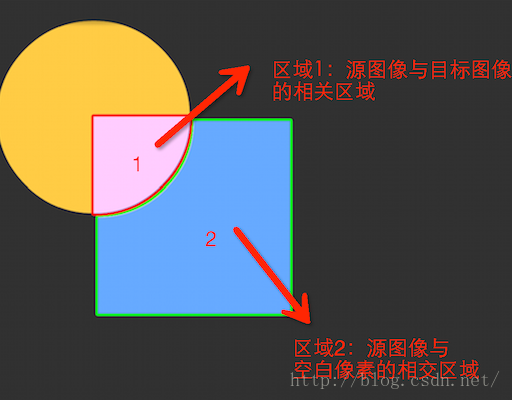
這篇文章將逐個講解每個模式的意義。這裡所講的各種模式,在大家理解了之後可以回過頭來看看setColorFilter(new PorterDuffColorFilter(C
 Android源碼適配器模式-Activity類結構
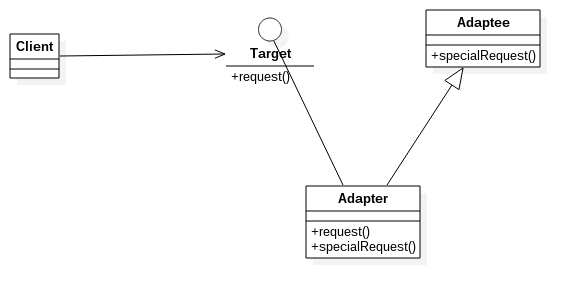
其實適配器模式在Android源碼中非常多,而從整體的源碼角度上來看Activity的結構就是一種適配器模式。從這個角度上面看Activity,對Activity和應用層
 AndroidStudio代碼檢查,Lint檢查,還有注解
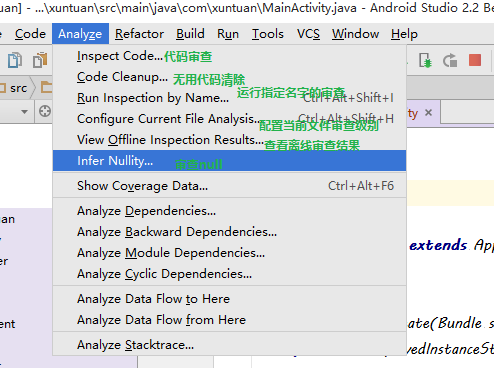
一,IntelliJ 代碼檢查IntelliJ IDEA的具有強大,快速,靈活的靜態代碼分析。它可以檢測編譯器和運行時錯誤,提出改進和完善,甚至在編譯之前。代碼檢查基礎(