編輯:關於Android編程
原文地址:http://android.xsoftlab.net/training/multiple-threads/run-code.html
上節課我們學習了如何定義一個類用於管理線程以及任務。這節課將會學習如何在線程池中運行任務。要做到這一點,只需要往線程池的工作隊列中添加任務即可。當一條線程處於閒置狀態時,那麼ThreadPoolExecutor會從任務隊列中取出一條任務並放入該線程中運行。
這節課還介紹了如何停止一個正在運行中的任務。如果在任務開始後,可能發現這項任務並不是必須的,那麼就需要用到任務取消的功能了。這樣可以避免浪費處理器的時間。舉個例子,如果你正從網絡上下載一張圖像,如果偵測到這張圖像已經在緩存中了,那麼這時就需要停止這項網絡任務了。
為了在指定的線程池中啟動一項線程任務,需要將Runnable對象傳給ThreadPoolExecutor的execute()方法。這個方法會將任務添加到線程池的工作隊列中去。當其中一個線程變為閒置狀態時,那麼線程池管理器會從隊列中取出一個已經等待了很久的任務,然後放到這個線程中運行:
public class PhotoManager {
    public void handleState(PhotoTask photoTask, int state) {
        switch (state) {
            // The task finished downloading the image
            case DOWNLOAD_COMPLETE:
            // Decodes the image
                mDecodeThreadPool.execute(
                        photoTask.getPhotoDecodeRunnable());
            ...
        }
        ...
    }
    ...
}
當ThreadPoolExecutor啟動一個Runnable時,它會自動調用Runnable的run()方法。
如果要停止一項任務,那麼需要中斷該任務所在的線程。為了可以預先做到這一點,那麼需要在任務創建時存儲該任務所在線程的句柄:
class PhotoDecodeRunnable implements Runnable {
    // Defines the code to run for this task
    public void run() {
        /*
         * Stores the current Thread in the
         * object that contains PhotoDecodeRunnable
         */
        mPhotoTask.setImageDecodeThread(Thread.currentThread());
        ...
    }
    ...
}
我們可以調用Thread.interrupt()方法來中斷一個線程。這裡要注意Thread對象是由系統控制的,系統會在應用進程的范圍之外修改它們。正因為這個原因,在中斷線程之前,需要對線程的訪問加鎖。通常需要將這部分代碼放入同步代碼塊中:
public class PhotoManager {
    public static void cancelAll() {
        /*
         * Creates an array of Runnables that's the same size as the
         * thread pool work queue
         */
        Runnable[] runnableArray = new Runnable[mDecodeWorkQueue.size()];
        // Populates the array with the Runnables in the queue
        mDecodeWorkQueue.toArray(runnableArray);
        // Stores the array length in order to iterate over the array
        int len = runnableArray.length;
        /*
         * Iterates over the array of Runnables and interrupts each one's Thread.
         */
        synchronized (sInstance) {
            // Iterates over the array of tasks
            for (int runnableIndex = 0; runnableIndex < len; runnableIndex++) {
                // Gets the current thread
                Thread thread = runnableArray[taskArrayIndex].mThread;
                // if the Thread exists, post an interrupt to it
                if (null != thread) {
                    thread.interrupt();
                }
            }
        }
    }
    ...
}
在多數情況下,Thread.interrupt()會使線程立刻停止。然而,它只會將那些正在等待的線程停下來,它並不會中止CPU或網絡任務。為了避免使系統變慢或卡頓,你應當在開始任意一項操作之前測試是否有中斷請求:
/*
 * Before continuing, checks to see that the Thread hasn't
 * been interrupted
 */
if (Thread.interrupted()) {
    return;
}
...
// Decodes a byte array into a Bitmap (CPU-intensive)
BitmapFactory.decodeByteArray(
        imageBuffer, 0, imageBuffer.length, bitmapOptions);
...
 Android動畫效果之自定義ViewGroup添加布局動畫(五)
前言:前面幾篇文章介紹了補間動畫、逐幀動畫、屬性動畫,大部分都是針對View來實現的動畫,那麼該如何為了一個ViewGroup添加動畫呢?今天結合自定義ViewGroup
 Android -- Service的使用
Service正如其名服務,我們之前了解過Activity表示的是一個頁面,但是如果我們某些操作,不需要展示頁面,值需要進行後台的一個操作,這時候我們可以創建一個Serv
 Android的四大組建Service 簡單、易懂的解析
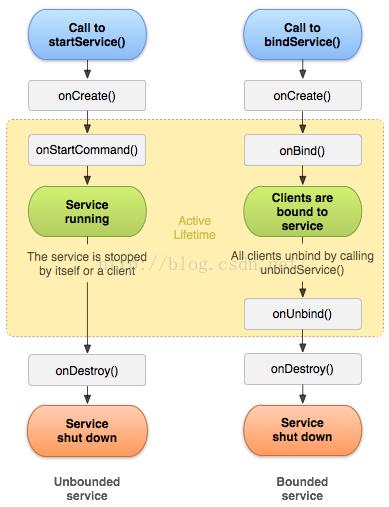
Service 服務:四大組件之一特性: 沒有界面運行在後台,除了界面相關的之外,Activity能做的Service也能做。service的生命周期:上圖所述一共有兩種
 Android 初識 MVC、MVP框架
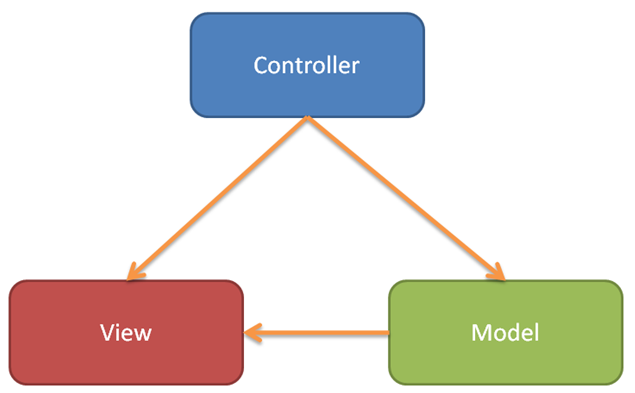
前言MVC、MVP、MVVP相信大家已經耳熟能詳了,作為Android最出名的三個框架,它們的應用是非常的廣泛。這篇博客就來簡單介紹下其中二種框架。也加強下自己對這方面的