編輯:關於Android編程
文檔總覽:
1.網略無線相關
2.LogCat相關
3.Toast相關
3.Dialog相關
4.文件操作相關
5.Md5相關
6.字符驗證相關
7.SdCard相關
8.App操作相關
9.SharedPreferences相關
10.app版本相關
11:雜亂的收集
網絡無線相關:
判斷手機是否連接網絡:
public static boolean isOnline(Context context) {
boolean flag = false;
if (context != null) {
ConnectivityManager mConnectivityManager = (ConnectivityManager) context.getSystemService(Context.CONNECTIVITY_SERVICE);
NetworkInfo mNetworkInfo = mConnectivityManager.getActiveNetworkInfo();


if (mNetworkInfo != null) {
mNetworkInfo.isAvailable();
flag = true;
} else {
flag = false;
}
}
return flag;
}
判斷手機連接的是哪種網絡
public static int getWlanState(Context context) {
ConnectivityManager mConnectivityManager = (ConnectivityManager) context.getSystemService(Context.CONNECTIVITY_SERVICE);
boolean wifi = mConnectivityManager.getNetworkInfo(ConnectivityManager.TYPE_WIFI).isConnectedOrConnecting();
boolean gprs = mConnectivityManager.getNetworkInfo(ConnectivityManager.TYPE_MOBILE).isConnectedOrConnecting();
if (gprs) {
return 1;// GPRS網
} else if (wifi) {
return 2;// WIFI網
} else {
return 0;// 無網
}
}
判斷手機是否開啟GPS
public static boolean isGPS(Context context) {
// 通過GPS衛星定位,定位級別可以精確到街
LocationManager locationManager = (LocationManager) context.getSystemService(Context.LOCATION_SERVICE);
boolean gps = locationManager.isProviderEnabled(LocationManager.GPS_PROVIDER);
// 通過WLAN或移動網絡(3G/2G)確定的位置(也稱作AGPS,輔助GPS定位。主要用於在室內或遮蓋物(建築群或茂密的深林等)密集的地方定位)

// boolean network = locationManager.isProviderEnabled(LocationManager.NETWORK_PROVIDER);
if (gps) {
return true;
} else {
return false;
}
}
打開系統網絡設置界面
public static boolean openSttingForWlan(Context context) {
Intent intent = null;
// 判斷手機系統的版本 即API大於10 就是3.0或以上版本
if (android.os.Build.VERSION.SDK_INT > 10) {
intent = new Intent(android.provider.Settings.ACTION_WIRELESS_SETTINGS);
} else {
intent = new Intent();
ComponentName component = new ComponentName("com.android.settings", "com.android.settings.WirelessSettings");
intent.setComponent(component);
intent.setAction("android.intent.action.VIEW");
}
context.startActivity(intent);


return true;
}
打開系統GPS設置界面
public static boolean openSttingForGPS(Context context) {
boolean flagSetting = false;
Intent intent = new Intent();
intent.setAction(Settings.ACTION_LOCATION_SOURCE_SETTINGS);
intent.setFlags(Intent.FLAG_ACTIVITY_NEW_TASK);
try {
context.startActivity(intent);


} catch (ActivityNotFoundException ex) {


intent.setAction(Settings.ACTION_SETTINGS);
try {
context.startActivity(intent);
flagSetting = true;
} catch (Exception e) {
flagSetting = false;
}
}
return flagSetting;
}
嘗試幫用戶直接開啟GPS
@SuppressWarnings("deprecation")
public static void openGPS(Context context) {
Intent intent = new Intent("android.location.GPS_ENABLED_CHANGE");
intent.putExtra("enabled", true);
context.sendBroadcast(intent);
String provider = Settings.Secure.getString(context.getContentResolver(), Settings.Secure.LOCATION_PROVIDERS_ALLOWED);
if (!provider.contains("gps")) { // if gps is disabled
final Intent poke = new Intent();
poke.setClassName("com.android.settings", "com.android.settings.widget.SettingsAppWidgetProvider");
poke.addCategory(Intent.CATEGORY_ALTERNATIVE);
poke.setData(Uri.parse("3"));
context.sendBroadcast(poke);
}


}
LogCat統一管理:
public class L
{

	private L()
	{
		/* cannot be instantiated */
		throw new UnsupportedOperationException("cannot be instantiated");
	}

	public static boolean isDebug = true;// 是否需要打印bug,可以在application的onCreate函數裡面初始化
	private static final String TAG = "way";

	// 下面四個是默認tag的函數
	public static void i(String msg)
	{
		if (isDebug)
			Log.i(TAG, msg);
	}

	public static void d(String msg)
	{
		if (isDebug)
			Log.d(TAG, msg);
	}

	public static void e(String msg)
	{
		if (isDebug)
			Log.e(TAG, msg);
	}

	public static void v(String msg)
	{
		if (isDebug)
			Log.v(TAG, msg);
	}

	// 下面是傳入自定義tag的函數
	public static void i(String tag, String msg)
	{
		if (isDebug)
			Log.i(tag, msg);
	}

	public static void d(String tag, String msg)
	{
		if (isDebug)
			Log.i(tag, msg);
	}

	public static void e(String tag, String msg)
	{
		if (isDebug)
			Log.i(tag, msg);
	}

	public static void v(String tag, String msg)
	{
		if (isDebug)
			Log.i(tag, msg);
	}
}
Toast統一管理:
public class T
{

	private T()
	{
		/* cannot be instantiated */
		throw new UnsupportedOperationException("cannot be instantiated");
	}

	public static boolean isShow = true;

	/**
	 * 短時間顯示Toast
	 *
	 * @param context
	 * @param message
	 */
	public static void showShort(Context context, CharSequence message)
	{
		if (isShow)
			Toast.makeText(context, message, Toast.LENGTH_SHORT).show();
	}

	/**
	 * 短時間顯示Toast
	 *
	 * @param context
	 * @param message
	 */
	public static void showShort(Context context, int message)
	{
		if (isShow)
			Toast.makeText(context, message, Toast.LENGTH_SHORT).show();
	}

	/**
	 * 長時間顯示Toast
	 *
	 * @param context
	 * @param message
	 */
	public static void showLong(Context context, CharSequence message)
	{
		if (isShow)
			Toast.makeText(context, message, Toast.LENGTH_LONG).show();
	}

	/**
	 * 長時間顯示Toast
	 *
	 * @param context
	 * @param message
	 */
	public static void showLong(Context context, int message)
	{
		if (isShow)
			Toast.makeText(context, message, Toast.LENGTH_LONG).show();
	}

	/**
	 * 自定義顯示Toast時間
	 *
	 * @param context
	 * @param message
	 * @param duration
	 */
	public static void show(Context context, CharSequence message, int duration)
	{
		if (isShow)
			Toast.makeText(context, message, duration).show();
	}

	/**
	 * 自定義顯示Toast時間
	 *
	 * @param context
	 * @param message
	 * @param duration
	 */
	public static void show(Context context, int message, int duration)
	{
		if (isShow)
			Toast.makeText(context, message, duration).show();
	}
Dialog管理:
public class DialogTool
{
	public static final int NO_ICON = -1; // 無圖標
	/**
	 * @description 創建消息對話框
	 *
	 * @param context
	 *            上下文 必填
	 * @param iconId
	 *            圖標,如:R.drawable.icon 或 DialogTool.NO_ICON 必填
	 * @param title
	 *            標題 必填
	 * @param message
	 *            顯示內容 必填
	 * @param btnName
	 *            按鈕名稱 必填
	 * @param listener
	 *            監聽器,需實現android.content.DialogInterface.OnClickListener接口 必填
	 * @return
	 */
	@SuppressLint("NewApi")
	public static Dialog createMessageDialog(Context context, String title,
			String message, String btnName, OnClickListener listener,
			int iconId, boolean flag)
	{
		Dialog dialog = null;
		AlertDialog.Builder builder = new AlertDialog.Builder(context,
				AlertDialog.THEME_HOLO_LIGHT);

		if (iconId != NO_ICON)
		{
			// 設置對話框圖標
			builder.setIcon(iconId);
		}
		// 設置對話框標題
		builder.setTitle(title);
		// 設置對話框消息
		builder.setMessage(message);
		// 設置按鈕
		builder.setPositiveButton(btnName, listener);
		// 創建一個消息對話框
		dialog = builder.create();
		// 點擊其它地方可以讓窗口消失
		dialog.setCancelable(flag);

		return dialog;
	}

	/**
	 * @description 創建警示(確認、取消)對話框
	 *
	 * @param context
	 *            上下文 必填
	 * @param iconId
	 *            圖標,如:R.drawable.icon 或 DialogTool.NO_ICON 必填
	 * @param title
	 *            標題 必填
	 * @param message
	 *            顯示內容 必填
	 * @param positiveBtnName
	 *            確定按鈕名稱 必填
	 * @param negativeBtnName
	 *            取消按鈕名稱 必填
	 * @param positiveBtnListener
	 *            監聽器,需實現android.content.DialogInterface.OnClickListener接口 必填
	 * @param negativeBtnListener
	 *            監聽器,需實現android.content.DialogInterface.OnClickListener接口 必填
	 */
	@SuppressLint("NewApi")
	public static Dialog createConfirmDialog(Context context, String title,
			String message, String positiveBtnName, String negativeBtnName,
			OnClickListener positiveBtnListener,
			OnClickListener negativeBtnListener, int iconId, boolean flag)
	{
		Dialog dialog = null;
		AlertDialog.Builder builder = new AlertDialog.Builder(context,
				AlertDialog.THEME_HOLO_LIGHT);

		if (iconId != NO_ICON)
		{
			// 設置對話框圖標
			builder.setIcon(iconId);
		}
		// 設置對話框標題
		builder.setTitle(title);
		// 設置對話框消息
		builder.setMessage(message);
		// 設置確定按鈕
		builder.setPositiveButton(positiveBtnName, positiveBtnListener);
		// 設置取消按鈕
		builder.setNegativeButton(negativeBtnName, negativeBtnListener);
		// 創建一個消息對話框
		dialog = builder.create();
		// 點擊其它地方可以讓窗口消失
		dialog.setCancelable(flag);

		return dialog;
	}

	/**
	 * @description 創建單選對話框
	 *
	 * @param context
	 *            上下文 必填
	 * @param iconId
	 *            圖標,如:R.drawable.icon 或 DialogTool.NO_ICON 必填
	 * @param title
	 *            標題 必填
	 * @param itemsString
	 *            選擇項 必填
	 * @param positiveBtnName
	 *            確定按鈕名稱 必填
	 * @param negativeBtnName
	 *            取消按鈕名稱 必填
	 * @param positiveBtnListener
	 *            監聽器,需實現android.content.DialogInterface.OnClickListener接口 必填
	 * @param negativeBtnListener
	 *            監聽器,需實現android.content.DialogInterface.OnClickListener接口 必填
	 * @param itemClickListener
	 *            監聽器,需實現android.content.DialogInterface.OnClickListener接口 必填
	 * @return
	 */
	public static Dialog createSingleChoiceDialog(Context context,
			String title, String[] itemsString, String positiveBtnName,
			String negativeBtnName, OnClickListener positiveBtnListener,
			OnClickListener negativeBtnListener,
			OnClickListener itemClickListener, int iconId, boolean flag)
	{
		Dialog dialog = null;
		AlertDialog.Builder builder = new AlertDialog.Builder(context);

		if (iconId != NO_ICON)
		{
			// 設置對話框圖標
			builder.setIcon(iconId);
		}
		// 設置對話框標題
		builder.setTitle(title);
		// 設置單選選項, 參數0: 默認第一個單選按鈕被選中
		builder.setSingleChoiceItems(itemsString, 0, itemClickListener);
		// 設置確定按鈕
		builder.setPositiveButton(positiveBtnName, positiveBtnListener);
		// 設置確定按鈕
		builder.setNegativeButton(negativeBtnName, negativeBtnListener);
		// 創建一個消息對話框
		dialog = builder.create();

		// 點擊其它地方可以讓窗口消失
		dialog.setCancelable(flag);

		return dialog;
	}

	/**
	 * @description 創建復選對話框
	 *
	 * @param context
	 *            上下文 必填
	 * @param iconId
	 *            圖標,如:R.drawable.icon 或 DialogTool.NO_ICON 必填
	 * @param title
	 *            標題 必填
	 * @param itemsString
	 *            選擇項 必填
	 * @param positiveBtnName
	 *            確定按鈕名稱 必填
	 * @param negativeBtnName
	 *            取消按鈕名稱 必填
	 * @param positiveBtnListener
	 *            監聽器,需實現android.content.DialogInterface.OnClickListener接口 必填
	 * @param negativeBtnListener
	 *            監聽器,需實現android.content.DialogInterface.OnClickListener接口 必填
	 * @param itemClickListener
	 *            監聽器,需實現android.content.DialogInterface.
	 *            OnMultiChoiceClickListener;接口 必填
	 * @return
	 */
	public static Dialog createMultiChoiceDialog(Context context, String title,
			String[] itemsString, String positiveBtnName,
			String negativeBtnName, OnClickListener positiveBtnListener,
			OnClickListener negativeBtnListener,
			OnMultiChoiceClickListener itemClickListener, int iconId,
			boolean flag)
	{
		Dialog dialog = null;
		AlertDialog.Builder builder = new AlertDialog.Builder(context);

		if (iconId != NO_ICON)
		{
			// 設置對話框圖標
			builder.setIcon(iconId);
		}
		// 設置對話框標題
		builder.setTitle(title);
		// 設置選項
		builder.setMultiChoiceItems(itemsString, null, itemClickListener);
		// 設置確定按鈕
		builder.setPositiveButton(positiveBtnName, positiveBtnListener);
		// 設置確定按鈕
		builder.setNegativeButton(negativeBtnName, negativeBtnListener);
		// 創建一個消息對話框
		dialog = builder.create();
		// 點擊其它地方可以讓窗口消失
		dialog.setCancelable(flag);

		return dialog;
	}

	/**
	 * @description 創建列表對話框
	 *
	 * @param context
	 *            上下文 必填
	 * @param iconId
	 *            圖標,如:R.drawable.icon 或 DialogTool.NO_ICON 必填
	 * @param title
	 *            標題 必填
	 * @param itemsString
	 *            列表項 必填
	 * @param negativeBtnName
	 *            取消按鈕名稱 必填
	 * @param negativeBtnListener
	 *            監聽器,需實現android.content.DialogInterface.OnClickListener接口 必填
	 * @return
	 */
	public static Dialog createListDialog(Context context, String title,
			String[] itemsString, String negativeBtnName,
			OnClickListener negativeBtnListener,
			OnClickListener itemClickListener, int iconId, boolean flag)
	{
		Dialog dialog = null;
		AlertDialog.Builder builder = new AlertDialog.Builder(context);

		if (iconId != NO_ICON)
		{
			// 設置對話框圖標
			builder.setIcon(iconId);
		}
		// 設置對話框標題
		builder.setTitle(title);
		// 設置列表選項
		builder.setItems(itemsString, itemClickListener);
		// 設置確定按鈕
		builder.setNegativeButton(negativeBtnName, negativeBtnListener);
		// 創建一個消息對話框
		dialog = builder.create();
		// 點擊其它地方可以讓窗口消失
		dialog.setCancelable(flag);

		return dialog;
	}

	/**
	 * @description 創建自定義(含確認、取消)對話框
	 *
	 * @param context
	 *            上下文 必填
	 * @param iconId
	 *            圖標,如:R.drawable.icon 或 DialogTool.NO_ICON 必填
	 * @param title
	 *            標題 必填
	 * @param positiveBtnName
	 *            確定按鈕名稱 必填
	 * @param negativeBtnName
	 *            取消按鈕名稱 必填
	 * @param positiveBtnListener
	 *            監聽器,需實現android.content.DialogInterface.OnClickListener接口 必填
	 * @param negativeBtnListener
	 *            監聽器,需實現android.content.DialogInterface.OnClickListener接口 必填
	 * @param view
	 *            對話框中自定義視圖 必填
	 * @return
	 */
	@SuppressLint("NewApi")
	public static Dialog createRandomDialog(Context context, String title,
			String positiveBtnName, String negativeBtnName,
			OnClickListener positiveBtnListener,
			OnClickListener negativeBtnListener, View view, int iconId,
			boolean flag)
	{
		Dialog dialog = null;
		AlertDialog.Builder builder = new AlertDialog.Builder(context,
				AlertDialog.THEME_HOLO_LIGHT);

		if (iconId != NO_ICON)
		{
			// 設置對話框圖標
			builder.setIcon(iconId);
		}
		// 設置對話框標題
		builder.setTitle(title);
		builder.setView(view);
		// 設置確定按鈕
		builder.setPositiveButton(positiveBtnName, positiveBtnListener);
		// 設置確定按鈕
		builder.setNegativeButton(negativeBtnName, negativeBtnListener);
		// 創建一個消息對話框
		dialog = builder.create();
		// 設置點擊屏幕其他地方是否消失
		dialog.setCancelable(flag);

		return dialog;
	}

	/**
	 * @description 創建警示(確認、取消)對話框
	 *
	 * @param context
	 *            上下文 必填
	 * @param iconId
	 *            圖標,如:R.drawable.icon 或 DialogTool.NO_ICON 必填
	 * @param title
	 *            標題 必填
	 * @param message
	 *            顯示內容 必填
	 * @param positiveBtnName
	 *            確定按鈕名稱 必填
	 * @param negativeBtnName
	 *            取消按鈕名稱 必填
	 * @param positiveBtnListener
	 *            監聽器,需實現android.content.DialogInterface.OnClickListener接口 必填
	 * @param negativeBtnListener
	 *            監聽器,需實現android.content.DialogInterface.OnClickListener接口 必填
	 */
	@SuppressLint("NewApi")
	public static Dialog createEnsureDialog(Context context, View aboutView2,
			String title, String message, String positiveBtnName,
			OnClickListener positiveBtnListener, int iconId, boolean flag)
	{
		Dialog dialog = null;
		AlertDialog.Builder builder = new AlertDialog.Builder(context,
				AlertDialog.THEME_HOLO_LIGHT);
		// LayoutInflater factory = LayoutInflater.from(context);
		// View aboutView = factory.inflate(aboutView2, null);// 獲得自定義對話框
		builder.setView(aboutView2);

		if (iconId != NO_ICON)
		{
			// 設置對話框圖標
			builder.setIcon(iconId);
		}
		// 設置對話框標題
		builder.setTitle(title);
		// 設置對話框消息
		builder.setMessage(message);
		// 設置確定按鈕
		builder.setPositiveButton(positiveBtnName, positiveBtnListener);
		// //設置取消按鈕
		// builder.setNegativeButton(negativeBtnName, negativeBtnListener);
		// 創建一個消息對話框
		dialog = builder.create();
		// 點擊其它地方可以讓窗口消失
		dialog.setCancelable(flag);

		return dialog;
	}
}
文件操作類:
public class FileUtil {
	private static final int BUFF_SIZE = 1048576; // 1M Byte

	/**
	 * @方法描述  復制單個文件

	 * @參數  oldFile 源文件 newFile 復制後的新文件
	 * */
	public static boolean copyFile(File oldFile, File newFile) {
		if (oldFile == null && newFile == null) {
			return false;
		}
		try {
			@SuppressWarnings("unused")
			int bytesum = 0;
			int byteread = 0;
			if (oldFile.exists()) {
				// 文件存在時
				InputStream inStream = new FileInputStream(oldFile); // 讀入原文件
				FileOutputStream fs = new FileOutputStream(newFile);
				byte[] buffer = new byte[1024];
				while ((byteread = inStream.read(buffer)) != -1) {
					bytesum += byteread; // 字節數 文件大小
					fs.write(buffer, 0, byteread);
				}
				fs.flush();
				fs.close();
				inStream.close();
			} else {
				return false;
			}
		} catch (Exception e) {
			e.printStackTrace();
			return false;
		}
		return true;
	}

	/**
	 * 方法描述: 復制單個文件
 參數: oldPath 源文件路徑 newPath 復制後的新文件路徑
	 * */
	public static boolean copyFile(String oldPath, String newPath) {
		return copyFile(new File(oldPath), new File(newPath));
	}

	/**
	 * 方法描述: 將文件夾下的所有文件復制到新的文件夾下
 參數: oldFile 源文件夾 newFile 復制後的新文件夾 	*/
	@SuppressWarnings("resource")
	public static boolean copyFiles(File oldFile, File newFile) {
		{
			if (!oldFile.exists()) {
				return false;
			}
			byte[] b = new byte[(int) oldFile.length()];
			if (oldFile.isFile()) {
				try {
					FileInputStream is = new FileInputStream(oldFile);
					FileOutputStream ps = new FileOutputStream(newFile);
					is.read(b);
					ps.write(b);
				} catch (Exception e) {
					e.printStackTrace();
					return false;
				}
			} else if (oldFile.isDirectory()) {
				if (!oldFile.exists())
					oldFile.mkdir();
				String[] list = oldFile.list();
				for (int i = 0; i < list.length; i++) {
					copyFiles(oldFile.getAbsolutePath() + "/" + list[i], newFile.getAbsolutePath() + "/" + list[i]);
				}
			}
		}
		return true;
	}

	/**
	 * 方法描述: 將文件夾下的所有文件復制到新的文件夾下
 參數:oldPath 源文件夾路徑 newPath 復制後的新文件夾路徑
	 * */
	public static boolean copyFiles(String oldPath, String newPath) {
		return copyFiles(new File(oldPath), new File(newPath));
	}

	/**
	 * 方法描述: 將文件夾下的所有文件刪除  參數: File 源文件夾
	 * */
	public static boolean delFiles(File file) {
		if (file.isFile()) {
			file.delete();
		}
		if (file.isDirectory()) {
			File[] childFile = file.listFiles();
			if (childFile == null || childFile.length == 0) {
				file.delete();
			}
			for (File f : childFile) {
				delFiles(f);
			}
			// file.delete();
		}
		return true;
	}

	/**
	 * 方法描述: 將文件夾下的所有文件刪除
 參數: File 源文件夾
 創 建 人:
 創建時間:

	 * */
	public static boolean delFiles(String Path) {
		return delFiles(new File(Path));
	}

	/**
	 * 方法描述: 獲取文件夾下某格式的所有文件列表
 參數: File 源文件夾 suffixName 後綴名 例如 ".zip"

	 * 返回值:針對該文件夾的相對路徑列表
	 * */
	public static List getSimpleFileList(File file, String suffixName) {
		List list = new ArrayList();
		String path = "";
		if (!file.exists()) {
			return null;
		}
		// 創建fileArray名字的數組
		File[] fileArray = file.listFiles();
		// 如果傳進來一個以文件作為對象的allList 返回0
		if (null == fileArray) {
			return null;
		}
		// 偏歷目錄下的文件
		for (int i = 0; i < fileArray.length; i++) {
			// 如果是個目錄
			if (fileArray[i].isDirectory()) {
				// 遞歸調用
				list.addAll(getSimpleFileList(fileArray[i].getAbsoluteFile(), suffixName));

			} else if (fileArray[i].isFile()) {
				// 如果是以“”結尾的文件
				if (suffixName == null || fileArray[i].getName().endsWith(suffixName)) {
					// 展示文件
					path = fileArray[i].getAbsolutePath();
					Log.e("@@@@@", path);
					list.add(path);
				}
			}
		}
		return list;
	}

	/**
	 * 方法描述: 獲取文件夾下某格式的所有文件列表
 參數: path 源文件夾路徑 suffixName 後綴名 例如
	 * ".zip"
 返回值:針對該文件夾的相對路徑列表
	 * */
	public static List getSimpleFileList(String path, String suffixName) {
		return getSimpleFileList(new File(path), suffixName);
	}

	/**
	 * 獲得指定文件的byte數組
	 *
	 * @param filePath
	 *            文件路徑
	 * @return byte數組
	 */
	public static byte[] getBytes(String filePath) {
		byte[] buffer = null;
		try {
			File file = new File(URLDecoder.decode(filePath, "UTF-8"));
			FileInputStream fis = new FileInputStream(file);
			ByteArrayOutputStream bos = new ByteArrayOutputStream(1000);
			byte[] b = new byte[1000];
			int n;
			while ((n = fis.read(b)) != -1) {
				bos.write(b, 0, n);
			}
			fis.close();
			bos.close();
			buffer = bos.toByteArray();
		} catch (FileNotFoundException e) {
			e.printStackTrace();
		} catch (IOException e) {
			e.printStackTrace();
		}
		return buffer;
	}

	/**
	 * 根據byte數組,生成文件
	 *
	 * @param bfile
	 *            byte流
	 * @param filePath
	 *            文件路徑
	 * @param fileName
	 *            文件名稱
	 */
	public static void getFile(byte[] bfile, String filePath, String fileName) {
		BufferedOutputStream bos = null;
		FileOutputStream fos = null;
		File file = null;
		try {
			File dir = new File(filePath);
			if (!dir.exists() && dir.isDirectory()) {
				// 判斷文件目錄是否存在
				dir.mkdirs();
			}
			file = new File(filePath + "\\" + fileName);
			fos = new FileOutputStream(file);
			bos = new BufferedOutputStream(fos);
			bos.write(bfile);
		} catch (Exception e) {
			e.printStackTrace();
		} finally {
			if (bos != null) {
				try {
					bos.close();
				} catch (IOException e1) {
					e1.printStackTrace();
				}
			}
			if (fos != null) {
				try {
					fos.close();
				} catch (IOException e1) {
					e1.printStackTrace();
				}
			}
		}
	}

	/**
	 * @description 從assets文件夾中拷貝數據到sd卡中
	 * @param context
	 *            上下文環境
	 * @param assetsNamee
	 *            資源文件名
	 * @param strOutFilePath
	 *            拷貝到指定路徑
	 * @throws IOException
	 */
	public static void copyDataToSD(Context context, String assetsNamee, String strOutFilePath) throws IOException {
		InputStream myInput;
		OutputStream myOutput = new FileOutputStream(strOutFilePath + "/" + assetsNamee);
		myInput = context.getAssets().open(assetsNamee);
		byte[] buffer = new byte[1024];
		int length = myInput.read(buffer);
		while (length > 0) {
			myOutput.write(buffer, 0, length);
			length = myInput.read(buffer);
		}
		myOutput.flush();
		myInput.close();
		myOutput.close();
	}

	/**
	 * @description 獲取文件夾的大小
	 *
	 * @param f
	 *            文件夾
	 * @return size 文件大小
	 * @throws Exception
	 */
	public static long getFileSize(File f) throws Exception {
		long size = 0;
		File flist[] = f.listFiles();
		for (int i = 0; i < flist.length; i++) {
			if (flist[i].isDirectory()) {
				size = size + getFileSize(flist[i]);
			} else {
				size = size + flist[i].length();
			}
		}
		return size;
	}

	/**
	 * @description 加載本地圖片
	 *
	 * @param url
	 *            本地圖片地址
	 * @return Bitmap
	 */
	public static Bitmap getLoacalBitmap(String url) {
		try {
			FileInputStream fis = new FileInputStream(url);
			return BitmapFactory.decodeStream(fis);
		} catch (FileNotFoundException e) {
			e.printStackTrace();
			return null;
		}
	}

	/**
	 * @description 文件夾內是否存在文件。是返回true
	 *
	 * @param file
	 *            文件夾
	 * @return true/false
	 */
	public static boolean havefile(File file) {
		File[] files = file.listFiles();
		if (files != null) {
			for (int i = 0; i < files.length; i++) {
				if (files[i].isDirectory()) {
					havefile(files[i]);
				} else {
					return true;
				}
			}
		}
		return false;
	}

	/**
	 * @description 獲取文件內容
	 * @param strFilePath
	 *            文件地址
	 * @return content 文件內容字符串
	 * @throws IOException
	 */
	public static String ReadTxtFile(String strFilePath) throws IOException {
		String path = strFilePath;
		String content = ""; // 文件內容字符串
		// 打開文件
		File file = new File(path);
		// 如果path是傳遞過來的參數,可以做一個非目錄的判斷
		if (!file.isDirectory()) {
			InputStream instream = new FileInputStream(file);
			if (instream != null) {
				InputStreamReader inputreader = new InputStreamReader(instream);
				BufferedReader buffreader = new BufferedReader(inputreader);
				String line;
				// 分行讀取
				while ((line = buffreader.readLine()) != null) {
					content += line;
				}
				instream.close();
			}
		}
		return content;
	}

	/**
	 * @description 解壓縮ZIP文件,將ZIP文件裡的內容解壓到targetDIR目錄下
	 * @param zipName
	 *            待解壓縮的ZIP文件名 /mnt/sdcard/ce.zip
	 * @param targetBaseDirName
	 *            目標目錄 /mnt/sdcard/cache/
	 */
	public static void upzipFile(String zipFileName, String targetBaseDirName) throws IOException {
		if (!targetBaseDirName.endsWith(File.separator)) {
			targetBaseDirName += File.separator;
		}

		// 根據ZIP文件創建ZipFile對象
		@SuppressWarnings("resource")
		ZipFile myZipFile = new ZipFile(zipFileName);
		ZipEntry entry = null;
		String entryName = null;
		String targetFileName = null;
		byte[] buffer = new byte[4096];
		int bytes_read;
		// 獲取ZIP文件裡所有的entry
		Enumeration entrys = myZipFile.entries();
		// 遍歷所有entry
		while (entrys.hasMoreElements()) {
			entry = (ZipEntry) entrys.nextElement();
			// 獲得entry的名字
			entryName = entry.getName();
			targetFileName = targetBaseDirName + entryName;
			if (entry.isDirectory()) {
				// 如果entry是一個目錄,則創建目錄
				new File(targetFileName).mkdirs();
				continue;
			} else {
				// 如果entry是一個文件,則創建父目錄
				new File(targetFileName).getParentFile().mkdirs();
			}
			// 否則創建文件
			File targetFile = new File(targetFileName);
			// System.out.println("創建文件:" + targetFile.getAbsolutePath());
			// 打開文件輸出流
			FileOutputStream os = new FileOutputStream(targetFile);
			// 從ZipFile對象中打開entry的輸入流
			InputStream is = myZipFile.getInputStream(entry);
			while ((bytes_read = is.read(buffer)) != -1) {
				os.write(buffer, 0, bytes_read);
			}
			// 關閉流
			os.close();
			is.close();
		}
	}

	/**
	 * @description 壓縮文件
	 * @param resFile
	 *            需要壓縮的文件(夾) F://cc/ or F://abc.txt
	 * @param zipout
	 *            壓縮的目的文件
	 * @param rootpath
	 *            壓縮的文件路徑
	 * @throws FileNotFoundException
	 *             找不到文件時拋出
	 * @throws IOException
	 *             當壓縮過程出錯時拋出
	 */
	public static void zipFile(File resFile, ZipOutputStream zipout, String rootpath) throws FileNotFoundException, IOException {
		rootpath = rootpath + (rootpath.trim().length() == 0 ? "" : File.separator) + resFile.getName();
		rootpath = new String(rootpath.getBytes("8859_1"), "UTF-8");
		if (resFile.isDirectory()) {
			File[] fileList = resFile.listFiles();
			for (File file : fileList) {
				zipFile(file, zipout, rootpath);
			}
		} else {
			byte buffer[] = new byte[BUFF_SIZE];
			BufferedInputStream in = new BufferedInputStream(new FileInputStream(resFile), BUFF_SIZE);
			zipout.putNextEntry(new ZipEntry(rootpath));
			int realLength;
			while ((realLength = in.read(buffer)) != -1) {
				zipout.write(buffer, 0, realLength);
			}
			in.close();
			zipout.flush();
			zipout.closeEntry();
		}
	}

	/**
	 * @description
	 *              將存放在sourceFilePath目錄下的源文件,打包成fileName名稱的ZIP文件,並存放到zipFilePath
	 *
	 * @param sourceFilePath
	 *            待壓縮的文件路徑
	 * @param zipFilePath
	 *            壓縮後存放路徑
	 * @param fileName
	 *            壓縮後文件的名稱
	 * @return flag 壓縮是否成功
	 */
	public static boolean fileToZip(String sourceFilePath, String zipFilePath, String fileName) throws IOException {
		boolean flag = false;
		File sourceFile = new File(sourceFilePath);
		FileInputStream fis = null;
		BufferedInputStream bis = null;
		FileOutputStream fos = null;
		ZipOutputStream zos = null;
		if (sourceFile.exists() == false) {
		} else {
			File zipFile = new File(zipFilePath + "/" + fileName + ".zip");
			File[] sourceFiles = sourceFile.listFiles();
			if (null == sourceFiles || sourceFiles.length < 1) {
			} else {
				fos = new FileOutputStream(zipFile);
				zos = new ZipOutputStream(new BufferedOutputStream(fos));
				byte[] bufs = new byte[1024 * 10];
				for (int i = 0; i < sourceFiles.length; i++) {
					// 創建ZIP實體,並添加進壓縮包
					// if(sourceFiles[i].getName().contains(".p12")||sourceFiles[i].getName().contains(".truststore")){
					ZipEntry zipEntry = new ZipEntry(sourceFiles[i].getName());
					zos.putNextEntry(zipEntry);
					// 讀取待壓縮的文件並寫進壓縮包裡
					fis = new FileInputStream(sourceFiles[i]);
					bis = new BufferedInputStream(fis, 1024 * 10);
					int read = 0;
					while ((read = bis.read(bufs, 0, 1024 * 10)) != -1) {
						zos.write(bufs, 0, read);
					}
					bis.close();
					fis.close();
					// }
				}
				flag = true;
			}
			zos.close();
			fos.close();
		}
		return flag;
	}
}
MD5操作類:
public class MD5Util
{
	/**
	 * 將字符串進行MD5加密
	 *
	 * @param pstr 被加密的字符串
	 * @return MD5 string
	 */
	public static String ToMD5(String pstr)
	{
		char hexDigits[] = { '0', '1', '2', '3', '4', '5', '6', '7', '8', '9', 'A', 'B', 'C', 'D', 'E', 'F' };
		try
		{
			MessageDigest md5Temp = MessageDigest.getInstance("MD5");
			md5Temp.update(pstr.getBytes("UTF8"));
			byte[] md = md5Temp.digest();
			int j = md.length;
			char str[] = new char[j * 2];
			int k = 0;
			for (int i = 0; i < j; i++)
			{
				byte byte0 = md[i];
				str[k++] = hexDigits[byte0 >>> 4 & 0xf];
				str[k++] = hexDigits[byte0 & 0xf];
			}
			return new String(str);
		}
		catch (Exception e)
		{
			return null;
		}
	}
}
驗證管理:
public class StrUtil {
	  /**
     * 驗證Email
     * @param email email地址,格式:zhangsan@sina.com,zhangsan@xxx.com.cn,xxx代表郵件服務商
     * @return 驗證成功返回true,驗證失敗返回false
     */
    public static boolean checkEmail(String email) {
        String regex = "\\w+@\\w+\\.[a-z]+(\\.[a-z]+)?";
        return Pattern.matches(regex, email);
    }

    /**
     * 驗證身份證號碼
     * @param idCard 居民身份證號碼15位或18位,最後一位可能是數字或字母
     * @return 驗證成功返回true,驗證失敗返回false
     */
    public static boolean checkIdCard(String idCard) {
        String regex = "[1-9]\\d{13,16}[a-zA-Z0-9]{1}";
        return Pattern.matches(regex,idCard);
    }

    /**
     * 驗證手機號碼(支持國際格式,+86135xxxx...(中國內地),+00852137xxxx...(中國香港))
     * @param mobile 移動、聯通、電信運營商的號碼段
     *
移動的號段:134(0-8)、135、136、137、138、139、147(預計用於TD上網卡) *、150、151、152、157(TD專用)、158、159、187(未啟用)、188(TD專用)
*聯通的號段:130、131、132、155、156(世界風專用)、185(未啟用)、186(3g)
*電信的號段:133、153、180(未啟用)、189
* @return 驗證成功返回true,驗證失敗返回false */ public static boolean checkMobile(String mobile) { String regex = "(\\+\\d+)?1[3458]\\d{9}$"; return Pattern.matches(regex,mobile); } /** * 驗證固定電話號碼 * @param phone 電話號碼,格式:國家(地區)電話代碼 + 區號(城市代碼) + 電話號碼,如:+8602085588447 *國家(地區) 代碼 :標識電話號碼的國家(地區)的標准國家(地區)代碼。它包含從 0 到 9 的一位或多位數字, * 數字之後是空格分隔的國家(地區)代碼。
*區號(城市代碼):這可能包含一個或多個從 0 到 9 的數字,地區或城市代碼放在圓括號—— * 對不使用地區或城市代碼的國家(地區),則省略該組件。
*電話號碼:這包含從 0 到 9 的一個或多個數字
* @return 驗證成功返回true,驗證失敗返回false */ public static boolean checkPhone(String phone) { String regex = "(\\+\\d+)?(\\d{3,4}\\-?)?\\d{7,8}$"; return Pattern.matches(regex, phone); } /** * 驗證整數(正整數和負整數) * @param digit 一位或多位0-9之間的整數 * @return 驗證成功返回true,驗證失敗返回false */ public static boolean checkDigit(String digit) { String regex = "\\-?[1-9]\\d+"; return Pattern.matches(regex,digit); } /** * 驗證整數和浮點數(正負整數和正負浮點數) * @param decimals 一位或多位0-9之間的浮點數,如:1.23,233.30 * @return 驗證成功返回true,驗證失敗返回false */ public static boolean checkDecimals(String decimals) { String regex = "\\-?[1-9]\\d+(\\.\\d+)?"; return Pattern.matches(regex,decimals); } /** * 驗證空白字符 * @param blankSpace 空白字符,包括:空格、\t、\n、\r、\f、\x0B * @return 驗證成功返回true,驗證失敗返回false */ public static boolean checkBlankSpace(String blankSpace) { String regex = "\\s+"; return Pattern.matches(regex,blankSpace); } /** * 驗證中文 * @param chinese 中文字符 * @return 驗證成功返回true,驗證失敗返回false */ public static boolean checkChinese(String chinese) { String regex = "^[\u4E00-\u9FA5]+$"; return Pattern.matches(regex,chinese); } /** * 驗證日期(年月日) * @param birthday 日期,格式:1992-09-03,或1992.09.03 * @return 驗證成功返回true,驗證失敗返回false */ public static boolean checkBirthday(String birthday) { String regex = "[1-9]{4}([-./])\\d{1,2}\\1\\d{1,2}"; return Pattern.matches(regex,birthday); } /** * 驗證URL地址 * @param url 格式:http://blog.csdn.net:80/xyang81/article/details/7705960? 或 http://www.csdn.net:80 * @return 驗證成功返回true,驗證失敗返回false */ public static boolean checkURL(String url) { String regex = "(https?://(w{3}\\.)?)?\\w+\\.\\w+(\\.[a-zA-Z]+)*(:\\d{1,5})?(/\\w*)*(\\??(.+=.*)?(&.+=.*)?)?"; return Pattern.matches(regex, url); } /** * 匹配中國郵政編碼 * @param postcode 郵政編碼 * @return 驗證成功返回true,驗證失敗返回false */ public static boolean checkPostcode(String postcode) { String regex = "[1-9]\\d{5}"; return Pattern.matches(regex, postcode); } /** * 匹配IP地址(簡單匹配,格式,如:192.168.1.1,127.0.0.1,沒有匹配IP段的大小) * @param ipAddress IPv4標准地址 * @return 驗證成功返回true,驗證失敗返回false */ public static boolean checkIpAddress(String ipAddress) { String regex = "[1-9](\\d{1,2})?\\.(0|([1-9](\\d{1,2})?))\\.(0|([1-9](\\d{1,2})?))\\.(0|([1-9](\\d{1,2})?))"; return Pattern.matches(regex, ipAddress); } } SD卡相關的輔助:
public class SDCardUtils
{
	private SDCardUtils()
	{
		/* cannot be instantiated */
		throw new UnsupportedOperationException("cannot be instantiated");
	}

	/**
	 * 判斷SDCard是否可用
	 *
	 * @return
	 */
	public static boolean isSDCardEnable()
	{
		return Environment.getExternalStorageState().equals(
				Environment.MEDIA_MOUNTED);

	}

	/**
	 * 獲取SD卡路徑
	 *
	 * @return
	 */
	public static String getSDCardPath()
	{
		return Environment.getExternalStorageDirectory().getAbsolutePath()
				+ File.separator;
	}

	/**
	 * 獲取SD卡的剩余容量 單位byte
	 *
	 * @return
	 */
	@SuppressWarnings("deprecation")
	public static long getSDCardAllSize()
	{
		if (isSDCardEnable())
		{
			StatFs stat = new StatFs(getSDCardPath());
			// 獲取空閒的數據塊的數量
			long availableBlocks = (long) stat.getAvailableBlocks() - 4;
			// 獲取單個數據塊的大小(byte)
			long freeBlocks = stat.getAvailableBlocks();
			return freeBlocks * availableBlocks;
		}
		return 0;
	}

	/**
	 * 獲取指定路徑所在空間的剩余可用容量字節數,單位byte
	 *
	 * @param filePath
	 * @return 容量字節 SDCard可用空間,內部存儲可用空間
	 */
	@SuppressWarnings("deprecation")
	public static long getFreeBytes(String filePath)
	{
		// 如果是sd卡的下的路徑,則獲取sd卡可用容量
		if (filePath.startsWith(getSDCardPath()))
		{
			filePath = getSDCardPath();
		} else
		{// 如果是內部存儲的路徑,則獲取內存存儲的可用容量
			filePath = Environment.getDataDirectory().getAbsolutePath();
		}
		StatFs stat = new StatFs(filePath);
		long availableBlocks = (long) stat.getAvailableBlocks() - 4;
		return stat.getBlockSize() * availableBlocks;
	}

	/**
	 * 獲取系統存儲路徑
	 *
	 * @return
	 */
	public static String getRootDirectoryPath()
	{
		return Environment.getRootDirectory().getAbsolutePath();
	}


}
處理APP操作的工具:
public class AppUtils {

	private AppUtils() {
		/* cannot be instantiated */
		throw new UnsupportedOperationException("cannot be instantiated");

	}

	/**
	 * @Description 判斷某一apk是否被安裝到設備上
	 * @param context
	 * @param apkPackageName
	 *            app包名
	 * @return boolean
	 * @throws
	 */
	public static boolean appInstalled(Context context, String apkPackageName) {
		PackageInfo packageInfo;
		try {
			packageInfo = context.getPackageManager().getPackageInfo(apkPackageName, 0);
		} catch (NameNotFoundException e) {
			packageInfo = null;
			e.printStackTrace();
		}
		if (packageInfo == null) {
			return false;
		} else {
			return true;
		}
	}

	/**
	 * 判斷該APK是否正在運行
	 *
	 * @param apkPackageName
	 *            想要判斷的應用包名
	 * @return true 正在運行 false 未運行
	 *
	 * */
	public static boolean appIsRun(Context context, String apkPackageName) {

		ActivityManager am = (ActivityManager) context.getSystemService(Context.ACTIVITY_SERVICE);
		List list = am.getRunningTasks(100);
		for (RunningTaskInfo info : list) {
			if (info.topActivity.getPackageName().equals(apkPackageName) && info.baseActivity.getPackageName().equals(apkPackageName)) {
				return true;
			}
		}
		return false;
	}

	/**
	 * 獲取安裝應用的詳細信息
	 *
	 * @param packageName
	 *            安裝應用的包名
	 * @return AppInfo
	 */
	public static AppInfo getPackageInfo(Context context, String packageName) {
		AppInfo packages = new AppInfo();
		PackageInfo packageInfo = new PackageInfo();
		try {
			packageInfo = context.getPackageManager().getPackageInfo(packageName, 0);
		} catch (NameNotFoundException e) {
			packageInfo = null;
			e.printStackTrace();
			return null;
		}
		if (packageInfo != null) {
			packages.setAppName(packageInfo.applicationInfo.loadLabel(context.getPackageManager()).toString());
			packages.setPackageName(packageInfo.packageName);
			packages.setVersionName(packageInfo.versionName);
			packages.setVersionCode(packageInfo.versionCode);
			packages.setAppIcon(packageInfo.applicationInfo.loadIcon(context.getPackageManager()));
		} else {
			packages = null;
		}
		return packages;
	}

	/**
	 * 獲取機器安裝軟件信息(包名、版本號、版本code、icon)
	 *
	 * @return ArrayList
	 */
	public static ArrayList getPackagesInfo(Context context) {
		ArrayList appList = new ArrayList(); // 用來存儲獲取的應用信息數據
		List packages = context.getPackageManager().getInstalledPackages(0);
		for (int i = 0; i < packages.size(); i++) {
			PackageInfo packageInfo = packages.get(i);
			// 非系統應用才會添加至appList
			if ((packageInfo.applicationInfo.flags & ApplicationInfo.FLAG_SYSTEM) == 0) {
				AppInfo tmpInfo = new AppInfo();
				tmpInfo = getPackageInfo(context, packageInfo.packageName);
				appList.add(tmpInfo);
			}
		}
		return appList;
	}

	/**
	 * 獲取應用程序名稱
	 */
	public static String getAppName(Context context) {
		try {
			PackageManager packageManager = context.getPackageManager();
			PackageInfo packageInfo = packageManager.getPackageInfo(context.getPackageName(), 0);
			int labelRes = packageInfo.applicationInfo.labelRes;
			return context.getResources().getString(labelRes);
		} catch (NameNotFoundException e) {
			e.printStackTrace();
		}
		return null;
	}

	/**
	 * [獲取應用程序版本名稱信息]
	 *
	 * @param context
	 * @return 當前應用的版本名稱
	 */
	public static String getVersionName(Context context) {
		try {
			PackageManager packageManager = context.getPackageManager();
			PackageInfo packageInfo = packageManager.getPackageInfo(context.getPackageName(), 0);
			return packageInfo.versionName;

		} catch (NameNotFoundException e) {
			e.printStackTrace();
		}
		return null;
	}

	/**
	 * app詳細信息,包括應用名稱,包名,版本號,圖標等
	 * */

	static class AppInfo {

		private String appName = "";// 應用名稱
		private String packageName = "";// 應用包名
		private String versionName = "";// 版本名稱
		private int versionCode = 0;// 版本ID
		private Drawable appIcon = null;// 應用圖標

		public String getAppName() {
			return appName;
		}

		public void setAppName(String appName) {
			this.appName = appName;
		}

		public String getPackageName() {
			return packageName;
		}

		public void setPackageName(String packageName) {
			this.packageName = packageName;
		}

		public String getVersionName() {
			return versionName;
		}

		public void setVersionName(String versionName) {
			this.versionName = versionName;
		}

		public int getVersionCode() {
			return versionCode;
		}

		public void setVersionCode(int versionCode) {
			this.versionCode = versionCode;
		}

		public Drawable getAppIcon() {
			return appIcon;
		}

		public void setAppIcon(Drawable appIcon) {
			this.appIcon = appIcon;
		}

	}
}
SharedPreferences管理:
public class SPUtils
{
	public SPUtils()
	{
		/* cannot be instantiated */
		throw new UnsupportedOperationException("cannot be instantiated");
	}

	/**
	 * 保存在手機裡面的文件名
	 */
	public static final String FILE_NAME = "share_data";

	/**
	 * 保存數據的方法,我們需要拿到保存數據的具體類型,然後根據類型調用不同的保存方法
	 *
	 * @param context
	 * @param key
	 * @param object
	 */
	public static void put(Context context, String key, Object object)
	{

		SharedPreferences sp = context.getSharedPreferences(FILE_NAME,
				Context.MODE_PRIVATE);
		SharedPreferences.Editor editor = sp.edit();

		if (object instanceof String)
		{
			editor.putString(key, (String) object);
		} else if (object instanceof Integer)
		{
			editor.putInt(key, (Integer) object);
		} else if (object instanceof Boolean)
		{
			editor.putBoolean(key, (Boolean) object);
		} else if (object instanceof Float)
		{
			editor.putFloat(key, (Float) object);
		} else if (object instanceof Long)
		{
			editor.putLong(key, (Long) object);
		} else
		{
			editor.putString(key, object.toString());
		}

		SharedPreferencesCompat.apply(editor);
	}

	/**
	 * 得到保存數據的方法,我們根據默認值得到保存的數據的具體類型,然後調用相對於的方法獲取值
	 *
	 * @param context
	 * @param key
	 * @param defaultObject
	 * @return
	 */
	public static Object get(Context context, String key, Object defaultObject)
	{
		SharedPreferences sp = context.getSharedPreferences(FILE_NAME,
				Context.MODE_PRIVATE);

		if (defaultObject instanceof String)
		{
			return sp.getString(key, (String) defaultObject);
		} else if (defaultObject instanceof Integer)
		{
			return sp.getInt(key, (Integer) defaultObject);
		} else if (defaultObject instanceof Boolean)
		{
			return sp.getBoolean(key, (Boolean) defaultObject);
		} else if (defaultObject instanceof Float)
		{
			return sp.getFloat(key, (Float) defaultObject);
		} else if (defaultObject instanceof Long)
		{
			return sp.getLong(key, (Long) defaultObject);
		}

		return null;
	}

	/**
	 * 移除某個key值已經對應的值
	 *
	 * @param context
	 * @param key
	 */
	public static void remove(Context context, String key)
	{
		SharedPreferences sp = context.getSharedPreferences(FILE_NAME,
				Context.MODE_PRIVATE);
		SharedPreferences.Editor editor = sp.edit();
		editor.remove(key);
		SharedPreferencesCompat.apply(editor);
	}

	/**
	 * 清除所有數據
	 *
	 * @param context
	 */
	public static void clear(Context context)
	{
		SharedPreferences sp = context.getSharedPreferences(FILE_NAME,
				Context.MODE_PRIVATE);
		SharedPreferences.Editor editor = sp.edit();
		editor.clear();
		SharedPreferencesCompat.apply(editor);
	}

	/**
	 * 查詢某個key是否已經存在
	 *
	 * @param context
	 * @param key
	 * @return
	 */
	public static boolean contains(Context context, String key)
	{
		SharedPreferences sp = context.getSharedPreferences(FILE_NAME,
				Context.MODE_PRIVATE);
		return sp.contains(key);
	}

	/**
	 * 返回所有的鍵值對
	 *
	 * @param context
	 * @return
	 */
	public static Map getAll(Context context)
	{
		SharedPreferences sp = context.getSharedPreferences(FILE_NAME,
				Context.MODE_PRIVATE);
		return sp.getAll();
	}

	/**
	 * 創建一個解決SharedPreferencesCompat.apply方法的一個兼容類
	 *
	 * @author zhy
	 *
	 */
	private static class SharedPreferencesCompat
	{
		private static final Method sApplyMethod = findApplyMethod();

		/**
		 * 反射查找apply的方法
		 *
		 * @return
		 */
		@SuppressWarnings({ "unchecked", "rawtypes" })
		private static Method findApplyMethod()
		{
			try
			{
				Class clz = SharedPreferences.Editor.class;
				return clz.getMethod("apply");
			} catch (NoSuchMethodException e)
			{
			}

			return null;
		}

		/**
		 * 如果找到則使用apply執行,否則使用commit
		 *
		 * @param editor
		 */
		public static void apply(SharedPreferences.Editor editor)
		{
			try
			{
				if (sApplyMethod != null)
				{
					sApplyMethod.invoke(editor);
					return;
				}
			} catch (IllegalArgumentException e)
			{
			} catch (IllegalAccessException e)
			{
			} catch (InvocationTargetException e)
			{
			}
			editor.commit();
		}
	}

}
版本管理:
public class VersionUtils {
    /**
     * 獲取版本號
     *
     * @return 當前應用的版本號
     */
    public static String getVersionName(Context context) {
        PackageManager manager = context.getPackageManager();
        PackageInfo info = null;
        try {
            info = manager.getPackageInfo(context.getPackageName(), 0);
        } catch (PackageManager.NameNotFoundException e) {
            e.printStackTrace();
        }
        String version = info.versionName;
        return version;
    }

    public static String getVersionCode(Context context) {
        PackageManager manager = context.getPackageManager();
        PackageInfo info = null;
        try {
            info = manager.getPackageInfo(context.getPackageName(), 0);
        } catch (PackageManager.NameNotFoundException e) {
            e.printStackTrace();
        }
        String version = info.versionCode + "";
        return version;
    }
}
其他的一些:
public class Comm {
	private static long lastClickTime;

	/**
	 * 處理按鈕被連續點擊的問題。
	 *
	 * @param ms
	 *            毫秒
	 * @return boolean 是否在這段時間內連續點擊
	 * */
	public static boolean isFastDoubleClick(int ms) {
		long time = System.currentTimeMillis();
		long timeD = time - lastClickTime;
		if (0 < timeD && timeD < ms) {
			return true;
		}
		lastClickTime = time;
		return false;
	}

	/**
	 * 深度復制內存對象,處理在復制對象特別是集合類時的淺復制
	 *
	 * @param srcObj
	 *            復制的目標
	 * @return cloneObj 復制後的對象(完全獨立的個體)
	 * */
	public static Object depthClone(Object srcObj) {
		Object cloneObj = null;
		try {
			ByteArrayOutputStream out = new ByteArrayOutputStream();
			ObjectOutputStream oo = new ObjectOutputStream(out);
			oo.writeObject(srcObj);

			ByteArrayInputStream in = new ByteArrayInputStream(out.toByteArray());
			ObjectInputStream oi = new ObjectInputStream(in);
			cloneObj = oi.readObject();
		} catch (IOException e) {
			e.printStackTrace();
		} catch (ClassNotFoundException e) {
			e.printStackTrace();
		}
		return cloneObj;
	}

	/**
	 * 判斷是否橫屏
	 *
	 * @return true 橫屏,false 豎屏
	 */
	public static boolean isLand(Context context) {
		Configuration cf = context.getResources().getConfiguration();
		int ori = cf.orientation;
		if (ori == Configuration.ORIENTATION_LANDSCAPE) {
			return true;
		} else if (ori == Configuration.ORIENTATION_PORTRAIT) {
			return false;
		}
		return false;
	}

	/**
	 * 打開軟鍵盤
	 *
	 * @param mEditText輸入框
	 * @param mContext上下文
	 */
	public static void openKeybord(EditText mEditText, Context mContext) {
		InputMethodManager imm = (InputMethodManager) mContext.getSystemService(Context.INPUT_METHOD_SERVICE);
		imm.showSoftInput(mEditText, InputMethodManager.RESULT_SHOWN);
		imm.toggleSoftInput(InputMethodManager.SHOW_FORCED, InputMethodManager.HIDE_IMPLICIT_ONLY);
	}

	/**
	 * 關閉軟鍵盤
	 *
	 * @param mEditText輸入框
	 * @param mContext上下文
	 */
	public static void closeKeybord(EditText mEditText, Context mContext) {
		InputMethodManager imm = (InputMethodManager) mContext.getSystemService(Context.INPUT_METHOD_SERVICE);

		imm.hideSoftInputFromWindow(mEditText.getWindowToken(), 0);
	}
}
》》》TextView文字中間有橫線:
textview.getPaint().setFlags(Paint. STRIKE_THRU_TEXT_FLAG); //中劃線

setFlags(Paint. STRIKE_THRU_TEXT_FLAG|Paint.ANTI_ALIAS_FLAG);  // 設置中劃線並加清晰
》》》彈出安裝app界面:
new Intent(Intent.ACTION_VIEW);
setDataAndType(Uri.fromFile(FilePath),"application/vnd.android.package-archive");
startActivity();
{收集序列中有的類並不是博主所寫,原作者也找不到,不過在此感謝原作者;收集並不完善,如有意添加資源 可以在評論區留下代碼 非常感謝}
 Android 在不同Actitity之間數據傳遞
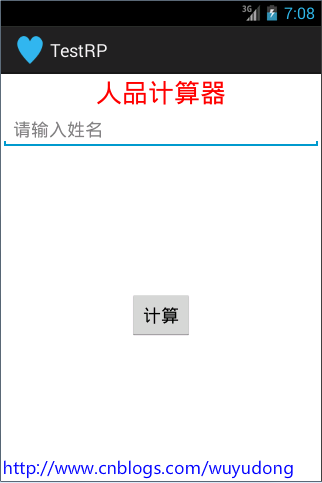
本文實現一個簡易的人品計算器來實踐在不同Actitity之間數據傳遞intent的數據傳遞從A界面打開B界面 把A界面的數據傳遞給B界面1. intent.setData
 Android GridView仿微信朋友圈顯示圖片
最近項目要求上傳多圖並且多圖顯示,而且要規則的顯示,就像微信朋友圈的圖片顯示一樣。利用GridView再適合不過了,GridView可以動態加載圖片的數量,而且還比較規律
 Android仿支付寶中余額寶的數字動畫效果
實現效果圖:下面是具體代碼,可直接復制:package com.lcw.rabbit.widget;import android.animation.ObjectAnim
 android適配器中的觀察者模式
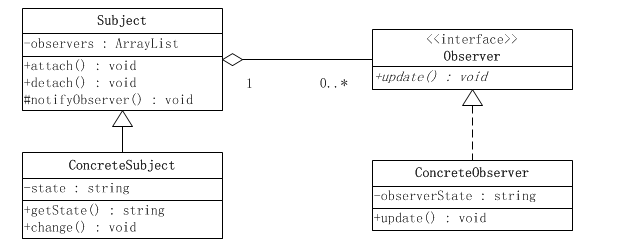
1. 模式介紹模式的定義定義對象間一種一對多的依賴關系,使得每當一個對象改變狀態,則所有依賴於它的對象都會得到通知並被自動更新。模式的使用場景關聯行為場景。需要注意的是,