編輯:關於Android編程
對之前的幾篇文章裡的model進行補充
後期會把這個功能類,添加到這個框架裡,有興趣的可以下載下來看,這個框架會經常更新:


public class BaseFundChartView extends View implements View.OnTouchListener{

    Paint linePaint;
    Paint textPaint;
    Paint xyChartPaint;
    Paint chartLinePaint;
    Paint chartJianbianPaint;
    Paint huodongPaint;
    Paint huodongPaintText;
    List points;
    public BaseFundChartView(Context context, AttributeSet attrs, int defStyleAttr) {
        super(context, attrs, defStyleAttr);
        init();
    }

    public BaseFundChartView(Context context) {
        this(context, null);
    }

    public BaseFundChartView(Context context, AttributeSet attrs) {
        this(context, attrs, 0);
    }

    PathEffect effect;
    Path path;

    private float getWidthYMax(){
        return getWidth()-15;
    }

    private void init() {
        linePaint = new Paint();
        textPaint = new Paint();
        xyChartPaint = new Paint();
        chartLinePaint = new Paint();
        chartJianbianPaint = new Paint();
        huodongPaint = new Paint();
        huodongPaintText = new Paint();
        //設置繪制模式為-虛線作為背景線。
        effect = new DashPathEffect(new float[] { 6, 6, 6, 6, 6}, 2);
        //背景虛線路徑.
        path = new Path();
        //只是繪制的XY軸
        linePaint.setStyle(Paint.Style.STROKE);
//        linePaint.setStrokeWidth((float) 0.7);
        linePaint.setStrokeWidth((float) 1.0);             //設置線寬

        linePaint.setColor(Color.BLACK);
        linePaint.setAntiAlias(true);// 鋸齒不顯示

        //XY刻度上的字
        textPaint.setStyle(Paint.Style.FILL);// 設置非填充
        textPaint.setStrokeWidth(1);// 筆寬5像素
        textPaint.setColor(Color.BLACK);// 設置為藍筆
        textPaint.setAntiAlias(true);// 鋸齒不顯示
        textPaint.setTextAlign(Paint.Align.CENTER);
        textPaint.setTextSize(15);

        //繪制XY軸上的字:Y開關狀態、X時間
        xyChartPaint.setStyle(Paint.Style.FILL);
        xyChartPaint.setStrokeWidth(1);
        xyChartPaint.setColor(Color.BLUE);
        xyChartPaint.setAntiAlias(true);
        xyChartPaint.setTextAlign(Paint.Align.CENTER);
        xyChartPaint.setTextSize(18);
        //繪制的折線
        chartLinePaint.setStyle(Paint.Style.STROKE);
        chartLinePaint.setStrokeWidth(5);
        chartLinePaint.setColor(Color.BLUE);
        chartLinePaint.setAntiAlias(true);

        //繪制的折線
        chartJianbianPaint.setStyle(Paint.Style.FILL);
        chartJianbianPaint.setStrokeWidth(5);
        //chartJianbianPaint.setColor(Color.YELLOW);

        chartJianbianPaint.setAntiAlias(true);


        huodongPaint.setStyle(Paint.Style.STROKE);
        huodongPaint.setStrokeWidth((float) 3.0);             //設置線寬

        huodongPaint.setColor(Color.GRAY);
        huodongPaint.setAntiAlias(true);// 鋸齒不顯示

        huodongPaintText.setStyle(Paint.Style.STROKE);
        huodongPaintText.setStrokeWidth((float) 2.0);             //設置線寬
        huodongPaintText.setTextSize(40);
        huodongPaintText.setColor(Color.GRAY);
        huodongPaintText.setAntiAlias(true);// 鋸齒不顯示

        setOnTouchListener(this);
    }

    private boolean refData = true;

    public void setRefData(boolean refData) {
        this.refData = refData;
    }

    /**
     * 重要參數,兩點之間分為幾段描畫,數字愈大分段越多,描畫的曲線就越精細.
     */
    private static final int STEPS = 12;

    float gridX,gridY,xSpace = 0,ySpace = 0,spaceYT = 0;
    Float yStart=null,yStop = null;
    Integer yCount = null;

    List text = null;

    public void setText(List text) {
        this.text = text;
    }

    public void setyCount(Integer yCount) {
        this.yCount = yCount;
    }

    public void setyStart(Float yStart) {
        this.yStart = yStart;
    }

    public void setyStop(Float yStop) {
        this.yStop = yStop;
    }

    String yFormat=null;

    public void setFormat(String yFormat){
        this.yFormat = yFormat;
    }

    List dateX = null;
    List dateY = null;

    List> data = null;

    List colors = null;

    public void setColors(List colors) {
        this.colors = colors;
    }

    public List getDateY() {
        return dateY;
    }

    public void setDateY(List dateY) {
        this.dateY = dateY;
    }

    public List> getData() {
        return data;
    }

    public void setData(List> data) {
        this.data = data;
    }

    public List getDateX() {
        return dateX;
    }

    public void setDateX(List dateX) {
        this.dateX = dateX;
    }

    Map> mapCacheX = new HashMap<>();
    Map> mapCacheY = new HashMap<>();

    @Override
    protected void onDraw(Canvas canvas) {
        super.onDraw(canvas);

        //基准點。
        gridX = 40;
        gridY = getHeight() - 50;
        //XY間隔。
        if(dateX!=null&&dateX.size()>0){
            xSpace = (getWidthYMax() - gridX)/dateX.size();
        }
        /**
         * 如果設置開頭和結尾的話,就直接生成y軸
         */
        if(yStart!=null&&yStop!=null&&yCount!=null){
            dateY = new ArrayList<>();
            ySpace = (gridY - 70)/yCount;
            float ze = (yStop-yStart)/yCount;
            for(int i=0;i2){
                spaceYT = dateY.get(1)-dateY.get(0);
            }
        }else{
            if(dateY!=null&&dateY.size()>0){
                ySpace = (gridY - 70)/dateY.size();
                yStart = dateY.get(0);
                if(dateY.size()>2){
                    spaceYT = dateY.get(1)-dateY.get(0);
                }
            }
        }


        UIUtils.log("rewqfdesa",gridY,"fdsafdsa");

        //畫Y軸(帶箭頭)。
        canvas.drawLine(gridX, gridY - 20 - 10, gridX,  10, linePaint);
        canvas.drawLine(gridX,  10, gridX - 6, 14 + 10, linePaint);//Y軸箭頭。
        canvas.drawLine(gridX,  10, gridX + 6, 14 + 10, linePaint);


        //畫Y軸名字。
        //由於是豎直顯示的,先以原點順時針旋轉90度後為新的坐標系
        //canvas.rotate(-90);
        //當xyChartPaint的setTextAlign()設置為center時第二、三個參數代表這四個字中點所在的xy坐標

        //canvas.drawText("開關狀態", -((float) (getHeight() - 60) - 15 - 5 - 1 / ((float) 1.6 * 1) * (getHeight() - 60) / 2), gridX - 15, xyChartPaint);
        //繪制Y軸坐標


        //canvas.rotate(90); //改變了坐標系還要再改過來
        float y = 0;
        //畫X軸。
        y = gridY - 20;
        canvas.drawLine(gridX, y - 10, getWidthYMax(), y - 10, linePaint);//X軸.
        canvas.drawLine(getWidthYMax(), y - 10, getWidthYMax() - 14, y - 6 - 10, linePaint);//X軸箭頭。
        canvas.drawLine(getWidthYMax(), y - 10, getWidthYMax() - 14, y + 6 - 10, linePaint);

        //繪制X刻度坐標。
        float x = 0;
        if(dateX!=null){
            for (int n = 0; n < dateX.size(); n++) {
                //取X刻度坐標.
                x = gridX + (n) * xSpace;//在原點(0,0)處也畫刻度(不畫的話就是n+1),向右移動一個跨度。
                //畫X軸具體刻度值。
                if (dateX.get(n) != null) {
                    //canvas.drawLine(x, gridY - 30, x, gridY - 18, linePaint);//短X刻度。
                    canvas.drawText(dateX.get(n), x, gridY + 5, textPaint);//X具體刻度值。
                }
            }
        }

        float my = 0;

        if(dateY!=null){

            for(int n=0;n0){
            float lastPointX = 0; //前一個點
            float lastPointY = 0;
            float currentPointX = 0;//當前點
            float currentPointY = 0;
            for(int n=0;n da = data.get(n);
                List da_x = new ArrayList<>();
                List da_y = new ArrayList<>();
                /**
                 * 曲線路勁
                 */
                Path curvePath = new Path();
                /**
                 * 漸變色路徑
                 */
                Path jianBianPath = new Path();

                List calculate_y;
                List calculate_x;
                if(refData){
                    for(int m=0;m0){
//                        canvas.drawLine(lastPointX, lastPointY, currentPointX, currentPointY, chartLinePaint);
//                    }
//                    lastPointX = currentPointX;
//                    lastPointY = currentPointY;
                    }
                    calculate_y = calculate(da_y);
                    calculate_x = calculate(da_x);
                    mapCacheY.put(n,calculate_y);
                    mapCacheX.put(n,calculate_x);
                    if(n>=data.size()-1){
                        refData = false;
                    }
                }else{
                    calculate_y = mapCacheY.get(n);
                    calculate_x = mapCacheX.get(n);
                }


                curvePath.moveTo(calculate_x.get(0).eval(0), calculate_y.get(0).eval(0));
                jianBianPath.moveTo(gridX,gridY - 20 - 10);
                jianBianPath.lineTo(calculate_x.get(0).eval(0), calculate_y.get(0).eval(0));
                chartLinePaint.setColor(colors.get(n));
                float lastx = 0;
                for (int i = 0; i < calculate_x.size(); i++) {
                    for (int j = 1; j <= STEPS; j++) {
                        float u = j / (float) STEPS;
                        curvePath.lineTo(calculate_x.get(i).eval(u), calculate_y.get(i)
                                .eval(u));
                        jianBianPath.lineTo(calculate_x.get(i).eval(u), calculate_y.get(i)
                                .eval(u));
                        lastx = calculate_x.get(i).eval(u);
                    }
                }
                jianBianPath.lineTo(lastx,gridY - 20 - 10);
                canvas.drawPath(curvePath, chartLinePaint);
                Shader mShader = new LinearGradient(0,30 + 10,0,gridY - 20 - 10,new int[] {colors.get(n),Color.TRANSPARENT},null,Shader.TileMode.REPEAT);
//新建一個線性漸變,前兩個參數是漸變開始的點坐標,第三四個參數是漸變結束的點的坐標。連接這2個點就拉出一條漸變線了,玩過PS的都懂。然後那個數組是漸變的顏色。下一個參數是漸變顏色的分布,如果為空,每個顏色就是均勻分布的。最後是模式,這裡設置的是循環漸變

                chartJianbianPaint.setShader(mShader);
                canvas.drawPath(jianBianPath, chartJianbianPaint);
            }
        }

        if(lineX!=null){
            if(text!=null&&text.size()>0){
                Paint.FontMetrics metrics = huodongPaintText.getFontMetrics();
                float top = metrics.top;
                float bootom = metrics.bottom;
                float h = bootom-top;
                float th = h + h*text.size();
                float w=0;
                float fx = 1;
                if(lineX>getWidth()/2){
                    fx = -1;
                }else{
                    fx = 1;
                }
                for(int i=0;iw){
                        w = width;
                    }
                    canvas.drawText(text.get(i),fx==1?lineX+10:lineX-10-width,40+ h*(i+1),huodongPaintText);
                }
                canvas.drawLine(lineX, gridY - 20 - 10, lineX, 30 + 10, huodongPaint);
                //canvas.drawRect(lineX,40,lineX+w*fx+20*fx,40+th,huodongPaint);
            }
        }

    }


    /**
     * 計算曲線.
     *
     * @param x
     * @return
     */
    private List calculate(List x) {
        int n = x.size() - 1;
        float[] gamma = new float[n + 1];
        float[] delta = new float[n + 1];
        float[] D = new float[n + 1];
        int i;
        /*
         * We solve the equation [2 1 ] [D[0]] [3(x[1] - x[0]) ] |1 4 1 | |D[1]|
         * |3(x[2] - x[0]) | | 1 4 1 | | . | = | . | | ..... | | . | | . | | 1 4
         * 1| | . | |3(x[n] - x[n-2])| [ 1 2] [D[n]] [3(x[n] - x[n-1])]
         *
         * by using row operations to convert the matrix to upper triangular and
         * then back sustitution. The D[i] are the derivatives at the knots.
         */

        gamma[0] = 1.0f / 2.0f;
        for (i = 1; i < n; i++) {
            gamma[i] = 1 / (4 - gamma[i - 1]);
        }
        gamma[n] = 1 / (2 - gamma[n - 1]);

        delta[0] = 3 * (x.get(1) - x.get(0)) * gamma[0];
        for (i = 1; i < n; i++) {
            delta[i] = (3 * (x.get(i + 1) - x.get(i - 1)) - delta[i - 1])
                    * gamma[i];
        }
        delta[n] = (3 * (x.get(n) - x.get(n - 1)) - delta[n - 1]) * gamma[n];

        D[n] = delta[n];
        for (i = n - 1; i >= 0; i--) {
            D[i] = delta[i] - gamma[i] * D[i + 1];
        }

        /* now compute the coefficients of the cubics */
        List cubics = new LinkedList();
        for (i = 0; i < n; i++) {
            Cubic c = new Cubic(x.get(i), D[i], 3 * (x.get(i + 1) - x.get(i))
                    - 2 * D[i] - D[i + 1], 2 * (x.get(i) - x.get(i + 1)) + D[i]
                    + D[i + 1]);
            cubics.add(c);
        }
        return cubics;
    }


    Float lineX = null;

    Integer temp = null;

    @Override
    public boolean onTouch(View v, MotionEvent event) {
        getParent().requestDisallowInterceptTouchEvent(true);
        switch(event.getAction()){
            case MotionEvent.ACTION_DOWN:
            case MotionEvent.ACTION_MOVE:
                float zhi = (event.getX()-gridX)%xSpace;
                boolean fanwei = zhi>0&&zhi0&&fanwei&&event.getX()
 TaintDroid深入剖析之啟動篇
?1背景知識1.1Android平台軟件動態分析現狀眾所周知,在計算機領域中所有的軟件分析方法都可以歸為靜態分析和動態分析兩大類,在Android平台也不例外。而隨著軟件
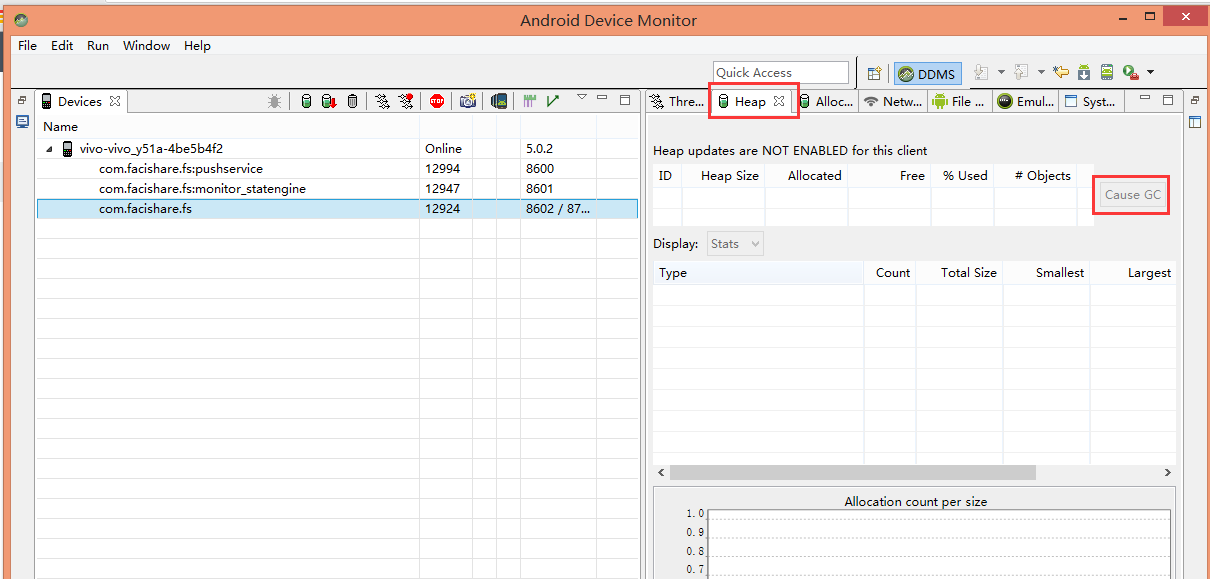 Android —— 內存洩漏檢查
今天地鐵上看到一篇不錯的將內存洩漏簡單檢查的文章,覺得還不錯喲,內存洩漏確實是每個程序員頭疼的事情,這裡就多研究一下咯^^一. 常見的垃圾回收算法參看文章引用計數法引用計
 打造一個Android 3D立體旋轉容器
1.概述回到正題,這次帶來的效果,是一個Android 的3D立體旋轉的效果。當然靈感的來源,來自早些時間微博上看到的效果圖。非常酷有木有!作為程序猿我當然要把它加入我的
 Android入門之AlertDialog用法實例分析
本文實例講述的是AlertDialog,這種對話框會經常遇到。AlertDialog跟WIN32開發中的Dialog不一樣,AlertDialog是非阻塞的,而阻塞的對話