編輯:關於Android編程
下面介紹 “豬腳光環的” : Handler 、Message 、MessageQueue Looper。並以Java 程序模擬安卓的消息處理機制
Handler 在前面已經介紹過了,從創建Handler 實例順籐摸瓜…
兩大用途
There are two main uses for a Handler: (1) to schedule messages and runnables to be executed as some point in the future; and (2) to enqueue an action to be performed on a different thread than your own.
...
public Handler() {
        if (FIND_POTENTIAL_LEAKS) {
            final Class klass = getClass();
            if ((klass.isAnonymousClass() || klass.isMemberClass() || klass.isLocalClass()) &&
                    (klass.getModifiers() & Modifier.STATIC) == 0) {
                Log.w(TAG, "The following Handler class should be static or leaks might occur: " +
                    klass.getCanonicalName());
            }
        }
        mLooper = Looper.myLooper(); //進行關聯
        if (mLooper == null) {
            throw new RuntimeException(
                "Can't create handler inside thread that has not called Looper.prepare()");
        }
        mQueue = mLooper.mQueue;
        mCallback = null;
    }

    ...
由源碼得出:
Post:Post允許把一個Runnable對象入隊到消息隊列中。它的方法有:post(Runnable),postAtTime(Runnable,long),postDelayed(Runnable,long).
sendMessage:sendMessage允許把一個包含消息數據的Message對象壓入到消息隊列中。它的方法有:sendEmptyMessage(int), sendMessage(Message).sendMessageAtTime(Message,long).sendMessageDelayed(Message,long)。
從上面的各種方法可以看出,不管是post還是sendMessage都具有多種方法,它們可以設定Runnable對象和Message對象被入隊到消息隊列中,是立即執行還是延遲執行。
本質是一個死循環 不斷地從 MessageQueue 中取出數據,有消息就取出,沒消息就阻塞。
Looper中重要的方法:
static void loop()
Run the message queue in this thread.
不關聯Handler 如何向MessageQueue 發送Message呢
總的來說: Handler 負責發送消息,Looper 負責接收消息並把消息回傳給 Handler , 而 MessageQueue 是就是存儲 Message 的容器
UI 線程 ActivityThread 創建 Looper Message


new LoZ喎?/kf/ware/vc/" target="_blank" class="keylink">vcGVyKCk7ILrz1/bBy8TH0Kmy2df3xNijvzwvcD4NCjxwPjxpbWcgYWx0PQ=="這裡寫圖片描述" src="/uploadfile/Collfiles/20160912/201609120928371073.png" title="\" />
如何取出 當前線程關聯的 Looper 對象?
public static Looper myLooper() {
        return sThreadLocal.get();
}
Handler 發送消息到 MessageQueue (消息入列)

Handler取出 當前線程關聯的 Looper 對象 是為了Looper 中MessageQueue 對象進行發送消息Message
Tips:對於Message對象,一般並不推薦直接使用它的構造方法得到,而是建議通過使用Message.obtain()這個靜態的方法或者Handler.obtainMessage()獲取。Message.obtain()會從消息池中獲取一個Message對象,如果消息池中是空的,才會使用構造方法實例化一個新Message,這樣有利於消息資源的利用。並不需要擔心消息池中的消息過多,它是有上限的,上限為10個。Handler.obtainMessage()具有多個重載方法,如果查看源碼,會發現其實Handler.obtainMessage()在內部也是調用的Message.obtain()。
下面代碼由 Framework 源碼拷貝出來進行分析,每一位安卓工程師都應該擁有一份 Framework 源碼,以便了解android.
ActivityThread (程序入口)
public class ActivityThread {

    public static void main(String[] args) {
        //初始化主線程的 Looper 對象
        Looper.prepareMainLooper();
        final Handler handler = new Handler() {
            @Override
            public void handleMessage(Message msg) {
                super.handleMessage(msg);
                System.out.println("接收到 what = " + msg.what);
                System.out.println("Thread " + Thread.currentThread().getName());
            }
        };
        handler.sendEmptyMessage(1);
        handler.sendEmptyMessage(2);
        new Thread(new Runnable() {
            @Override
            public void run() {
                handler.sendEmptyMessage(1001);
                try {
                    Thread.sleep(6000);
                } catch (InterruptedException e) {
                    e.printStackTrace();
                }
                //子線程 通過Handler 發送消息到主線程的消息隊列, 主線程處理該消息
                handler.sendEmptyMessage(1001);
            }
        }).start();

        new Thread(new Runnable() {
            @Override
            public void run() {
                try {
                    Thread.sleep(3000);
                } catch (InterruptedException e) {
                    e.printStackTrace();
                }

                handler.sendEmptyMessage(1000);
                handler.sendEmptyMessage(1000);
                handler.sendEmptyMessage(1000);
                handler.sendEmptyMessage(1000);
                handler.sendEmptyMessage(1000);

                //初始化 Looper
                Looper.prepare();
                final Handler handler = new Handler() {
                    @Override
                    public void handleMessage(Message msg) {
                        super.handleMessage(msg);
                        //子線程
                        System.out.println("接收到 what = " + msg.what);
                        System.out.println("Thread " + Thread.currentThread().getName());
                    }
                };

                handler.sendEmptyMessage(999);
                handler.sendEmptyMessage(9999);
                //輪詢
                Looper.loop();
            }
        }).start();
        //輪詢
        Looper.loop();
    }
}
Handler 代碼
package android.os;

/**
 * Created by system on 16/9/6.
 *
* 處理和分發消息 * */ public class Handler { final MessageQueue mQueue; final Looper mLooper; public Handler() { mLooper = Looper.myLooper(); if (mLooper == null) { throw new RuntimeException( "Can't create handler inside thread that has not called Looper.prepare()"); } mQueue = mLooper.mQueue; } public void handleMessage(Message msg) { } /** * Handle system messages here. */ public void dispatchMessage(Message msg) { if (msg != null) { handleMessage(msg); } } public final boolean sendEmptyMessage(int what) { Message msg = new Message(); msg.what = what; MessageQueue queue = mQueue; if (queue == null) { RuntimeException e = new RuntimeException( this + " sendMessageAtTime() called with no mQueue"); System.out.println(e.getMessage()); return false; } msg.target = this; return queue.enqueueMessage(msg); } }
Looper
package android.os;

/**
 * Created by system on 16/9/6.
 *
 *
 * 每開啟一條線程都應為之創建一個與該線程綁定 Looper 對象 ,以及 MessageQueue 隊列
 */
public class Looper {

    static final ThreadLocal sThreadLocal = new ThreadLocal();
    private static Looper sMainLooper;  // guarded by Looper.class

    final MessageQueue mQueue;
    final Thread mThread;

    private Looper() {
        mQueue = new MessageQueue();
        mThread = Thread.currentThread();
    }

    public static void prepare() {
        if (sThreadLocal.get() != null) {
            throw new RuntimeException("Only one Looper may be created per thread");
        }
        sThreadLocal.set(new Looper());
    }

    public static void prepareMainLooper() {
        prepare();
        synchronized (Looper.class) {
            if (sMainLooper != null) {
                throw new IllegalStateException("The main Looper has already been prepared.");
            }
            sMainLooper = myLooper();
        }
    }

    public static Looper myLooper() {
        return sThreadLocal.get();
    }

    public static void loop() {
        final Looper me = myLooper();
        if (me == null) {
            throw new RuntimeException("No Looper; Looper.prepare() wasn't called on this thread.");
        }
        final MessageQueue queue = me.mQueue;

        // Make sure the identity of this thread is that of the local process,
        // and keep track of what that identity token actually is.

        for (;;) {
            Message msg = queue.next(); // might block
            if (msg == null) {
                // No message indicates that the message queue is quitting.
                return;
            }

            //分發消息
            msg.target.dispatchMessage(msg);


        }
    }
}
Message
package android.os;

/**
 * Created by system on 16/9/6.
 *  消息
 *  由MessageQueue統一列隊,終由Handler處理。
 */
public class Message {

    public int what;

    /*package*/ Handler target;

    /*package*/ Runnable callback;

    // sometimes we store linked lists of these things
    /*package*/ Message next;


}
MessageQueue
package android.os;

/**
 * Created by system on 16/9/6.
 *
 * 消息隊列,用來存放Handler發送過來的消息(Message),並按照FIFO規則執行
 * note:(將Message以鏈表的方式串聯起來的,等待Looper的輪詢)
 */
public class MessageQueue {
    Message mMessages;// 當前消息
    private static final Object lock = new Object();

    /**
     * 出列 FO (即取出隊頭的消息)
     * @return Message
     */
    Message next() {
        //沒有消息時 阻塞
        for (; ; ) {
            synchronized (this) {
                Message prevMsg = null;
                Message msg = mMessages;
                if (msg != null && msg.target == null) {
                    // Stalled by a barrier.  Find the next asynchronous message in the queue.
                    do {
                        prevMsg = msg;
                        msg = msg.next;
                    } while (msg != null);
                }
                if (msg != null) {

                    if (prevMsg != null) {
                        prevMsg.next = msg.next;
                    } else {
                        mMessages = msg.next; //成為隊頭
                    }
                    msg.next = null; //remove
                    return msg;
                }

            }
        }
    }

    /**
     * 消息入列  FIFO
     * @param msg
     * @return
     */
    boolean enqueueMessage(Message msg) {
        if (msg.target == null) {
            throw new IllegalArgumentException("Message must have a target.");
        }
        synchronized (this) {

            Message p = mMessages;

            if (p == null) {
                // New head, wake up the event queue if blocked.
                msg.next = p;
                mMessages = msg;

            } else {
                Message prev;
                for (; ; ) {
                    prev = p;
                    p = p.next;
                    if (p == null) {
                        break;
                    }

                }
                msg.next = p; // invariant: p == prev.next
                prev.next = msg; //成為鏈尾
            }

        }
        return true;
    }
}
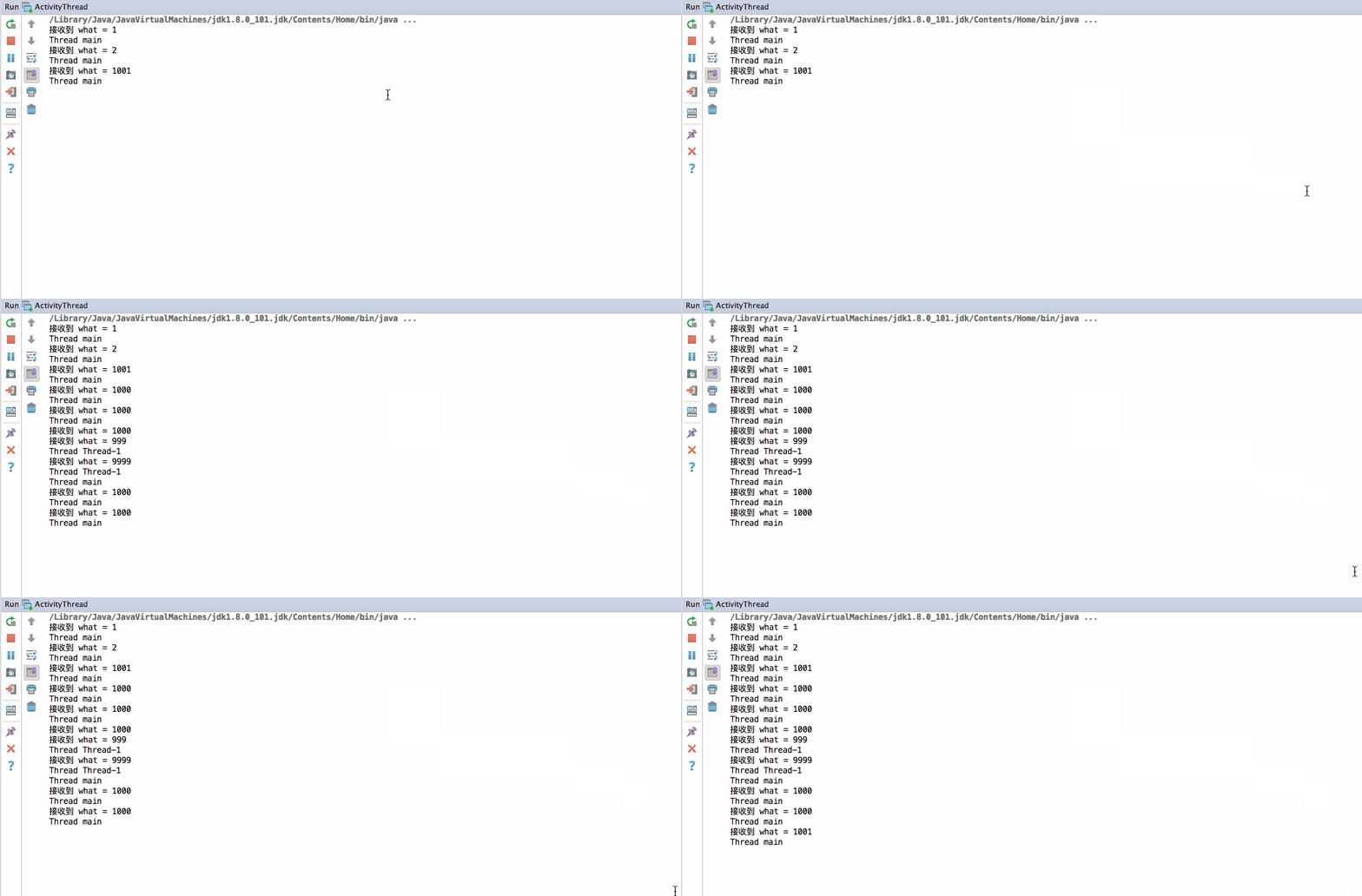
運行效果圖:
 Android熱補丁動態修復技術(完結篇):自動生成打包帶簽名的補丁,重構項目
一、關於前面四篇博文Android熱補丁動態修復技術(一):從Dex分包原理到熱補丁Android熱補丁動態修復技術(二):實戰!CLASS_ISPREVERIFIED問
 Android ViewPager實現無限循環效果
最近項目裡有用到ViewPager來做廣告運營位展示,看到現在很多APP的廣告運營位都是無限循環的,所以就研究了一下這個功能的實現。先看看效果從一個方向上一直滑動,麼有滑
 Android AbsoluteLayout和RelativeLayout布局詳解
Android 線性布局: AbsoluteLayout布局和RelativeLayout布局。 1、絕對布局 AbsoluteLayout絕對定位Absolu
 Android adb logcat 命令查看日志詳細介紹
Android 開發的程序員開發程序的時候,一定為log而苦惱過吧。Eclipse老是Log找不到,是不是很讓人不爽,雖然Android Studio的Logcat功能很