編輯:關於Android編程
本次項目,我用apache-tomcat將自己的計算機弄成了一個小服務器,然後對裡面的jsp類型的文件進行讀寫。
首先,如何弄服務器呢?
1.下載一個apache-tomcat,這裡我給大家提供一個apache-tomcat-6.0.37的下載地址:點擊打開鏈接 提取碼:utb8
2.下載好之後解壓,解壓完成,進入文件夾,運行apache-tomcat-6.0.37/bin/startup.dat 如下圖所示。
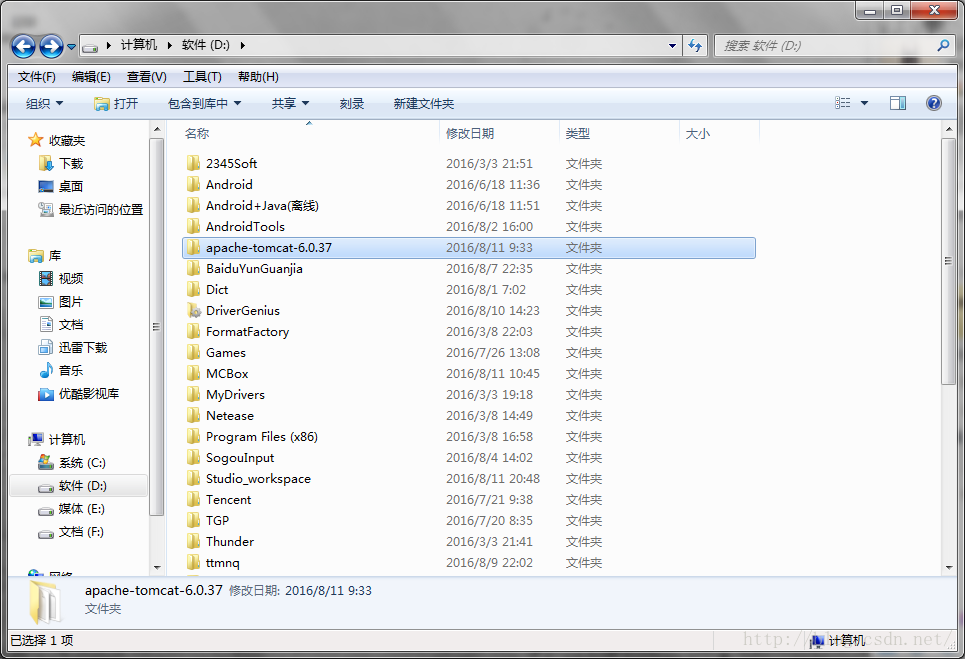
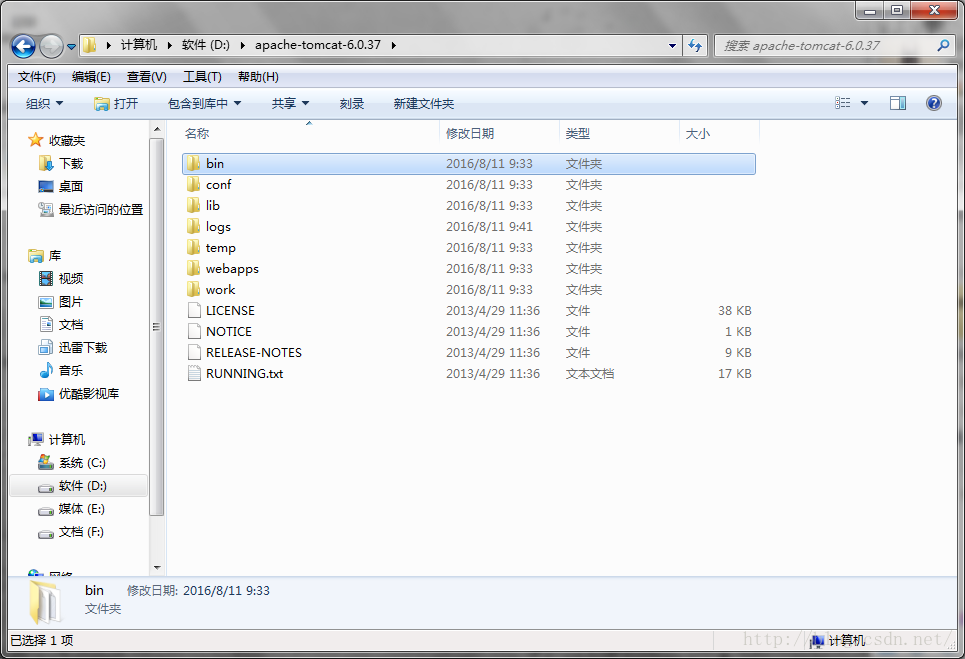
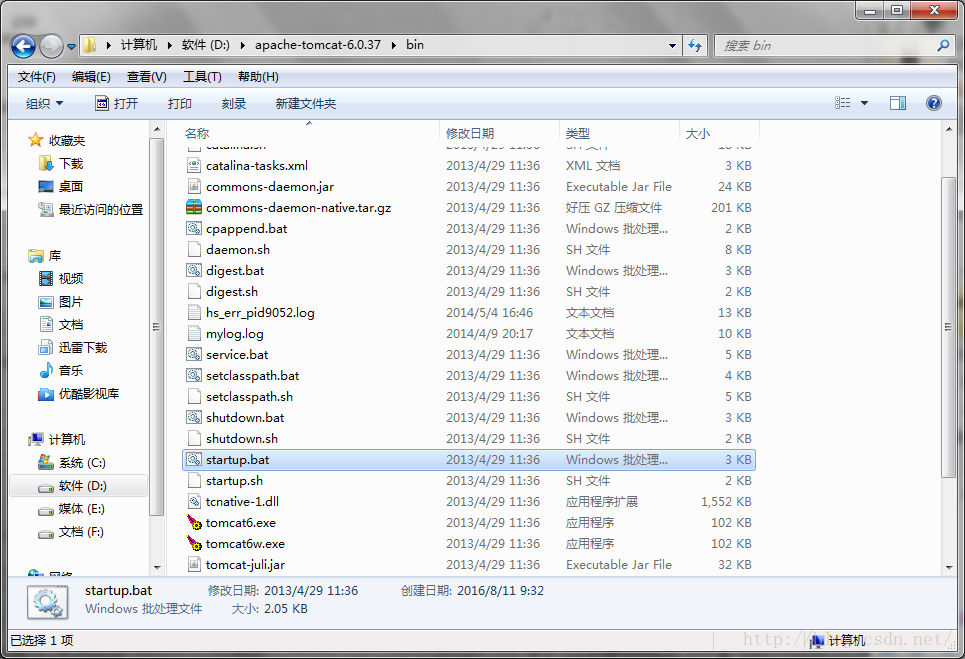
3.打開該文件之後,等待。等到進程完成後。打開你的浏覽器,在地址欄中鍵入:localhost:8080
跳轉,如果可以正常訪問到有貓的界面,那麼恭喜,服務器已建立。
服務器建好了,那麼該讀取其中的數據了。
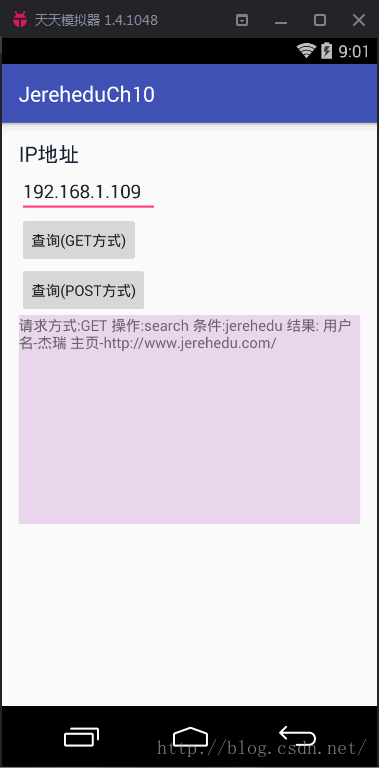
這裡的布局我設了一個EditView,用於輸入IP地址,兩個按鈕,分別是不同的獲取信息的方式,而文本框,則是為了顯示讀取的信息。
接下來是Acticity,裡面有詳細的注釋,我就不在這裡說了。
public class HttpActivity extends AppCompatActivity {

    private EditText et ;
    private Button search1;
    private Button search2;
    private TextView show;
    @Override
    protected void onCreate(Bundle savedInstanceState) {
        super.onCreate(savedInstanceState);
        setContentView(R.layout.activity_http);
        et = (EditText) findViewById(R.id.et);
        search1 = (Button) findViewById(R.id.search1);
        search2 = (Button) findViewById(R.id.search2);
        show = (TextView) findViewById(R.id.show);
        search1.setOnClickListener(new View.OnClickListener() {
            @Override
            public void onClick(View view) {
                String url =
                        "http://"+et.getText()+":8080/HttpTest/index.jsp" +
                                "?option=getUser&uName=jerehedu";
                new MyGetJob().execute(url);
            }
        });
        search2.setOnClickListener(new View.OnClickListener() {
            @Override
            public void onClick(View view) {
                String[] arg = new String[2];
                arg[0] = "http://"+et.getText()+":8080/HttpTest/index.jsp";
                arg[1] = "option=getUser&uName=jerehedu";
                new MyPostJob().execute(arg);
            }
        });
    }

    public class MyPostJob extends AsyncTask{

        @Override
        protected String doInBackground(String... strings) {
            HttpURLConnection httpURLConnection = null;
            InputStream is = null;
            StringBuilder sbd = new StringBuilder();
            try {
                URL url = new URL(strings[0]);
                httpURLConnection = (HttpURLConnection) url.openConnection();
                httpURLConnection.setConnectTimeout(5*1000);
                httpURLConnection.setReadTimeout(5*1000);
                httpURLConnection.setRequestMethod("POST");
                httpURLConnection.setDoInput(true);
                httpURLConnection.setDoOutput(true);
                //是否保存用戶緩存
                httpURLConnection.setUseCaches(false);
                //在這裡設置編碼方式
                httpURLConnection.setRequestProperty("Charset","UTF-8");
                httpURLConnection.setRequestProperty("Content-type","application/x-www-form-urlencoded");
                //params應該是這樣的樣式: option=getUser&Name=jerehedu  (沒了問號)
                String params = strings[1];
                OutputStream os = httpURLConnection.getOutputStream();
                os.write(params.getBytes());
                os.flush();
                os.close();

                if(httpURLConnection.getResponseCode()==200){
                    is=httpURLConnection.getInputStream();
                    int next = 0;
                    byte[] bt = new byte[1024];
                    while ((next=is.read(bt))>0){
                        sbd.append(new String(bt,0,next));
                    }
                }
            } catch (MalformedURLException e) {
                e.printStackTrace();
            } catch (IOException e) {
                e.printStackTrace();
            }finally {
                if(is!=null){
                    try {
                        is.close();
                    } catch (IOException e) {
                        e.printStackTrace();
                    }
                }
                if(httpURLConnection!=null){
                    httpURLConnection.disconnect();
                }
            }
            return sbd.toString();
        }

        @Override
        protected void onPostExecute(String s) {
            super.onPostExecute(s);
            show.setText("POST請求結果:"+s);

        }
    }
    /*
    AsyncTask異步任務類
      異步任務類的第一個參數會傳到doInBackground方法中
      第三個參數:
          此為指定doInBackground方法的返回值。
          onPostExecute方法中的String s是來自doInBackground方法的返回值。
      UI線程裡聲明的任何變量,在子線程中禁止操作。

     異步任務類裡只有5個方法。

     */
    public class MyGetJob extends AsyncTask{

        //onPreExecute在主線程中執行命令,它會在doInBackground前執行。
        //通常會在這裡做進度條的初始化,例如:下載進度
        @Override
        protected void onPreExecute() {
            super.onPreExecute();
        }

        //必須實現的方法,可以理解成,在子線程中執行命令
        @Override
        //這裡的...代表數組
        protected String doInBackground(String... strings) {
            HttpURLConnection httpURLConnection = null;
            InputStream is = null;
            StringBuilder sbd = new StringBuilder();
            try {
                URL url = new URL(strings[0]);
                httpURLConnection = (HttpURLConnection) url.openConnection();
                httpURLConnection.setConnectTimeout(5*1000);
                httpURLConnection.setReadTimeout(5*1000);
                 /*
                    http 響應碼
                    200:成功
                    404:未找到
                    500:發生錯誤
                     */
                if(httpURLConnection.getResponseCode()==200){
                    is=httpURLConnection.getInputStream();
                    int next = 0;
                    byte[] bt = new byte[1024];
                    while ((next=is.read(bt))>0){
                        sbd.append(new String(bt,0,next));
                    }
                }
            } catch (MalformedURLException e) {
                e.printStackTrace();
            } catch (IOException e) {
                e.printStackTrace();
            } finally {
                if(is!=null){
                    try {
                        is.close();
                    } catch (IOException e) {
                        e.printStackTrace();
                    }
                }
                if(httpURLConnection!=null){
                    httpURLConnection.disconnect();
                }
            }
            return sbd.toString();
        }

        //在UI線程(主線程)中執行命令
        @Override
        protected void onPostExecute(String s) {
            super.onPostExecute("GET請求結果:"+s);
            show.setText(s);
        }
    }
}
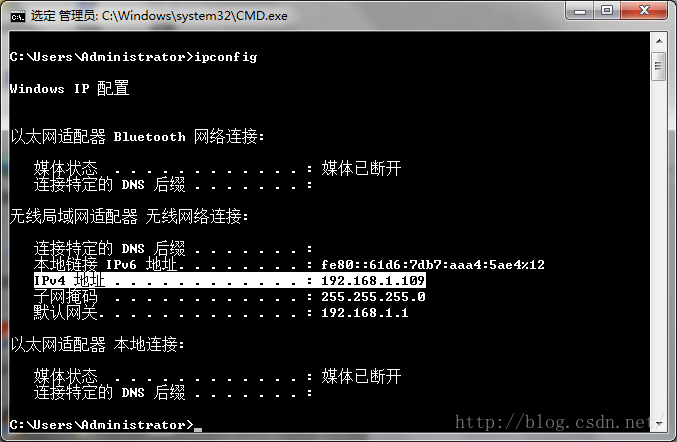
在運行的時候,需要我們輸入IP地址,即我們服務器的IP地址,怎麼獲得呢?
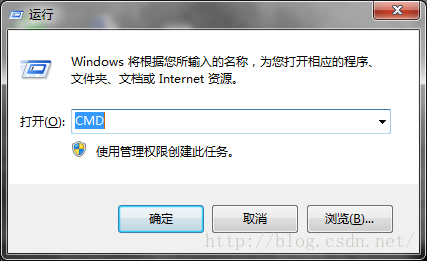
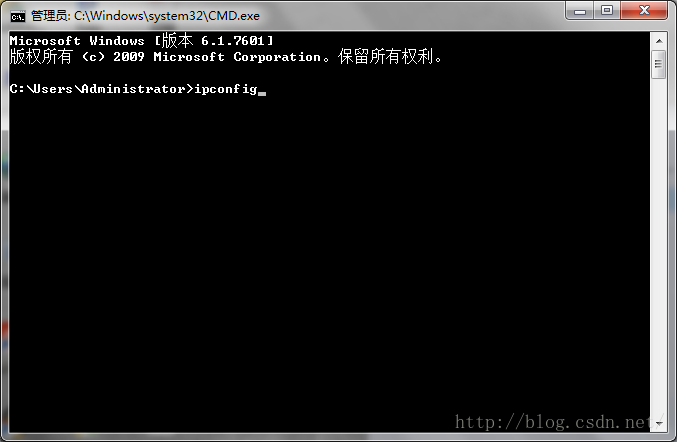
首先我們打開“運行”——Windows+R,然後輸入CMD,確認。之後再輸入ipconfig,回車。則就可以看到IP地址了,如下圖所示:
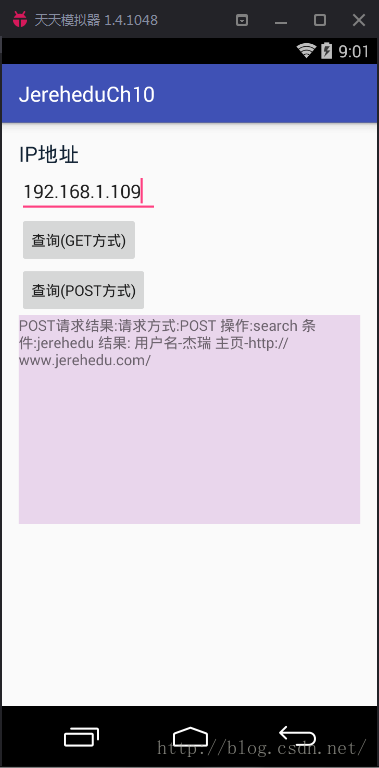
輸入IP地址,點擊按鈕。效果圖如下:
 Android屬性動畫與自定義View——實現vivo x6更新系統的動畫效果
晚上好,現在是凌晨兩點半,然後我還在寫代碼。電腦裡播放著《凌晨兩點半》,晚上寫代碼,腦子更清醒,思路更清晰。今天聊聊屬性動畫和自定義View搭配使用,前面都講到自定義Vi
 Android 有效的解決內存洩漏的問題實例詳解
Android 有效的解決內存洩漏的問題Android內存洩漏,我想做Android 應用的時候遇到的話很是頭疼,這裡是我在網上找的不錯的資料,實例詳解這個問題的解決方案
 Android 組件Gallery和GridView示例講解
Android Gallery和GridView組件:Gallery 畫廊Gallery是一個內部元素可以水平滾動,並且可以把當前選擇的子元素定位在它中心的布局組件。我們
 手機qq群如何簽到 手機qq群怎麼簽到 qq群簽到在哪裡
qq群簽到有什麼用?手機qq群怎麼簽到?下面就讓小編來教教你吧!qq群簽到應用介紹:連續15天簽到,可以獲得群空間橙名的特權;連續30天簽到,可以獲得會員試