編輯:關於Android編程
1.應用場景
ProgressBar主要的應用場景在於對網絡請求,數據加載顯示時由於需要用戶等待,如果沒有提示有可能造成用戶退出,或者誤認為程序錯誤,增加ProgressBar的目的就是顯式的
告訴用戶正在加載數據,顯示數據加載的進度是多少,以此來優化用戶體驗
2.常用屬性
    //最大進度值,一般為100
    android:max=""
    //進度條風格
    style=""
    //第一進度
    android:progress=""
    //第二進度,多用於視頻緩存進度顯示
    android:secondaryProgress=""
    //是否為明確進度
    android:indeterminate=""
    //強制indeterminate模式
    android:indeterminateOnly="true|false"
    //明確進度條顯示的Drawable
    android:progressDrawable=""
    //不明確進度顯示的Drawable
    android:indeterminateDrawable=""
    //不明確進度條模式的動畫間隔時間
    android:indeterminateDuration=""
    //不明確進度模式下,達到最大時動畫處理效果
    //repeat:從頭開始 |cycle:反過來從後往前
    android:indeterminateBehavior="repeat|cycle"
package com.andy.androiduiprogressbar;


import android.app.Activity;
import android.os.AsyncTask;
import android.os.Bundle;
import android.os.Handler;
import android.os.Message;
import android.util.Log;
import android.view.View;
import android.view.View.OnClickListener;
import android.widget.Button;
import android.widget.ProgressBar;
import android.widget.TextView;


public class MainActivity extends Activity {
	private Button start;
	private ProgressBar progressBar;
	private TextView value;
	private AsyncTask myAsyncTask;

	@Override
	protected void onCreate(Bundle savedInstanceState) {
		super.onCreate(savedInstanceState);
		setContentView(R.layout.activity_main);
		//初始化控件
		start =(Button) findViewById(R.id.start);
		progressBar =(ProgressBar) findViewById(R.id.progress);
		value=(TextView) findViewById(R.id.value);
		//內部類初始化AsyncTask並實現方法
		 myAsyncTask= new AsyncTask() {


		   /*
		    * result:doInBackground的回傳值
		   * 執行完後台線程後做的操作
		   */
			@Override
			protected void onPostExecute(Integer result) {
				Log.d("info", "myAsyncTask執行完成");
			}

			/*
			 * 更新進度條,和實時更新Text的進度值
			 */
			@Override
			protected void onProgressUpdate(Integer... values) {
				progressBar.setProgress(values[0]);
				value.setText("當前進度:"+values[0].toString());
			}


			/*
			 * 執行後台操作
			 */
			@Override
			protected Integer doInBackground(Integer... params) {
				for(int i=1;i<=100;i++){
					try {
						Thread.sleep(500);
						//執行該操作系統會調用onProgressUpdate方法
						publishProgress(i);
					} catch (InterruptedException e) {
						e.printStackTrace();
					}
				}

				return 100;
			}
		};

		//設置按鈕監聽
		start.setOnClickListener(new OnClickListener() {


			@Override
			public void onClick(View v) {
				//啟動myAsyncTask線程
				myAsyncTask.execute();
			}});


}
}
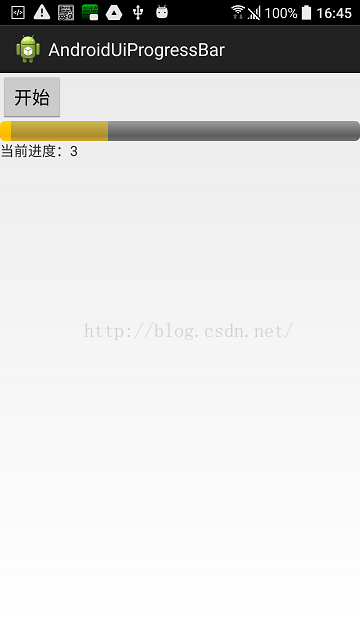
package com.andy.androiduiprogressbar;


import android.app.Activity;
import android.app.ProgressDialog;
import android.content.DialogInterface;
import android.os.Bundle;
import android.util.Log;
import android.view.View;
import android.view.View.OnClickListener;
import android.widget.Button;


public class SecondActivity extends Activity {
	private Button dlgProgressBtn;


	@Override
	protected void onCreate(Bundle savedInstanceState) {
		super.onCreate(savedInstanceState);
		setContentView(R.layout.activity_second);
		//初始化控件
		dlgProgressBtn =(Button) findViewById(R.id.dlgProgressBtn);
		//設置監聽
		dlgProgressBtn.setOnClickListener(new OnClickListener() {

			@Override
			public void onClick(View v) {
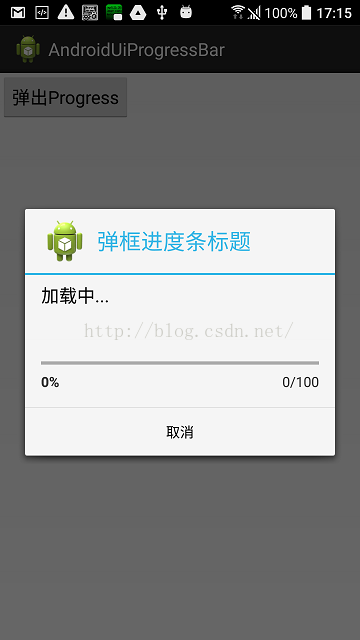
				ProgressDialog progressDialog =new ProgressDialog(SecondActivity.this);
				//設置圖標
				progressDialog.setIcon(R.drawable.ic_launcher);
				//設置標題
				progressDialog.setTitle("彈框進度條標題");
				//設置提示信息
				progressDialog.setMessage("加載中...");
				//設置進度條類型ProgressDialog.STYLE_HORIZONTAL(長進度條)|ProgressDialog.STYLE_SPINNER(圓進度條)
				progressDialog.setProgressStyle(ProgressDialog.STYLE_HORIZONTAL);
				//設置是否可以按back鍵取消
				progressDialog.setCancelable(true);
				//設置是否可以觸摸彈框外部取消
				progressDialog.setCanceledOnTouchOutside(true);
				//設置按鈕DialogInterface.BUTTON_NEGATIVE(取消)|DialogInterface.BUTTON_POSITIVE(確認)|DialogInterface.BUTTON_NEUTRAL(普通)
				progressDialog.setButton(DialogInterface.BUTTON_NEGATIVE, "取消", new DialogInterface.OnClickListener() {

					@Override
					public void onClick(DialogInterface dialog, int which) {
						Log.d("cancel", "進度條彈框取消");
					}
				});
				//設置按鈕DialogInterface.BUTTON_POSITIVE(確認)
/*				progressDialog.setButton(DialogInterface.BUTTON_POSITIVE, "確認", new DialogInterface.OnClickListener() {

					@Override
					public void onClick(DialogInterface dialog, int which) {
						Log.d("cancel", "點擊確認進度條");
					}
				});*/
				//顯示progressDialog
				progressDialog.show();

			}
		});


}
}
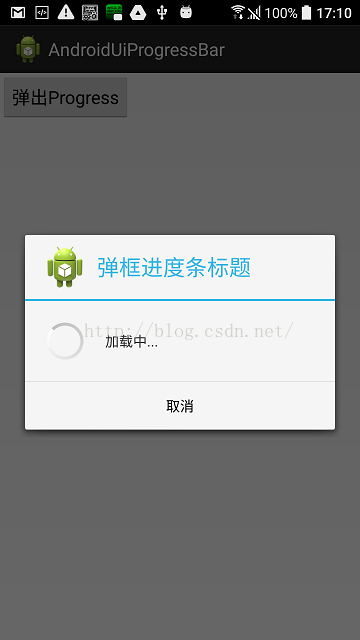
1)彈框布局custom_dialog_layout.xml
2)主布局activity_three.xml
package com.andy.androiduiprogressbar;


import android.app.Activity;
import android.app.AlertDialog;
import android.content.DialogInterface;
import android.os.Bundle;
import android.util.Log;
import android.view.LayoutInflater;
import android.view.View;
import android.view.View.OnClickListener;
import android.widget.Button;
import android.widget.LinearLayout;
import android.widget.ProgressBar;
import android.widget.Toast;


public class ThreeActivity extends Activity {
	private Button alertDialogbtn;
	private ProgressBar progress;
	//可理解為AlertDialog構建者
	private AlertDialog.Builder builder;
	//AlertDialog實例化
	private AlertDialog progressDialog;
	//布局加載器
	private LayoutInflater minflater;
	//布局
	private LinearLayout mLayout;

	@Override
	protected void onCreate(Bundle savedInstanceState) {
		super.onCreate(savedInstanceState);
		setContentView(R.layout.activity_three);
		//初始化
		//minflater=getLayoutInflater();
		minflater=(LayoutInflater) getSystemService(this.LAYOUT_INFLATER_SERVICE);
		mLayout = (LinearLayout) minflater.inflate(R.layout.custom_dialog_layout, null);
		progress = (ProgressBar)mLayout.findViewById(R.id.progress);
		alertDialogbtn =(Button) findViewById(R.id.alertDialogbtn);
		//alertDialogbtn設置監聽
		alertDialogbtn.setOnClickListener(new OnClickListener() {

			@Override
			public void onClick(View v) {
				//顯示progressDialog
				progressDialog.show();
			}
		});
		//初始化構建者
		builder = new AlertDialog.Builder(ThreeActivity.this);
		//用AlertDialog構建者,構建一個progressDialog
		progressDialog = builder.create();
		//設置progressDialog圖標
		Log.d("dialog", progressDialog.toString());
		progressDialog.setIcon(R.drawable.ic_launcher);
		//設置標題
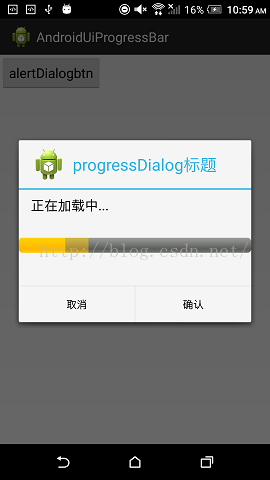
		progressDialog.setTitle("progressDialog標題");
		//設置提示信息
		progressDialog.setMessage("正在加載中...");
		//設置自定義的layout布局
		progressDialog.setView(mLayout);
		//設置back鍵取消
		progressDialog.setCancelable(true);
		//設置點擊彈框外部取消
		progressDialog.setCanceledOnTouchOutside(true);
		//設置確認按鈕,除可以設置DialogInterface.BUTTON_POSITIVE(確認)以外還可以設置RESULT_OK
		progressDialog.setButton(RESULT_OK, "確認", new DialogInterface.OnClickListener() {

			@Override
			public void onClick(DialogInterface dialog, int which) {
						Toast.makeText(ThreeActivity.this, "點擊了確認", Toast.LENGTH_SHORT).show();
			}
		});
		//設置按鈕DialogInterface.BUTTON_NEGATIVE(取消)|DialogInterface.BUTTON_POSITIVE(確認)|DialogInterface.BUTTON_NEUTRAL(普通)
		progressDialog.setButton(DialogInterface.BUTTON_NEGATIVE, "取消", new DialogInterface.OnClickListener() {

			@Override
			public void onClick(DialogInterface dialog, int which) {
				Toast.makeText(ThreeActivity.this, "進度條彈框取消", Toast.LENGTH_SHORT).show();
			}
		});


}
}
    package com.andy.androiduiprogressbar;


    import android.app.Activity;
    import android.os.Bundle;
    import android.view.Window;


    public class FourActivity extends Activity {
        @Override
        protected void onCreate(Bundle savedInstanceState) {
            super.onCreate(savedInstanceState);
            //請求窗口屬性中的FEATURE_PROGRESS屬性
            requestWindowFeature(Window.FEATURE_PROGRESS);
            //設置進度條可見
            setProgressBarVisibility(true);
            super.onCreate(savedInstanceState);
            setContentView(R.layout.activity_four);
            //設置第一進度
            setProgress(30);
            //設置是否為不明確進度條樣式
            setProgressBarIndeterminate(false);
            //設置第二進度
            setSecondaryProgress(40);

        }
    }
 微信怎麼玩 微信好玩嗎
微信作為手機端通訊應用,很多人把它當做常用的通訊工具了,如果你還停留在QQ,還沒有開始使用微信的話,說明你就out了,微信功能強大,微信支付,微信叫滴滴,微
 【我的Android進階之旅】解決strings.xml格式化占位符錯誤: Multiple substitutions specified in non-positional format
今天有一個Android新手使用strings.xml進行格式化的時候報了占位符錯誤, Multiple substitutions specified in non-
 Android自定義ProgressDialog加載圖片
為了提高用戶體驗,我們肯定希望該Dialog能更加炫酷,讓用戶看著更舒服。那如何做呢,當然是我們自己定義一個ProgressDialog了。一、使用系統加載框mDialo
 Android平台Camera實時濾鏡實現方法探討(八)--簡單美顏濾鏡
美顏包含磨皮、美白、瘦臉等效果,其中磨皮算法在很多博客中均有介紹例如:雙指數邊緣平滑濾波器用於磨皮算法的嘗試選擇性模糊及其算法的實現基於局部均方差相關信息的圖像去噪及其在