編輯:關於Android編程
縱觀目前主流的圖片加載庫:Picasso,Glide,Fresco,Android-Universal-Image-Loader等,它們都可以顯示圓角的圖片,但是除了Fresco可以指定哪幾個角為圓角、哪幾個角不為圓角外,其他三者都沒有實現這個功能,而Fresco的侵入性比較強,布局中需使用com.facebook.drawee.view.simpledraweeview而不是簡單的ImageView,同時Fresco需要在布局中每個角的圓角屬性上設置false或true,這就未免有些麻煩了。
本文基於大眾化圖片加載庫Universal-Image-Loader中的RoundedBitmapDisplayer源碼進行拓展,自定義了一個FlexibleRoundedBitmapDisplayer,可以用簡單快捷的代碼指定圖片的某幾個角為圓角,某幾個角不為圓角。
public class RoundedBitmapDisplayer implements BitmapDisplayer {
    protected final int cornerRadius;
    protected final int margin;

    public RoundedBitmapDisplayer(int cornerRadiusPixels) {
        this(cornerRadiusPixels, 0);
    }

    public RoundedBitmapDisplayer(int cornerRadiusPixels, int marginPixels) {
        this.cornerRadius = cornerRadiusPixels;
        this.margin = marginPixels;
    }

    public void display(Bitmap bitmap, ImageAware imageAware, LoadedFrom loadedFrom) {
        if(!(imageAware instanceof ImageViewAware)) {
            throw new IllegalArgumentException("ImageAware should wrap ImageView. ImageViewAware is expected.");
        } else {
            imageAware.setImageDrawable(new RoundedBitmapDisplayer.RoundedDrawable(bitmap, this.cornerRadius, this.margin));
        }
    }

    public static class RoundedDrawable extends Drawable {
        protected final float cornerRadius;
        protected final int margin;
        protected final RectF mRect = new RectF();
        protected final RectF mBitmapRect;
        protected final BitmapShader bitmapShader;
        protected final Paint paint;

        public RoundedDrawable(Bitmap bitmap, int cornerRadius, int margin) {
            this.cornerRadius = (float)cornerRadius;
            this.margin = margin;
            this.bitmapShader = new BitmapShader(bitmap, TileMode.CLAMP, TileMode.CLAMP);
            this.mBitmapRect = new RectF((float)margin, (float)margin, (float)(bitmap.getWidth() - margin), (float)(bitmap.getHeight() - margin));
            this.paint = new Paint();
            this.paint.setAntiAlias(true);
            this.paint.setShader(this.bitmapShader);
            this.paint.setFilterBitmap(true);
            this.paint.setDither(true);
        }

        protected void onBoundsChange(Rect bounds) {
            super.onBoundsChange(bounds);
            this.mRect.set((float)this.margin, (float)this.margin, (float)(bounds.width() - this.margin), (float)(bounds.height() - this.margin));
            Matrix shaderMatrix = new Matrix();
            shaderMatrix.setRectToRect(this.mBitmapRect, this.mRect, ScaleToFit.FILL);
            this.bitmapShader.setLocalMatrix(shaderMatrix);
        }

        public void draw(Canvas canvas) {
            canvas.drawRoundRect(this.mRect, this.cornerRadius, this.cornerRadius, this.paint);
        }

        public int getOpacity() {
            return -3;
        }

        public void setAlpha(int alpha) {
            this.paint.setAlpha(alpha);
        }

        public void setColorFilter(ColorFilter cf) {
            this.paint.setColorFilter(cf);
        }
    }
}
可以看出Universal-Image-Loader顯示圓角圖片的方法屬於上述第四種方法——BitmapShader,Shader被稱之為著色器、渲染器,而BitmapShader產生的是一個圖像,有點類似Photoshop中的圖像漸變填充,它的作用就是通過Paint對畫布進行指定Bitmap的填充,這裡的填充模式是TileMode.CLAMP(拉伸模式,拉伸圖片最後一像素點,一般指定圖片合適大小時不會拉伸),也就是使用BitmapShader來進行圖形填充。通俗些說就是用一張圖片創建了一支具有圖像填充功能的畫筆,然後使用這個畫筆畫出一個形狀,圖片就在畫出的地方顯示。Universal-Image-Loader這裡用drawRoundRect()方法畫出了一個圓角矩形,故圖像顯示成了圓角矩形。
用過Photoshop的童鞋應該比較好理解,這就類似你給一個圖層加了一個白蒙板,然後用不透明度100%的黑色畫筆去在蒙板上繪制,畫筆所過之處你原來的圖層就會顯現出來,就是這個意思。
思路就是先畫一個圓角矩形把這個圖片變成圓角,然後你想讓那個角不是圓角,就把對應角位置那部分的原圖畫出來即可,畫一個矩形就可以把原來的角顯示出來,用的方法是drawRect()。
/**
 * Universal-Image-Loader中RoundedBitmapDisplayer的增強版,可以自定義圖片4個角中的指定角為圓角

 */
public class FlexibleRoundedBitmapDisplayer implements BitmapDisplayer {
    protected int cornerRadius;
    protected int corners;

    public static final int CORNER_TOP_LEFT = 1;
    public static final int CORNER_TOP_RIGHT = 1 << 1;
    public static final int CORNER_BOTTOM_LEFT = 1 << 2;
    public static final int CORNER_BOTTOM_RIGHT = 1 << 3;
    public static final int CORNER_ALL = CORNER_TOP_LEFT | CORNER_TOP_RIGHT | CORNER_BOTTOM_LEFT | CORNER_BOTTOM_RIGHT;
    /**
     * 構造方法說明:設定圓角像素大小,所有角都為圓角
     * @param cornerRadiusPixels 圓角像素大小
     */

    public FlexibleRoundedBitmapDisplayer(int cornerRadiusPixels){
        this.cornerRadius = cornerRadiusPixels;
        this.corners = CORNER_ALL;
    }
    /**
     * 構造方法說明:設定圓角像素大小,指定角為圓角
     * @param cornerRadiusPixels 圓角像素大小
     * @param corners 自定義圓角

     * CORNER_NONE 無圓角

     * CORNER_ALL 全為圓角

     * CORNER_TOP_LEFT | CORNER_TOP_RIGHT | CORNER_BOTTOM_LEFT | CORNER_BOTTOM_RIGHT 指定圓角(選其中若干組合  )

     */
    public FlexibleRoundedBitmapDisplayer(int cornerRadiusPixels, int corners){
        this.cornerRadius = cornerRadiusPixels;
        this.corners = corners;
    }

    @Override
    public void display(Bitmap bitmap, ImageAware imageAware, LoadedFrom loadedFrom) {
        if (!(imageAware instanceof ImageViewAware)) {
            throw new IllegalArgumentException("ImageAware should wrap ImageView. ImageViewAware is expected.");
        }
        imageAware.setImageDrawable(new FlexibleRoundedDrawable(bitmap,cornerRadius,corners));
    }
    public static class FlexibleRoundedDrawable extends Drawable {
        protected final float cornerRadius;

        protected final RectF mRect = new RectF(), mBitmapRect;
        protected final BitmapShader bitmapShader;
        protected final Paint paint;
        private int corners;

        public FlexibleRoundedDrawable(Bitmap bitmap, int cornerRadius, int corners) {
            this.cornerRadius = cornerRadius;
            this.corners = corners;

            bitmapShader = new BitmapShader(bitmap, Shader.TileMode.CLAMP, Shader.TileMode.CLAMP);
            mBitmapRect = new RectF(0, 0, bitmap.getWidth(), bitmap.getHeight());

            paint = new Paint();
            paint.setAntiAlias(true);
            paint.setShader(bitmapShader);
        }

        @Override
        protected void onBoundsChange(Rect bounds) {
            super.onBoundsChange(bounds);
            mRect.set(0, 0, bounds.width(), bounds.height());
            Matrix shaderMatrix = new Matrix();
            shaderMatrix.setRectToRect(mBitmapRect, mRect, Matrix.ScaleToFit.FILL);
            bitmapShader.setLocalMatrix(shaderMatrix);

        }

        @Override
        public void draw(Canvas canvas) {
            //先畫一個圓角矩形將圖片顯示為圓角
            canvas.drawRoundRect(mRect, cornerRadius, cornerRadius, paint);
            int notRoundedCorners = corners ^ CORNER_ALL;
            //哪個角不是圓角我再把你用矩形畫出來
            if ((notRoundedCorners & CORNER_TOP_LEFT) != 0) {
                canvas.drawRect(0, 0, cornerRadius, cornerRadius, paint);
            }
            if ((notRoundedCorners & CORNER_TOP_RIGHT) != 0) {
                canvas.drawRect(mRect.right - cornerRadius, 0, mRect.right, cornerRadius, paint);
            }
            if ((notRoundedCorners & CORNER_BOTTOM_LEFT) != 0) {
                canvas.drawRect(0, mRect.bottom - cornerRadius, cornerRadius, mRect.bottom, paint);
            }
            if ((notRoundedCorners & CORNER_BOTTOM_RIGHT) != 0) {
                canvas.drawRect(mRect.right - cornerRadius, mRect.bottom - cornerRadius, mRect.right, mRect.bottom, paint);
            }
        }

        @Override
        public int getOpacity() {
            return PixelFormat.TRANSLUCENT;
        }

        @Override
        public void setAlpha(int alpha) {
            paint.setAlpha(alpha);
        }

        @Override
        public void setColorFilter(ColorFilter cf) {
            paint.setColorFilter(cf);
        }
    }
}
然後就可以這樣使用Universal-Image-Loader了:
/*
     * 設置圖片---自定義圖片4個角中的指定角為圓角
     * @param url 圖片的url
     * @param cornerRadius 圓角像素大小
     * @param corners 自定義圓角:

     * 以下參數為FlexibleRoundedBitmapDisplayer中靜態變量:

     * CORNER_NONE 無圓角

     * CORNER_ALL 全為圓角

     * CORNER_TOP_LEFT | CORNER_TOP_RIGHT | CORNER_BOTTOM_LEFT | CORNER_BOTTOM_RIGHT 指定圓角(選其中若干組合  )

     * @param image url為空時加載該圖片
     * @param imageView 要設置圖片的ImageView
     */

    public void setRoundedImage(String url, int cornerRadius, int corners, int image, ImageView imageView) {
        ImageLoader imageLoader = ImageLoader.getInstance();
        DisplayImageOptions options = new DisplayImageOptions.Builder()
                .showImageOnLoading(image).showStubImage(image)
                .showImageForEmptyUri(image)//url為空時顯示的圖片
                .showImageOnFail(image)//加載失敗顯示的圖片
                .cacheInMemory()//內存緩存
                .cacheOnDisc()//磁盤緩存
                .displayer(new FlexibleRoundedBitmapDisplayer(cornerRadius,corners)) // 自定義增強型BitmapDisplayer
                .build();
        imageLoader.displayImage(url, imageView, options);

    }
來個示例:
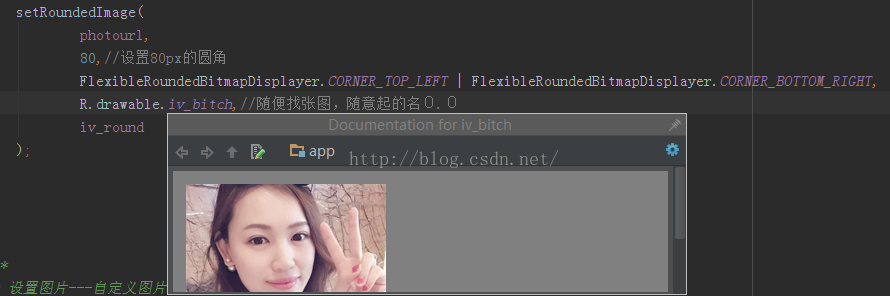
看看效果:

 Android漫游記(3)---重定位之GOT & PLT & R_ARM_JUMP_SLOT
Android系統的動態鏈接工具是/system/bin/linker(一般的Linux系統是ld.so),雖然名字不同,但是基本的動態鏈接過程是類似的。需
 Android EventBus3.0使用及源碼解析
叨了個叨最近因為換工作的一些瑣事搞的我一個頭兩個大,也沒怎麼去學新東西,實在是有些愧疚。新項目用到了EventBus3.0,原來只是聽說EventBus的鼎鼎大名,一直沒
 android中使用Activity實現監聽手指上下左右滑動
用Activity的onTouchEvent方法實現監聽手指上下左右滑動應用了Activity的ontouchEvent方法監聽手指點擊事件,手指滑動的時候會先按下,滑倒
 u-boot-2012.04.1 第一階段分析 內存劃分 代碼重定位
今天學習了一下 u-boot-2012.04.01 的第一階段,發現與 u-boot1.1.6 的差異還是很大的,尤其是在代碼重定位方面。在 u-boot1.1.6 中鏈