編輯:關於Android編程
首先我們要知道一共有哪幾種動畫,這個面試有可能被問哦^_^。
變換動畫(透明度、縮放、平移、旋轉)、逐幀動畫、布局動畫和屬性動畫
我們可以通過XML文件設置動畫也可以通過java代碼設置動畫,當動畫的狀態是動態獲取的,就是比較靈活的時候,我們選java代碼的,否則選擇XML的更加方便。
1、透明度
1)通過xml文件設置alphademo.xml(在res/anim文件夾下)
啟動的代碼還是一樣的
 Animation animation = AnimationUtils.loadAnimation(this,R.anim.rotatedemo);
 imageView.startAnimation(animation);
2)java代碼實現
RotateAnimation rotateAnimation = new RotateAnimation(0f,-30f);
rotateAnimation.setDuration(2000);
rotateAnimation.setFillAfter(true);
imageView.startAnimation(rotateAnimation);
5、每種動畫都會了,來一個組合的吧
RotateAnimation rotateAnimation = new RotateAnimation(0f, -30f,0.5f,0.5f);
        rotateAnimation.setDuration(2000);
        rotateAnimation.setFillAfter(true);
        //設置啟動的時間
//        rotateAnimation.setStartOffset(2000);
        imageView.startAnimation(rotateAnimation);
        rotateAnimation.setAnimationListener(new Animation.AnimationListener() {
            //動畫開始的時候執行
            @Override
            public void onAnimationStart(Animation animation) {

            }
            //動畫結束後執行
            @Override
            public void onAnimationEnd(Animation animation) {
                TranslateAnimation translateAnimation = new TranslateAnimation(0f, 200f, 0f, 50f);
                translateAnimation.setFillAfter(true);
                translateAnimation.setDuration(3000);
                imageView.startAnimation(translateAnimation);
            }
            //動畫重復的時候執行
            @Override
            public void onAnimationRepeat(Animation animation) {

            }
        });
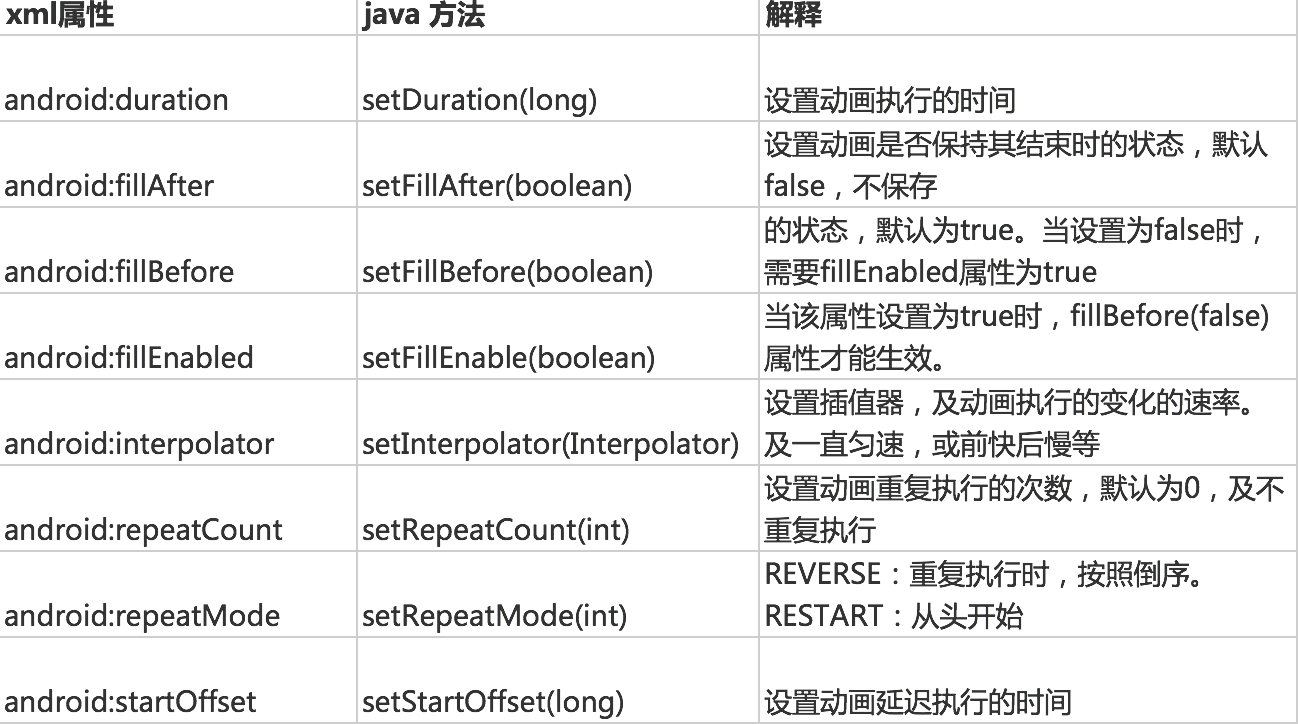
參考的
6、我們可能會有這樣的需求:多個動畫同時執行
1)xml文件方式togeranimation.xml
啟動的方式還是一樣的
 Animation animation = AnimationUtils.loadAnimation(this,R.anim.togeranimation);
imageView.startAnimation(animation);
2)使用java代碼有些不同
        AnimationSet animationSet = new AnimationSet(true);
        TranslateAnimation translateAnimation = new TranslateAnimation(0f, 200f, 0f, 50f);
        translateAnimation.setDuration(3000);
        //一定要把動畫添加到動畫集中
        animationSet.addAnimation(translateAnimation);

        RotateAnimation rotateAnimation = new RotateAnimation(0f, -30f,0.5f,0.5f);
        rotateAnimation.setDuration(2000);
        animationSet.addAnimation(rotateAnimation);
        //啟動方式一樣,只不過傳入的是AnimationSet對象了
        imageView.startAnimation(animationSet);
與上面那種動畫不同的是,xml文件放到了drawable文件夾下
animation.xml
注意哦這裡的根元素是animation-list ,子元素是item
-
-
-
-
-
-
-
接下來就是java代碼了
public class Animationtoger extends AppCompatActivity {

    private AnimationDrawable animationDrawable = null;
    private ImageView imageView;

    @Override
    protected void onCreate(Bundle savedInstanceState) {
        super.onCreate(savedInstanceState);
        setContentView(R.layout.activity_animationtoger);
        imageView = (ImageView) findViewById(image_view);
        //初始化AnimationDrawable
        animationDrawable = (AnimationDrawable) getResources().getDrawable(R.drawable.animation);
        //將imageView的背景設置為AnimationDrawable
        imageView.setBackground(animationDrawable);

    }
    public void startAnimation(View view){
        //開啟動畫,停止用stop
        animationDrawable.start();
    }
}
我這裡面實現的效果是,ListView中每個條目一次從右滑出並可見。
布局動畫使用的是LayoutAnimationController,它是用於為一個layout裡面的控件,或者是一個ViewGroup裡面的控件設置動畫效果。
public class LayoutAnimationActivity extends AppCompatActivity {

    private ListView listView;
    private List list;
    private ArrayAdapter adapter;

    @Override
    protected void onCreate(Bundle savedInstanceState) {
        super.onCreate(savedInstanceState);
        setContentView(R.layout.activity_layout_animation);
        listView = (ListView) findViewById(R.id.listview);

        list = new ArrayList<>();
        for (int i = 0; i < 20; i++) {
            list.add("你好黑啊+" + i);
        }
        adapter = new ArrayAdapter(this, android.R.layout.simple_list_item_1, list);
        listView.setAdapter(adapter);
        AnimationSet set = new AnimationSet(true);

        Animation animation = new AlphaAnimation(0.0f, 1.0f);
        animation.setDuration(2000);
        set.addAnimation(animation);

        animation = new TranslateAnimation(100f,10f,0,0);
        animation.setDuration(2000);
        set.addAnimation(animation);
        //得到布局動畫控制器
        LayoutAnimationController layoutAnimationController = new LayoutAnimationController(set);
//設置控件顯示的順序
             layoutAnimationController.setOrder(LayoutAnimationController.ORDER_NORMAL);
        listView.setLayoutAnimation(layoutAnimationController);
        //寫不寫都可以,不寫也會出現同樣的效果
        listView.startLayoutAnimation();

    }
}
 詳解Android自定義View--自定義柱狀圖
緒論轉眼間,2016伴隨著互聯網寒冬和帝都的霧霾馬上就過去了,不知道大家今年一整年過得怎麼樣?最近票圈被各個城市的霧霾刷屏,內心難免會動蕩,慶幸自己早出來一年,也擔憂著自
 Android實現原生側滑菜單的超簡單方式
先來看看效果圖當你點擊菜單可以更改圖標,例如點擊happy,首頁就會變一個笑臉,這個實現的過程超級簡單你需要使用ToolBar與DrawableLayout兩個比較新的控
 我的Android進階之旅------)Android中制作和查看自定義的Debug版本Android簽名證書
Android應用開發接入各種SDK時會發現,有很多SDK是需要靠package name和的證書指紋SHA1碼來識別的,如百度地圖SDK。這樣如果使用默認自動生成的de
 Android之事件響應的兩種模型分析
Android的事件響應處理 一、android事件響應模型的概述 事件響應對於android這種“頁程序”而言相當重要,因為這是與界面編程緊緊相關的知識;就如同Ac