編輯:關於Android編程
在多線程的世界中,是那麼的神奇 與 高效以及合理;
官方推薦使用Executors類工廠方法來創建線程池管理,Executors類是官方提供的一個工廠類,裡面封裝了好多功能不一樣的線程池,從而使得我們創建線程池非常的簡單:
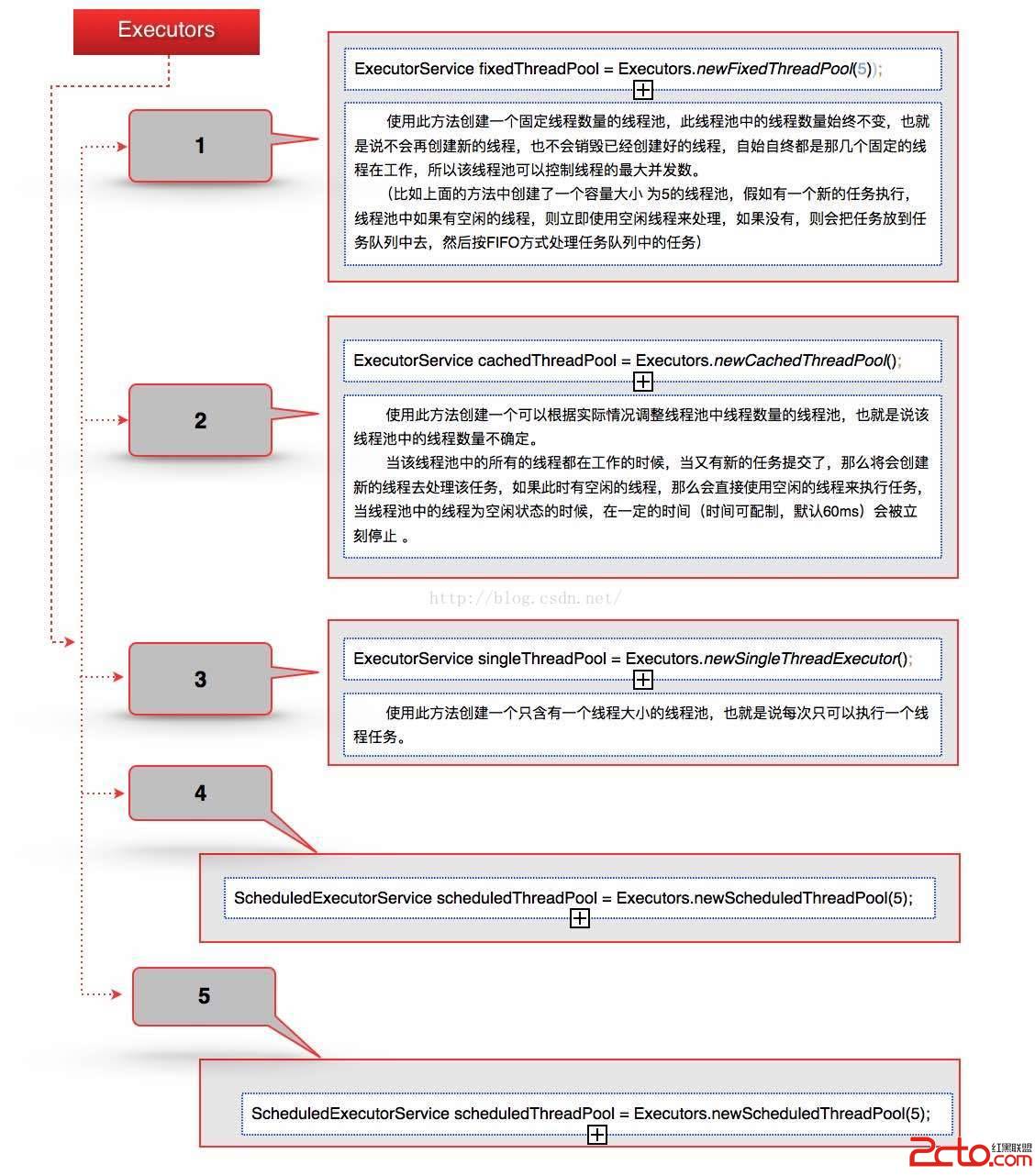
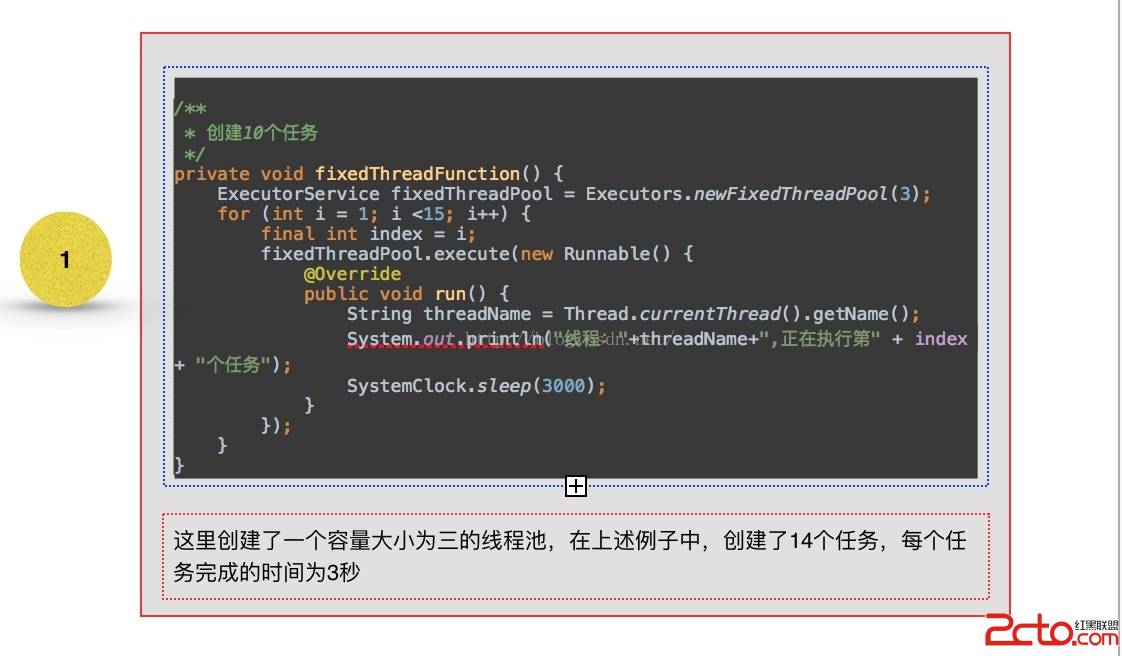
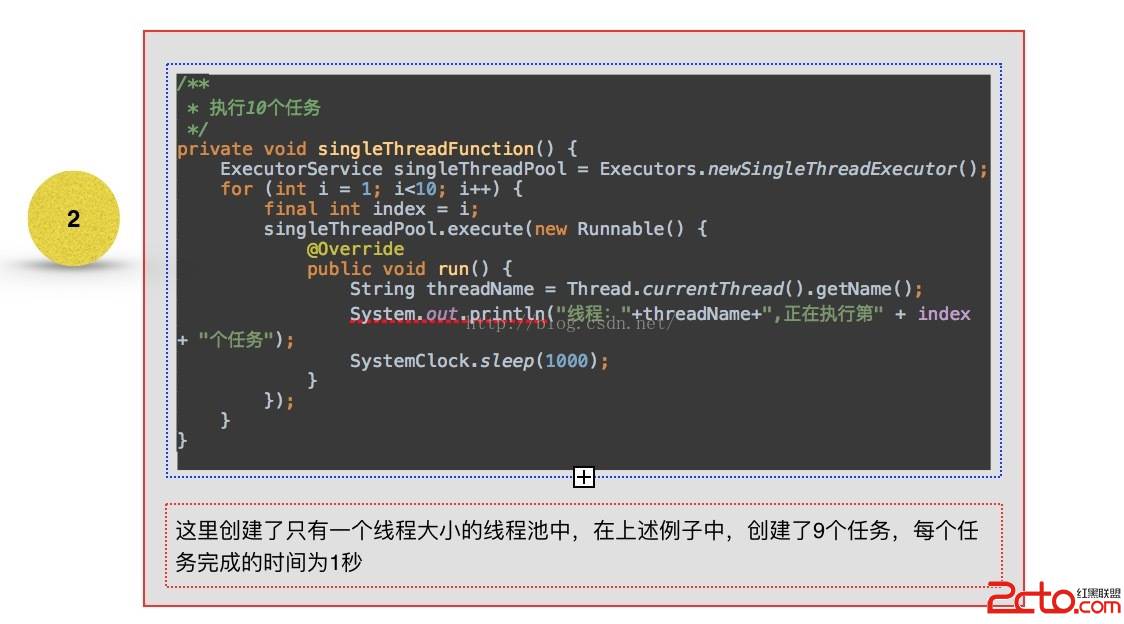
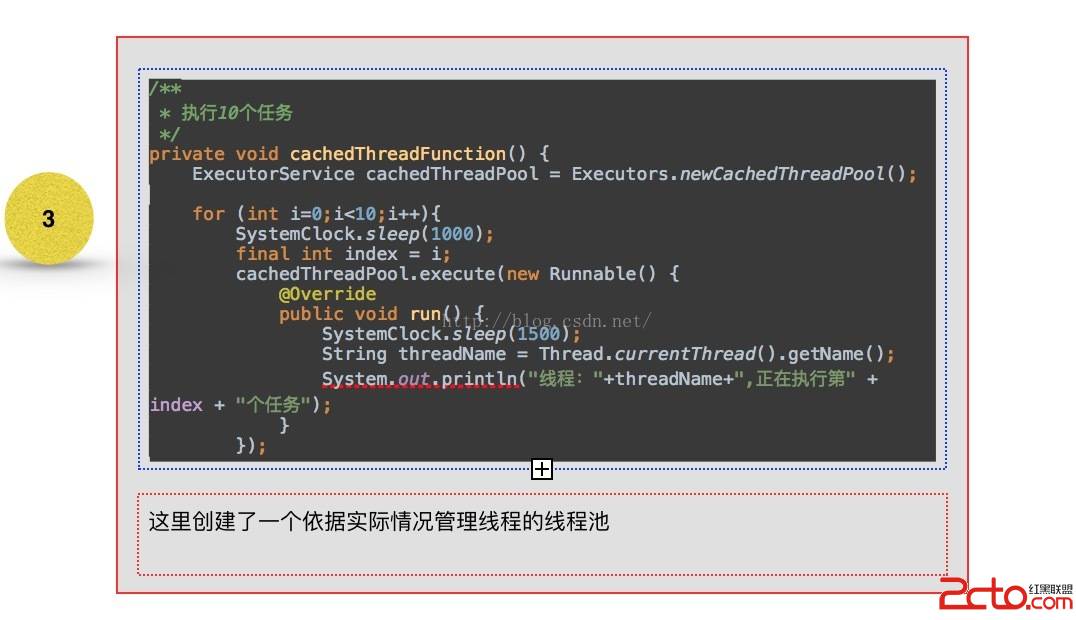
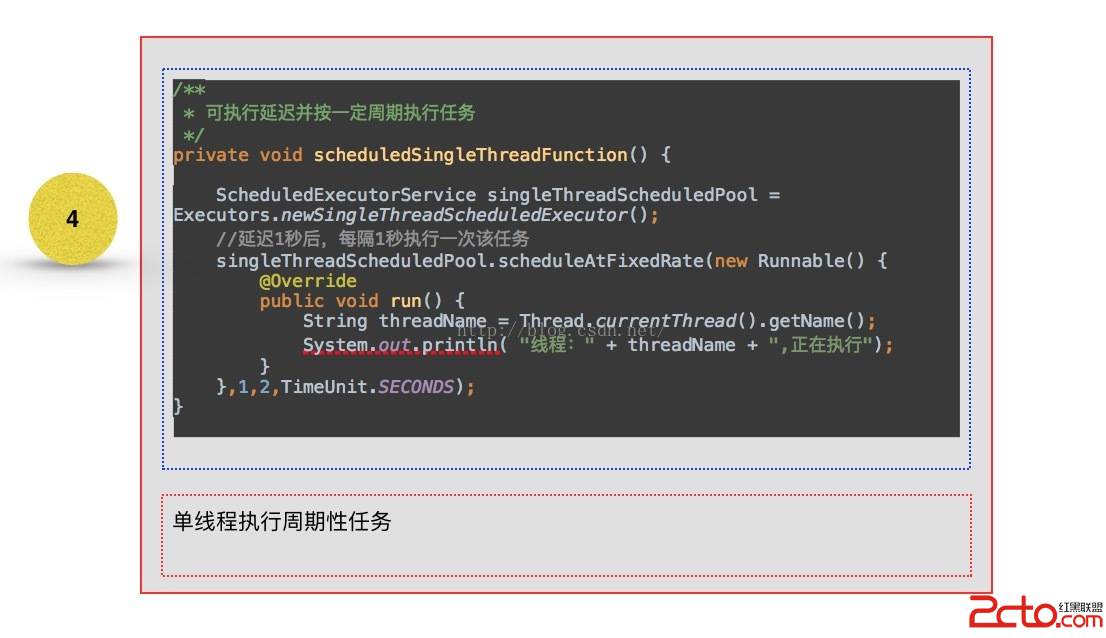
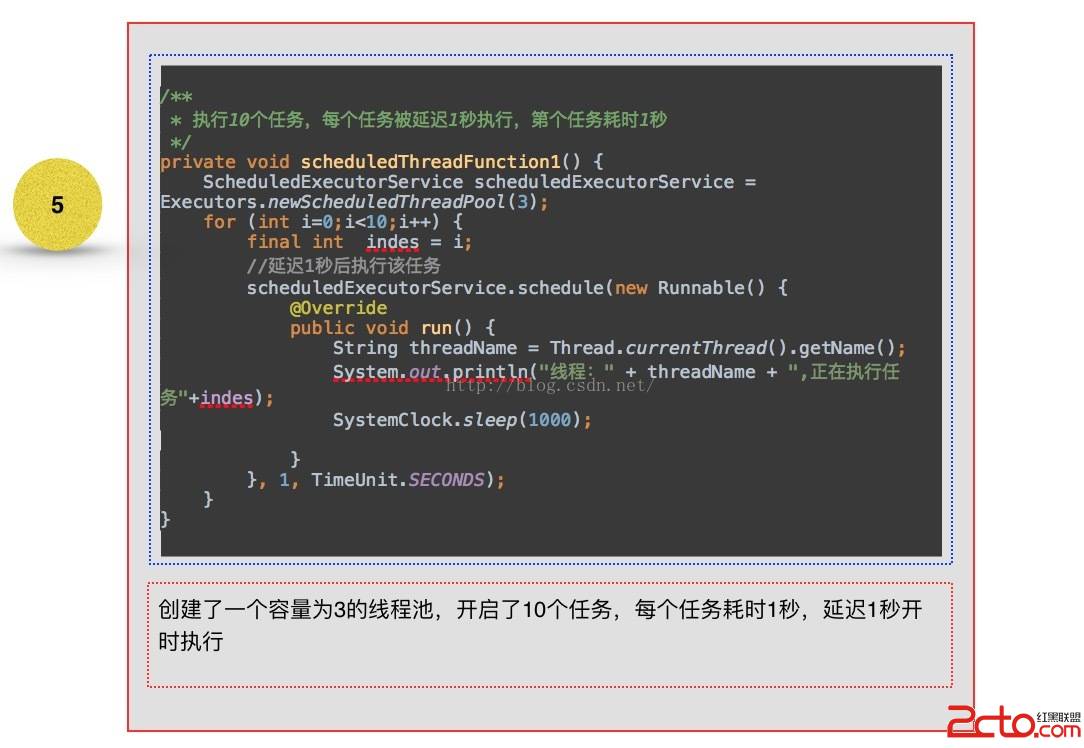
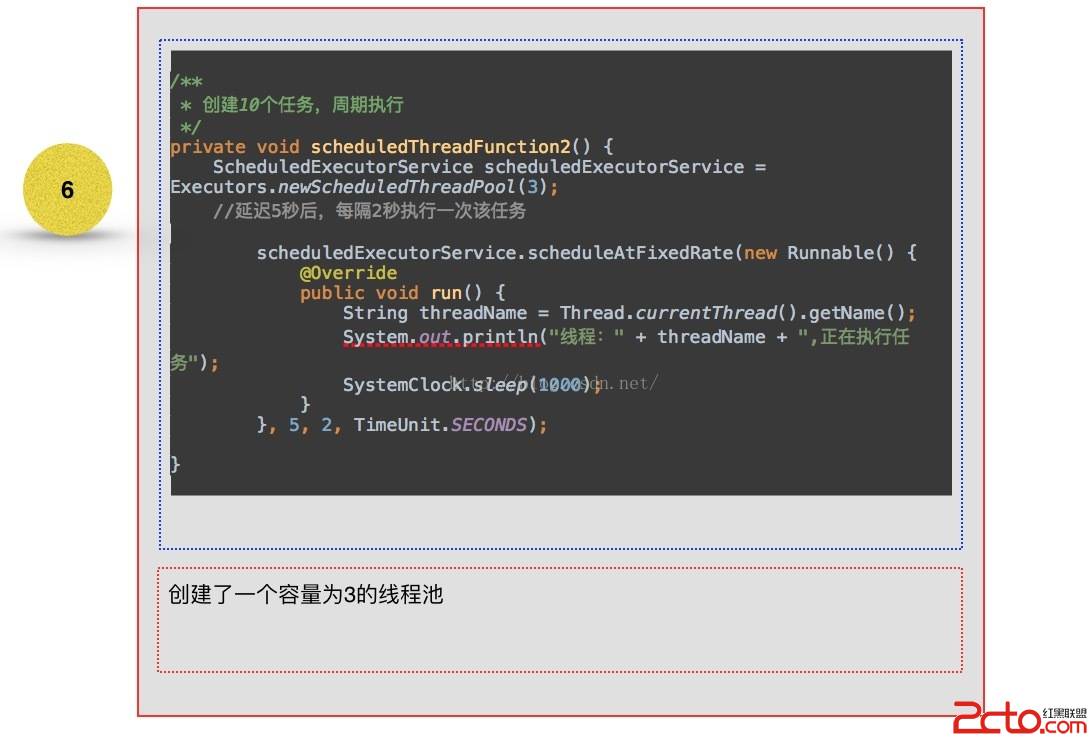
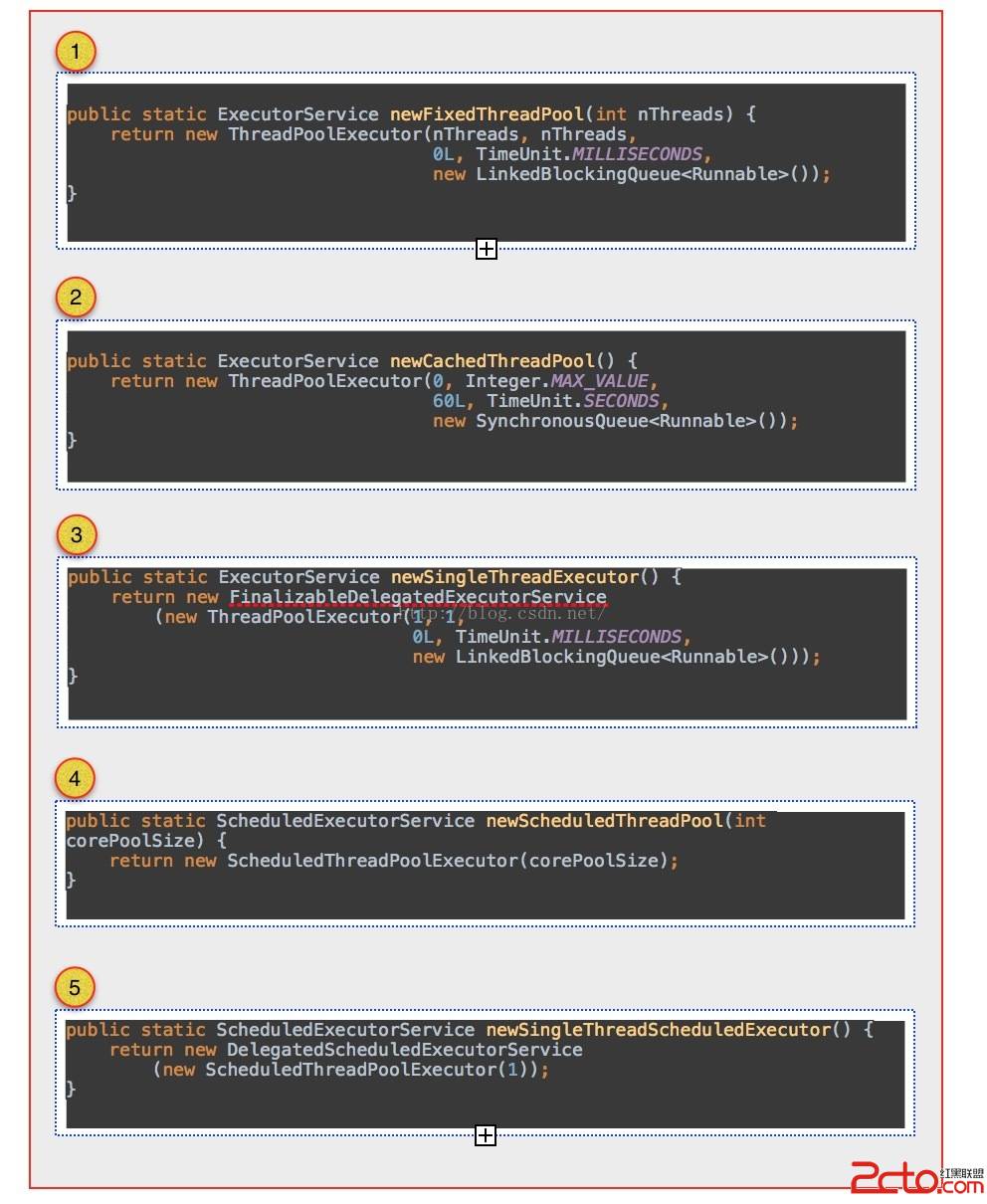
可以看到1 - 3 創建線程池的方法中,全部是創建了ThreadPoolExecutor這個對象實例,不同的只是構造中的參數不一至,而在4 與5 ,從其繼承的角度來看
public class ScheduledThreadPoolExecutor
        extends ThreadPoolExecutor
        implements ScheduledExecutorService {
可以看到其實質也是繼承於ThreadPoolExecutor這個對象實例。
也就是說上述一種類型的線程池其都是 ThreadPoolExecutor子類,其實直接創建ThreadPoolExecutor實例對象,只需要傳入相對應的配制參數,就可以創建出來與上述五種效果相一至的線程池管理,只不過是在書寫的時候太過於繁鎖。
 /**
     * Creates a new {@code ThreadPoolExecutor} with the given initial
     * parameters and default thread factory and rejected execution handler.
     * It may be more convenient to use one of the {@link Executors} factory
     * methods instead of this general purpose constructor.
     *
     * @param corePoolSize the number of threads to keep in the pool, even
     *        if they are idle, unless {@code allowCoreThreadTimeOut} is set
     * @param maximumPoolSize the maximum number of threads to allow in the
     *        pool
     * @param keepAliveTime when the number of threads is greater than
     *        the core, this is the maximum time that excess idle threads
     *        will wait for new tasks before terminating.
     * @param unit the time unit for the {@code keepAliveTime} argument
     * @param workQueue the queue to use for holding tasks before they are
     *        executed.  This queue will hold only the {@code Runnable}
     *        tasks submitted by the {@code execute} method.
     * @throws IllegalArgumentException if one of the following holds:

     *         {@code corePoolSize < 0}

     *         {@code keepAliveTime < 0}

     *         {@code maximumPoolSize <= 0}

     *         {@code maximumPoolSize < corePoolSize}
     * @throws NullPointerException if {@code workQueue} is null
     */
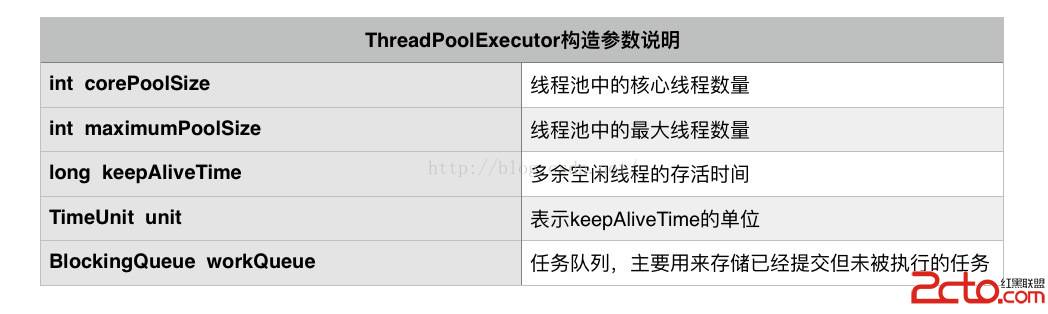
    public ThreadPoolExecutor(int corePoolSize,
                              int maximumPoolSize,
                              long keepAliveTime,
                              TimeUnit unit,
                              BlockingQueue workQueue) {
        this(corePoolSize, maximumPoolSize, keepAliveTime, unit, workQueue,
             Executors.defaultThreadFactory(), defaultHandler);
    }
從上述創建ThreadPoolEecutor實例的構造來說,
    /**
     * 創建線程池也是需要資源的,所以線程池內線程數量的大小也會影響系統的性能,
     * 大了反而浪費資源,小了反而影響系統的吞吐量,
     * 所以我們創建線程池需要把握一個度才能合理的發揮它的優點,
     * 通常來說我們要考慮的因素有CPU的數量、內存的大小、並發請求的數量等因素,按需調整。
     *通常核心線程數可以設為CPU數量+1,而最大線程數可以設為CPU的數量*2+1。
     */
    private void customThreadFunction() {
        /**
         * 獲取CPU數量
         */
        int processors = Runtime.getRuntime().availableProcessors();

        /**
         * 核心線程數量
         */
        int corePoolSize =processors + 1;
        /**
         * 最大線程數量
         */
        int maximumPoolSize =  processors * 2 + 1;
        /**
         * 空閒有效時間
         */
        long keepAliveTime = 60;
        /**
         * 創建自定義線程池
         */

        ThreadPoolExecutor threadPoolExecutor = new ThreadPoolExecutor(corePoolSize, maximumPoolSize, keepAliveTime, TimeUnit.SECONDS, new PriorityBlockingQueue());

        /**
         * 添加執行任務
         */
        for (int i=1;i<=20;i++){
            final int prites = i;
            threadPoolExecutor.execute(new CustomRunnable(prites){

                @Override
                public void doRun() {

                    String name = Thread.currentThread().getName();
                    System.out.println("curentThread name is "+name +"and prites is "+prites);
                    SystemClock.sleep(1000);

                }
            });
        }
    }
public abstract class CustomRunnable implements Runnable,Comparable{ private int priority; public CustomRunnable(int priority) { if (priority<0) throw new IllegalArgumentException(); this.priority = priority; } @Override public int compareTo(CustomRunnable another) { int my = this.getPriority(); int other = another.getPriority(); if (my>other){ return -1; }else{ return 0; } } @Override public void run() { doRun(); } public abstract void doRun(); public int getPriority() { return priority; } }
public class CustomExpanThreadPool extends ThreadPoolExecutor {

    private CustomExpanThreadPool(int corePoolSize, int maximumPoolSize, long keepAliveTime, TimeUnit unit, BlockingQueue workQueue) {
        super(corePoolSize, maximumPoolSize, keepAliveTime, unit, workQueue);
    }

    public static CustomExpanThreadPool getInstance() {
        /**
         * 獲取CPU數量
         */
        int processors = Runtime.getRuntime().availableProcessors();

        /**
         * 核心線程數量
         */
        int corePoolSize = processors + 1;
        /**
         * 最大線程數量
         */
        int maximumPoolSize = processors * 2 + 1;
        /**
         * 空閒有效時間
         */
        long keepAliveTime = 60;
        /**
         * 創建自定義線程池
         */

        return new CustomExpanThreadPool(corePoolSize, maximumPoolSize, keepAliveTime, TimeUnit.SECONDS, new PriorityBlockingQueue());

    }

    /**
     * 用於控制線程開始與停止執行的方法
     */
    private boolean isPaused;
    private ReentrantLock pauseLock = new ReentrantLock();
    private Condition unpaused = pauseLock.newCondition();


    /**
     * 任務執行前要執行的方法
     *
     * @param t
     * @param r
     */
    @Override
    protected void beforeExecute(Thread t, Runnable r) {
        super.beforeExecute(t, r);
        System.out.println(Thread.currentThread().getName() + "  任務執行開始 ");
        pauseLock.lock();
        try {
            while (isPaused) unpaused.await();
        } catch (InterruptedException ie) {
            t.interrupt();
        } finally {
        }
    }

    /**
     * 任務執行後要執行的方法
     *
     * @param r
     * @param t
     */
    @Override
    protected void afterExecute(Runnable r, Throwable t) {
        super.afterExecute(r, t);
        System.out.println(Thread.currentThread().getName() + "  任務執行over ");
    }

    /**
     * 線程池關閉後要執行的方法
     */
    @Override
    protected void terminated() {
        super.terminated();
    }

    /**
     * 暫停執行任務的方法
     */
    public void pause() {
        pauseLock.lock();
        try {
            isPaused = true;
        } finally {
            pauseLock.unlock();
        }
    }

    /**
     * 恢復執行任務的方法
     */
    public void resume() {
        pauseLock.lock();
        try {
            isPaused = false;
            unpaused.signalAll();
        } finally {
            pauseLock.unlock();
        }
    }
}
 private void customThreadFunction2() {

        CustomExpanThreadPool threadPoolExecutor = CustomExpanThreadPool.getInstance();

        /**
         * 添加執行任務
         */
        for (int i=1;i<=20;i++){
            final int prites = i;
            threadPoolExecutor.execute(new CustomRunnable(prites){

                @Override
                public void doRun() {

                    String name = Thread.currentThread().getName();
                    System.out.println("curentThread name is "+name +"and prites is "+prites);
                    SystemClock.sleep(1000);

                }
            });
        }
    }
 Android UI設計系列之HTML標簽實現TextView設置中文字體加粗效果(6)
搞軟件開發的都知道項目中各種需求都有,而有時候各種奇葩的需求真是讓人大跌眼鏡,為了實現這些奇葩的需求我們往往苦逼的廢寢忘食,我現在的項目中就有一個應該算得上奇葩的需求吧,
 Android:Pull解析XML
在上一篇文章寫了SAX解析XML,感覺Pull方式和SAX方式非常相似,只是SAX需要一個輔助的類,解析時觸發事件後在回調方法裡面寫代碼,而Pull則通過調
 Android中自定義View實現圓環等待及相關的音量調節效果
圓環交替、等待效果效果就這樣,分析了一下,大概有這幾個屬性,兩個顏色,一個速度,一個圓環的寬度。自定View的幾個步驟:1、自定義View的屬性2、在View的構造方法中
 Android插件開發初探——基礎篇
Android插件開發初探對於Android的插件化其實已經討論已久了,但是市面上還沒有非常靠譜成熟的插件框架供我們使用。這裡我們就嘗試性的對比一下Java中,我們使用插