編輯:關於Android編程
Snackbar提供了一個介於Toast和AlertDialog之間輕量級控件,它可以很方便的提供消息的提示和動作反饋。
有時我們想這樣一種控件,我們想他可以想Toast一樣顯示完成便可以消失,又想在這個信息提示上進行用戶反饋。寫Toast沒有反饋效果,寫Dialog只能點擊去dismiss它。是的,可能你會說是可以去自定義它們來達到這樣的效果。而事實上也是這樣。
其實要實現這樣的一個提示窗口,只是針對自定義控件來說,應該是So easy的,不過這裡我們想著會有一些比較完善的功能,比如,我們要同時去顯示多個提示時,又該如何呢?這一點我們就要去模仿Toast原本的隊列機制了。
對於本博客的源碼也並非本人所寫,我也只是在網絡上下載下來之後研究了一下,並把研究的一些過程在這裡和大家分享一下。代碼的xml部分,本文不做介紹,大家可以在源碼中去詳細了解。
而在Java的部分,則有三個類。這三個類的功能職責則是依據MVC的模式來編寫,看完這三個類,自己也是學到了不少的東西呢。M(Snack)、V(SnackContainer)、C(SnackBar)
/**
 * Model角色,顯示SnackBar時信息屬性
 * http://blog.csdn.net/lemon_tree12138
 */
class Snack implements Parcelable {

    final String mMessage;

    final String mActionMessage;

    final int mActionIcon;

    final Parcelable mToken;

    final short mDuration;

    final ColorStateList mBtnTextColor;

    Snack(String message, String actionMessage, int actionIcon,
            Parcelable token, short duration, ColorStateList textColor) {
        mMessage = message;
        mActionMessage = actionMessage;
        mActionIcon = actionIcon;
        mToken = token;
        mDuration = duration;
        mBtnTextColor = textColor;
    }

    // reads data from parcel
    Snack(Parcel p) {
        mMessage = p.readString();
        mActionMessage = p.readString();
        mActionIcon = p.readInt();
        mToken = p.readParcelable(p.getClass().getClassLoader());
        mDuration = (short) p.readInt();
        mBtnTextColor = p.readParcelable(p.getClass().getClassLoader());
    }

    // writes data to parcel
    public void writeToParcel(Parcel out, int flags) {
        out.writeString(mMessage);
        out.writeString(mActionMessage);
        out.writeInt(mActionIcon);
        out.writeParcelable(mToken, 0);
        out.writeInt((int) mDuration);
        out.writeParcelable(mBtnTextColor, 0);
    }

    public int describeContents() {
        return 0;
    }

    // creates snack array
    public static final Parcelable.Creator CREATOR = new Parcelable.Creator() {
        public Snack createFromParcel(Parcel in) {
            return new Snack(in);
        }

        public Snack[] newArray(int size) {
            return new Snack[size];
        }
    };
}
這一個類就沒什麼好說的了,不過也有一點還是要注意一下的。就是這個類需要去實現Parcelable的接口。為什麼呢?因為我們在V(SnackContainer)層會對M(Snack)在Bundle之間進行傳遞,而在Bundle和Intent之間的數據傳遞時,如果是一個類的對象,那麼這個對象要是Parcelable或是Serializable類型的。
class SnackContainer extends FrameLayout {

    private static final int ANIMATION_DURATION = 300;

    private static final String SAVED_MSGS = SAVED_MSGS;

    private Queue mSnacks = new LinkedList();

    private AnimationSet mOutAnimationSet;
    private AnimationSet mInAnimationSet;

    private float mPreviousY;

    public SnackContainer(Context context) {
        super(context);
        init();
    }

    public SnackContainer(Context context, AttributeSet attrs) {
        super(context, attrs);
        init();
    }

    SnackContainer(ViewGroup container) {
        super(container.getContext());

        container.addView(this, new ViewGroup.LayoutParams(
                ViewGroup.LayoutParams.MATCH_PARENT,
                ViewGroup.LayoutParams.MATCH_PARENT));
        setVisibility(View.GONE);
        setId(R.id.snackContainer);
        init();
    }

    private void init() {
        mInAnimationSet = new AnimationSet(false);

        TranslateAnimation mSlideInAnimation = new TranslateAnimation(
                TranslateAnimation.RELATIVE_TO_PARENT, 0.0f,
                TranslateAnimation.RELATIVE_TO_PARENT, 0.0f,
                TranslateAnimation.RELATIVE_TO_SELF, 1.0f,
                TranslateAnimation.RELATIVE_TO_SELF, 0.0f);

        AlphaAnimation mFadeInAnimation = new AlphaAnimation(0.0f, 1.0f);

        mInAnimationSet.addAnimation(mSlideInAnimation);
        mInAnimationSet.addAnimation(mFadeInAnimation);

        mOutAnimationSet = new AnimationSet(false);

        TranslateAnimation mSlideOutAnimation = new TranslateAnimation(
                TranslateAnimation.RELATIVE_TO_PARENT, 0.0f,
                TranslateAnimation.RELATIVE_TO_PARENT, 0.0f,
                TranslateAnimation.RELATIVE_TO_SELF, 0.0f,
                TranslateAnimation.RELATIVE_TO_SELF, 1.0f);

        AlphaAnimation mFadeOutAnimation = new AlphaAnimation(1.0f, 0.0f);

        mOutAnimationSet.addAnimation(mSlideOutAnimation);
        mOutAnimationSet.addAnimation(mFadeOutAnimation);

        mOutAnimationSet.setDuration(ANIMATION_DURATION);
        mOutAnimationSet
                .setAnimationListener(new Animation.AnimationListener() {
                    @Override
                    public void onAnimationStart(Animation animation) {

                    }

                    @Override
                    public void onAnimationEnd(Animation animation) {
                        removeAllViews();

                        if (!mSnacks.isEmpty()) {
                            sendOnHide(mSnacks.poll());
                        }

                        if (!isEmpty()) {
                            showSnack(mSnacks.peek());
                        } else {
                            setVisibility(View.GONE);
                        }
                    }

                    @Override
                    public void onAnimationRepeat(Animation animation) {

                    }
                });
    }

    @Override
    protected void onDetachedFromWindow() {
        super.onDetachedFromWindow();
        mInAnimationSet.cancel();
        mOutAnimationSet.cancel();
        removeCallbacks(mHideRunnable);
        mSnacks.clear();
    }

    /**
     * Q Management
     */

    public boolean isEmpty() {
        return mSnacks.isEmpty();
    }

    public Snack peek() {
        return mSnacks.peek().snack;
    }

    public Snack pollSnack() {
        return mSnacks.poll().snack;
    }

    public void clearSnacks(boolean animate) {
        mSnacks.clear();
        if (animate) {
            mHideRunnable.run();
        }
    }

    /**
     * Showing Logic
     */

    public boolean isShowing() {
        return !mSnacks.isEmpty();
    }

    public void hide() {
        removeCallbacks(mHideRunnable);
        mHideRunnable.run();
    }

    public void showSnack(Snack snack, View snackView,
            OnVisibilityChangeListener listener) {
        showSnack(snack, snackView, listener, false);
    }

    public void showSnack(Snack snack, View snackView,
            OnVisibilityChangeListener listener, boolean immediately) {
        if (snackView.getParent() != null && snackView.getParent() != this) {
            ((ViewGroup) snackView.getParent()).removeView(snackView);
        }

        SnackHolder holder = new SnackHolder(snack, snackView, listener);
        mSnacks.offer(holder);
        if (mSnacks.size() == 1) {
            showSnack(holder, immediately);
        }
    }

    private void showSnack(final SnackHolder holder) {
        showSnack(holder, false);
    }

    /**
     * TODO
     * 2015年7月19日
     * 上午4:24:10
     */
    private void showSnack(final SnackHolder holder, boolean showImmediately) {

        setVisibility(View.VISIBLE);

        sendOnShow(holder);

        addView(holder.snackView);
        holder.messageView.setText(holder.snack.mMessage);
        if (holder.snack.mActionMessage != null) {
            holder.button.setVisibility(View.VISIBLE);
            holder.button.setText(holder.snack.mActionMessage);
            holder.button.setCompoundDrawablesWithIntrinsicBounds(
                    holder.snack.mActionIcon, 0, 0, 0);
        } else {
            holder.button.setVisibility(View.GONE);
        }

        holder.button.setTextColor(holder.snack.mBtnTextColor);

        if (showImmediately) {
            mInAnimationSet.setDuration(0);
        } else {
            mInAnimationSet.setDuration(ANIMATION_DURATION);
        }
        startAnimation(mInAnimationSet);

        if (holder.snack.mDuration > 0) {
            postDelayed(mHideRunnable, holder.snack.mDuration);
        }

        holder.snackView.setOnTouchListener(new View.OnTouchListener() {
            @Override
            public boolean onTouch(View v, MotionEvent event) {
                float y = event.getY();

                switch (event.getAction()) {
                case MotionEvent.ACTION_MOVE:
                    int[] location = new int[2];
                    holder.snackView.getLocationInWindow(location);
                    if (y > mPreviousY) {
                        float dy = y - mPreviousY;
                        holder.snackView.offsetTopAndBottom(Math.round(4 * dy));

                        if ((getResources().getDisplayMetrics().heightPixels - location[1]) - 100 <= 0) {
                            removeCallbacks(mHideRunnable);
                            sendOnHide(holder);
                            startAnimation(mOutAnimationSet);

                            // 清空列表中的SnackHolder,也可以不要這句話。這樣如果後面還有SnackBar要顯示就不會被Hide掉了。
                            if (!mSnacks.isEmpty()) {
                                mSnacks.clear();
                            }
                        }
                    }
                }

                mPreviousY = y;

                return true;
            }
        });
    }

    private void sendOnHide(SnackHolder snackHolder) {
        if (snackHolder.visListener != null) {
            snackHolder.visListener.onHide(mSnacks.size());
        }
    }

    private void sendOnShow(SnackHolder snackHolder) {
        if (snackHolder.visListener != null) {
            snackHolder.visListener.onShow(mSnacks.size());
        }
    }

    /**
     * Runnable stuff
     */
    private final Runnable mHideRunnable = new Runnable() {
        @Override
        public void run() {
            if (View.VISIBLE == getVisibility()) {
                startAnimation(mOutAnimationSet);
            }
        }
    };

    /**
     * Restoration
     */
    public void restoreState(Bundle state, View v) {
        Parcelable[] messages = state.getParcelableArray(SAVED_MSGS);
        boolean showImmediately = true;

        for (Parcelable message : messages) {
            showSnack((Snack) message, v, null, showImmediately);
            showImmediately = false;
        }
    }

    public Bundle saveState() {
        Bundle outState = new Bundle();

        final int count = mSnacks.size();
        final Snack[] snacks = new Snack[count];
        int i = 0;
        for (SnackHolder holder : mSnacks) {
            snacks[i++] = holder.snack;
        }

        outState.putParcelableArray(SAVED_MSGS, snacks);
        return outState;
    }

    private static class SnackHolder {
        final View snackView;
        final TextView messageView;
        final TextView button;

        final Snack snack;
        final OnVisibilityChangeListener visListener;

        private SnackHolder(Snack snack, View snackView,
                OnVisibilityChangeListener listener) {
            this.snackView = snackView;
            button = (TextView) snackView.findViewById(R.id.snackButton);
            messageView = (TextView) snackView.findViewById(R.id.snackMessage);

            this.snack = snack;
            visListener = listener;
        }
    }
}
這是要顯示我們View的地方。這裡的SnackContainer一看名稱就應該知道它是一個容器類了吧,我們把得到將Show的SnackBar都放進一個Queue裡,需要顯示哪一個就把在Queue中取出顯示即可。而它本身就好像是一面牆,我們會把一個日歷掛在上面,顯示過一張就poll掉一個,直到Queue為Empty為止。
在上面的顯示SnackBar的代碼showSnack(...)部分,我們看到還有一個onTouch的觸摸事件。好了,代碼中實現的是當我們把這個SnackBar向下Move的時候,這一條SnackBar就被Hide了,而要不要再繼續顯示Queue中其他的SnackBar就要針對具體的需求自己來衡量了。
SnackContainer中還有一個SnackHolder的內部類,大家可以把它看成是Adapter中的ViewHolder,很類似的東西。
public class SnackBar {

    public static final short LONG_SNACK = 5000;

    public static final short MED_SNACK = 3500;

    public static final short SHORT_SNACK = 2000;

    public static final short PERMANENT_SNACK = 0;

    private SnackContainer mSnackContainer;

    private View mParentView;

    private OnMessageClickListener mClickListener;

    private OnVisibilityChangeListener mVisibilityChangeListener;

    public interface OnMessageClickListener {
        void onMessageClick(Parcelable token);
    }

    public interface OnVisibilityChangeListener {

        /**
         * Gets called when a message is shown
         *
         * @param stackSize
         *            the number of messages left to show
         */
        void onShow(int stackSize);

        /**
         * Gets called when a message is hidden
         *
         * @param stackSize
         *            the number of messages left to show
         */
        void onHide(int stackSize);
    }

    public SnackBar(Activity activity) {
        ViewGroup container = (ViewGroup) activity.findViewById(android.R.id.content);
        View v = activity.getLayoutInflater().inflate(R.layout.sb_snack, container, false);

//        v.setBackgroundColor(activity.getResources().getColor(R.color.beige));

        init(container, v);
    }

    public SnackBar(Context context, View v) {
        LayoutInflater inflater = (LayoutInflater) context.getSystemService(Context.LAYOUT_INFLATER_SERVICE);
        inflater.inflate(R.layout.sb_snack_container, ((ViewGroup) v));
        View snackLayout = inflater.inflate(R.layout.sb_snack, ((ViewGroup) v), false);
        init((ViewGroup) v, snackLayout);
    }

    private void init(ViewGroup container, View v) {
        mSnackContainer = (SnackContainer) container.findViewById(R.id.snackContainer);
        if (mSnackContainer == null) {
            mSnackContainer = new SnackContainer(container);
        }

        mParentView = v;
        TextView snackBtn = (TextView) v.findViewById(R.id.snackButton);
        snackBtn.setOnClickListener(mButtonListener);
    }

    public static class Builder {

        private SnackBar mSnackBar;

        private Context mContext;
        private String mMessage;
        private String mActionMessage;
        private int mActionIcon = 0;
        private Parcelable mToken;
        private short mDuration = MED_SNACK;
        private ColorStateList mTextColor;

        /**
         * Constructs a new SnackBar
         *
         * @param activity
         *            the activity to inflate into
         */
        public Builder(Activity activity) {
            mContext = activity.getApplicationContext();
            mSnackBar = new SnackBar(activity);
        }

        /**
         * Constructs a new SnackBar
         *
         * @param context
         *            the context used to obtain resources
         * @param v
         *            the view to inflate the SnackBar into
         */
        public Builder(Context context, View v) {
            mContext = context;
            mSnackBar = new SnackBar(context, v);
        }

        /**
         * Sets the message to display on the SnackBar
         *
         * @param message
         *            the literal string to display
         * @return this builder
         */
        public Builder withMessage(String message) {
            mMessage = message;
            return this;
        }

        /**
         * Sets the message to display on the SnackBar
         *
         * @param messageId
         *            the resource id of the string to display
         * @return this builder
         */
        public Builder withMessageId(int messageId) {
            mMessage = mContext.getString(messageId);
            return this;
        }

        /**
         * Sets the message to display as the action message
         *
         * @param actionMessage
         *            the literal string to display
         * @return this builder
         */
        public Builder withActionMessage(String actionMessage) {
            mActionMessage = actionMessage;
            return this;
        }

        /**
         * Sets the message to display as the action message
         *
         * @param actionMessageResId
         *            the resource id of the string to display
         * @return this builder
         */
        public Builder withActionMessageId(int actionMessageResId) {
            if (actionMessageResId > 0) {
                mActionMessage = mContext.getString(actionMessageResId);
            }

            return this;
        }

        /**
         * Sets the action icon
         *
         * @param id
         *            the resource id of the icon to display
         * @return this builder
         */
        public Builder withActionIconId(int id) {
            mActionIcon = id;
            return this;
        }

        /**
         * Sets the {@link com.github.mrengineer13.snackbar.SnackBar.Style} for
         * the action message
         *
         * @param style
         *            the
         *            {@link com.github.mrengineer13.snackbar.SnackBar.Style} to
         *            use
         * @return this builder
         */
        public Builder withStyle(Style style) {
            mTextColor = getActionTextColor(style);
            return this;
        }

        /**
         * The token used to restore the SnackBar state
         *
         * @param token
         *            the parcelable containing the saved SnackBar
         * @return this builder
         */
        public Builder withToken(Parcelable token) {
            mToken = token;
            return this;
        }

        /**
         * Sets the duration to show the message
         *
         * @param duration
         *            the number of milliseconds to show the message
         * @return this builder
         */
        public Builder withDuration(Short duration) {
            mDuration = duration;
            return this;
        }

        /**
         * Sets the {@link android.content.res.ColorStateList} for the action
         * message
         *
         * @param colorId
         *            the
         * @return this builder
         */
        public Builder withTextColorId(int colorId) {
            ColorStateList color = mContext.getResources().getColorStateList(colorId);
            mTextColor = color;
            return this;
        }

        /**
         * Sets the OnClickListener for the action button
         *
         * @param onClickListener
         *            the listener to inform of click events
         * @return this builder
         */
        public Builder withOnClickListener(
                OnMessageClickListener onClickListener) {
            mSnackBar.setOnClickListener(onClickListener);
            return this;
        }

        /**
         * Sets the visibilityChangeListener for the SnackBar
         *
         * @param visibilityChangeListener
         *            the listener to inform of visibility changes
         * @return this builder
         */
        public Builder withVisibilityChangeListener(
                OnVisibilityChangeListener visibilityChangeListener) {
            mSnackBar.setOnVisibilityChangeListener(visibilityChangeListener);
            return this;
        }

        /**
         * Shows the first message in the SnackBar
         *
         * @return the SnackBar
         */
        public SnackBar show() {
            Snack message = new Snack(mMessage,
                    (mActionMessage != null ? mActionMessage.toUpperCase()
                            : null), mActionIcon, mToken, mDuration,
                    mTextColor != null ? mTextColor
                            : getActionTextColor(Style.DEFAULT));

            mSnackBar.showMessage(message);

            return mSnackBar;
        }

        private ColorStateList getActionTextColor(Style style) {
            switch (style) {
            case ALERT:
                return mContext.getResources().getColorStateList(
                        R.color.sb_button_text_color_red);
            case INFO:
                return mContext.getResources().getColorStateList(
                        R.color.sb_button_text_color_yellow);
            case CONFIRM:
                return mContext.getResources().getColorStateList(
                        R.color.sb_button_text_color_green);
            case DEFAULT:
                return mContext.getResources().getColorStateList(
                        R.color.sb_default_button_text_color);
            default:
                return mContext.getResources().getColorStateList(
                        R.color.sb_default_button_text_color);
            }
        }
    }

    private void showMessage(Snack message) {
        mSnackContainer.showSnack(message, mParentView, mVisibilityChangeListener);
    }

    /**
     * Calculates the height of the SnackBar
     *
     * @return the height of the SnackBar
     */
    public int getHeight() {
        mParentView.measure(View.MeasureSpec.makeMeasureSpec(
                mParentView.getWidth(), View.MeasureSpec.EXACTLY),
                View.MeasureSpec.makeMeasureSpec(mParentView.getHeight(),
                        View.MeasureSpec.AT_MOST));
        return mParentView.getMeasuredHeight();
    }

    /**
     * Getter for the SnackBars parent view
     *
     * @return the parent view
     */
    public View getContainerView() {
        return mParentView;
    }

    private final View.OnClickListener mButtonListener = new View.OnClickListener() {
        @Override
        public void onClick(View v) {
            if (mClickListener != null && mSnackContainer.isShowing()) {
                mClickListener.onMessageClick(mSnackContainer.peek().mToken);
            }
            mSnackContainer.hide();
        }
    };

    private SnackBar setOnClickListener(OnMessageClickListener listener) {
        mClickListener = listener;
        return this;
    }

    private SnackBar setOnVisibilityChangeListener(
            OnVisibilityChangeListener listener) {
        mVisibilityChangeListener = listener;
        return this;
    }

    /**
     * Clears all of the queued messages
     *
     * @param animate
     *            whether or not to animate the messages being hidden
     */
    public void clear(boolean animate) {
        mSnackContainer.clearSnacks(animate);
    }

    /**
     * Clears all of the queued messages
     *
     */
    public void clear() {
        clear(true);
    }

    /**
     * All snacks will be restored using the view from this Snackbar
     */
    public void onRestoreInstanceState(Bundle state) {
        mSnackContainer.restoreState(state, mParentView);
    }

    public Bundle onSaveInstanceState() {
        return mSnackContainer.saveState();
    }

    public enum Style {
        DEFAULT, ALERT, CONFIRM, INFO
    }
}
相信如果你寫過自定義的Dialog,對這個類一定不會陌生,它采用的是Builder模式編寫,這樣在使用端的部分就可以很輕松地設置它們。就像這樣:
mBuilder = new SnackBar.Builder(MainActivity.this).withMessage(Hello SnackBar!).withDuration(SnackBar.LONG_SNACK);
                mBuilder = mBuilder.withActionMessage(Undo);
                mBuilder = mBuilder.withStyle(SnackBar.Style.INFO);
                mBuilder = mBuilder.withOnClickListener(new OnMessageClickListener() {

                    @Override
                    public void onMessageClick(Parcelable token) {
                        Toast.makeText(getApplicationContext(), Click Undo, 0).show();
                    }
                });
                mSnackBar = mBuilder.show();
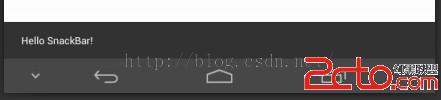
不帶Action按鈕的SnackBar
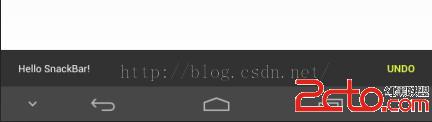
帶Action按鈕的SnackBar
 Android js啟動APK
1.在移動設備訪問m.alipay.com時,如果本地安裝了支付寶客戶端,則浏覽器會調用本地客戶端,沒有安裝則會跳轉到下載頁面,提示安裝。剛好有這樣的需求,就分析了下支付
 Android基礎入門教程——7.5.6 WebView處理網頁返回的錯誤碼信息
本節引言: 嘿嘿,假如你們公司是做HTML5端的移動APP的,就是通過WebView來顯示網頁的,假如你訪問的網頁 不存在,或者其他錯誤,報404,401,4
 知乎的微信朋友圈值乎怎麼玩 微信朋友圈值乎具體玩法介紹
微信朋友圈值乎怎麼玩?大家是否還記得微信紅包看照片的活動?現在知乎也推出了一個新的活動,那就是如果你想看完我的整篇文章,請付錢。 哈哈~是不是很有意思呢?
 [android]配置SVN(Subversion)服務器端/客戶端(多圖)
安裝SVN服務端安裝VisualSVN-Server,我的電腦是XP,所以安裝的VisualSVN-Server-2.5.8.msi版本。 這裡要注