編輯:關於Android編程
相信大家都遇到過這種情況,就是在Android手機中的應用,往往在應用的設置裡面,都會有一個檢查更新的功能,如果應用開發商或者運營商發布了新的應用版本,點擊設置裡面檢查更新的按鈕就會提示用戶有新版本,是否需要更新,如果用戶點擊了“立即更新”後,會將應用開發商或運營商服務器上最新的應用版本更新到手機中,如果用戶沒有選擇立即更新,則不會更新手機應用程序。
服務端存放有一個描述應用版本信息的文件,我們這個程序中姑且將這個版本描述文件定義為XML格式,在這個文件中定義了應用的版本號,名稱大小,下載鏈接,更新描述等信息。這個文件中所描述的應用版本號與服務器上發布的版本信息對應。當手機用戶點擊應用設置中檢查更新的功能時,會將手機中安裝的應用版本號與服務器中描述應用版本信息的文件版本號比較,如果手機中的版本號小於文件中的版本號,則提示用戶有新版本,是否需要更新。否則,提示用戶手機中安裝的應用程序已是最新版本。
這裡服務端需要一個描述應用更新信息的XML文件,一個新版本的APK文件和一個下載APK文件的接口路徑。
在這個文件中定義了要更新的應用的版本號,名稱大小,下載鏈接,更新描述等信息,它作為手機客戶端應用程序與服務端應用程序對比的媒介。這個文件中描述的版本信息與更新信息與服務端存放的APK信息完全一致。
具體實現如下:
	2
	0.2
	update.apk
	6313406
	http://192.168.254.103:9999/Wechat/app/get-app/update.apk
	我們的產品上線啦
在這個類中主要是實現了以文件流的形式來響應Android客戶端的請求,從而實現XML文件的下載與APK文件的下載功能。
具體實現代碼如下:
package com.cdsmartlink.system.mobile.api.version;

import java.io.BufferedInputStream;
import java.io.BufferedOutputStream;
import java.io.File;
import java.io.FileInputStream;
import java.io.IOException;
import java.io.InputStream;
import java.io.OutputStream;

import javax.servlet.http.HttpServletRequest;
import javax.servlet.http.HttpServletResponse;

import org.springframework.stereotype.Controller;
import org.springframework.web.bind.annotation.RequestMapping;

import com.cdsmartlink.utils.common.FileCopyUtils;
import com.cdsmartlink.utils.common.StringUtils;

/**
 * 獲取App版本的api
 * @author liuyazhuang
 *
 */
@Controller
public class MobileVersionAPI {

	private static final String TYPE_APK = apk;
	private static final String TYPE_XML = xml;
	/**
	 * 獲取Android版本比對文件
	 * @param request
	 * @param response
	 */
	@RequestMapping(value=/app/get-android-version/android.xml)
	public void getAndroidVersionXml(HttpServletRequest request,HttpServletResponse response){
		try {
			this.downloadFile(request, response,TYPE_XML ,version/android/version.xml);
		} catch (IOException e) {
			e.printStackTrace();
		}
	}

	/**
	 * 獲取IOS版本對比文件
	 * @param request
	 * @param response
	 */
	@RequestMapping(value=/app/get-ios-version/ios.xml)
	public void getIOSVersionXml(HttpServletRequest request,HttpServletResponse response){
		try {
			this.downloadFile(request, response,TYPE_XML, version/ios/version.xml);
		} catch (IOException e) {
			e.printStackTrace();
		}
	}

	/**
	 * 下載
	 * @param request
	 * @param response
	 */
	@RequestMapping(value=/app/get-app/update.ipa)
	public void getIOSApp(HttpServletRequest request,HttpServletResponse response){
		try {
			this.downloadFile(request, response,TYPE_APK, app/update.ipa);
		} catch (IOException e) {
			e.printStackTrace();
		}
	}

	/**
	 * 獲取IOS apk
	 * @param request
	 * @param response
	 */
	@RequestMapping(value=/app/get-web-app/update.ipa)
	public void getIOSWebApp(HttpServletRequest request,HttpServletResponse response){
		try {
			this.download(request, response, app/update.ipa,application/octet-stream);
		} catch (Exception e) {
			e.printStackTrace();
		}
	}

	/**
	 * 下載app
	 * @param request
	 * @param response
	 */
	@RequestMapping(value=/app/get-app/update.apk)
	public void getApp(HttpServletRequest request,HttpServletResponse response){
		try {
			this.downloadFile(request, response,TYPE_APK, app/update.apk);
		} catch (IOException e) {
			e.printStackTrace();
		}
	}

	@RequestMapping(value=/app/get-web-app/update.apk)
	public void getWebApp(HttpServletRequest request,HttpServletResponse response){
		try {
			this.download(request, response, app/update.apk,application/octet-stream);
		} catch (Exception e) {
			e.printStackTrace();
		}
	}

	/**
	 * 網頁下載
	 * @param request
	 * @param response
	 * @param fileName
	 * @param contentType
	 * @throws Exception
	 */
	public static void download(HttpServletRequest request,
            HttpServletResponse response, String fileName, String contentType) throws Exception {
		String path = request.getServletContext().getRealPath(/);
		if(StringUtils.isEmpty(path)) return;
		if(path.contains(\))
			path = path.replace(\, /);
		path = path.concat(fileName);
//        response.setContentType(text/html;charset=UTF-8);
        request.setCharacterEncoding(UTF-8);
        BufferedInputStream bis = null;
        BufferedOutputStream bos = null;
        File file = new File(path);
        if(file==null || !file.exists() || !file.isFile())
        	return;
        long fileLength = file.length();
        response.setContentType(contentType);
        response.setHeader(Content-disposition, attachment; filename=+new String(fileName.getBytes(utf-8), ISO8859-1));
        response.setHeader(Content-Length, String.valueOf(fileLength));
        bis = new BufferedInputStream(new FileInputStream(path));
        bos = new BufferedOutputStream(response.getOutputStream());
//        byte[] buff = new byte[2048];
//        int bytesRead;
//        while (-1 != (bytesRead = bis.read(buff, 0, buff.length))) {
//            bos.write(buff, 0, bytesRead);
//        }
        FileCopyUtils.copy(bis, bos);
}

	/**
	 * 下載文件(未下載的時候要顯示文件的大小信息)
	 * @param request
	 * @param response
	 * @param type
	 */
	private void downloadFile(HttpServletRequest request,HttpServletResponse response,String type,String fileName)throws IOException{
		String path = request.getServletContext().getRealPath(/);
		if(StringUtils.isEmpty(path)) return;
		if(path.contains(\))
			path = path.replace(\, /);
		path = path.concat(fileName);
		File file = new File(path);
		if(file == null || !file.exists()|| !file.isFile())
			return;
		response.setHeader(Content-Length, String.valueOf(file.length()));
		InputStream in = new FileInputStream(file);
		BufferedInputStream bin = new BufferedInputStream(in);
		OutputStream out = response.getOutputStream();
		BufferedOutputStream bout = new BufferedOutputStream(out);
		FileCopyUtils.copy(bin, bout);
	}
}
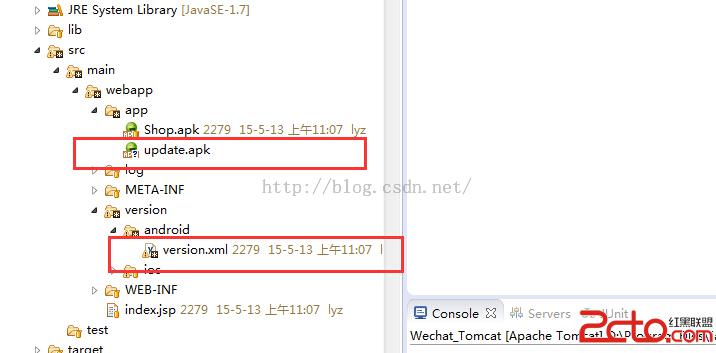
在這個示例中我在WebRoot下面新建目錄叫做app,將要更新的apk文件存放到目錄下;在WebRoot目錄下新建目錄叫做version/android,將更新信息描述文件放在version/android目錄中。
整體結構圖如下:
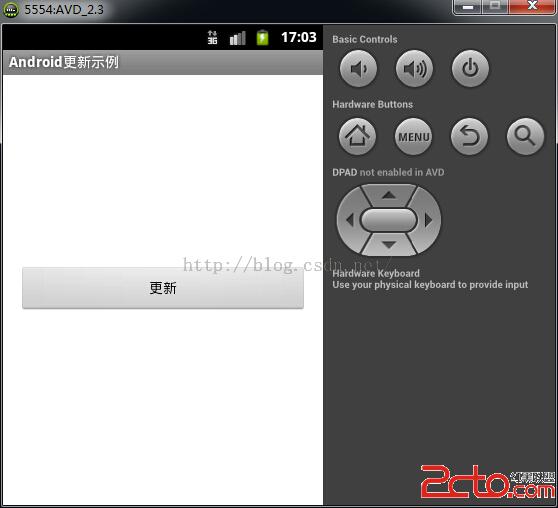
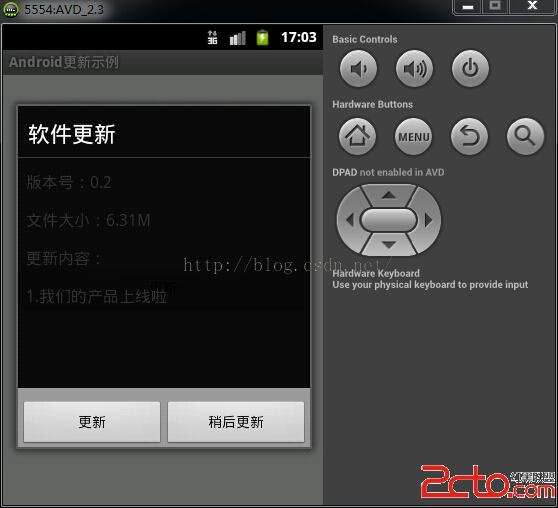
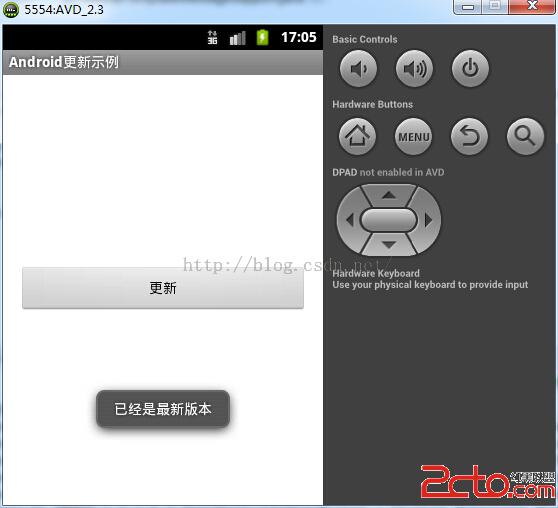
通過上面兩篇博文《Android之——多線程下載示例》與《Android之——多線程斷點續傳下載示例》的學習,我們對Android中多線程的下載有了較為深入的理解,這裡我們將版本更新的功能同樣放在子線程中去執行。首先,用戶點擊界面上的更新按鈕,向服務器發送請求,服務器將更新描述文件響應給Android客戶端,客戶端通過解析這個XML文件,獲取文件中描述的版本號與本應用程序的版本號比較,如果文件中描述的版本號大於本應用程序的版本號,則提示用戶有新版本,是否更新;否則提示用戶當前已是最新版本。
此布局實現起來比較簡單,就是在界面上顯示一個按鈕,用戶點擊按鈕實現程序的更新操作。
具體實現的代碼如下:
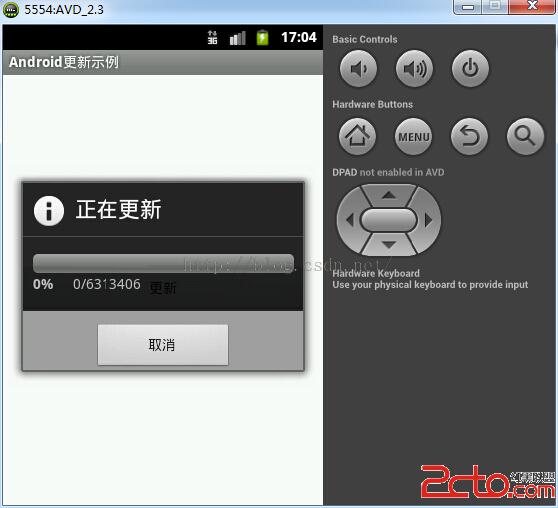
在這個界面中主要是顯示更新過程中顯示的更新信息,更新進度,版本說明等信息。
具體實現代碼如下:
在這個程序中,我主要封裝了一些獲取應用程序基本信息的方法。比如獲取應用版本號,版本名稱和安裝情況等等。
具體實現代碼如下:
package com.lyz.utils.app;

import java.util.List;

import android.app.Activity;
import android.content.Context;
import android.content.Intent;
import android.content.pm.PackageInfo;
import android.content.pm.PackageManager;
import android.content.pm.PackageManager.NameNotFoundException;
import android.graphics.Bitmap;
import android.graphics.Canvas;
import android.graphics.PixelFormat;
import android.graphics.drawable.Drawable;
import android.net.Uri;
import android.view.WindowManager;

/**
 * 操作當前的App的工具類
 *
 * @author liuyazhuang
 *
 */
public final class AppUtils {

	/**
	 * 獲取軟件版本號
	 *
	 * @param context
	 * @return
	 */
	public static int getVersionCode(Context context) {
		int versionCode = 0;
		try {
			// 獲取軟件版本號,對應AndroidManifest.xml下android:versionCode
			versionCode = context.getPackageManager().getPackageInfo(
					context.getPackageName(), 0).versionCode;
		} catch (NameNotFoundException e) {
			e.printStackTrace();
		}
		return versionCode;
	}
	/**
	 * 獲取當前應用的版本號
	 *
	 * @param pName
	 *            :應用程序包名
	 * @param mContext
	 *            :
	 * @return
	 */
	public static int getVersionCode(String pName, Context mContext) throws Exception {
		PackageInfo pinfo = mContext.getPackageManager().getPackageInfo(pName,
				PackageManager.GET_CONFIGURATIONS);
		return pinfo.versionCode;
	}

	/**
	 * 獲取當前應用的版本名稱
	 *
	 * @param pName
	 * @param mContext
	 * @return
	 * @throws Exception
	 */
	public static String getVersionName(String pName, Context mContext) {
		try {
			PackageInfo pinfo = mContext.getPackageManager().getPackageInfo(pName,
					PackageManager.GET_CONFIGURATIONS);
			return pinfo.versionName;
		} catch (Exception e) {
			// TODO Auto-generated catch block
			e.printStackTrace();
		}
		return null;
	}

	/**
	 * 判斷該應用在手機中的安裝情況
	 *
	 * @param packageName
	 *            要判斷應用的包名
	 */
	public static boolean checkAPK(String packageName, Context context) {
		List pakageinfos = context.getPackageManager()
				.getInstalledPackages(PackageManager.GET_UNINSTALLED_PACKAGES);
		for (PackageInfo pi : pakageinfos) {
			String pi_packageName = pi.packageName;
			if (packageName.endsWith(pi_packageName)) {
				return true;
			}
		}
		return false;
	}

	/**
	 * 退出當前應用程序
	 *
	 * @param context
	 */
	public static void exitCurrentProgress(Context context) {
		Intent startMain = new Intent(Intent.ACTION_MAIN);
		startMain.addCategory(Intent.CATEGORY_HOME);
		startMain.setFlags(Intent.FLAG_ACTIVITY_NEW_TASK);
		context.startActivity(startMain);
		System.exit(0);
	}

	/**
	 * 下載新的app
	 *
	 * @param url
	 * @param context
	 */
	public static void downloadNewApp(String url, Context context) {
		Intent it = new Intent(android.intent.action.VIEW, Uri.parse(url));
		context.startActivity(it);
	}

	/**
	 * 隱藏軟鍵盤
	 *
	 * @param context
	 */
	public static void hideSoftKeyBoard(Activity context) {
		context.getWindow().setSoftInputMode(
				WindowManager.LayoutParams.SOFT_INPUT_STATE_ALWAYS_HIDDEN);
	}

	/**
	 * 將Drawable轉化為Bitmap
	 *
	 * @param drawable
	 * @return
	 */
	public static Bitmap drawableToBitmap(Drawable drawable) {
		int width = drawable.getIntrinsicWidth();
		int height = drawable.getIntrinsicHeight();
		Bitmap bitmap = Bitmap.createBitmap(width, height, drawable
				.getOpacity() != PixelFormat.OPAQUE ? Bitmap.Config.ARGB_8888
				: Bitmap.Config.RGB_565);
		Canvas canvas = new Canvas(bitmap);
		drawable.setBounds(0, 0, width, height);
		drawable.draw(canvas);
		return bitmap;
	}
}
主要接收更新功能發出的廣播來進行應用程序的安裝操作,在這個類中,主要實現了應用程序的自動安裝功能
具體實現的代碼如下:
package com.lyz.utils.update.broadcast;

import android.content.BroadcastReceiver;
import android.content.Context;
import android.content.Intent;
import android.util.Log;

/**
 * 自定義廣播接收者
 * 來實現自動安裝APK的功能
 *
 * @author liuyazhuang
 *
 */
public class PkInstallReceiver extends BroadcastReceiver {

	@Override
	public void onReceive(Context context, Intent intent) {
		// 監聽安裝程序
		if (intent.getAction().equals(android.intent.action.PACKAGE_ADDED)) {
			String packageName = intent.getDataString().substring(8);
			Log.i(安裝應用, 安裝: + packageName + 包名的程序);
			Intent newIntent = new Intent();
			newIntent.setClassName(com.lyz.update.activity, com.lyz.update.activity.MainActivity);
			newIntent.setAction(android.intent.action.MAIN);
			newIntent.addCategory(android.intent.category.LAUNCHER);
			newIntent.setFlags(Intent.FLAG_ACTIVITY_NEW_TASK);
			context.startActivity(newIntent);
		}
		//監聽卸載
//		if (intent.getAction().equals(android.intent.action.PACKAGE_REMOVED)) {
//			String packageName = intent.getDataString().substring(8);
//			Log.i(卸載應用, 卸載: + packageName + 包名的程序);
//		}
	}

}
為了使應用程序的開發更加符合面向對象的封裝,我們將更新文件的長度和文件流信息封裝為一個實體類,以實現對這些信息的封裝操作。
具體實現的代碼如下:
package com.lyz.utils.update;

import java.io.InputStream;
import java.io.Serializable;

/**
 * 封裝更新文件的數據流和長度
 * @author liuyazhuang
 *
 */
public class UpdateDatas implements Serializable {
	private static final long serialVersionUID = 9210856546501387030L;
	//長度信息
	private Integer length;
	//文件流信息
	private InputStream in;

	public Integer getLength() {
		return length;
	}
	public void setLength(Integer length) {
		this.length = length;
	}
	public InputStream getIn() {
		return in;
	}
	public void setIn(InputStream in) {
		this.in = in;
	}

}
這個類主要負責XML文件的解析操作,將獲取到的文件輸入流解析成一個Map對象返回,其中Map中存放的每一個鍵值對就代表XML文件中的每一個節點信息。
具體實現的代碼如下:
package com.lyz.utils.update;

import java.io.InputStream;
import java.util.HashMap;
import java.util.Map;

import org.w3c.dom.Element;
import org.w3c.dom.Node;
import org.w3c.dom.NodeList;

import com.lyz.utils.common.XmlUtils;
/**
 * 解析版本更新文件
 * @author liuyazhuang
 *
 */
public class ParseXmlUtils {

	//版本信息
	public static final String Version = version;
	//名稱
	public static final String Name = name;
	//下載的鏈接
	public static final String Url = url;
	//項目更新描述
	public static final String Description = description;
	//大小
	public static final String Size = size;
	//用戶看到的版本信息
	public static final String VERSION_DESC = versiondesc;


	/**
	 * 將輸入流轉化為map
	 * @param inStream
	 * @return
	 * @throws Exception
	 */
	public static Map parseXml(InputStream inStream) throws Exception {
		NodeList childNodes = XmlUtils.parseXml(inStream);
		if(childNodes == null) return null;
		Map hashMap = new HashMap();
		for (int j = 0; j < childNodes.getLength(); j++) {
			// 遍歷子節點
			Node childNode = childNodes.item(j);
			if (childNode.getNodeType() == Node.ELEMENT_NODE) {
				Element childElement = (Element) childNode;
				// 版本號
				if (Version.equals(childElement.getNodeName())) {
					hashMap.put(Version, childElement.getFirstChild().getNodeValue());
				}
				// 軟件名稱
				else if ((Name.equals(childElement.getNodeName()))) {
					hashMap.put(Name, childElement.getFirstChild().getNodeValue());
				}
				// 下載地址
				else if ((Url.equals(childElement.getNodeName()))) {
					hashMap.put(Url, childElement.getFirstChild().getNodeValue());
				//應用更新描述
				}else if(Description.equals(childElement.getNodeName())){
					hashMap.put(Description, childElement.getFirstChild().getNodeValue());
				}
				//大小
				else if(Size.equals(childElement.getNodeName())){
					hashMap.put(Size, childElement.getFirstChild().getNodeValue());
				}
				//用戶所看到的版本號
				else if(VERSION_DESC.equals(childElement.getNodeName())){
					hashMap.put(VERSION_DESC, childElement.getFirstChild().getNodeValue());
				}
			}
		}
		return hashMap;
	}
}
這個類是整個應用程序的核心實現類,在這個類中,我們實現了文件的下載,版本對比與是否更新的操作,我們同樣將文件的下載放在子線程中執行,子線程對過Handler與Message機制與主線程交互數據,通知主線程更新UI,同時在這個類的構造方法中注冊廣播接收者。在解析XML文件時,文件中的版本號不大於手機中應用版本號的時候取消注冊廣播接收者,同時在下載最新APK文件結束,安裝完成後取消注冊廣播接收者。
具體實現代碼如下:
package com.lyz.utils.update;

import java.io.File;
import java.io.FileOutputStream;
import java.io.InputStream;
import java.util.HashMap;
import java.util.Map;

import android.app.AlertDialog;
import android.app.AlertDialog.Builder;
import android.app.Dialog;
import android.app.ProgressDialog;
import android.content.Context;
import android.content.DialogInterface;
import android.content.DialogInterface.OnClickListener;
import android.content.Intent;
import android.content.IntentFilter;
import android.net.Uri;
import android.os.Environment;
import android.os.Handler;
import android.os.Message;
import android.view.LayoutInflater;
import android.view.View;
import android.widget.LinearLayout;
import android.widget.TextView;
import android.widget.Toast;

import com.lyz.update.activity.R;
import com.lyz.utils.app.AppUtils;
import com.lyz.utils.common.FileConnectionUtils;
import com.lyz.utils.common.FileUtils;
import com.lyz.utils.common.StringUtils;
import com.lyz.utils.update.broadcast.PkInstallReceiver;

/**
 * 應用更新類
 * @author liuyazhuang
 *
 */
public class UpdateManager {
	//獲取更新文件的基本路徑
	private static final String URL  = http://192.168.254.103:9999/Wechat;

	private ProgressDialog mProgressDialog = null;
	/* 下載中 */
	private static final int DOWNLOAD = 1;
	/* 下載結束 */
	private static final int DOWNLOAD_FINISH = 2;
	// 解析下載的版本文件
	private static final int PARSE_XML = 3;
	//版本號
	private static final String VERSION = version;
	//長度
	private static final String LENGTH = length;
	/* 保存解析的XML信息 */
	private Map mHashMap;
	/* 下載保存路徑 */
	private String mSavePath;
	/* 記錄進度條數量 */
	private int progress;
//	int count;
	/* 是否取消更新 */
	private boolean cancelUpdate = false;

	private int count;

	private Context mContext;
	/* 更新進度條 */
	private PkInstallReceiver pkInstallReceiver;


	private Handler mHandler = new Handler() {
		@Override
		public void handleMessage(Message msg) {
			switch (msg.what) {
			// 正在下載
			case DOWNLOAD:
				// 設置進度條位置
				mProgressDialog.incrementProgressBy(progress);
				//設置第一進度值   (數值)
				mProgressDialog.setProgress(count);
//				mProgressDialog.setSecondaryProgress(10);
				break;
			case DOWNLOAD_FINISH:
				// 安裝文件
				installApk();
				if(pkInstallReceiver != null){
					mContext.unregisterReceiver(pkInstallReceiver);
				}
				break;
			case PARSE_XML:
//				int serviceCode = (Integer) msg.obj;
				Map map = (Map) msg.obj;
				int serviceCode = map.get(VERSION);
				int length = map.get(LENGTH);
				// 獲取當前軟件版本
				int versionCode = AppUtils.getVersionCode(mContext);
				if (serviceCode > versionCode) {
					// 顯示提示對話框
					showNoticeDialog(length);
				} else {
					Toast.makeText(mContext, R.string.soft_update_no,
							Toast.LENGTH_LONG).show();
					if(pkInstallReceiver != null){
						mContext.unregisterReceiver(pkInstallReceiver);
					}
				}
				break;
			default:
				break;
			}
		};
	};

	/**
	 * 構造方法
	 * @param context
	 */
	public UpdateManager(Context context) {
		this.mContext = context;
		pkInstallReceiver = new PkInstallReceiver();
		IntentFilter intentFilter=new IntentFilter();
		intentFilter.addAction(android.intent.action.PACKAGE_ADDED);
		intentFilter.addAction(android.intent.action.PACKAGE_REMOVED);
		intentFilter.addDataScheme(package);
		this.mContext.registerReceiver(pkInstallReceiver, intentFilter);
	}

	/**
	 * 檢查軟件是否有更新版本
	 * @return
	 */
	public void checkUpdate() {
		new Thread(new Runnable() {
			@Override
			public void run() {
				try {
					InputStream inStream = FileUtils.getInputStreamFromUrl(URL+/app/get-android-version/android.xml);
					// 解析XML文件。 由於XML文件比較小,因此使用DOM方式進行解析
					mHashMap = ParseXmlUtils.parseXml(inStream);

					if (null != mHashMap) {
						String size = mHashMap.get(ParseXmlUtils.Size);
						int length = StringUtils.isEmpty(size) ? 0 : Integer.parseInt(size);
						Map map = new HashMap();
						int serviceCode = Integer.valueOf(mHashMap.get(ParseXmlUtils.Version));
						map.put(VERSION, serviceCode);
						map.put(LENGTH, length);
						Message msg = new Message();
						msg.what = PARSE_XML;
						msg.obj = map;
						mHandler.sendMessage(msg);
					}
				} catch (Exception e) {
					e.printStackTrace();
				}
			}
		}).start();

	}

	/**
	 * 顯示軟件更新對話框
	 */
	private void showNoticeDialog(final int length) {
		// 構造對話框
		AlertDialog.Builder builder = new Builder(mContext);
		builder.setTitle(R.string.soft_update_title);
//		builder.setMessage(R.string.soft_update_info);
		//構建更新提示內容布局
		View view =  LayoutInflater.from(mContext).inflate(R.layout.softupdate_progress, null);
		TextView tvVersion = (TextView) view.findViewById(R.id.vesion_num_textview);
		TextView tvSize = (TextView) view.findViewById(R.id.file_size_textview);
		LinearLayout layout = (LinearLayout) view.findViewById(R.id.update_content_layout);
		//設置要更新至的版本號
		tvVersion.setText(mHashMap.get(ParseXmlUtils.VERSION_DESC));
		String size = Double.toString(((double)length) / (1000*1000));
		//獲取更新文件的大小
		tvSize.setText(size.substring(0,size.indexOf(.) +3)+M);
		//要更新的內容
		String [] updateContetnts = mHashMap.get(ParseXmlUtils.Description).split(;);
		for (int i = 0; i < updateContetnts.length; i++) {
			TextView tv = new TextView(mContext);
			tv.setText((i+1)+.+updateContetnts[i]);
			tv.setTextSize(16);
			layout.addView(tv);
		}
		builder.setView(view);
		// 更新
		builder.setPositiveButton(R.string.soft_update_updatebtn,
				new OnClickListener() {
					@Override
					public void onClick(DialogInterface dialog, int which) {
						dialog.dismiss();
						// 顯示下載對話框
						showDownloadDialog(length);
					}
				});
		// 稍後更新
		builder.setNegativeButton(R.string.soft_update_later,
				new OnClickListener() {
					@Override
					public void onClick(DialogInterface dialog, int which) {
						dialog.dismiss();
					}
				});
		Dialog noticeDialog = builder.create();
		noticeDialog.show();
	}

	/**
	 * 顯示軟件下載對話框
	 */
	@SuppressWarnings(deprecation)
	public void showDownloadDialog(int length) {

		mProgressDialog = new ProgressDialog(mContext);
//		mProgressDialog.setIcon(R.drawable.app_icon);

		mProgressDialog.setTitle(R.string.soft_updating);

//		按對話框以外的地方不起作用。按返回鍵也不起作用
		mProgressDialog.setCancelable(false);
		mProgressDialog.setProgressStyle(ProgressDialog.STYLE_HORIZONTAL);
		//設置文件大小的顯示  --  使用
		mProgressDialog.setMax(length);

		mProgressDialog.setButton(取消,
				new DialogInterface.OnClickListener() {
					public void onClick(DialogInterface dialog,
							int whichButton) {
						// 這裡添加點擊後的邏輯
						mProgressDialog.dismiss();
						// 設置取消狀態
						cancelUpdate = true;
					}
				});
		mProgressDialog.show();
		// 下載文件
		downloadApk();
	}

	/**
	 * 下載apk文件
	 */
	private void downloadApk() {
		// 啟動新線程下載軟件
		new downloadApkThread().start();
	}
	//下載APK的線程
	private class downloadApkThread extends Thread {
		@Override
		public void run() {
			try {
				// 判斷SD卡是否存在,並且是否具有讀寫權限
				if (Environment.getExternalStorageState().equals(
						Environment.MEDIA_MOUNTED)) {
					// 獲得存儲卡的路徑
					StringBuffer sb = new StringBuffer();
					sb.append(Environment.getExternalStorageDirectory()+ /).append(download);
					mSavePath = sb.toString();
					UpdateDatas datas = FileConnectionUtils.getDatasFromUrl(mHashMap.get(ParseXmlUtils.Url));
					int length = datas.getLength();
					InputStream is = datas.getIn();
					File file = new File(mSavePath);
					// 判斷文件目錄是否存在
					if (!file.exists()) {
						file.mkdir();
					}
					File apkFile = new File(mSavePath, mHashMap.get(ParseXmlUtils.Name));
					FileOutputStream fos = new FileOutputStream(apkFile);
//					int count = 0;
					// 緩存
					byte buf[] = new byte[1024];
					// 寫入到文件中
					do {
						int numread = is.read(buf);
						count = count + numread;
						// 計算進度條位置
						progress = (int) (((float) count / length) * 100);
//						Log.i(下載應用的進度, String.valueOf(progress));
						// 更新進度
						mHandler.sendEmptyMessage(DOWNLOAD);
						if (numread <= 0) {							// 下載完成
							mHandler.sendEmptyMessage(DOWNLOAD_FINISH);
							break;
						}
						// 寫入文件
						fos.write(buf, 0, numread);
					} while (!cancelUpdate);// 點擊取消就停止下載.
					fos.close();
					is.close();
				}
			} catch (Exception e) {
				e.printStackTrace();
			}
			// 取消下載對話框顯示
			mProgressDialog.dismiss();
		}
	};

	/**
	 * 安裝APK文件
	 */
	private void installApk() {
		File apkfile = new File(mSavePath, mHashMap.get(ParseXmlUtils.Name));
		if (!apkfile.exists()) {
			return;
		}
		// 通過Intent安裝APK文件
		Intent i = new Intent(Intent.ACTION_VIEW);
		i.setDataAndType(Uri.parse(file:// + apkfile.toString()),application/vnd.android.package-archive);
		mContext.startActivity(i);
	}
}
這個類中很簡單,只是實現了按鈕的點擊事件。
具體代碼實現如下:
package com.lyz.update.activity;

import com.lyz.utils.update.UpdateManager;

import android.os.Bundle;
import android.app.Activity;
import android.view.Menu;
import android.view.View;

/**
 * 應用程序的入口
 * @author liuyazhuang
 *
 */
public class MainActivity extends Activity {

	@Override
	protected void onCreate(Bundle savedInstanceState) {
		super.onCreate(savedInstanceState);
		setContentView(R.layout.activity_main);
	}

	@Override
	public boolean onCreateOptionsMenu(Menu menu) {
		// Inflate the menu; this adds items to the action bar if it is present.
		getMenuInflater().inflate(R.menu.main, menu);
		return true;
	}

	public void update(View v){
		UpdateManager manager = new UpdateManager(this);
		manager.checkUpdate();
	}
}
最後不要忘記我們的應用程序要聯網操作,要給應用程序添加網絡授權。
具體實現如下
 Android API Guides---Drawable Resources
繪圖資源也可以看看2D圖形可繪制資源是可以被繪制到屏幕上,哪些是你可以用的API,如getDrawable(INT)檢索或應用到另一個XML資源與屬性,比如Android
 Android中的文件下載——DownLoadManager
一、問題概述 在android開發中,經常會使用到文件下載的功能,比如app版本更新等。在api level 9之後,android系統為我們提供了DownLoa
 Android-下拉刷新庫
前言入職接近半個多月,有幾天空閒,所以想著能不能自己實現一個庫來練練手,因為之前一直想要實現下拉刷新的功能,因此就有了這樣一個自制的下拉刷新庫——
 Android 6.0 動態權限申請詳解
1.介紹Runtime Permissions官方說明Android 6.0之前,權限在應用安裝過程中只詢問一次,以列表的形式展現給用戶,然而大多數用戶並不會注意到這些,