編輯:關於Android編程
Android5.0新增了一個重啟後可恢復Task功能。在正常的Activity切換使用過程中AMS會將Task和對應截圖進行保存,重啟後會將Task和截圖恢復到最近任務欄中。開機恢復Task沒什麼好說的,我們重點研究下Task和截圖的保存邏輯,如下。
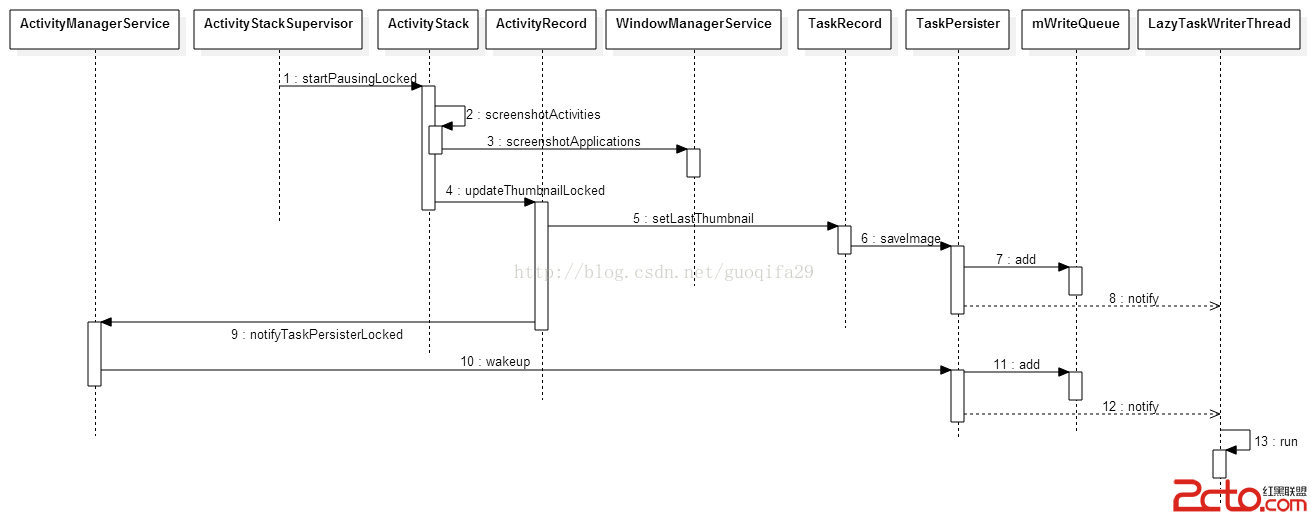
我們重點分析下screenshotApplications()、notifyTaskPersisterLocked()、LazyTaskWriterThread線程。
1、screenshotApplications()
    public Bitmap screenshotApplications(IBinder appToken, int displayId, int width,
            int height, boolean force565) {
        if (!checkCallingPermission(Manifest.permission.READ_FRAME_BUFFER,
                screenshotApplications())) {
            throw new SecurityException(Requires READ_FRAME_BUFFER permission);
        }

        final DisplayContent displayContent = getDisplayContentLocked(displayId);
        if (displayContent == null) {
            if (DEBUG_SCREENSHOT) Slog.i(TAG, Screenshot of  + appToken
                    + : returning null. No Display for displayId= + displayId);
            return null;
        }
        final DisplayInfo displayInfo = displayContent.getDisplayInfo();
        int dw = displayInfo.logicalWidth;
        int dh = displayInfo.logicalHeight;
        if (dw == 0 || dh == 0) {
            if (DEBUG_SCREENSHOT) Slog.i(TAG, Screenshot of  + appToken
                    + : returning null. logical widthxheight= + dw + x + dh);
            return null;
        }

        Bitmap bm = null;

        int maxLayer = 0;
        final Rect frame = new Rect();
        final Rect stackBounds = new Rect();

        float scale = 0;
        int rot = Surface.ROTATION_0;

        boolean screenshotReady;
        int minLayer;
        if (appToken == null) {
            screenshotReady = true;
            minLayer = 0;
        } else {
            screenshotReady = false;
            minLayer = Integer.MAX_VALUE;
        }

        int retryCount = 0;
        WindowState appWin = null;

        final boolean appIsImTarget = mInputMethodTarget != null
                && mInputMethodTarget.mAppToken != null
                && mInputMethodTarget.mAppToken.appToken != null
                && mInputMethodTarget.mAppToken.appToken.asBinder() == appToken;

        final int aboveAppLayer = (mPolicy.windowTypeToLayerLw(TYPE_APPLICATION) + 1)
                * TYPE_LAYER_MULTIPLIER + TYPE_LAYER_OFFSET;

        while (true) {
            if (retryCount++ > 0) {
                // Reset max/min layers on retries so we don't accidentally take a screenshot of a
                // layer based on the previous try.
                maxLayer = 0;
                minLayer = Integer.MAX_VALUE;
                try {
                    Thread.sleep(100);
                } catch (InterruptedException e) {
                }
            }
            synchronized(mWindowMap) {
                // Figure out the part of the screen that is actually the app.
                appWin = null;
                final WindowList windows = displayContent.getWindowList();
                for (int i = windows.size() - 1; i >= 0; i--) {
                    WindowState ws = windows.get(i);
                    if (!ws.mHasSurface) {
                        continue;
                    }
                    if (ws.mLayer >= aboveAppLayer) {
                        continue;
                    }
                    if (ws.mIsImWindow) {
                        if (!appIsImTarget) {
                            continue;
                        }
                    } else if (ws.mIsWallpaper) {
                        if (appWin == null) {
                            // We have not ran across the target window yet, so it is probably
                            // behind the wallpaper. This can happen when the keyguard is up and
                            // all windows are moved behind the wallpaper. We don't want to
                            // include the wallpaper layer in the screenshot as it will coverup
                            // the layer of the target window.
                            continue;
                        }
                        // Fall through. The target window is in front of the wallpaper. For this
                        // case we want to include the wallpaper layer in the screenshot because
                        // the target window might have some transparent areas.
                    } else if (appToken != null) {
                        if (ws.mAppToken == null || ws.mAppToken.token != appToken) {
                            // This app window is of no interest if it is not associated with the
                            // screenshot app.
                            continue;
                        }
                        appWin = ws;
                    }

                    // Include this window.

                    final WindowStateAnimator winAnim = ws.mWinAnimator;
                    if (maxLayer < winAnim.mSurfaceLayer) {
                        maxLayer = winAnim.mSurfaceLayer;
                    }
                    if (minLayer > winAnim.mSurfaceLayer) {
                        minLayer = winAnim.mSurfaceLayer;
                    }

                    // Don't include wallpaper in bounds calculation
                    if (!ws.mIsWallpaper) {
                        final Rect wf = ws.mFrame;
                        final Rect cr = ws.mContentInsets;
                        int left = wf.left + cr.left;
                        int top = wf.top + cr.top;
                        int right = wf.right - cr.right;
                        int bottom = wf.bottom - cr.bottom;
                        frame.union(left, top, right, bottom);
                        ws.getStackBounds(stackBounds);
                        frame.intersect(stackBounds);
                    }

                    if (ws.mAppToken != null && ws.mAppToken.token == appToken &&
                            ws.isDisplayedLw()) {
                        screenshotReady = true;
                    }
                }

                if (appToken != null && appWin == null) {
                    // Can't find a window to snapshot.
                    if (DEBUG_SCREENSHOT) Slog.i(TAG,
                            Screenshot: Couldn't find a surface matching  + appToken);
                    return null;
                }

                if (!screenshotReady) {
                    if (retryCount > MAX_SCREENSHOT_RETRIES) {
                        Slog.i(TAG, Screenshot max retries  + retryCount +  of  + appToken +
                                 appWin= + (appWin == null ? null : (appWin +  drawState= +
                                appWin.mWinAnimator.mDrawState)));
                        return null;
                    }

                    // Delay and hope that window gets drawn.
                    if (DEBUG_SCREENSHOT) Slog.i(TAG, Screenshot: No image ready for  + appToken
                            + ,  + appWin +  drawState= + appWin.mWinAnimator.mDrawState);
                    continue;
                }

                // Screenshot is ready to be taken. Everything from here below will continue
                // through the bottom of the loop and return a value. We only stay in the loop
                // because we don't want to release the mWindowMap lock until the screenshot is
                // taken.

                if (maxLayer == 0) {
                    if (DEBUG_SCREENSHOT) Slog.i(TAG, Screenshot of  + appToken
                            + : returning null maxLayer= + maxLayer);
                    return null;
                }

                // Constrain frame to the screen size.
                frame.intersect(0, 0, dw, dh);

                // Tell surface flinger what part of the image to crop. Take the top
                // right part of the application, and crop the larger dimension to fit.
                Rect crop = new Rect(frame);
                if (width / (float) frame.width() < height / (float) frame.height()) {
                    int cropWidth = (int)((float)width / (float)height * frame.height());
                    crop.right = crop.left + cropWidth;
                } else {
                    int cropHeight = (int)((float)height / (float)width * frame.width());
                    crop.bottom = crop.top + cropHeight;
                }

                // The screenshot API does not apply the current screen rotation.
                rot = getDefaultDisplayContentLocked().getDisplay().getRotation();

                if (rot == Surface.ROTATION_90 || rot == Surface.ROTATION_270) {
                    rot = (rot == Surface.ROTATION_90) ? Surface.ROTATION_270 : Surface.ROTATION_90;
                }

                // Surfaceflinger is not aware of orientation, so convert our logical
                // crop to surfaceflinger's portrait orientation.
                convertCropForSurfaceFlinger(crop, rot, dw, dh);

                if (DEBUG_SCREENSHOT) {
                    Slog.i(TAG, Screenshot:  + dw + x + dh +  from  + minLayer +  to
                            + maxLayer +  appToken= + appToken);
                    for (int i = 0; i < windows.size(); i++) {
                        WindowState win = windows.get(i);
                        Slog.i(TAG, win + :  + win.mLayer
                                +  animLayer= + win.mWinAnimator.mAnimLayer
                                +  surfaceLayer= + win.mWinAnimator.mSurfaceLayer);
                    }
                }

                ScreenRotationAnimation screenRotationAnimation =
                        mAnimator.getScreenRotationAnimationLocked(Display.DEFAULT_DISPLAY);
                final boolean inRotation = screenRotationAnimation != null &&
                        screenRotationAnimation.isAnimating();
                if (DEBUG_SCREENSHOT && inRotation) Slog.v(TAG,
                        Taking screenshot while rotating);
                Trace.traceBegin(Trace.TRACE_TAG_WINDOW_MANAGER, wmScreenshot);
                bm = SurfaceControl.screenshot(crop, width, height, minLayer, maxLayer,
                        inRotation, rot);
                Trace.traceEnd(Trace.TRACE_TAG_WINDOW_MANAGER);
                if (bm == null) {
                    Slog.w(TAG, Screenshot failure taking screenshot for ( + dw + x + dh
                            + ) to layer  + maxLayer);
                    return null;
                }
            }

            break;
        }

        if (DEBUG_SCREENSHOT) {
            // TEST IF IT's ALL BLACK
            int[] buffer = new int[bm.getWidth() * bm.getHeight()];
            bm.getPixels(buffer, 0, bm.getWidth(), 0, 0, bm.getWidth(), bm.getHeight());
            boolean allBlack = true;
            final int firstColor = buffer[0];
            for (int i = 0; i < buffer.length; i++) {
                if (buffer[i] != firstColor) {
                    allBlack = false;
                    break;
                }
            }
            if (allBlack) {
                Slog.i(TAG, Screenshot  + appWin +  was monochrome( +
                        Integer.toHexString(firstColor) + )! mSurfaceLayer= +
                        (appWin != null ? appWin.mWinAnimator.mSurfaceLayer : null) +
                         minLayer= + minLayer +  maxLayer= + maxLayer);
            }
        }

        // Copy the screenshot bitmap to another buffer so that the gralloc backed
        // bitmap will not have a long lifetime. Gralloc memory can be pinned or
        // duplicated and might have a higher cost than a skia backed buffer.
        Bitmap ret = bm.copy(bm.getConfig(),true);
        bm.recycle();
        return ret;
    }
2、notifyTaskPersisterLocked()
    void wakeup(TaskRecord task, boolean flush) {
        synchronized (this) {
            if (task != null) {
                int queueNdx;
                for (queueNdx = mWriteQueue.size() - 1; queueNdx >= 0; --queueNdx) {
                    final WriteQueueItem item = mWriteQueue.get(queueNdx);
                    if (item instanceof TaskWriteQueueItem &&
                            ((TaskWriteQueueItem) item).mTask == task) {
                        if (!task.inRecents) {
                            // This task is being removed.
                            removeThumbnails(task);
                        }
                        break;
                    }
                }
                if (queueNdx < 0 && task.isPersistable) {
                    mWriteQueue.add(new TaskWriteQueueItem(task));
                }
            } else {
                // Dummy.
                mWriteQueue.add(new WriteQueueItem());
            }
            if (flush || mWriteQueue.size() > MAX_WRITE_QUEUE_LENGTH) {
                mNextWriteTime = FLUSH_QUEUE;
            } else if (mNextWriteTime == 0) {
                mNextWriteTime = SystemClock.uptimeMillis() + PRE_TASK_DELAY_MS;
            }
            if (DEBUG_PERSISTER) Slog.d(TAG, wakeup: task= + task +  flush= + flush
                    +  mNextWriteTime= + mNextWriteTime +  mWriteQueue.size=
                    + mWriteQueue.size() +  Callers= + Debug.getCallers(4));
            notifyAll();
        }

        yieldIfQueueTooDeep();
    }
3、LazyTaskWriterThread線程
        public void run() {
            ArraySet persistentTaskIds = new ArraySet();
            while (true) {
                // We can't lock mService while holding TaskPersister.this, but we don't want to
                // call removeObsoleteFiles every time through the loop, only the last time before
                // going to sleep. The risk is that we call removeObsoleteFiles() successively.
                final boolean probablyDone;
                synchronized (TaskPersister.this) {
                    probablyDone = mWriteQueue.isEmpty();
                }
                if (probablyDone) {
                    if (DEBUG_PERSISTER) Slog.d(TAG, Looking for obsolete files.);
                    persistentTaskIds.clear();
                    synchronized (mService) {
                        final ArrayList tasks = mService.mRecentTasks;
                        if (DEBUG_PERSISTER) Slog.d(TAG, mRecents= + tasks);
                        for (int taskNdx = tasks.size() - 1; taskNdx >= 0; --taskNdx) {
                            final TaskRecord task = tasks.get(taskNdx);
                            if (DEBUG_PERSISTER) Slog.d(TAG, LazyTaskWriter: task= + task +
                                     persistable= + task.isPersistable);
                            if ((task.isPersistable || task.inRecents)
                                    && (task.stack == null || !task.stack.isHomeStack())) {
                                if (DEBUG_PERSISTER)
                                        Slog.d(TAG, adding to persistentTaskIds task= + task);
                                persistentTaskIds.add(task.taskId);
                            } else {
                                if (DEBUG_PERSISTER) Slog.d(TAG,
                                        omitting from persistentTaskIds task= + task);
                            }
                        }
                    }
                    removeObsoleteFiles(persistentTaskIds);
                }

                // If mNextWriteTime, then don't delay between each call to saveToXml().
                final WriteQueueItem item;
                synchronized (TaskPersister.this) {
                    if (mNextWriteTime != FLUSH_QUEUE) {
                        // The next write we don't have to wait so long.
                        mNextWriteTime = SystemClock.uptimeMillis() + INTER_WRITE_DELAY_MS;
                        if (DEBUG_PERSISTER) Slog.d(TAG, Next write time may be in  +
                                INTER_WRITE_DELAY_MS +  msec. ( + mNextWriteTime + ));
                    }


                    while (mWriteQueue.isEmpty()) {
                        if (mNextWriteTime != 0) {
                            mNextWriteTime = 0; // idle.
                            TaskPersister.this.notifyAll(); // wake up flush() if needed.
                        }

                        // See if we need to remove any expired back-up tasks before waiting.
                        removeExpiredTasksIfNeeded();

                        try {
                            if (DEBUG_PERSISTER)
                                    Slog.d(TAG, LazyTaskWriter: waiting indefinitely.);
                            TaskPersister.this.wait();
                        } catch (InterruptedException e) {
                        }
                        // Invariant: mNextWriteTime is either FLUSH_QUEUE or PRE_WRITE_DELAY_MS
                        // from now.
                    }
                    item = mWriteQueue.remove(0);

                    long now = SystemClock.uptimeMillis();
                    if (DEBUG_PERSISTER) Slog.d(TAG, LazyTaskWriter: now= + now
                                +  mNextWriteTime= + mNextWriteTime +  mWriteQueue.size=
                                + mWriteQueue.size());
                    while (now < mNextWriteTime) {
                        try {
                            if (DEBUG_PERSISTER) Slog.d(TAG, LazyTaskWriter: waiting  +
                                    (mNextWriteTime - now));
                            TaskPersister.this.wait(mNextWriteTime - now);
                        } catch (InterruptedException e) {
                        }
                        now = SystemClock.uptimeMillis();
                    }

                    // Got something to do.
                }

                if (item instanceof ImageWriteQueueItem) {
                    ImageWriteQueueItem imageWriteQueueItem = (ImageWriteQueueItem) item;
                    final String filename = imageWriteQueueItem.mFilename;
                    final Bitmap bitmap = imageWriteQueueItem.mImage;
                    if (DEBUG_PERSISTER) Slog.d(TAG, writing bitmap: filename= + filename);
                    FileOutputStream imageFile = null;
                    try {
                        imageFile = new FileOutputStream(new File(sImagesDir, filename));
                        bitmap.compress(Bitmap.CompressFormat.PNG, 100, imageFile);
                    } catch (Exception e) {
                        Slog.e(TAG, saveImage: unable to save  + filename, e);
                    } finally {
                        IoUtils.closeQuietly(imageFile);
                    }
                } else if (item instanceof TaskWriteQueueItem) {
                    // Write out one task.
                    StringWriter stringWriter = null;
                    TaskRecord task = ((TaskWriteQueueItem) item).mTask;
                    if (DEBUG_PERSISTER) Slog.d(TAG, Writing task= + task);
                    synchronized (mService) {
                        if (task.inRecents) {
                            // Still there.
                            try {
                                if (DEBUG_PERSISTER) Slog.d(TAG, Saving task= + task);
                                stringWriter = saveToXml(task);
                            } catch (IOException e) {
                            } catch (XmlPullParserException e) {
                            }
                        }
                    }
                    if (stringWriter != null) {
                        // Write out xml file while not holding mService lock.
                        FileOutputStream file = null;
                        AtomicFile atomicFile = null;
                        try {
                            atomicFile = new AtomicFile(new File(sTasksDir, String.valueOf(
                                    task.taskId) + RECENTS_FILENAME + TASK_EXTENSION));
                            file = atomicFile.startWrite();
                            file.write(stringWriter.toString().getBytes());
                            file.write('
');
                            atomicFile.finishWrite(file);
                        } catch (IOException e) {
                            if (file != null) {
                                atomicFile.failWrite(file);
                            }
                            Slog.e(TAG, Unable to open  + atomicFile +  for persisting.  +
                                    e);
                        }
                    }
                }
            }
        }
 Android編程之藍牙測試實例
本文實例講述了Android編程之藍牙測試。分享給大家供大家參考。具體分析如下:一、軟件平台:win7 + eclipse + sdk二、設計思路:配合倒計時定時器實現藍
 Android實現Service獲取當前位置(GPS+基站)的方法
本文實例講述了Android實現Service獲取當前位置(GPS+基站)的方法。分享給大家供大家參考。具體如下:需求詳情:1)、Service中每隔1秒執行一次定位操作
 三行Android代碼實現白天夜間模式流暢切換
Usage xml android:background= ?attr/zzbackground app:backgroundAttr= zzbackground
 魅藍Max和小米Max哪個好?魅藍Max和小米Max買哪個?
魅藍Max和小米Max哪個好?在小米Max發布了四個月了,魅族旗下的子系列魅藍Max也跟隨腳步發布了,那麼對於兩款都是“MAX”的手