編輯:關於Android編程
硬盤緩存策略:
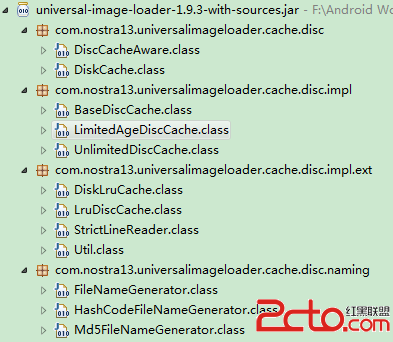
UnlimitedDiscCache(這個緩存類沒有任何的限制)
public class LimitedAgeDiscCache extends BaseDiscCache
public abstractclass BaseDiscCache implements DiskCache
public interface DiskCache extends DiscCacheAware
public interface DiscCacheAware
自底向上解析得: 1、DiscCacheAware源碼:
/** Interface for disk cache */
@Deprecated
public interface DiscCacheAware {

    /** 返回硬盤緩存的root directory*/
    File getDirectory();

    /** 返回緩存圖片的file
     * @param imageUri Original image URI
     * @return File of cached image or null - 圖片未緩存
     */
    File get(String imageUri);

    /**
     * 保存image bitmap到硬盤緩存中.
     * @param imageUri    Original image URI
     * @param imageStream image輸入流
     * @param listener    保存進程監聽器;在ImageLoader中不使用.core.listener.ImageLoadingProgressListener情況下可以忽略該listener
     * @return true - 保存成功; false - 保存失敗.
     * @throws IOException
     */
    boolean save(String imageUri, InputStream imageStream, IoUtils.CopyListener listener) throws IOException;

    /**
     * (重載)保存image bitmap到硬盤緩存中.
     * @param  imageUri - Original image URI
     * @param  bitmap   Image bitmap
     * @return true - 保存成功; false - 保存失敗.
     * @throws IOException
     */
    boolean save(String imageUri, Bitmap bitmap) throws IOException;

    /**
     * 根據給定URI刪除對應的image file
     * @param  imageUri - 圖片URI
     * @return true - 圖片刪除成功;
               false- 指定URI圖片不存在或者圖片文件無法刪除
     */
    boolean remove(String imageUri);

    /** 關閉硬盤緩存,釋放資源. */
    void close();

    /** 清除硬盤緩存*/
    void clear();
}
I)上面代碼用用到IoUtils.CopyListener listener:
/** Listener and controller for copy process */
public static interface CopyListener {
    /**
      * @param  current 已經加載的bytes
      * @param  total   需要加載的總共的bytes
      * @return true  - 如果copying操作需要繼續進行
                false - 如果copying操作需要中斷
      */
    boolean onBytesCopied(int current, int total);
}
II)以及ImageLoadingProgressListener:
/** Listener for image loading progress.*/
public interface ImageLoadingProgressListener {
    /**
     * 當加載進程改變時被調用
     * @param imageUri Image URI
     * @param view     image的View控件,可以為null.
     * @param current  已經下載的bytes大小
     * @param total    總共的bytes大小
     */
    void onProgressUpdate(String imageUri, View view, intcurrent, inttotal);
}
2、DiskCache源碼:(形式意義同MemoryCache 之於MemoryCacheAware
/**Interface for disk cache*/
public interface DiskCache extendsDiscCacheAware {
}
3、BaseDiscCache源碼:
/**
 * Base disk cache.
 */
public abstract class BaseDiscCache implements DiskCache {
    /** {@value */
    public static final int DEFAULT_BUFFER_SIZE = 32 * 1024; // 32 Kb
    public static final Bitmap.CompressFormat DEFAULT_COMPRESS_FORMAT = Bitmap.CompressFormat.PNG;
    public static final int DEFAULT_COMPRESS_QUALITY = 100;

    private static final String ERROR_ARG_NULL = " argument must be not null";
    private static final String TEMP_IMAGE_POSTFIX = ".tmp";

    protected final File cacheDir;
    protected final File reserveCacheDir;
    protected final FileNameGenerator fileNameGenerator;

    protected int bufferSize = DEFAULT_BUFFER_SIZE;// 32 Kb
    protected Bitmap.CompressFormat compressFormat = DEFAULT_COMPRESS_FORMAT;//Bitmap.CompressFormat.PNG
    protected int compressQuality = DEFAULT_COMPRESS_QUALITY;//100

    public BaseDiscCache(File cacheDir) {
        this(cacheDir, null);
    }

    public BaseDiscCache(File cacheDir, File reserveCacheDir) {
        this(cacheDir, reserveCacheDir, DefaultConfigurationFactory.createFileNameGenerator());
    }

    /**
     * @param cacheDir          Directory for file caching
     * @param reserveCacheDir   可以為null;
                                Reserve directory for file caching. It's used when the primary directory isn't available.
     * @param fileNameGenerator FileNameGenerator(Generates names for files at disk cache) for cached files
     */
    public BaseDiscCache(File cacheDir, File reserveCacheDir, FileNameGenerator fileNameGenerator) {
        if (cacheDir == null) {
            throw new IllegalArgumentException("cacheDir" + ERROR_ARG_NULL);
        }
        if (fileNameGenerator == null) {
            throw new IllegalArgumentException("fileNameGenerator" + ERROR_ARG_NULL);
        }

        this.cacheDir = cacheDir;
        this.reserveCacheDir = reserveCacheDir;
        this.fileNameGenerator = fileNameGenerator;
    }

    @Override
   /** 重寫DiscCacheAware.getDirectory()*/
    public File getDirectory() {
        return cacheDir;
    }

    @Override
    /** 重寫DiscCacheAware.get()*/
    public File get(String imageUri) {
        return getFile(imageUri);
    }

    @Override
    /**保存image bitmap到硬盤緩存中.參數含義見DisCacheAware*/
    public boolean save(String imageUri, InputStream imageStream, IoUtils.CopyListener listener) throws IOException {
        File imageFile = getFile(imageUri);//根據imageUri獲取相關File
        File tmpFile = new File(imageFile.getAbsolutePath() + TEMP_IMAGE_POSTFIX);//定義為.tmp文件
        boolean loaded = false;//加載標志
        try {
            OutputStream os = new BufferedOutputStream(new FileOutputStream(tmpFile), bufferSize);//bufferSize=32 Kb
            try {
                loaded = IoUtils.copyStream(imageStream, os, listener, bufferSize);//imageStream寫入os,見注釋III
            } finally {
                IoUtils.closeSilently(os); //釋放資源,見注釋IV
            }
        } finally {
            IoUtils.closeSilently(imageStream);
            if (loaded && !tmpFile.renameTo(imageFile)) {//見注釋V
                loaded = false;
            }
            if (!loaded) {
                tmpFile.delete();//失敗注意釋放資源
            }
        }
        return loaded;
    }

    @Override
    /** 保存image bitmap到硬盤緩存中,沒有IoUtils.CopyListener情況*/
    public boolean save(String imageUri, Bitmap bitmap) throws IOException {
        File imageFile = getFile(imageUri);
        File tmpFile = new File(imageFile.getAbsolutePath() + TEMP_IMAGE_POSTFIX);
        OutputStream os = new BufferedOutputStream(new FileOutputStream(tmpFile), bufferSize);
        boolean savedSuccessfully = false;
        try {
            savedSuccessfully = bitmap.compress(compressFormat, compressQuality, os);//圖片壓縮
        } finally {
            IoUtils.closeSilently(os);
            if (savedSuccessfully && !tmpFile.renameTo(imageFile)) {
                savedSuccessfully = false;
            }
            if (!savedSuccessfully) {
                tmpFile.delete();
            }
        }
        bitmap.recycle();
        return savedSuccessfully;
    }

    @Override
    public boolean remove(String imageUri) {
        return getFile(imageUri).delete();
    }

    @Override
    public void close() {
        // Nothing to do
    }

    @Override
    public void clear() {
        File[] files = cacheDir.listFiles();
        if (files != null) {
            for (File f : files) {
                f.delete();
            }
        }
    }

    /** Returns file object (not null) for incoming image URI. File object can reference to non-existing file. */
    protected File getFile(String imageUri) {
        String fileName = fileNameGenerator.generate(imageUri);
        File dir = cacheDir;
        if (!cacheDir.exists() && !cacheDir.mkdirs()) {
            if (reserveCacheDir != null && (reserveCacheDir.exists() || reserveCacheDir.mkdirs())) {
                dir = reserveCacheDir;
            }
        }
        return new File(dir, fileName);//Constructs a new file using the specified directory and name.
    }

    public void setBufferSize(intbufferSize) {
        this.bufferSize = bufferSize;
    }

    public void setCompressFormat(Bitmap.CompressFormat compressFormat) {
        this.compressFormat = compressFormat;
    }

    public void setCompressQuality(intcompressQuality) {
        this.compressQuality = compressQuality;
    }
}
I)用到的CompressFormat.PNG枚舉類
/** Specifies the known formats a bitmap can be compressed into*/
public enum CompressFormat {
    JPEG    (0),
    PNG     (1),
    WEBP    (2);

    CompressFormat(int nativeInt) {
        this.nativeInt = nativeInt;
    }
    final int nativeInt;
}
II)工具類:FileNameGenerator
/** Generates names for files at disk cache*/
public interface FileNameGenerator {
    /** Generates unique file name for image defined by URI */
    String generate(String imageUri);
}
III)IoUtils.copyStream(imageStream, os, listener, bufferSize);
/**
     * 拷貝stream, fires progress events by listener, can be interrupted by listener.
     *
     * @param is         Input stream
     * @param os         Output stream
     * @param listener   可以為null; 拷貝進程的Listener以及拷貝中斷的控制器controller
     * @param bufferSize copying的Buffer Size;也代表了每一次觸發progress listener callback回調的“一步”
                         ————即每次copied bufferSize個bytes大小後即觸發progress event
     * @returntrue -    stream拷貝成功; false - 拷貝操作被listener中斷
     * @throws IOException
     */
    public static boolean copyStream(InputStream is, OutputStream os, CopyListener listener, int bufferSize)
            throws IOException {
        int current = 0;
        int total = is.available();
        if (total <= 0) {
            total = DEFAULT_IMAGE_TOTAL_SIZE;
        }

        final byte[] bytes = new byte[bufferSize];
        int count;
        if (shouldStopLoading(listener, current, total)) return false;
        while ((count = is.read(bytes, 0, bufferSize)) != -1) {
            os.write(bytes, 0, count);//寫入os中
            current += count;         //更新當前加載的bytes數
            if (shouldStopLoading(listener, current, total)) return false;
        }
        os.flush();
        return true;
    }

   private static boolean shouldStopLoading(CopyListener listener, int current, int total) {
        if (listener != null) {
            boolean shouldContinue = listener.onBytesCopied(current, total);//參加上面CopyListener
            if (!shouldContinue) {
                if (100 * current / total < CONTINUE_LOADING_PERCENTAGE) {
                    return true; // 當加載超過75%,則直接加載,不中斷;否則,return true,產生中斷
                }
            }
        }
        return false;
    }
IV)IoUtils.closeSilently()方法
 publicstaticvoid closeSilently(Closeable closeable) {
        try {
            closeable.close();
        } catch (Exception e) {
            // Do nothing
        }
    }
下面分析JDK中的Closeable :
比如InputStream,OutputStream都實現了 Closeable接口
public abstract class InputStream extends Object implementsCloseable
public abstract class OutputStream implements Closeable, Flushable
AutoCloseable源碼:
package java.lang;
/**
 * 定義一個interface for 那些一旦不再使用就可以(或者需要)被關閉的classes
 *  一般用法:
 *   Closable foo = new Foo();
 *   try {
 *      ...;
 *   } finally {
 *      foo.close();
 *   }
 * }
 */
public interface AutoCloseable {
    /** Close 相應 Object 並釋放它所持有的所有系統資源(system resources)*/
    void close() throws Exception;
}
Closeable源碼:
package java.io;
public interface Closeable extends AutoCloseable {

    /**
     * 與AutoCloseable區別:雖然只有第一次call會產生有效作用,但本close方法
     * 在同一個object上被多次調用是安全的。而 AutoCloseable.close()最多只能被調用一次
     */
    void close() throws IOException;
}
V) File.renameTo()方法
 /**
     * Renames this file to {@code newPath}. 該操作支持files 和 directories
     * 此操作有很多導致failures的方法,包括:
     * (1) 寫權限(Write permission)Write permission is required on the directories containing both the source and
     * destination paths.
     * (2) 搜索權限(Search permission) is required for all parents of both paths.
     */
    public boolean renameTo(File newPath) {
        try {
            Libcore.os.rename(path, newPath.path);
            return true;
        } catch (ErrnoException errnoException) {
            return false;
        }
    }
4、LimitedAgeDiscCache 源碼:
/**
 * 時間策略,刪除最早加載即loaded的時間超過限定時間的文件. Cache size是無限制的.
 */
public class LimitedAgeDiscCache extends BaseDiscCache {

    private final long maxFileAge;

    private final Map loadingDates = Collections.synchronizedMap(new HashMap());

    public LimitedAgeDiscCache(File cacheDir, long maxAge) {
        this(cacheDir, null, DefaultConfigurationFactory.createFileNameGenerator(), maxAge);
    }

    public LimitedAgeDiscCache(File cacheDir, File reserveCacheDir, long maxAge) {
        this(cacheDir, reserveCacheDir, DefaultConfigurationFactory.createFileNameGenerator(), maxAge);
    }

    /**
     * @param cacheDir          Directory for file caching
     * @param reserveCacheDir   可為null; Reserve directory for file caching. It's used when the primary directory isn't available.
     * @param fileNameGenerator Name generator for cached files
     * @param maxAge            Max file age (in seconds). If file age will exceed this value then it'll be removed on next
     *                          treatment (and therefore be reloaded).
     */
    public LimitedAgeDiscCache(File cacheDir, File reserveCacheDir, FileNameGenerator fileNameGenerator, long maxAge) {
        //調用public BaseDiscCache(File cacheDir, File reserveCacheDir, FileNameGenerator fileNameGenerator)
        super(cacheDir, reserveCacheDir, fileNameGenerator);
        this.maxFileAge = maxAge * 1000; // 轉化為milliseconds
    }

    @Override
    public File get(String imageUri) {
        File file = super.get(imageUri);
        if (file != null && file.exists()) {
            boolean cached;
            Long loadingDate = loadingDates.get(file);//Map loadingDates
            if (loadingDate == null) {
                cached = false;
                loadingDate = file.lastModified();
            } else {
                cached = true;
            }
            //刪除策略
            if (System.currentTimeMillis() - loadingDate > maxFileAge) {
                file.delete();
                loadingDates.remove(file);
            } else if (!cached) {
                loadingDates.put(file, loadingDate);
            }
        }
        return file;
    }

    @Override
    public boolean save(String imageUri, InputStream imageStream, IoUtils.CopyListener listener) throws IOException {
        boolean saved = super.save(imageUri, imageStream, listener);
        rememberUsage(imageUri);//更新相關文件的最新修改時間
        return saved;
    }

    @Override
    public boolean save(String imageUri, Bitmap bitmap) throws IOException {
        boolean saved = super.save(imageUri, bitmap);
        rememberUsage(imageUri);
        return saved;
    }

    @Override
    public boolean remove(String imageUri) {
        loadingDates.remove(getFile(imageUri));
        return super.remove(imageUri);
    }

    @Override
    public void clear() {
        super.clear();
        loadingDates.clear();
    }

    private void rememberUsage(String imageUri) {
        File file = getFile(imageUri);
        long currentTime = System.currentTimeMillis();
        file.setLastModified(currentTime);
        loadingDates.put(file, currentTime);
    }
}
5、UnlimitedDiscCache 源碼:
/**
 * UIL框架中默認的DiskCache實現,Cache size是無限制的
 */
public class UnlimitedDiscCache extends BaseDiscCache {

    public UnlimitedDiscCache(File cacheDir) {
        super(cacheDir);
    }

    public UnlimitedDiscCache(File cacheDir, File reserveCacheDir) {
        super(cacheDir, reserveCacheDir);
    }

    /**
     * @param cacheDir          Directory for file caching
     * @param reserveCacheDir   null-ok; Reserve directory for file caching. It's used when the primary directory isn't available.
     * @param fileNameGenerator {@linkplain com.nostra13.universalimageloader.cache.disc.naming.FileNameGenerator
     *                          Name generator} for cached files
     */
    public UnlimitedDiscCache(File cacheDir, File reserveCacheDir, FileNameGenerator fileNameGenerator) {
        super(cacheDir, reserveCacheDir, fileNameGenerator);
    }
}
 Java反射機制的原理及在Android下的簡單應用
花了幾天時間,研究了一下Java的反射機制。在這裡總結一下這幾天學習的成果,一來分享自己的學習過程和在學習中遇到的問題,二來是給像我一樣不太了解Java反射機制的同學做一
 Android UI開發神兵利器之Angrytools
最近很多人在問我,個人App開發者如何去設計UI。 其實這是個人開發者最頭痛的問題,搞技術的人,確實沒法做到面面俱到,不可能花大量的時間去切圖,去做原型設計,去做美工。
 Android開發之SoundPool使用詳解
使用SoundPool播放音效 如果應用程序經常播放密集、急促而又短暫的音效(如游戲音效)那麼使用MediaPlayer顯得有些不太適合了。因為MediaPlayer
 Android 實現變色狀態欄
首先我們得了解什麼是透明狀態欄以及什麼是沉浸式狀態欄,以及其區別,國內習慣稱透明狀態欄為沉浸式狀態欄,但是兩者是有本質區別的。先來看看什麼是沉浸式模式。 Android