編輯:關於Android編程
wm = WindowManagerService.main(context, power, display, inputManager,
                    wmHandler, factoryTest != SystemServer.FACTORY_TEST_LOW_LEVEL,
                    !firstBoot, onlyCore);
try { wm.systemReady(); } catch (Throwable e) { reportWtf(making Window Manager Service ready, e); }
public class WindowManagerService extends IWindowManager.Stub
        implements Watchdog.Monitor, WindowManagerPolicy.WindowManagerFuncs,
                DisplayManagerService.WindowManagerFuncs, DisplayManager.DisplayListener {
                ......
                    final WindowManagerPolicy mPolicy = PolicyManager.makeNewWindowManager();
                ......
                public static WindowManagerService main(final Context context,
		            final PowerManagerService pm, final DisplayManagerService dm,
		            final InputManagerService im, final Handler wmHandler,
		            final boolean haveInputMethods, final boolean showBootMsgs,
		            final boolean onlyCore) {
				     final WindowManagerService[] holder = new WindowManagerService[1];
				        wmHandler.runWithScissors(new Runnable() {
				            @Override
				            public void run() {
				              holder[0] = new WindowManagerService(context, pm, dm, im,
				                        haveInputMethods, showBootMsgs, onlyCore);
				            }
				        }, 0);
				        return holder[0];
		    }
		    .......
		    private WindowManagerService(Context context, PowerManagerService pm,
	            DisplayManagerService displayManager, InputManagerService inputManager,
	            boolean haveInputMethods, boolean showBootMsgs, boolean onlyCore) {
            }
                }
final WindowManagerPolicy mPolicy = PolicyManager.makeNewWindowManager();
                    public void systemReady() {
                        mPolicy.systemReady();
                    }
public class PhoneWindowManager implements WindowManagerPolicy {
    @Override
    public void systemReady() {
        if (!mHeadless) {
            mKeyguardDelegate = new KeyguardServiceDelegate(mContext, null);
            mKeyguardDelegate.onSystemReady();
        }
        synchronized (mLock) {
            updateOrientationListenerLp();
            mSystemReady = true;
            mHandler.post(new Runnable() {
                @Override
                public void run() {
                    updateSettings();
                }
            });
        }
    }
}
啟動到了這一步,不用我說,大家都明白是時候初始化KeyguardServiceDelegate並且告訴鎖屏的管理者,我准備好了,該你來控制加載鎖屏界面了。接著調用到了KeyguardServiceDelegate.java這個類的onSystemReady()方法
/**
 * A local class that keeps a cache of keyguard state that can be restored in the event
 * keyguard crashes. It currently also allows runtime-selectable
 * local or remote instances of keyguard.
 */
public class KeyguardServiceDelegate {
    public KeyguardServiceDelegate(Context context, LockPatternUtils lockPatternUtils) {
        Intent intent = new Intent();
        intent.setClassName(KEYGUARD_PACKAGE, KEYGUARD_CLASS);
        mScrim = createScrim(context);
        if (!context.bindServiceAsUser(intent, mKeyguardConnection,
                Context.BIND_AUTO_CREATE, UserHandle.OWNER)) {
            if (DEBUG) Log.v(TAG, *** Keyguard: can't bind to  + KEYGUARD_CLASS);
        } else {
            if (DEBUG) Log.v(TAG, *** Keyguard started);
        }
    }

    private final ServiceConnection mKeyguardConnection = new ServiceConnection() {
        @Override
        public void onServiceConnected(ComponentName name, IBinder service) {
            if (DEBUG) Log.v(TAG, *** Keyguard connected (yay!));
            mKeyguardService = new KeyguardServiceWrapper(
                    IKeyguardService.Stub.asInterface(service));
            if (mKeyguardState.systemIsReady) {
                // If the system is ready, it means keyguard crashed and restarted.
                mKeyguardService.onSystemReady();
                // This is used to hide the scrim once keyguard displays.
                mKeyguardService.onScreenTurnedOn(new KeyguardShowDelegate(null));
            }
            if (mKeyguardState.bootCompleted) {
                mKeyguardService.onBootCompleted();
            }
        }

        @Override
        public void onServiceDisconnected(ComponentName name) {
            if (DEBUG) Log.v(TAG, *** Keyguard disconnected (boo!));
            mKeyguardService = null;
        }

    };
    public void onSystemReady() {
        if (mKeyguardService != null) {
            mKeyguardService.onSystemReady();
        } else {
            if (DEBUG) Log.v(TAG, onSystemReady() called before keyguard service was ready);
            mKeyguardState.systemIsReady = true;
        }
    }

    public void onSystemReady() {
        if (mKeyguardService != null) {
            mKeyguardService.onSystemReady();
        } else {
            if (DEBUG) Log.v(TAG, onSystemReady() called before keyguard service was ready);
            mKeyguardState.systemIsReady = true;
        }
    }
}
            mKeyguardService = new KeyguardServiceWrapper(
                    IKeyguardService.Stub.asInterface(service));
在Android4.4/frameworks/base/policy/src/com/android/internal/policy/impl/keyguard/KeyguardServiceWrapper.java中
public class KeyguardServiceWrapper implements IKeyguardService {
    public KeyguardServiceWrapper(IKeyguardService service) {
        mService = service;
    }
}
public class KeyguardService extends Service {
    static final String TAG = KeyguardService;
    static final String PERMISSION = android.Manifest.permission.CONTROL_KEYGUARD;
    private KeyguardViewMediator mKeyguardViewMediator;

    @Override
    public void onCreate() {
        if (mKeyguardViewMediator == null) {
            mKeyguardViewMediator = new KeyguardViewMediator(
                    KeyguardService.this, new LockPatternUtils(KeyguardService.this));
        }
        Log.v(TAG, onCreate());
    }

    @Override
    public IBinder onBind(Intent intent) {
        return mBinder;
    }

    @Override
    protected void dump(FileDescriptor fd, PrintWriter pw, String[] args) {
        // TODO
    }

    void checkPermission() {
        if (getBaseContext().checkCallingOrSelfPermission(PERMISSION) != PERMISSION_GRANTED) {
            Log.w(TAG, Caller needs permission ' + PERMISSION + ' to call  + Debug.getCaller());
            throw new SecurityException(Access denied to process:  + Binder.getCallingPid()
                    + , must have permission  + PERMISSION);
        }
    }

    private final IKeyguardService.Stub mBinder = new IKeyguardService.Stub() {
        public boolean isShowing() {
            return mKeyguardViewMediator.isShowing();
        }
        public boolean isSecure() {
            return mKeyguardViewMediator.isSecure();
        }
        public boolean isShowingAndNotHidden() {
            return mKeyguardViewMediator.isShowingAndNotHidden();
        }
        public boolean isInputRestricted() {
            return mKeyguardViewMediator.isInputRestricted();
        }
        public void verifyUnlock(IKeyguardExitCallback callback) {
            mKeyguardViewMediator.verifyUnlock(callback);
        }
        public void keyguardDone(boolean authenticated, boolean wakeup) {
            checkPermission();
            mKeyguardViewMediator.keyguardDone(authenticated, wakeup);
        }
        public void setHidden(boolean isHidden) {
            checkPermission();
            mKeyguardViewMediator.setHidden(isHidden);
        }
        public void dismiss() {
            mKeyguardViewMediator.dismiss();
        }
        public void onDreamingStarted() {
            checkPermission();
            mKeyguardViewMediator.onDreamingStarted();
        }
        public void onDreamingStopped() {
            checkPermission();
            mKeyguardViewMediator.onDreamingStopped();
        }
        public void onScreenTurnedOff(int reason) {
            checkPermission();
            mKeyguardViewMediator.onScreenTurnedOff(reason);
        }
        public void onScreenTurnedOn(IKeyguardShowCallback callback) {
            checkPermission();
            mKeyguardViewMediator.onScreenTurnedOn(callback);
        }
        public void setKeyguardEnabled(boolean enabled) {
            checkPermission();
            mKeyguardViewMediator.setKeyguardEnabled(enabled);
        }
        public boolean isDismissable() {
            return mKeyguardViewMediator.isDismissable();
        }
        public void onSystemReady() {
            checkPermission();
            mKeyguardViewMediator.onSystemReady();
        }
        public void doKeyguardTimeout(Bundle options) {
            checkPermission();
            mKeyguardViewMediator.doKeyguardTimeout(options);
        }
        public void setCurrentUser(int userId) {
            checkPermission();
            mKeyguardViewMediator.setCurrentUser(userId);
        }
        public void showAssistant() {
            checkPermission();
            mKeyguardViewMediator.showAssistant();
        }
        public void dispatch(MotionEvent event) {
            checkPermission();
            mKeyguardViewMediator.dispatch(event);
        }
        public void launchCamera() {
            checkPermission();
            mKeyguardViewMediator.launchCamera();
        }
        public void onBootCompleted() {
            checkPermission();
            mKeyguardViewMediator.onBootCompleted();
        }
    };

}
interface IKeyguardService {
    boolean isShowing();
    boolean isSecure();
    boolean isShowingAndNotHidden();
    boolean isInputRestricted();
    boolean isDismissable();
    oneway void verifyUnlock(IKeyguardExitCallback callback);
    oneway void keyguardDone(boolean authenticated, boolean wakeup);
    oneway void setHidden(boolean isHidden);
    oneway void dismiss();
    oneway void onDreamingStarted();
    oneway void onDreamingStopped();
    oneway void onScreenTurnedOff(int reason);
    void onScreenTurnedOn(IKeyguardShowCallback callback);
    oneway void setKeyguardEnabled(boolean enabled);
    oneway void onSystemReady();
    oneway void doKeyguardTimeout(in Bundle options);
    oneway void setCurrentUser(int userId);
    oneway void showAssistant();
    oneway void dispatch(in MotionEvent event);
    oneway void launchCamera();
    oneway void onBootCompleted();
}
那麼我們的AIDL框架自然就自動布好 也就是說最終的時間處理交給了我們的 Android4.4/frameworksasepackagesKeyguardsrccomandroidkeyguard/KeyguardViewMediator.java
/**
     * Let us know that the system is ready after startup.
     */
    public void onSystemReady() {
        mSearchManager = (SearchManager) mContext.getSystemService(Context.SEARCH_SERVICE);
        synchronized (this) {
            if (DEBUG) Log.d(TAG, onSystemReady);
            mSystemReady = true;
            mUpdateMonitor.registerCallback(mUpdateCallback);

            // Suppress biometric unlock right after boot until things have settled if it is the
            // selected security method, otherwise unsuppress it.  It must be unsuppressed if it is
            // not the selected security method for the following reason:  if the user starts
            // without a screen lock selected, the biometric unlock would be suppressed the first
            // time they try to use it.
            //
            // Note that the biometric unlock will still not show if it is not the selected method.
            // Calling setAlternateUnlockEnabled(true) simply says don't suppress it if it is the
            // selected method.
            if (mLockPatternUtils.usingBiometricWeak()
                    && mLockPatternUtils.isBiometricWeakInstalled()
                    || mLockPatternUtils.usingVoiceWeak()
                    && FeatureOption.MTK_VOICE_UNLOCK_SUPPORT) {
                if (DEBUG) Log.d(TAG, suppressing biometric unlock during boot);
                mUpdateMonitor.setAlternateUnlockEnabled(false);
            } else {
                mUpdateMonitor.setAlternateUnlockEnabled(true);
            }
            /// M: power-off alarm @{
            if (!KeyguardUpdateMonitor.isAlarmBoot()) {
                doKeyguardLocked();
            }
            /// @}
        }
        // Most services aren't available until the system reaches the ready state, so we
        // send it here when the device first boots.
        maybeSendUserPresentBroadcast();
    }
接著由doKeyguardLocked()這個方法來做啟動鎖屏界面的預處理,來看看這個方法都做了什麼:
[java] view plaincopyprint?
來注意最後調用的這個方法showLocked(options),這個方法是啟動鎖屏關鍵的方法,來看看:
[java] view plaincopyprint?
這下就通過發送消息來進一步啟動鎖屏界面,來看看這個mHandler中的SHOW都做了什麼:
[java] view plaincopyprint?
[java] view plaincopyprint?
[java] view plaincopyprint?
這下終於看到如山真面目了,看裡面的方法maybeCreateKeyguardLocked()這個是真正起作用的地方:
[java] view plaincopyprint?
來看看這個inflateKeyguardView()這個方法都加載了哪個布局:
[java] view plaincopyprint?
[html] view plaincopyprint?
[java] view plaincopyprint?
特別說明:
1、加載鎖屏widget的地方在KeyguardHostView.java的onFinishInflate()中,調用的addDefaultWidget()這個方法中添加了單click事件,最後調用到KeyguardActivityLauncher.java的launcherWidgetPicker()這個方法;
2、要想你寫的widget能被鎖屏widget過濾出來,只需要在wdget的xml中添加一個屬性即可:
android:widgetCategory=home_screen|keyguard,這樣你寫的桌面widget,也能在鎖屏wiget過濾出來,具體布局需要你微調下;
添加一張圖,
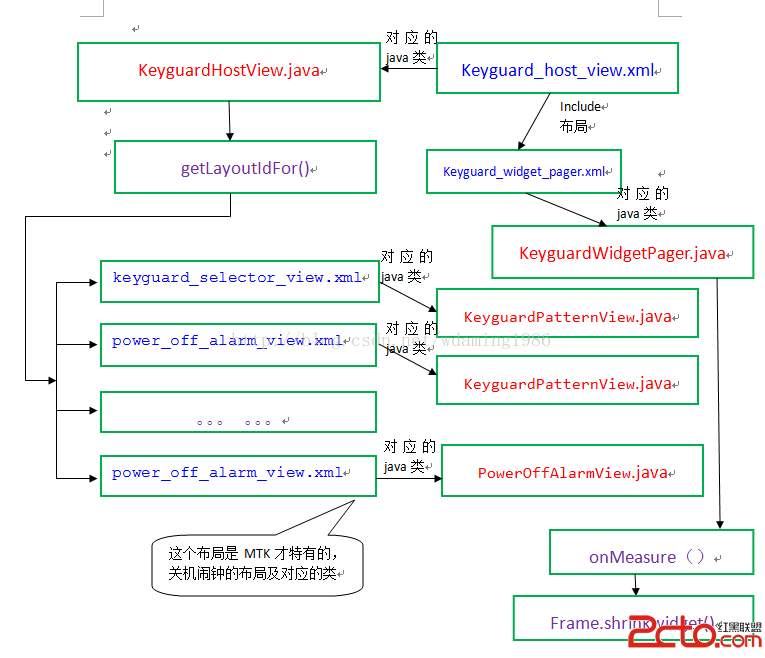
到了這一步,我們的整個鎖屏框架就已經很明顯了
特別感謝
 Android自定義View 實現鬧鐘喚起播放鬧鐘鈴聲功能
先上圖看一下鬧鐘喚期頁面的效果實現的功能:1:轉動的圖片根據天氣情況更換2:轉動時間可以設置,轉動結束,鬧鈴聲音就結束3:光圈顏色漸變效果直接上代碼啦:package c
 Andriod學習教程之滑動布局(14)
本文實例為大家分享了Andriod滑動布局的具體代碼,供大家參考,具體內容如下MainActivity.java代碼:package siso.swipelayoutde
 Android4.4 鼠標光標切換具體整改
鼠標客制化目的:在應用層,進入特定的應用顯示自己的指定的鼠標icon,或者隨時切換鼠標icon。實現方案:開機預加載鼠標icon,app發送廣播方式通過不同的index,
 Android練習項目 Mp3播放器實現(一)
對於Android的學習,需要掌握的東西有點多,需要我們認真,小心,不斷的進取。前天突然有個想法,覺得Mp3播放器是一個可以練習的項目,於是在網上搜了下,發現有人已經寫了