編輯:關於Android編程
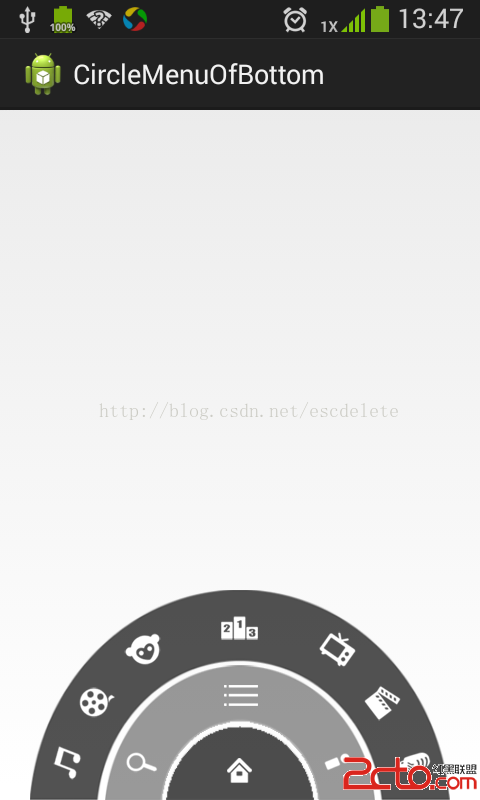
廢話不多說,先看效果圖:
package com.example.circlemenuofbottom.anim;

import android.view.animation.RotateAnimation;
import android.widget.RelativeLayout;

/**
 * @author lzd
 *
 * QQ : 2622596982
 *
 * email :www.2cto.com
 *
 * QQ 交流群 :277599214
 */
public class MyAnimationUtils {

	/**
	 * 出去的動畫---順時針出
	 *
	 * @param view
	 *            執行動畫的對象
	 */
	public static void animaOut(RelativeLayout view) {
		/*
		 * RotateAnimation animation = new RotateAnimation(0, 180,
		 * view.getWidth() / 2, view.getHeight()); animation.setDuration(500);
		 * animation.setFillAfter(true); view.startAnimation(animation);
		 */
		animaOut(view, 0);
	}

	/**
	 * 出去的動畫---逆時針進
	 *
	 * @param view
	 *            執行動畫的對象
	 */
	public static void animaIn(RelativeLayout view) {
		/*
		 * // 順時針進 // RotateAnimation animation = new RotateAnimation(180, //
		 * 360,view.getWidth() / 2, view.getHeight()); // 逆時針進 RotateAnimation
		 * animation = new RotateAnimation(-180, -360, view.getWidth() /
		 * 2,view.getHeight()); animation.setDuration(500);
		 * animation.setFillAfter(true); view.startAnimation(animation);
		 */
		animaIn(view, 0);
	}

	/**
	 * 出去的動畫---順時針出
	 *
	 * @param view
	 *            執行動畫的對象
	 * @param offSetTime
	 *            延時執行的時間
	 */
	public static void animaOut(RelativeLayout view, int offSetTime) {

		RotateAnimation animation = new RotateAnimation(0, 180,
				view.getWidth() / 2, view.getHeight());
		animation.setDuration(500);
		animation.setStartOffset(offSetTime);
		animation.setFillAfter(true);
		view.startAnimation(animation);
	}

	public static void animaIn(RelativeLayout view, int offSetTime) {

		// 順時針進
		// RotateAnimation animation = new RotateAnimation(180,
		// 360,view.getWidth() / 2, view.getHeight());
		// 逆時針進
		RotateAnimation animation = new RotateAnimation(-180, -360,
				view.getWidth() / 2, view.getHeight());
		animation.setDuration(500);
		animation.setStartOffset(offSetTime);
		animation.setFillAfter(true);
		view.startAnimation(animation);
	}

}
按鍵的處理思路:
/*
	 * 監聽菜單鍵,當用戶點擊菜單鍵的時候,顯示和隱藏一級和二級菜單
	 *
	 * 監聽返回鍵,再按一次退出程序
	 */
	private long exitTime = 0;
	@Override
	public boolean onKeyDown(int keyCode, KeyEvent event) {
		// 菜單鍵的處理
		if(event.getAction() == KeyEvent.ACTION_DOWN && keyCode == KeyEvent.KEYCODE_MENU){
			// 如果 一級菜單顯示,隱藏 全部
			if(isShowLevel1){
				MyAnimationUtils.animaOut(level);
				isShowLevel1 = false;
				if(isShowLevel2){
					MyAnimationUtils.animaOut(level2,120);
					isShowLevel2 = false;
					if(isShowLevel3){
						MyAnimationUtils.animaOut(level3,120);
						isShowLevel3 = false;
					}
				}
			}else{
				// 如果一級菜單式隱藏的,顯示 一,二級菜單
				MyAnimationUtils.animaIn(level);
				MyAnimationUtils.animaIn(level2, 120);
				isShowLevel1 = true;
				isShowLevel2 = true;
			}
		}
		// 返回鍵
		if(event.getAction() == KeyEvent.ACTION_DOWN && keyCode == KeyEvent.KEYCODE_BACK){
			if(System.currentTimeMillis() - exitTime > 2000){
				Toast.makeText(this, 再按一次返回鍵退出, Toast.LENGTH_SHORT).show();
				exitTime = System.currentTimeMillis();
			}else{
				finish();
				System.exit(0);
			}
			return true;
		}
		return super.onKeyDown(keyCode, event);
	}
 RecyclerView下拉刷新上拉加載(一)
前幾篇文章講過listview的自定義下拉刷新上拉加載,最近一直考慮再來個RecyclerView的下拉刷新和上拉加載,畢竟RecyclerView使用的越來越多了,扒了
 Android Notification通知詳解
Android Notification通知詳解 Notification: (一)、簡介: 顯示在手機狀態欄的通知。Notification所代表
 Android控件系列之Toast使用介紹
Toast英文含義是吐司,在Android中,它就像烘烤機裡做好的吐司彈出來,並持續一小段時間後慢慢消失Toast也是一個容器,可以包含各種View,並承載著它們顯示。使
 Android性能優化之常見的內存洩漏
前言對於內存洩漏,我想大家在開發中肯定都遇到過,只不過內存洩漏對我們來說並不是可見的,因為它是在堆中活動,而要想檢測程序中是否有內存洩漏的產生,通常我們可以借助LeakC