編輯:關於Android編程
主要練習一下獲取網絡數據和解析xml
MainActivity.java
package com.example.weatherreport;

import java.io.UnsupportedEncodingException;
import java.net.URLEncoder;
import java.util.ArrayList;
import java.util.HashMap;
import java.util.List;
import java.util.Map;

import android.app.Activity;
import android.os.Bundle;
import android.widget.GridView;
import android.widget.SimpleAdapter;
import android.widget.TextView;

import com.example.weatherreport.contants.ApiContants;
import com.example.weatherreport.domain.Weather;
import com.example.weatherreport.net.HttpListener;
import com.example.weatherreport.net.HttpUtil;

public class MainActivity extends Activity {
    private GridView gv_airs;
    private TextView tv_city;
    private TextView tv_number;
    private TextView tv_rain;
    private TextView tv_cloth;
    @Override
    protected void onCreate(Bundle savedInstanceState) {
        super.onCreate(savedInstanceState);
        setContentView(R.layout.activity_main);
        gv_airs = (GridView) findViewById(R.id.gv_airs);
        tv_city=(TextView) findViewById(R.id.tv_city);
        tv_number=(TextView) findViewById(R.id.tv_number);
        tv_rain=(TextView) findViewById(R.id.tv_rain);
        tv_cloth=(TextView) findViewById(R.id.tv_cloth);
        setViewData();
        makeGridView();
    }

    /**
     * 設置界面數據
     */
    private void setViewData() {
        String city = null;
        try {
            city = URLEncoder.encode("北京", "gb2312");
        } catch (UnsupportedEncodingException e) {
            e.printStackTrace();
        }
        HttpUtil.get(ApiContants.WEATHER_URL+"?city="+city+"&password=DJOYnieT8234jlsK&day=0", new HttpListener() {
            @Override
            public void onSuccess(String result) {
                Weather weather=(Weather) HttpUtil.xml2object(result);
                setViewWeather(weather);

            }

            @Override
            public void onError(String result) {
                System.out.println(result);
            }
        });

    }

    protected void setViewWeather(Weather weather) {
        tv_city.setText(weather.getCity());
        tv_number.setText(weather.getHot());
        tv_rain.setText(weather.getRain());
        tv_cloth.setText(weather.getCloth());
        System.out.println(weather.toString());
    }

    /**
     * 組裝GridView
     */
    private void makeGridView() {
        List> data = new ArrayList<>();
        Map item = null;
        item = new HashMap<>();
        item.put("title", "83");
        item.put("desc", "濕度(%)");
        data.add(item);

        item = new HashMap<>();
        item.put("title", "11.3");
        item.put("desc", "可見度(km)");
        data.add(item);

        item = new HashMap<>();
        item.put("title", "2級");
        item.put("desc", "東南風");
        data.add(item);

        item = new HashMap<>();
        item.put("title", "最弱");
        item.put("desc", "紫外線");
        data.add(item);

        item = new HashMap<>();
        item.put("title", "1005.5");
        item.put("desc", "氣壓(mb)");
        data.add(item);

        item = new HashMap<>();
        item.put("title", "22.4");
        item.put("desc", "體感");
        data.add(item);

        SimpleAdapter adapter = new SimpleAdapter(this, data,
                R.layout.main_grid_item, new String[] { "title", "desc" },
                new int[] { R.id.tv_title, R.id.tv_desc });
        gv_airs.setAdapter(adapter);
    }
}
HttpUtil.java
package com.example.weatherreport.net;

import java.io.ByteArrayOutputStream;
import java.io.InputStream;
import java.io.StringReader;
import java.net.HttpURLConnection;
import java.net.URL;

import org.xmlpull.v1.XmlPullParser;

import android.os.Handler;
import android.os.Message;
import android.util.Xml;

import com.example.weatherreport.domain.Weather;

public class HttpUtil {
    public static final int SUCCESS = 1;
    public static final int ERROR = 2;

    /**
     * 獲取get數據
     *
     * @param apiUrl
     */
    public static void get(final String apiUrl, final HttpListener listener) {
        final Handler handler = new HttpHandler(listener);
        new Thread(new Runnable() {

            @Override
            public void run() {
                Message msg = new Message();
                try {
                    URL url = new URL(apiUrl);
                    HttpURLConnection conn = (HttpURLConnection) url
                            .openConnection();
                    conn.setRequestMethod("GET");
                    conn.setConnectTimeout(5000);

                    int code = conn.getResponseCode();
                    if (code == 200) {
                        InputStream is = conn.getInputStream();
                        String result = readInputStream(is);
                        msg.what = SUCCESS;
                        msg.obj = result;
                        handler.sendMessage(msg);

                    } else {
                        listener.onError(String.valueOf(code));
                    }
                } catch (Exception e) {
                    e.printStackTrace();
                    msg.what = ERROR;
                    msg.obj = "網絡異常";
                    handler.sendMessage(msg);
                }
            }
        }).start();

    }

    /**
     * 讀取輸入流
     *
     * @param is
     * @return
     */
    public static String readInputStream(InputStream is) {
        ByteArrayOutputStream baos = new ByteArrayOutputStream();
        int len = 0;
        byte[] buffer = new byte[1024];
        try {
            while ((len = is.read(buffer)) != -1) {
                baos.write(buffer, 0, len);
            }
            is.close();
            byte[] res = baos.toByteArray();
            return new String(res);
        } catch (Exception e) {
            e.printStackTrace();
        }
        return null;
    }

    /**
     * 解析xml
     *
     * @return
     */
    public static Object xml2object(String xmlString) {
        Weather weather = new Weather();
        try {
            XmlPullParser pullParser = Xml.newPullParser();
            pullParser.setInput(new StringReader(xmlString));
            int event = pullParser.getEventType();
            while (event != XmlPullParser.END_DOCUMENT) {
                switch (event) {
                case XmlPullParser.START_TAG:
                    String tagName = pullParser.getName();
                    if (tagName.equals("Weather") || tagName.equals("Profiles")) {
                    } else {
                        String tagValue = pullParser.nextText();
                        System.out.println(tagName + ":" + tagValue);
                        if (tagName.equals("status1")) {
                            weather.setRain(tagValue);
                        }
                        if (tagName.equals("tgd1")) {
                            weather.setHot(tagValue);
                        }
                        if (tagName.equals("chy_l")) {
                            weather.setCloth(tagValue);
                        }
                        if (tagName.equals("city")) {
                            weather.setCity(tagValue);
                        }
                    }
                    break;
                case XmlPullParser.END_TAG:
                default:
                    break;
                }
                event = pullParser.next();
            }
        } catch (Exception e) {
            e.printStackTrace();
        }
        return weather;
    }

}
/**
 *
 * 位於主線程的Handler
 * @author taoshihan
 *
 */
class HttpHandler extends Handler {
    private HttpListener listener;
    public HttpHandler(HttpListener listener) {
        this.listener=listener;
    }

    @Override
    public void handleMessage(Message msg) {
        int flag=msg.what;
        String res=(String)msg.obj;
        if (flag==HttpUtil.SUCCESS) {
            listener.onSuccess(res);
        }else{
            listener.onError(res);
        }
    }
}
HttpListener.java
package com.example.weatherreport.net;

public interface HttpListener {
    public void onSuccess(String result);
    public void onError(String result);
}
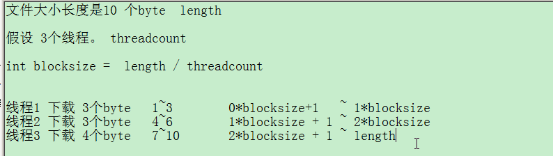 【黑馬Android】(07)多線程下載的原理/開源項目xutils/顯示意圖/隱式意圖/人品計算器/開啟activity獲取返回值
多線程下載的原理司馬光砸缸,多開幾個小水管,搶救小朋友。 import java.io.BufferedReader;import java.io.File;i
 Android JNI用於驅動測試
硬件平台:S3C6410 操作系統:Ubuntu、windows 板子系統:Android 開發工具:jdk,ndk,eclipse 本次測試從linux內核模塊編譯開始
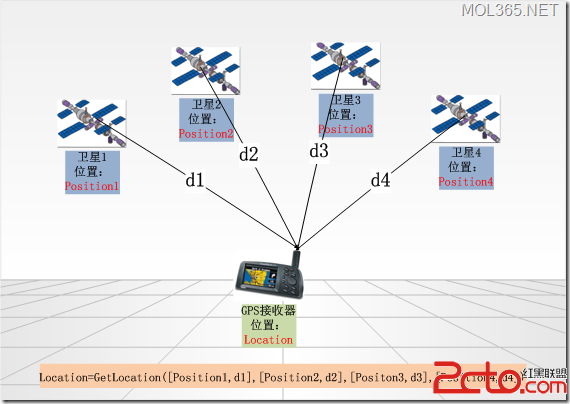 android GPS應用程序設計
GPS簡介 GPS是英文Global Positioning System(全球定位系統)的簡稱。GPS是20世紀70年代由美國陸海空三軍聯合研制的 新一代空間衛星導航定
 android開發筆記之網絡編程—簡易新聞客戶端
今天我們來對前面講過的知識綜合運用一下,包括xml的PULL解析,listView的萬能適配器等知識。。。。那先來看一個組件—->智能圖片加載器(sma