編輯:關於Android編程
mUploadMessage.onReceiveValue(Uri.parse(""));
必須得到調用,無論用戶是否選了圖,否則會出現再點擊不響應的情況
package com.fuiou.webviewupload;

import java.io.File;
import java.io.IOException;

import android.app.Activity;
import android.app.AlertDialog;
import android.content.ContentValues;
import android.content.Context;
import android.content.DialogInterface;
import android.content.Intent;
import android.database.Cursor;
import android.graphics.Bitmap;
import android.net.Uri;
import android.os.Bundle;
import android.os.Environment;
import android.provider.MediaStore;
import android.util.Log;
import android.view.KeyEvent;
import android.webkit.ValueCallback;
import android.webkit.WebChromeClient;
import android.webkit.WebView;
import android.webkit.WebViewClient;
import android.widget.Toast;

public class MainActivity extends Activity {
   public static final String TAG = "MainActivity";
   ValueCallback mUploadMessage;
   ValueCallback mFilePathCallback;
   private WebView mWebView;

   @Override
   protected void onCreate(Bundle savedInstanceState) {
      super.onCreate(savedInstanceState);
      setContentView(R.layout.activity_main);
      initView();
   }

   private void initView() {
      mWebView = (WebView) findViewById(R.id.web_view);
      mWebView.setWebChromeClient(new MyWebChromeClient());

      mWebView.setWebViewClient(new MyWebViewClient(this));
//    webView.loadUrl("file:///android_asset/upload_image.html");
      mWebView.loadUrl("http://192.168.25.38:8001/test/2016/5/2016-5-24/index.html");
   }


   private class MyWebViewClient extends WebViewClient{
      private Context mContext;
      public MyWebViewClient(Context context){
         super();
         mContext = context;
      }

      @Override
      public void onPageStarted(WebView view, String url, Bitmap favicon) {
         Log.d(TAG,"URL地址:" + url);
         super.onPageStarted(view, url, favicon);
      }

      @Override
      public void onPageFinished(WebView view, String url) {
         Log.i(TAG, "onPageFinished");
         super.onPageFinished(view, url);
      }
   }

   public static final int FILECHOOSER_RESULTCODE = 1;
   private static final int REQ_CAMERA = FILECHOOSER_RESULTCODE+1;
   private static final int REQ_CHOOSE = REQ_CAMERA+1;

   private class MyWebChromeClient extends WebChromeClient {

      public boolean onShowFileChooser(
            WebView webView, ValueCallback filePathCallback,
            WebChromeClient.FileChooserParams fileChooserParams) {
         if (mFilePathCallback != null) return true;
         mFilePathCallback = filePathCallback;
         selectImage();
         return true;
      }
      // For Android 3.0+
         public void openFileChooser(ValueCallback uploadMsg, String acceptType) {
               if (mUploadMessage != null) return;
               mUploadMessage = uploadMsg;
               selectImage();
//               Intent i = new Intent(Intent.ACTION_GET_CONTENT);
//               i.addCategory(Intent.CATEGORY_OPENABLE);
//               i.setType("*/*");
//                   startActivityForResult( Intent.createChooser( i, "File Chooser" ), FILECHOOSER_RESULTCODE );
           }
            // For Android < 3.0
           public void openFileChooser(ValueCallback uploadMsg) {
                  openFileChooser( uploadMsg, "" );
           }
           // For Android  > 4.1.1
         public void openFileChooser(ValueCallback uploadMsg, String acceptType, String capture) {
                 openFileChooser(uploadMsg, acceptType);
         }

   }

   /**
    * 檢查SD卡是否存在
    *
    * @return
    */
   public final boolean checkSDcard() {
      boolean flag = Environment.getExternalStorageState().equals(
            Environment.MEDIA_MOUNTED);
      if (!flag) {
         Toast.makeText(this, "請插入手機存儲卡再使用本功能",Toast.LENGTH_SHORT).show();
      }
      return flag;
   }
   String compressPath = "";

   protected final void selectImage() {
      if (!checkSDcard())
         return;
      String[] selectPicTypeStr = { "camera","photo" };
      AlertDialog alertDialog = new AlertDialog.Builder(this)
            .setItems(selectPicTypeStr,
                  new DialogInterface.OnClickListener() {
                     @Override
                     public void onClick(DialogInterface dialog,
                                    int which) {
                        switch (which) {
                           // 相機拍攝
                           case 0:
                              openCarcme();
                              break;
                           // 手機相冊
                           case 1:
                              chosePic();
                              break;
                           default:
                              break;
                        }
                        compressPath = Environment
                              .getExternalStorageDirectory()
                              .getPath()
                              + "/fuiou_wmp/temp";
                        new File(compressPath).mkdirs();
                        compressPath = compressPath + File.separator
                              + "compress.jpg";
                     }
                  }).setOnCancelListener(new DialogInterface.OnCancelListener() {
               @Override
               public void onCancel(DialogInterface dialogInterface) {
                  if(mFilePathCallback != null){
                     Uri[] uris = new Uri[1];
                     uris[0] = Uri.parse("");
                     mFilePathCallback.onReceiveValue(uris);
                     mFilePathCallback=null;
                  }else {
                     mUploadMessage.onReceiveValue(Uri.parse(""));
                     mUploadMessage=null;
                  }
               }
            }).show();
   }

   String imagePaths;
   Uri  cameraUri;
   /**
    * 打開照相機
    */
   private void openCarcme() {
      Intent intent = new Intent(MediaStore.ACTION_IMAGE_CAPTURE);

      imagePaths = Environment.getExternalStorageDirectory().getPath()
            + "/fuiou_wmp/temp/"
            + (System.currentTimeMillis() + ".jpg");
      // 必須確保文件夾路徑存在,否則拍照後無法完成回調
      File vFile = new File(imagePaths);
      if (!vFile.exists()) {
         File vDirPath = vFile.getParentFile();
         vDirPath.mkdirs();
      } else {
         if (vFile.exists()) {
            vFile.delete();
         }
      }
      cameraUri = Uri.fromFile(vFile);
      intent.putExtra(MediaStore.EXTRA_OUTPUT, cameraUri);
      startActivityForResult(intent, REQ_CAMERA);
   }

   /**
    * 拍照結束後
    */
   private void afterOpenCamera() {
      File f = new File(imagePaths);
      addImageGallery(f);
   }

   /** 解決拍照後在相冊中找不到的問題 */
   private void addImageGallery(File file) {
      ContentValues values = new ContentValues();
      values.put(MediaStore.Images.Media.DATA, file.getAbsolutePath());
      values.put(MediaStore.Images.Media.MIME_TYPE, "image/jpeg");
      getContentResolver().insert(
            MediaStore.Images.Media.EXTERNAL_CONTENT_URI, values);
   }

   /**
    * 本地相冊選擇圖片
    */
   private void chosePic() {
      FileUtils.delFile(compressPath);
      Intent innerIntent = new Intent(Intent.ACTION_GET_CONTENT); // "android.intent.action.GET_CONTENT"
      String IMAGE_UNSPECIFIED = "image/*";
      innerIntent.setType(IMAGE_UNSPECIFIED); // 查看類型
      Intent wrapperIntent = Intent.createChooser(innerIntent, null);
      startActivityForResult(wrapperIntent, REQ_CHOOSE);
   }

   /**
    * 選擇照片後結束
    *
    * @param data
    */
   private Uri afterChosePic(Intent data) {

      // 獲取圖片的路徑:
      String[] proj = { MediaStore.Images.Media.DATA };
      // 好像是android多媒體數據庫的封裝接口,具體的看Android文檔
      Cursor cursor = managedQuery(data.getData(), proj, null, null, null);
      if(cursor == null ){
         Toast.makeText(this, "上傳的圖片僅支持png或jpg格式",Toast.LENGTH_SHORT).show();
         return null;
      }
      // 按我個人理解 這個是獲得用戶選擇的圖片的索引值
      int column_index = cursor.getColumnIndexOrThrow(MediaStore.Images.Media.DATA);
      // 將光標移至開頭 ,這個很重要,不小心很容易引起越界
      cursor.moveToFirst();
      // 最後根據索引值獲取圖片路徑
      String path = cursor.getString(column_index);
      if(path != null && (path.endsWith(".png")||path.endsWith(".PNG")||path.endsWith(".jpg")||path.endsWith(".JPG"))){
         File newFile = FileUtils.compressFile(path, compressPath);
         return Uri.fromFile(newFile);
      }else{
         Toast.makeText(this, "上傳的圖片僅支持png或jpg格式",Toast.LENGTH_SHORT).show();
      }
      return null;
   }


   /**
    * 返回文件選擇
    */
   @Override
   protected void onActivityResult(int requestCode, int resultCode,
         Intent intent) {
//    if (requestCode == FILECHOOSER_RESULTCODE) {
//       if (null == mUploadMessage)
//          return;
//       Uri result = intent == null || resultCode != RESULT_OK ? null
//             : intent.getData();
//       mUploadMessage.onReceiveValue(result);
//       mUploadMessage = null;
//    }

      if (null == mUploadMessage || mFilePathCallback == null)
         return;
      Uri uri = null;
      File file = new File(cameraUri.getPath());
      if(!file.exists()){
         cameraUri = Uri.parse("");
      }
      if(requestCode == REQ_CAMERA ){
         afterOpenCamera();
         uri = cameraUri;
      }else if(requestCode == REQ_CHOOSE){
         uri = afterChosePic(intent);
      }
      if(mFilePathCallback != null){
         Uri[] uris = new Uri[1];
         uris[0] = uri;
         mFilePathCallback.onReceiveValue(uris);
      }else {
         mUploadMessage.onReceiveValue(uri);
      }
      mFilePathCallback = null;
      mUploadMessage = null;
      super.onActivityResult(requestCode, resultCode, intent);
   }

   public boolean onKeyDown(int keyCode, KeyEvent event) {
      if ((keyCode == KeyEvent.KEYCODE_BACK) && mWebView.canGoBack()) {
         mWebView.goBack();
         return true;
      }else{
              finish();
      }
      return super.onKeyDown(keyCode, event);
      }
}
 Android應用Loaders全面詳解及源碼淺析
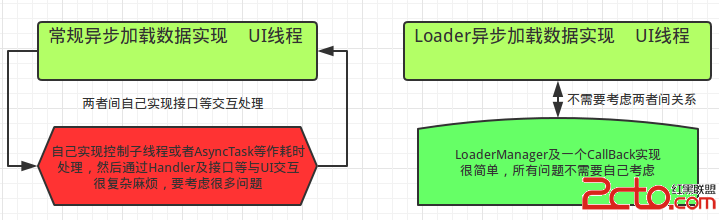
1 背景在Android中任何耗時的操作都不能放在UI主線程中,所以耗時的操作都需要使用異步實現。同樣的,在ContentProvider中也可能存在耗時操作,這時也該使
 手機QQ浏覽器怎麼清除緩存
當我們使用了手機QQ浏覽器一段時間後,就需要清除一下緩存,這樣才能使手機QQ浏覽器使用起來更流暢,同時也節省了一點手機空間。那麼手機QQ浏覽器如何清除緩存呢
 Android v4包下的PagerTitleStrip,ViewPager的頁面標題
android.support.v4.view.PagerTitleStrip將Page的Title分離出來的一個自定義View,這樣可以靈活的設置title的樣式、文本
 Android後台保活實踐總結:即時通訊應用無法根治的“頑疾”
前言Android進程和Service的保活,是困擾Android開發人員的一大頑疾。因涉及到省電和內存管理策略,各廠商基於自家的理解,在自已ROOM發布於都對標准And