編輯:關於Android編程
現在全面負責公司android 產品的開發與維護,壓力還真不小。因為產品多,android開發技術人員少。很多需要我親力親為。這裡記錄一下日常遇到的小知識。
//去掉app圖標顯示
getSupportActionBar().setDisplayShowHomeEnabled(false);

actionbarsherlock框架標題欄顯示返回圖標
// 添加返回按鈕
getSupportActionBar().setDisplayHomeAsUpEnabled(true);
public class MyComparator implements Comparator{ public int compare(Student s1, Student s2) { if(s1.getID() > s2.getID()){ return 1; } else if(s1.getID() < s2.getID()) { return -1; } return 0; } }
            Student s1 = new Student("001", "Jim", "男", 50);
            Student s2 = new Student("002", "Tom", "男", 70);
            Student s3 = new Student("003", "Dave", "男", 65);
            Student s4 = new Student("004", "Peter", "男", 80);
            Student s5 = new Student("005", "Lucy", "女", 100);
            //創建集合
            ArrayList list = new ArrayList();
            list.add(s1);
            list.add(s2);
            list.add(s3);
            list.add(s4);
            list.add(s5);
            Comparator comparator = new MyComparator();//重要部分
            Collections.sort(list, comparator);
			                Intent intent= new Intent();
			                intent.setAction("android.intent.action.VIEW");
			                Uri content_url = Uri.parse("file://" + strFilePathName);
			                intent.setData(content_url);
			                intent.setClassName("com.android.browser","com.android.browser.BrowserActivity");
			                mContext.startActivity(intent);
AndroidManifest.xml文件把加到相應activity的
data android:scheme="file" />
srcData[1].split("\\+")的字符串分隔的用法,遇到分隔是?(問號),+(加號),*(乘),|(豎線),.(點)等都是轉義字符,必須的加上"\\"。
	public static int getStringExtractInt(String string){
		String regEx="[^0-9]";
		Pattern p = Pattern.compile(regEx);
		Matcher m = p.matcher(string);
		String strResult = m.replaceAll("").trim();
		if (strResult.isEmpty() || strResult == "") {
			strResult = "0";
		}
		return Integer.parseInt(strResult);
	}
	public static int getStringSpiltToInt(String strSpilt , String string) {
		String[] result = string.split(strSpilt);
		if (result[0].isEmpty()|| result[0] == null ) {
			result[0] = "0";
		}
		return Integer.parseInt(result[0]);
	}
	/**
	 * 分割字符串提取數據,返回整型數組
	 * @param strSpilt
	 * @param string
	 * @return int[]
	 */
	public static int[] getStringSpiltToIntArray(String strSpilt , String string) {
		String[] result = string.split(strSpilt);
	    int[] nResult = new int[result.length];
		for (int i = 0; i < result.length; i++) {
			if (result[i].isEmpty()|| result[i] == null ) {
				result[i] = "0";
			}
		}

		for (int i = 0; i < nResult.length; i++) {
			Integer.parseInt(result[i]);
		}
		return nResult;
	}
textView.getPaint().setFlags(Paint. UNDERLINE_TEXT_FLAG ); //下劃線

textView.getPaint().setAntiAlias(true);//抗鋸齒

textview.getPaint().setFlags(Paint. STRIKE_THRU_TEXT_FLAG); //中劃線

setFlags(Paint. STRIKE_THRU_TEXT_FLAG|Paint.ANTI_ALIAS_FLAG);  // 設置中劃線並加清晰

textView.getPaint().setFlags(0);  // 取消設置的的劃線
根據列索引遍歷讀取列數據:
while(cursor.moveToNext())
{
//根據列的索引直接讀取  比如第0列的值
   String strValue= cursor.getString(0);
}
根據列名獲取列索引遍歷讀取列數據:
while(cursor.moveToNext())
{
//根據列名獲取列索引
int nameColumnIndex = cursor.getColumnIndex(“username");
String strValue=cursor.getString(nameColumnIndex);
}
 Android Ndk中C與JAVA之間的互相調用
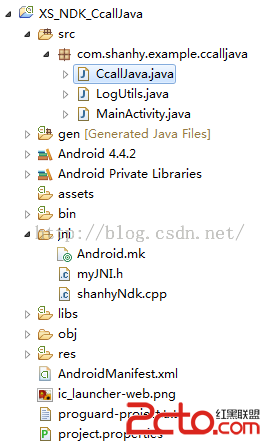
本例實現一個簡單的場景: 1、使用C編寫一個方法,接收1個參數,方法中調用Java的方法。 2、Java類中編寫一個方法,接收一個參數。 3、模擬調用場景:點擊按鈕 -&
 Android的Glide庫加載圖片的用法及其與Picasso的對比
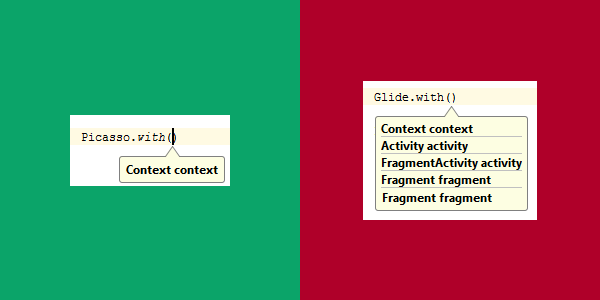
GlideGlide是一個高效、開源、 Android設備上的媒體管理框架,它遵循BSD、MIT以及Apache 2.0協議發布。Glide具有獲取、解碼和展示視頻劇照、
 Android 中通過實現線程更新Progressdialog (對話進度條)
作為開發者我們需要經常站在用戶角度考慮問題,比如在應用商城下載軟件時,當用戶點擊下載按鈕,則會有下載進度提示頁面出現,現在我們通過線程休眠的方式模擬下載進度更新的演示,如
 Android仿微信滑動退出Activity
效果圖:原理: 原理一句話就能描述清楚。重寫Activity的dispatchTouc