編輯:關於Android編程
這是一個比較簡單的問題,但是也是我們經常回遇到的問題,就是在Android的開發過程中,如何將內存卡的圖片或者其他的文件轉存,然後對這個文件進行處理,因為我們不能對原文件進行處理,最近正在做圖片方面的android項目,所以用到了這方面的知識,就和大家分享一下吧。
private void string2File() {
		tempFiles = new File[resultFileList.size()];
		passFileMap = new HashMap();
		for (int i = 0; i < resultFileList.size(); ++i) {
			String name = resultFileList.get(i).substring(
					resultFileList.get(i).lastIndexOf("/") + 1);
			name = getCacheDir(mContext) + "/" + name;
			File file = new File(resultFileList.get(i));
			tempFiles[i] = new File(name);
			Uri uri = Uri.fromFile(tempFiles[i]);
			try {
				Bitmap bitmap = decodeFile(file, 1000);
				if (!tempFiles[i].exists()) {
					tempFiles[i].createNewFile();
				}
				FileOutputStream out = new FileOutputStream(tempFiles[i]);
				bitmap.compress(Bitmap.CompressFormat.JPEG, 60, out);
				out.flush();
				out.close();
				passFileMap.put(tempFiles[i].getAbsolutePath(), tempFiles[i]);
				// tempFiles[i].delete();
			} catch (Exception e) {
				// TODO: handle exception
			}

		}
	}

	private Bitmap decodeFile(File f, int bmpsize) {
		if (f == null || !f.exists())
			return null;

		try {
			BitmapFactory.Options o = new BitmapFactory.Options();
			o.inJustDecodeBounds = true;
			o.inPreferredConfig = Bitmap.Config.ARGB_8888;
			o.inInputShareable = true;
			o.inPurgeable = true;
			BitmapFactory.decodeStream(new FileInputStream(f), null, o);
			final int REQUIRED_SIZE = bmpsize;
			int width_tmp = o.outWidth, height_tmp = o.outHeight;
			int scale = 1;
			if (width_tmp > REQUIRED_SIZE || height_tmp > REQUIRED_SIZE) {
				if (width_tmp > height_tmp) {
					scale = width_tmp / REQUIRED_SIZE;
				} else {
					scale = height_tmp / REQUIRED_SIZE;
				}
			}
			// decode with inSampleSize

			BitmapFactory.Options o2 = new BitmapFactory.Options();

			o2.inSampleSize = scale;
			o2.inPreferredConfig = Bitmap.Config.ARGB_8888;
			o2.inInputShareable = true;
			o2.inPurgeable = true;

			Bitmap bmp = BitmapFactory.decodeStream(new FileInputStream(f),
					null, o2);
			return bmp;
		} catch (FileNotFoundException e) {

		}

		return null;

	}
這種情況在處理本地圖片的壓縮中非常常見,希望能夠給大家一點啟示吧。
 Android桌面懸浮窗進階,QQ手機管家小火箭效果實現
今天是2013年的最後一天了,這裡首先提前祝大家新年快樂!同時,本篇文章也是我今年的最後一篇文章了,因此我想要讓它盡量有點特殊性,比起平時的文章要多一些特色
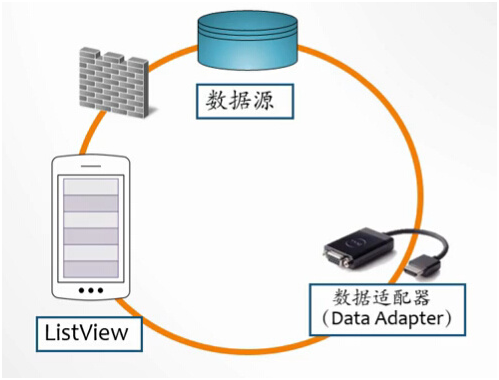 ListView
1.ListView和Adapter1)ListView就是一個能數據集合以動態滾動的方式展示到用戶界面上的View,即:以列表的形式展示具體內容,並且能夠根據數據的長度
 Android pendingInten 用法詳解
pendingIntent字面意義:等待的,未決定的Intent。要得到一個pendingIntent對象,使用方法類的靜態方法getActivity(Context,
 Android 數據存儲——SharedPreference
作為一個完成的應用程序,數據存儲操作是必不可少的,因此,Android系統提供了四種數據儲存方式,分別是:SharedPreference、File、SQLite以及Co