編輯:關於Android編程
main(int argc, char **argv) {

    ......

    Device* device = make_device();
    ui = device->GetUI();
    gCurrentUI = ui;

    ui->Init();
    ui->SetLocale(locale);
    ui->SetBackground(RecoveryUI::NONE);
    if (show_text) ui->ShowText(true);

    ......

    if (status != INSTALL_SUCCESS || ui->IsTextVisible()) {
        prompt_and_wait(device, status);
    }

    ......
}
1、首先新建了一個Device類的對象, Device類封裝了一些操作,包括UI的操作
2、調用Device類的GetUI()返回一個DefaultUI對象,recovery中涉及到三個UI類,三個類之間為繼承關系,分別為DefaultUI、
ScreenRecoveryUI、RecoveryUI
3、調用DefaultUI類的Init(), DefaultUI類沒有Init()方法,因此將調用它的父類ScreenRecoveryUI的Init()
4、同理,調用ScreenRecoveryUI類的SetLocale()來標識幾個比較特別的區域
5、同理,調用ScreenRecoveryUI類的SetBackground()設置初始狀態的背景圖
6、顯示recovery的主界面,即一個選擇菜單
void ScreenRecoveryUI::Init()
{
    gr_init();

    gr_font_size(&char_width, &char_height);

    text_col = text_row = 0;
    text_rows = gr_fb_height() / char_height;
    if (text_rows > kMaxRows) text_rows = kMaxRows;
    text_top = 1;

    text_cols = gr_fb_width() / char_width;
    if (text_cols > kMaxCols - 1) text_cols = kMaxCols - 1;

    LoadBitmap("icon_installing", &backgroundIcon[INSTALLING_UPDATE]);
    backgroundIcon[ERASING] = backgroundIcon[INSTALLING_UPDATE];
    LoadBitmap("icon_error", &backgroundIcon[ERROR]);
    backgroundIcon[NO_COMMAND] = backgroundIcon[ERROR];

    LoadBitmap("progress_empty", &progressBarEmpty);
    LoadBitmap("progress_fill", &progressBarFill);

    LoadLocalizedBitmap("installing_text", &backgroundText[INSTALLING_UPDATE]);
    LoadLocalizedBitmap("erasing_text", &backgroundText[ERASING]);
    LoadLocalizedBitmap("no_command_text", &backgroundText[NO_COMMAND]);
    LoadLocalizedBitmap("error_text", &backgroundText[ERROR]);

    int i;

    progressBarIndeterminate = (gr_surface*)malloc(indeterminate_frames *
                                                    sizeof(gr_surface));
    for (i = 0; i < indeterminate_frames; ++i) {
        char filename[40];
        // "indeterminate01.png", "indeterminate02.png", ...
        sprintf(filename, "indeterminate%02d", i+1);
        LoadBitmap(filename, progressBarIndeterminate+i);
    }

    if (installing_frames > 0) {
        installationOverlay = (gr_surface*)malloc(installing_frames *
                                                   sizeof(gr_surface));
        for (i = 0; i < installing_frames; ++i) {
            char filename[40];
            // "icon_installing_overlay01.png",
            // "icon_installing_overlay02.png", ...
            sprintf(filename, "icon_installing_overlay%02d", i+1);
            LoadBitmap(filename, installationOverlay+i);
        }
    } else {
        installationOverlay = NULL;
    }

    pthread_create(&progress_t, NULL, progress_thread, NULL);

    RecoveryUI::Init();
}
1、gr_init() 初始化圖形設備,分配Pixelflinger庫渲染的內存
2、gr_font_size() 將字體對應的surface長寬賦值給char_width和char_height
3、LoadBitmap() 將png生成surface, 每個png圖片對應一個surface, 所有surface存放在一個數組中 4、LoadLocalizedBitmap() 將區域文字所在的圖片中的text信息根據當前的locale提取出來,生成對應的surface, 所以 surface也存放在一個數組中 6、pthread_create(&progress_t, NULL, progress_thread, NULL) 創建一個線程,該線程的任務是一個死循環,在該循環中不停 地檢測currentIcon以及progressBarType來決定是不是要更新進度條。 7、調用RecoveryUI的Init(),初始化輸入事件處理。
void ScreenRecoveryUI::SetLocale(const char* locale) {
    if (locale) {
        char* lang = strdup(locale);
        for (char* p = lang; *p; ++p) {
            if (*p == '_') {
                *p = '\0';
                break;
            }
        }

        // A bit cheesy: keep an explicit list of supported languages
        // that are RTL.
        if (strcmp(lang, "ar") == 0 ||   // Arabic
            strcmp(lang, "fa") == 0 ||   // Persian (Farsi)
            strcmp(lang, "he") == 0 ||   // Hebrew (new language code)
            strcmp(lang, "iw") == 0 ||   // Hebrew (old language code)
            strcmp(lang, "ur") == 0) {   // Urdu
            rtl_locale = true;
        }
        free(lang);
    }
}
void ScreenRecoveryUI::SetBackground(Icon icon)
{
    pthread_mutex_lock(&updateMutex);

    // Adjust the offset to account for the positioning of the
    // base image on the screen.
    if (backgroundIcon[icon] != NULL) {
        gr_surface bg = backgroundIcon[icon];
        gr_surface text = backgroundText[icon];
        overlay_offset_x = install_overlay_offset_x + (gr_fb_width() - gr_get_width(bg)) / 2;
        overlay_offset_y = install_overlay_offset_y +
            (gr_fb_height() - (gr_get_height(bg) + gr_get_height(text) + 40)) / 2;
    }

    currentIcon = icon;
    update_screen_locked();

    pthread_mutex_unlock(&updateMutex);
}
SetBackground函數比較簡潔,關鍵部分在update_screen_locked,下面我們重點分析一下。
update_screen_locked和update_progress_locked是recovery的UI部分的關鍵函數,update_screen_locked用來更新背景, update_progress_locked用來更新進度條,因為顯示的畫面會一直在更新,所以這兩個函數會在不同的地方被反復調用
void ScreenRecoveryUI::update_screen_locked()
{
    draw_screen_locked();
    gr_flip();
}
update_screen_locked包含兩個操作,一是更新screen, 二是切換前後buffer。
void ScreenRecoveryUI::draw_screen_locked()
{
    draw_background_locked(currentIcon);
    draw_progress_locked();

    if (show_text) {
        SetColor(TEXT_FILL);
        gr_fill(0, 0, gr_fb_width(), gr_fb_height());

        int y = 0;
        int i = 0;
        if (show_menu) {
            SetColor(HEADER);

            for (; i < menu_top + menu_items; ++i) {
                if (i == menu_top) SetColor(MENU);

                if (i == menu_top + menu_sel) {
                    // draw the highlight bar
                    SetColor(MENU_SEL_BG);
                    gr_fill(0, y-2, gr_fb_width(), y+char_height+2);
                    // white text of selected item
                    SetColor(MENU_SEL_FG);
                    if (menu[i][0]) gr_text(4, y, menu[i], 1);
                    SetColor(MENU);
                } else {
                    if (menu[i][0]) gr_text(4, y, menu[i], i < menu_top);
                }
                y += char_height+4;
            }
            SetColor(MENU);
            y += 4;
            gr_fill(0, y, gr_fb_width(), y+2);
            y += 4;
            ++i;
        }

        SetColor(LOG);

        // display from the bottom up, until we hit the top of the
        // screen, the bottom of the menu, or we've displayed the
        // entire text buffer.
        int ty;
        int row = (text_top+text_rows-1) % text_rows;
        for (int ty = gr_fb_height() - char_height, count = 0;
             ty > y+2 && count < text_rows;
             ty -= char_height, ++count) {
            gr_text(4, ty, text[row], 0);
            --row;
            if (row < 0) row = text_rows-1;
        }
    }
}
void ScreenRecoveryUI::draw_progress_locked()
{
    if (currentIcon == ERROR) return;

    if (currentIcon == INSTALLING_UPDATE || currentIcon == ERASING) {
        draw_install_overlay_locked(installingFrame);
    }

    if (progressBarType != EMPTY) {
        int iconHeight = gr_get_height(backgroundIcon[INSTALLING_UPDATE]);
        int width = gr_get_width(progressBarEmpty);
        int height = gr_get_height(progressBarEmpty);

        int dx = (gr_fb_width() - width)/2;
        int dy = (3*gr_fb_height() + iconHeight - 2*height)/4;

        // Erase behind the progress bar (in case this was a progress-only update)
        gr_color(0, 0, 0, 255);
        gr_fill(dx, dy, width, height);

        if (progressBarType == DETERMINATE) {
            float p = progressScopeStart + progress * progressScopeSize;
            int pos = (int) (p * width);

            if (rtl_locale) {
                // Fill the progress bar from right to left.
                if (pos > 0) {
                    gr_blit(progressBarFill, width-pos, 0, pos, height, dx+width-pos, dy);
                }
                if (pos < width-1) {
                    gr_blit(progressBarEmpty, 0, 0, width-pos, height, dx, dy);
                }
            } else {
                // Fill the progress bar from left to right.
                if (pos > 0) {
                    gr_blit(progressBarFill, 0, 0, pos, height, dx, dy);
                }
                if (pos < width-1) {
                    gr_blit(progressBarEmpty, pos, 0, width-pos, height, dx+pos, dy);
                }
            }
        }

        if (progressBarType == INDETERMINATE) {
            static int frame = 0;
            gr_blit(progressBarIndeterminate[frame], 0, 0, width, height, dx, dy);
            // in RTL locales, we run the animation backwards, which
            // makes the spinner spin the other way.
            if (rtl_locale) {
                frame = (frame + indeterminate_frames - 1) % indeterminate_frames;
            } else {
                frame = (frame + 1) % indeterminate_frames;
            }
        }
    }
}
int gr_init(void);             /* 初始化圖形顯示,主要是打開設備、分配內存、初始化一些參數 */
void gr_exit(void);            /* 注銷圖形顯示,關閉設備並釋放內存 */

int gr_fb_width(void);         /* 獲取屏幕的寬度 */
int gr_fb_height(void);        /* 獲取屏幕的高度 */
gr_pixel *gr_fb_data(void);    /* 獲取顯示數據緩存的地址 */
void gr_flip(void);            /* 刷新顯示內容 */
void gr_fb_blank(bool blank);  /* 清屏 */

void gr_color(unsigned char r, unsigned char g, unsigned char b, unsigned char a);  /* 設置字體顏色 */
void gr_fill(int x, int y, int w, int h);  /* 填充矩形區域,參數分別代表起始坐標、矩形區域大小 */
int gr_text(int x, int y, const char *s);  /* 顯示字符串 */
int gr_measure(const char *s);             /* 獲取字符串在默認字庫中占用的像素長度 */
void gr_font_size(int *x, int *y);         /* 獲取當前字庫一個字符所占的長寬 */

void gr_blit(gr_surface source, int sx, int sy, int w, int h, int dx, int dy);  /* 填充由source指定的圖片 */
unsigned int gr_get_width(gr_surface surface);   /* 獲取圖片寬度 */
unsigned int gr_get_height(gr_surface surface);  /* 獲取圖片高度 */
/* 根據圖片創建顯示資源數據,name為圖片在mk文件指定的相對路徑 */
int res_create_surface(const char* name, gr_surface* pSurface);
void res_free_surface(gr_surface surface);       /* 釋放資源數據 */
 Android的事件分發與消費機制
一、Touch的三個重要方法在Android中,與觸摸事件也就是 Touch 相關的有三個重要方法,這三個方法共同完成觸摸事件的分發。public boolean dis
 android permission權限與安全機制解析(下)
android 6.0權限全面詳細分析和解決方案Marshmallow版本權限修改 android的權限系統一直是首要的安全概念,因為這些權限只在安裝的時候被詢問一次。
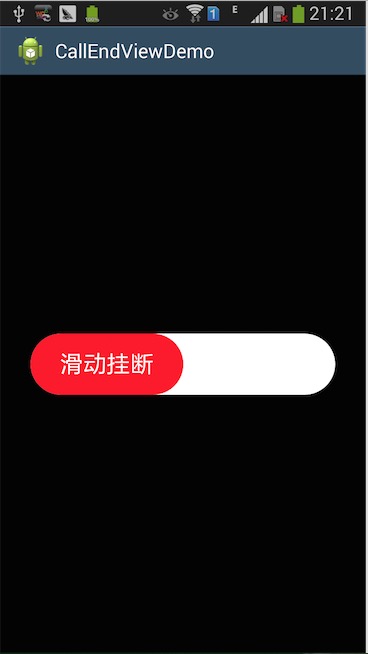 android:滑動掛斷自定義View的簡單實現
要點: 隨著手指的滑動更新位置 drawText的時候,如何計算開始的位置,使str居中 1.CallSliderEndView.java package net.m
 Android 仿淘寶、京東商品詳情頁向上拖動查看圖文詳情控件DEMO詳解
一、淘寶商品詳情頁效果我們的效果二、實現思路 使用兩個scrollView,兩個scrollView 豎直排列,通過自定義