編輯:關於Android編程
首先獲取本地apk版本:
/**
* 獲取本地軟件版本
*/
public static int getLocalVersion(Context ctx){
int localVersion = 0;
try {
PackageInfo packageInfo = ctx.getApplicationContext()
.getPackageManager().getPackageInfo(ctx.getPackageName(), 0);
localVersion = packageInfo.versionCode;
Log.d("TAG", "本軟件的版本。。"+localVersion);
} catch (NameNotFoundException e) {
e.printStackTrace();
}
return localVersion;
}
然後獲取服務器版本,這個可以通過很多方式獲取就自己發揮
獲取服務器版本後跟本地apk版本進行比較:
如果低於服務器版本就進行更新:(本人寫的僅供參考,我是異步下載的,然後通知的方式顯示進度)
/**
	 * 用於更新app版本
	 *
	 * @param ctx
	 *            上下文對象
	 * @param url
	 *            更新版本的地址
	 */
	private static PendingIntent pendingIntent;

	public static void UpdateVersion(final Context ctx, String url) {
		createNotification(ctx);
		// 創建文件,讀取app_name
		createFile(ctx.getResources().getString(R.string.app_name));
		new AsyncTask() {
			@Override
			protected String doInBackground(String... params) {
				int down_step = 1;// 提示step
				int totalSize;// 文件總大小
				int downloadCount = 0;// 已經下載好的大小
				int updateCount = 0;// 已經上傳的文件大小
				InputStream inputStream;
				OutputStream outputStream;

				URL url;
				HttpURLConnection httpURLConnection = null;
				try {
					url = new URL(params[0]);
					httpURLConnection = (HttpURLConnection) url
							.openConnection();
					httpURLConnection.setConnectTimeout(TIMEOUT);
					httpURLConnection.setReadTimeout(TIMEOUT);
					// 獲取下載文件的size
					totalSize = httpURLConnection.getContentLength();
					// Log.d("TAG", "totalSize"+totalSize);
					if (httpURLConnection.getResponseCode() == 404) {
						throw new Exception("fail!");
					}
					inputStream = httpURLConnection.getInputStream();
					// File appFile=File.createTempFile("中拓鋼鐵",".apk");
					outputStream = new FileOutputStream(updateFile, false);// 文件存在則覆蓋掉
					byte buffer[] = new byte[1024];
					int readsize = 0;
					while ((readsize = inputStream.read(buffer)) != -1) {
						outputStream.write(buffer, 0, readsize);
						downloadCount += readsize;// 時時獲取下載到的大小
						// Log.d("TAG", "downloadCount"+downloadCount);
						/**
						 * 每次增張1%
						 */
						if (updateCount == 0
								|| (downloadCount * 100 / totalSize - down_step) >= updateCount) {
							updateCount += down_step;
							// 改變通知欄
							// Log.d("TAG", "開始下載。。");
							builder = new Notification.Builder(ctx)
									.setSmallIcon(R.drawable.logo)
									.setContentText(
											"正在下載(" + updateCount + "%)...")
									.setProgress(100, updateCount, false);
							manager.notify(8, builder.build());
						}

					}
					if (httpURLConnection != null) {
						httpURLConnection.disconnect();
					}
					inputStream.close();
					outputStream.close();
				} catch (MalformedURLException e) {
					e.printStackTrace();
				} catch (IOException e) {
					e.printStackTrace();
				} catch (Exception e) {
					e.printStackTrace();
				}

				return null;
			}

			@Override
			protected void onPostExecute(String result) {
				// 下載完成,點擊安裝
				System.out.println("updateFile.." + updateFile);
				Uri uri = Uri.fromFile(updateFile);
				Intent intent = new Intent(Intent.ACTION_VIEW);
				intent.setDataAndType(uri,
						"application/vnd.android.package-archive");

				pendingIntent = PendingIntent.getActivity(ctx, 0, intent, 0);
				builder = new Notification.Builder(ctx)
						.setSmallIcon(R.drawable.logo)
						.setContentIntent(pendingIntent)
						.setContentTitle("apk下載更新")
						.setContentText("下載成功,請點擊安裝")
						.setProgress(100, 100, false);
				manager.notify(8, builder.build());

			}
		}.execute(url);

	}

	private static void createNotification(Context ctx) {

		// 最普通的通知欄
		manager = (NotificationManager) ctx
				.getSystemService(ctx.NOTIFICATION_SERVICE);
		builder = new Notification.Builder(ctx).setSmallIcon(R.drawable.logo)
				.setContentTitle("apk下載更新").setContentText("准備下載...")
				.setProgress(100, 0, false);
		manager.notify(8, builder.build());
	}
當下載完成後,可以點擊安裝。
注:當你的apk是簽名後的,如果手機上面的apk是沒有簽名的,那麼在安裝時會提示簽名不同的包沖突,無法安裝,這樣只能卸載沒有簽名的apk後再安裝
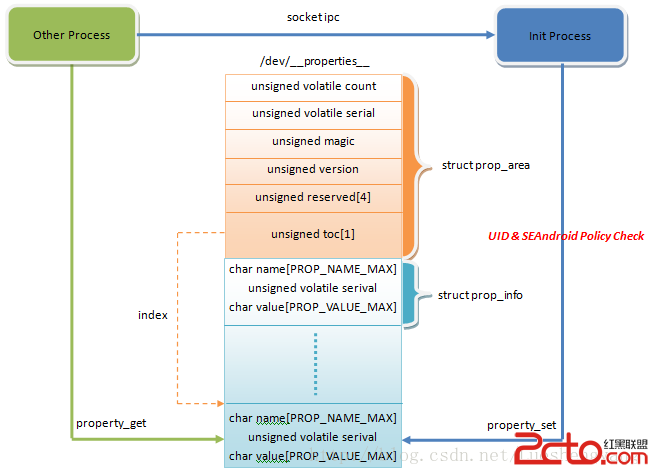 SEAndroid安全機制對Android屬性訪問的保護分析
Android系統通過屬性暴露設備和運行時信息,並且可以通過設置屬性來控制系統行為。因此,屬性也像文件一樣,是一種需要保護的資源。在啟用SEAndroid之前,敏感屬性只
 仿ViewPager相冊(使用HorizontalScrollView)
近期看了一堂某在線IT學習的視頻公開課,這裡就不說名字了,省的有打廣告的嫌疑。講到了利用HorizontalScrollView仿ViewPager設計的一個簡單相冊。其
 談談Material Design之CoordinatorLayout
本文主要介紹一下如何使用CoordinatorLayout先看看官方是怎麼介紹Material Design的 We challenged ourselves to cr
 微信怎麼投訴微商賣家 微信怎麼投訴好友
有時候,我們的微信會收到一些不認識的人發的廣告,甚至是一些微商的詐騙信息,特別一些微信群上,時不時就會遇到一些做垃圾廣告或者不法分子詐騙的,或者不小心就被加