編輯:關於Android編程
作為一名Android開發人員,相信大家對圖片OOM的問題已經耳熟能詳了,關於圖片緩存和解決OOM的開源項目也是相當的多,被大家熟知的就是Universal_image_loader和Volley了,Volley在前面的文章中已經有介紹。Universal_image_loader在圖片緩存功能方面應該算功能最強的,但是感覺很多功能用不上,所以在項目中我一般不太喜歡使用Universal_image_loader(因為本身自己的App源碼非常多,加入這些開源庫就就更大了,容易出現無法編譯的問題,因為Android貌似對一個應用中的方法個數好像有限制,貌似是655**個吧,具體多少我也記不清)。
關於處理圖片緩存上,我接觸的兩個播放器項目中,使用的都是BitmapFun,BitmapFun 是Google為Android開發提供了一個培訓教程,既然是Google提供的,那麼我覺得作為一名合格的Android開發人員很有必要學習學習,而且BitmapFun非常簡單,基本可以滿足我們項目中對於圖片緩存處理需求了。
對於開源項目的學習,我通常很少在應用層面來學習的,因為如何使用一個開源項目的相關博客已經相當多了,而且寫得都非常詳細,對於大多數開源項目它都是自帶sample的,所以如果想學習如何使用某個開源項目,好好研究sample就行了,但是我始終認為,熟悉經典開源項目源碼才是王道。好了廢話不多說,我們開始學習BitmapFun源碼吧。
1、BitmapFun結構
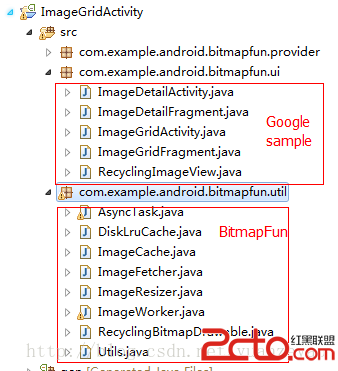
BitmapFun和其他開源庫的結構稍有不同,因為它僅僅是Google的培訓教程,所以BitmapFun和它的sample放在了一個工程裡面,結構圖如下:上面部分是BitmapFun的應用,下面部分是BitmapFun的源碼。
2、相關類介紹
在BitmapFun中最重要的一個類就是ImageFetcher,請求圖片主要就是調用loadImage方法,但是這個類是繼承ImageResizer,而ImageResizser是繼承ImageWorker,所以我們就從ImageWorker開始學習吧
ImageWorker.java
/**
	這個類用來封裝一次圖片的加載過程,包括使用從緩存中加載
 */
public abstract class ImageWorker {
    private static final String TAG = ImageWorker;
	//這個變量用於動畫效果,沒有實際意義
    private static final int FADE_IN_TIME = 200;
	//緩存,包括磁盤緩存和內存緩存
    private ImageCache mImageCache;
	//創建緩存需要的參數
    private ImageCache.ImageCacheParams mImageCacheParams;
	//加載過程中,ImageView顯示的圖片
    private Bitmap mLoadingBitmap;
	//是否使用漸變效果
    private boolean mFadeInBitmap = true;
	//是否提前退出任務,如果true,那麼圖片請求回來後是不會顯示出來的
    private boolean mExitTasksEarly = false;
	//是否暫停任務
    protected boolean mPauseWork = false;
    private final Object mPauseWorkLock = new Object();

    protected Resources mResources;

    private static final int MESSAGE_CLEAR = 0;
    private static final int MESSAGE_INIT_DISK_CACHE = 1;
    private static final int MESSAGE_FLUSH = 2;
    private static final int MESSAGE_CLOSE = 3;

    protected ImageWorker(Context context) {
        mResources = context.getResources();
    }

    /**
     * 請求一張圖片的接口
     * @param 圖片url
     * @param 要顯示這種圖片的ImageView
     */
    public void loadImage(Object data, ImageView imageView) {
        if (data == null) {
            return;
        }

        BitmapDrawable value = null;
		//如果緩存對象不為空,那麼從內存緩存中讀取對象
        if (mImageCache != null) {
            value = mImageCache.getBitmapFromMemCache(String.valueOf(data));
        }

        if (value != null) {
            // 內存緩存命中,那麼直接顯示
            imageView.setImageDrawable(value);
        } else if (cancelPotentialWork(data, imageView)) {
			//內存緩存沒有命中,那麼創建一個圖片請求Task,將imageView作為參數
            final BitmapWorkerTask task = new BitmapWorkerTask(imageView);
			//AsyncDrawable 是BitmapDrawable子類,主要用來存放當前任務的弱應用
            final AsyncDrawable asyncDrawable =
                    new AsyncDrawable(mResources, mLoadingBitmap, task);
			//將asyncDrawable設置到imageView中,這樣imageView和當前任務就一一對應了
            imageView.setImageDrawable(asyncDrawable);

            //調用AsyncTask的executeOnExecutor方法,這個AsyncTask和Android系統中的AsyncTask有些區別,但是使用上一樣的
            task.executeOnExecutor(AsyncTask.DUAL_THREAD_EXECUTOR, data);
        }
    }

    /**
     * 設置加載過程中的默認圖片
     *
     * @param bitmap
     */
    public void setLoadingImage(Bitmap bitmap) {
        mLoadingBitmap = bitmap;
    }

    /**
     * 將本地圖片設置為默認圖片
     *
     * @param resId
     */
    public void setLoadingImage(int resId) {
        mLoadingBitmap = BitmapFactory.decodeResource(mResources, resId);
    }

    /**
     * 添加一個緩沖對象,創建磁盤緩存時需要子線程中完成
     * @param fragmentManager
     * @param cacheParams The cache parameters to use for the image cache.
     */
    public void addImageCache(FragmentManager fragmentManager,
            ImageCache.ImageCacheParams cacheParams) {
        mImageCacheParams = cacheParams;
        mImageCache = ImageCache.getInstance(fragmentManager, mImageCacheParams);
		//完成磁盤緩存初始化
        new CacheAsyncTask().execute(MESSAGE_INIT_DISK_CACHE);
    }

    /**
     * Adds an {@link ImageCache} to this {@link ImageWorker} to handle disk and memory bitmap
     * caching.
     * @param activity
     * @param diskCacheDirectoryName See
     * {@link ImageCache.ImageCacheParams#ImageCacheParams(Context, String)}.
     */
    public void addImageCache(FragmentActivity activity, String diskCacheDirectoryName) {
        mImageCacheParams = new ImageCache.ImageCacheParams(activity, diskCacheDirectoryName);
        mImageCache = ImageCache.getInstance(activity.getSupportFragmentManager(), mImageCacheParams);
        new CacheAsyncTask().execute(MESSAGE_INIT_DISK_CACHE);
    }

    /**
     * 設置是否使用漸變效果
     */
    public void setImageFadeIn(boolean fadeIn) {
        mFadeInBitmap = fadeIn;
    }

	//是否提前退出任務
    public void setExitTasksEarly(boolean exitTasksEarly) {
        mExitTasksEarly = exitTasksEarly;
        setPauseWork(false);
    }

    /**
     * Subclasses should override this to define any processing or work that must happen to produce
     * the final bitmap. This will be executed in a background thread and be long running. For
     * example, you could resize a large bitmap here, or pull down an image from the network.
     *
     * @param data The data to identify which image to process, as provided by
     *            {@link ImageWorker#loadImage(Object, ImageView)}
     * @return The processed bitmap
     */
    protected abstract Bitmap processBitmap(Object data);

    /**
     * @return The {@link ImageCache} object currently being used by this ImageWorker.
     */
    protected ImageCache getImageCache() {
        return mImageCache;
    }

    /**
     * Cancels any pending work attached to the provided ImageView.
     * @param imageView
     */
    public static void cancelWork(ImageView imageView) {
		//通過ImageView找到task,為什麼可以找到?因為imageView和task一一對應
        final BitmapWorkerTask bitmapWorkerTask = getBitmapWorkerTask(imageView);
		//如果task不為空,那麼取消
        if (bitmapWorkerTask != null) {
            bitmapWorkerTask.cancel(true);
            if (BuildConfig.DEBUG) {
                final Object bitmapData = bitmapWorkerTask.data;
                Log.d(TAG, cancelWork - cancelled work for  + bitmapData);
            }
        }
    }

    /**
     * Returns true if the current work has been canceled or if there was no work in
     * progress on this image view.
     * Returns false if the work in progress deals with the same data. The work is not
     * stopped in that case.
     */
    public static boolean cancelPotentialWork(Object data, ImageView imageView) {
		//通過imageView找到task
        final BitmapWorkerTask bitmapWorkerTask = getBitmapWorkerTask(imageView);

        if (bitmapWorkerTask != null) {
			//如果找到的task不為null,並且task的url和給定的url相同,那麼取消任務
            final Object bitmapData = bitmapWorkerTask.data;
            if (bitmapData == null || !bitmapData.equals(data)) {
                bitmapWorkerTask.cancel(true);
                if (BuildConfig.DEBUG) {
                    Log.d(TAG, cancelPotentialWork - cancelled work for  + data);
                }
            } else {
                // The same work is already in progress.
                return false;
            }
        }
        return true;
    }

    /**
     * 通過iamgeView找到對應的Task
     */
    private static BitmapWorkerTask getBitmapWorkerTask(ImageView imageView) {
        if (imageView != null) {
            final Drawable drawable = imageView.getDrawable();
            if (drawable instanceof AsyncDrawable) {
                final AsyncDrawable asyncDrawable = (AsyncDrawable) drawable;
                return asyncDrawable.getBitmapWorkerTask();
            }
        }
        return null;
    }

    /**
     * 一個請求圖片的異步任務,
     */
    private class BitmapWorkerTask extends AsyncTask
@Override
    protected Bitmap processBitmap(Object data) {
        return processBitmap(Integer.parseInt(String.valueOf(data)));
    }
private Bitmap processBitmap(int resId) {
        if (BuildConfig.DEBUG) {
            Log.d(TAG, processBitmap -  + resId);
        }
        return decodeSampledBitmapFromResource(mResources, resId, mImageWidth,
                mImageHeight, getImageCache());
    }
private Bitmap processBitmap(String data) {

        final String key = ImageCache.hashKeyForDisk(data);
        FileDescriptor fileDescriptor = null;
        FileInputStream fileInputStream = null;
        DiskLruCache.Snapshot snapshot;
		//檢查mHttpDiskCache是否已經初始化,這裡一定要注意,mHttpDiskCache這個磁盤緩存是在ImageFetcher調用addImageCache時初始化的,如果你沒有調用addImageCache
		//那麼這裡就會阻塞,從而無法獲取圖片,具體情況還請大家自己分析代碼吧
        synchronized (mHttpDiskCacheLock) {
            // Wait for disk cache to initialize
            while (mHttpDiskCacheStarting) {
                try {
                    mHttpDiskCacheLock.wait();
                } catch (InterruptedException e) {}
            }
			//下面這段代碼就是從mHttpDiskCache裡面寫入圖片
            if (mHttpDiskCache != null) {
                try {
                    snapshot = mHttpDiskCache.get(key);
                    if (snapshot == null) {
                        if (BuildConfig.DEBUG) {
                            Log.d(TAG, processBitmap, not found in http cache, downloading...);
                        }
                        DiskLruCache.Editor editor = mHttpDiskCache.edit(key);
                        if (editor != null) {
							//下載圖片邏輯在這裡
                            if (downloadUrlToStream(data,
                                    editor.newOutputStream(DISK_CACHE_INDEX))) {
                                editor.commit();
                            } else {
                                editor.abort();
                            }
                        }
                        snapshot = mHttpDiskCache.get(key);
                    }
                    if (snapshot != null) {
                        fileInputStream =
                                (FileInputStream) snapshot.getInputStream(DISK_CACHE_INDEX);
                        fileDescriptor = fileInputStream.getFD();
                    }
                } catch (IOException e) {
                    Log.e(TAG, processBitmap -  + e);
                } catch (IllegalStateException e) {
                    Log.e(TAG, processBitmap -  + e);
                } finally {
                    if (fileDescriptor == null && fileInputStream != null) {
                        try {
                            fileInputStream.close();
                        } catch (IOException e) {}
                    }
                }
            }
        }

        Bitmap bitmap = null;
        if (fileDescriptor != null) {
			//調用ImageResizer中的方法來將mHttpDiskCache中的緩存生成指定大小的圖片
            bitmap = decodeSampledBitmapFromDescriptor(fileDescriptor, mImageWidth,
                    mImageHeight, getImageCache());
        }
        if (fileInputStream != null) {
            try {
                fileInputStream.close();
            } catch (IOException e) {}
        }
        return bitmap;
    }


    /**
     * 從網絡通過HttpURLConnection下載圖片,並寫入到磁盤緩存
     *
     * @param urlString The URL to fetch
     * @return true if successful, false otherwise
     */
    public boolean downloadUrlToStream(String urlString, OutputStream outputStream) {
        disableConnectionReuseIfNecessary();
        HttpURLConnection urlConnection = null;
        BufferedOutputStream out = null;
        BufferedInputStream in = null;

        try {
            final URL url = new URL(urlString);
            urlConnection = (HttpURLConnection) url.openConnection();
            in = new BufferedInputStream(urlConnection.getInputStream(), IO_BUFFER_SIZE);
            out = new BufferedOutputStream(outputStream, IO_BUFFER_SIZE);

            int b;
            while ((b = in.read()) != -1) {
                out.write(b);
            }
            return true;
        } catch (final IOException e) {
            Log.e(TAG, Error in downloadBitmap -  + e);
        } finally {
            if (urlConnection != null) {
                urlConnection.disconnect();
            }
            try {
                if (out != null) {
                    out.close();
                }
                if (in != null) {
                    in.close();
                }
            } catch (final IOException e) {}
        }
        return false;
    }
 Android開發常用工具總結
什麼是AIDL以及如何使用 ①aidl是Android interface definition Language 的英文縮寫,意思Android 接口定義語言。 ②使用
 Android存儲五大方式
Android存儲五大方式:1 使用SharedPreferences存儲數據2 文件存儲數據3 SQLite數據庫存儲數據4 使用ContentProvider存儲數據
 android源代碼在線搜索
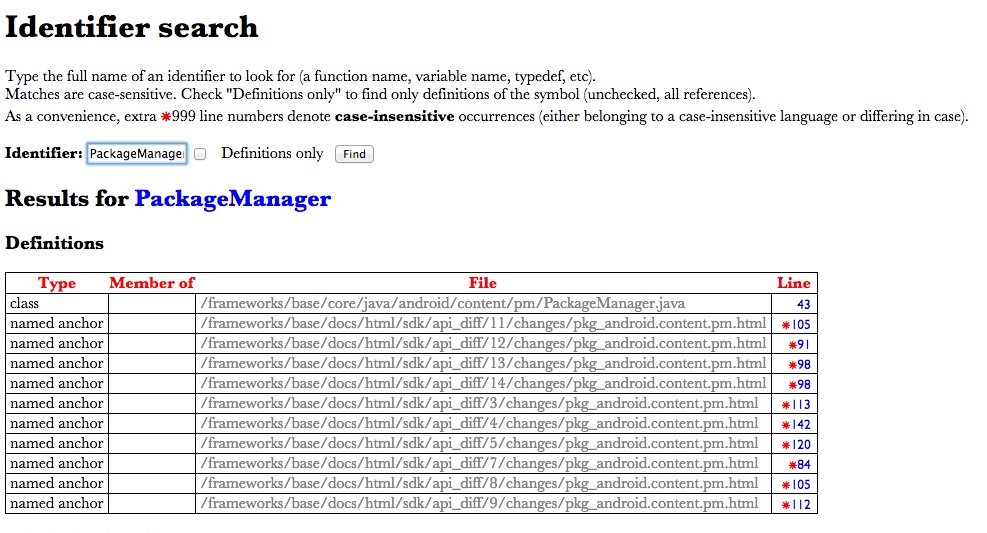
在沒有google的時代,當在開發中遇到問題時,程序員唯一的方式就是去讀源代碼,雖然現在可以通過搜索引擎解決大部分開發問題,但是要想理解其內部運行原理,還是要去讀源代碼。
 安卓開發 第六篇 我的安卓應用架構設計-----BaseActivity類
BaseActivity是項目中所有activity的基類,含有一些公共的屬性和方法,同時控制toolbar的顯示,以及其他一些功能。。。來看源碼:/** * BaseA