編輯:關於Android編程
SimpleCursorAdapter允許你綁定一個游標的列到ListView上,並使用自定義的layout顯示每個項目。
SimpleCursorAdapter的創建,需要傳入當前的上下文、一個layout資源,一個游標和兩個數組:一個包含使用的列的名字,另一個(相同大小)數組包含View中的資源ID,用於顯示相應列的數據值。
//第一步:從數據庫讀取數據
		dbHelper = new DBHelper(HistoryOrderActivity.this);
		database = dbHelper.getWritableDatabase();
		cursor = database.rawQuery("SELECT * FROM "+DBHelper.TABLE_ORDER+" where feedbackTime is not null", null);
		//startManagingCursor(cursor); 被遺棄的方法,主要是把cursor的生命周期交由Activity管理
		String[] fromColumns = new String[] {
				"orderDescription",
				"orderEffectiveTime",
				"orderConsumeTime",
				"promotion",
				"feedbackInfo",
				"feedbackTime",
				};
		int[] toLayoutIDs = new int[] {
				R.id.description,
				R.id.effectiveTime,
				R.id.consumeTime,
				R.id.promotion,
				R.id.feedbackInfo,
				R.id.feedbackTime};
adapter = new SimpleCursorAdapter(this, R.layout.histortyorder, cursor, fromColumns, toLayoutIDs,0);//第一步:從數據庫讀取數據
dbHelper = new DBHelper(HistoryOrderActivity.this);
database = dbHelper.getWritableDatabase();
cursor = database.rawQuery("SELECT * FROM "+DBHelper.TABLE_ORDER+" where feedbackTime is not null", null);
//startManagingCursor(cursor); 被遺棄的方法,主要是把cursor的生命周期交由Activity管理
String[] fromColumns = new String[] {
"orderDescription",
"orderEffectiveTime",
"orderConsumeTime",
"promotion",
"feedbackInfo",
"feedbackTime",
};
int[] toLayoutIDs = new int[] {
R.id.description,
R.id.effectiveTime,
R.id.consumeTime,
R.id.promotion,
R.id.feedbackInfo,
R.id.feedbackTime};
if (cursor == null) {
return;
}
adapter = new HistoryOrderAdapter(HistoryOrderActivity.this, R.layout.histortyorder,
cursor, fromColumns, toLayoutIDs, 0);public class HistoryOrderAdapter extends SimpleCursorAdapter {
private Cursor m_cursor;
private Context m_context;
private LayoutInflater miInflater;
public HistoryOrderAdapter(Context context, int layout, Cursor c,
String[] from, int[] to, int flags) {
super(context, layout, c, from, to, flags);
m_context = context;
m_cursor = c;
}
@Override
public void bindView(View arg0, Context arg1, Cursor arg2) {
View convertView = null;
if (arg0 == null) {
convertView = miInflater.inflate(R.layout.histortyorder, null);
} else {
convertView = arg0;
}
TextView tv_Description = (TextView) convertView
.findViewById(R.id.description);
TextView tv_EffectiveTime = (TextView) convertView
.findViewById(R.id.effectiveTime);
TextView tv_ConsumeTime = (TextView) convertView
.findViewById(R.id.consumeTime);
TextView tv_promotion = (TextView) convertView
.findViewById(R.id.promotion);
TextView tv_FeedbackInfo = (TextView) convertView
.findViewById(R.id.feedbackInfo);
TextView tv_FeedbackTime = (TextView) convertView
.findViewById(R.id.feedbackTime);
tv_Description.setText(arg2.getString(arg2
.getColumnIndex("orderDescription")));
tv_EffectiveTime.setText(ShopUtils.changeTimestampToTime(Long
.valueOf(arg2.getString(arg2
.getColumnIndex("orderEffectiveTime")))));
tv_ConsumeTime
.setText(ShopUtils.changeTimestampToTime(Long.valueOf(arg2
.getString(arg2.getColumnIndex("orderConsumeTime")))));
tv_promotion.setText(arg2.getString(arg2.getColumnIndex("promotion")));
tv_FeedbackInfo.setText(arg2.getString(arg2
.getColumnIndex("feedbackInfo")));
tv_FeedbackTime.setText(ShopUtils.changeTimestampToTime(Long
.valueOf(arg2.getString(arg2.getColumnIndex("feedbackTime")))));
}
} android開發筆記之適配器
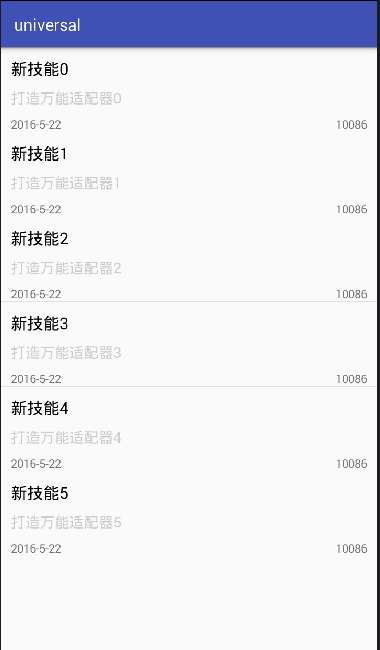
大家看到這個標題是不是覺得很詫異呢?什麼叫終極適配器,其實就是這種適配器是萬能的,所有需要使用適配器的組件,都可用這一個適配器就行。既然這樣,就來講講吧。效果:當然這是個
 Android中去掉標題欄的幾種方法(三種)
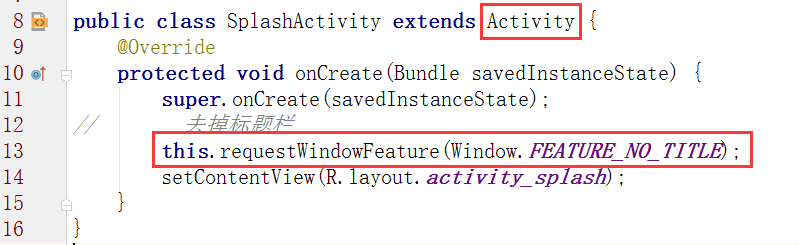
1.在java代碼中(SplashActivity繼承AppCompatActivity時無效)2.在manifest.xml中改Theme3.先在style.xml中自
 Android TextView中文本點擊文字跳轉 (代碼簡單)
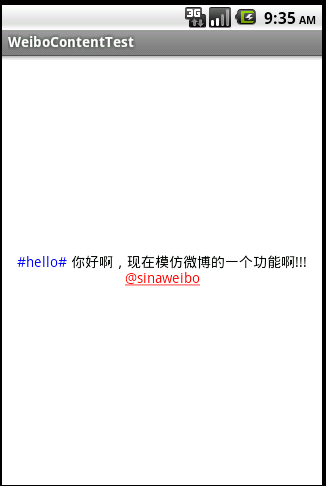
在web頁面中,有a標簽的超鏈接實現跳轉,同樣在Android當中,用TextView控件來顯示文字,實現它的事件來跳轉。用過微博Android手機端的朋友的都知道微博正
 Json解析速度比較-Android API、Gson、Fastjson
IOS現成的API裡的json解析速度非常快,這裡就不說了,今天對比一下Android裡面json的解析庫。首先第一個是Android API裡面自帶的json解析,其次