編輯:關於Android編程
在寫著東西之前,從網上找到很多這方面的源碼,但是基本沒有找到滿意的,包括在GitHub上的比較有名的Android-PullToRefresh-master,思來想去還是自己寫吧,當然其中借鑒了一些別的開源代碼!
廢話不多說,直接上代碼,注釋很全乎,應該不難理解,Demo下載地址在最後:
package com.zs.pulltorefreshtest;

import android.content.Context;
import android.util.AttributeSet;
import android.util.Log;
import android.view.MotionEvent;
import android.view.View;
import android.view.ViewConfiguration;
import android.view.ViewGroup;
import android.widget.LinearLayout;
import android.widget.ListView;
import android.widget.RelativeLayout;
import android.widget.ScrollView;
import android.widget.Scroller;

/**
 * 下拉刷新控件,主要測試了ScrollView,代碼中已實現ListView下拉和上拉刷新,不過沒有怎麼測
 * 至於GridView、WebView等,代碼中沒有實現,不過很好拓展,在isReadyForPullUp() 和
 * isReadyForPullDown()這兩個方法中加入相應的View的上下邊界判斷就OK了
 * @author zhangshuo
 * @version 1.0
 */
public class PullToRefreshView extends RelativeLayout {

	/**手指滑動距離與控件移動距離的比例為2:1*/
	static final float FRICTION = 2.0f;

	/**顯示“下拉刷新”的狀態*/
	static final int PULL_TO_REFRESH = 0x0;
	/**顯示“釋放刷新”的狀態*/
	static final int RELEASE_TO_REFRESH = 0x1;
	/**用戶通過下拉進入的刷新狀態*/
	static final int REFRESHING = 0x2;
	/**用戶通過代碼強制進入的刷新狀態*/
	static final int MANUAL_REFRESHING = 0x3;

	/**私有模式,不提供對外調用,
	 * 僅用來標示“用戶下拉刷新成功後,headerView顯示在頭部,當用戶手指向上滑動時,將headerView跟隨用戶滑動向上滑動”
	 * 及“用戶上拉更多成功後,footerView顯示在底部,當用戶手指向下滑動時,將footerView跟隨用戶滑動向下滑動”這兩個過程的模式*/
	private static final int MODE_PULL_TO_SCROLL_HEADER_OR_FOOTER = 0x0;
	/**標示當前支持下拉刷新模式*/
	public static final int MODE_PULL_DOWN_TO_REFRESH = 0x1;
	/**標示當前支持上拉更多模式*/
	public static final int MODE_PULL_UP_TO_REFRESH = 0x2;
	/**標示當前支持下拉刷新和上拉更多兩種模式*/
	public static final int MODE_BOTH = 0x3;


	private Context context;
	/**滾動對象*/
	private Scroller scroller;
	/**判斷用戶手指的移動距離是否足以響應為move*/
	private int touchSlop;

	private float initialMotionY;
	private float lastMotionX;
	private float lastMotionY;
	private boolean isBeingDragged = false;

	/**記錄headerView當前的狀態*/
	private int headerState = PULL_TO_REFRESH;
	/**記錄footerView當前的狀態*/
	private int footerState = PULL_TO_REFRESH;
	/**當前所支持的模式*/
	private int mode = MODE_PULL_DOWN_TO_REFRESH;
	/**當前處於的模式*/
	private int currentMode;

	/**根據不同的mode,contentView所在父View的位置不同,下拉刷新時為1,上拉更多時為1,上拉下拉都支持時為2*/
	private int index = 1;

	/**標示當處於刷新狀態時,是否需要禁用滑動*/
	private boolean disableScrollingWhileRefreshing = false;

	/**標示是否允許滑動刷新*/
	private boolean isPullToRefreshEnabled = true;

	private LoadingLayout headerLayout;
	private LoadingLayout footerLayout;
	private int headerHeight;

	/**記錄當處於刷新狀態時,用戶繼續下拉的次數*/
	private int pullWithRefreshingCount = 0;
	/**記錄當處於加載更多狀態時,用戶繼續上拉的次數*/
	private int pullWithLoadingMoreCount = 0;

	/**刷新回調接口*/
	private OnRefreshListener onRefreshListener;

	/**加載更多回調接口*/
	private OnLoadMoreListener onLoadMoreListener;


	public PullToRefreshView(Context context) {
		super(context);
		init(context, null);
	}

	public PullToRefreshView(Context context, AttributeSet attrs) {
		super(context, attrs);
		init(context, attrs);
	}

	/**
	 * @方法描述:	初始化方法
	 * @作者:zhangshuo
	 * @param context
	 * @param attrs
	 */
	private void init(Context context, AttributeSet attrs) {

		scroller = new Scroller(context);

		touchSlop = ViewConfiguration.get(context).getScaledTouchSlop();

		this.context = context;

		this.addLoadingView();
	}

	/**
	 * @方法描述: 根據當前模式設置,加載頭部和底部布局
	 * @作者:zhangshuo
	 */
	public void addLoadingView() {

		String pullDownLabel = context
				.getString(R.string.pull_to_refresh_pull_down_label);
		String refreshingDownLabel = context
				.getString(R.string.pull_to_refresh_refreshing_down_label);
		String releaseDownLabel = context
				.getString(R.string.pull_to_refresh_release_down_label);
		String pullUpLabel = context
				.getString(R.string.pull_to_refresh_pull_up_label);
		String refreshingUpLabel = context
				.getString(R.string.pull_to_refresh_refreshing_up_label);
		String releaseUpLabel = context
				.getString(R.string.pull_to_refresh_release_up_label);

		/*加載頭部和底部View*/
		if (mode == MODE_PULL_DOWN_TO_REFRESH || mode == MODE_BOTH) {
			headerLayout = new LoadingLayout(context,
					MODE_PULL_DOWN_TO_REFRESH, releaseDownLabel, pullDownLabel,
					refreshingDownLabel);
			addView(headerLayout, 0, new LinearLayout.LayoutParams(
					ViewGroup.LayoutParams.MATCH_PARENT,
					ViewGroup.LayoutParams.WRAP_CONTENT));
			measureView(headerLayout);
			headerHeight = headerLayout.getMeasuredHeight();
		}
		if (mode == MODE_PULL_UP_TO_REFRESH || mode == MODE_BOTH) {
			footerLayout = new LoadingLayout(context, MODE_PULL_UP_TO_REFRESH,
					releaseUpLabel, pullUpLabel, refreshingUpLabel);
			RelativeLayout.LayoutParams lp2 = new RelativeLayout.LayoutParams(ViewGroup.LayoutParams.MATCH_PARENT, ViewGroup.LayoutParams.WRAP_CONTENT);
		    lp2.addRule(RelativeLayout.ALIGN_PARENT_BOTTOM);
		    addView(footerLayout, lp2);
			measureView(footerLayout);
			headerHeight = footerLayout.getMeasuredHeight();
		}

		/*隱藏頭部和底部View*/
		switch (mode) {
		case MODE_BOTH:
			index = 2;
			setPadding(0, -headerHeight, 0, -headerHeight);
			break;
		case MODE_PULL_UP_TO_REFRESH:
			index = 1;
			setPadding(0, 0, 0, -headerHeight);
			break;
		case MODE_PULL_DOWN_TO_REFRESH:
		default:
			index = 1;
			setPadding(0, -headerHeight, 0, 0);
			break;
		}

	}

	/**
	 * 在頭部和底部View添加完成後,重新布局,以避免在隱藏headerView和footerView時會把一部分內容(contentView)隱藏
	 */
	@Override
	protected void onLayout(boolean changed, int l, int t, int r, int b) {
		// TODO Auto-generated method stub
		super.onLayout(changed, l, t, r, b);
		View contentView = null;
		RelativeLayout.LayoutParams lp1 = null;
		switch (mode) {
		case MODE_BOTH:
			contentView = this.getChildAt(index);
			lp1 = (LayoutParams) contentView.getLayoutParams();
			lp1.setMargins(0, headerHeight, 0, headerHeight);
			break;
		case MODE_PULL_UP_TO_REFRESH:
			contentView = this.getChildAt(index);
			lp1 = (LayoutParams) contentView.getLayoutParams();
			lp1.setMargins(0, 0, 0, headerHeight);
			break;
		case MODE_PULL_DOWN_TO_REFRESH:
		default:
			contentView = this.getChildAt(index);
			lp1 = (LayoutParams) contentView.getLayoutParams();
			lp1.setMargins(0, headerHeight, 0, 0);
			break;
		}
	}

	private void measureView(View child) {
		ViewGroup.LayoutParams p = child.getLayoutParams();
		if (p == null) {
			p = new ViewGroup.LayoutParams(ViewGroup.LayoutParams.MATCH_PARENT,
					ViewGroup.LayoutParams.WRAP_CONTENT);
		}

		int childWidthSpec = ViewGroup.getChildMeasureSpec(0, 0 + 0, p.width);
		int lpHeight = p.height;
		int childHeightSpec;
		if (lpHeight > 0) {
			childHeightSpec = MeasureSpec.makeMeasureSpec(lpHeight,
					MeasureSpec.EXACTLY);
		} else {
			childHeightSpec = MeasureSpec.makeMeasureSpec(0,
					MeasureSpec.UNSPECIFIED);
		}
		child.measure(childWidthSpec, childHeightSpec);
	}

	@Override
	public final boolean onInterceptTouchEvent(MotionEvent event) {

		Log.e("Intercept", "start");

		if (!isPullToRefreshEnabled) {
			return false;
		}

		if ((isLoadingMore() || isRefreshing()) && disableScrollingWhileRefreshing) {
			return true;
		}

		final int action = event.getAction();

		if (action == MotionEvent.ACTION_CANCEL
				|| action == MotionEvent.ACTION_UP) {
			isBeingDragged = false;
			return false;
		}

		if (action != MotionEvent.ACTION_DOWN && isBeingDragged) {
			return true;
		}

		switch (action) {
		case MotionEvent.ACTION_DOWN: {
			Log.e("Intercept", "down");
			if (isReadyForPull()) {
				lastMotionY = initialMotionY = event.getY();
				lastMotionX = event.getX();
				isBeingDragged = false;
			}
			break;
		}
		case MotionEvent.ACTION_MOVE: {
			Log.e("Intercept", "move");
			if (isReadyForPull()) {
				final float y = event.getY();
				final float dy = y - lastMotionY;
				final float yDiff = Math.abs(dy);
				final float xDiff = Math.abs(event.getX() - lastMotionX);

				if (yDiff > touchSlop && yDiff > xDiff) {
					if ((mode == MODE_PULL_DOWN_TO_REFRESH || mode == MODE_BOTH)
							&& dy >= 0.0001f && isReadyForPullDown()) {
						/*可以下拉刷新*/
						lastMotionY = y;
						isBeingDragged = true;
						currentMode = MODE_PULL_DOWN_TO_REFRESH;
					} else if ((mode == MODE_PULL_UP_TO_REFRESH || mode == MODE_BOTH)
							&& dy <= 0.0001f && isReadyForPullUp()) {
						/*可以上拉更多*/
						lastMotionY = y;
						isBeingDragged = true;
						currentMode = MODE_PULL_UP_TO_REFRESH;
					}else if((isRefreshing() && getScrollY() < 0)|| (isLoadingMore() && getScrollY() > 0)){
						/*當前headerView或footerView處於顯示狀態,開啟跟隨手指滑動模式*/
						lastMotionY = y;
						isBeingDragged = true;
						currentMode = MODE_PULL_TO_SCROLL_HEADER_OR_FOOTER;
					}
				}
			}
			break;
		}
		}
		return isBeingDragged;
	}

	@Override
	public final boolean onTouchEvent(MotionEvent event) {
		Log.e("Touch", "start");
		if (!isPullToRefreshEnabled) {
			return false;
		}

		if (isRefreshing() && disableScrollingWhileRefreshing) {
			return true;
		}

		if (event.getAction() == MotionEvent.ACTION_DOWN
				&& event.getEdgeFlags() != 0) {
			return false;
		}

		switch (event.getAction()) {

		case MotionEvent.ACTION_DOWN: {
			Log.e("Touch", "down");
			if (isReadyForPull()) {
				lastMotionY = initialMotionY = event.getY();
				return true;
			}
			break;
		}
		case MotionEvent.ACTION_MOVE: {
			Log.e("Touch", "move");
			if (isBeingDragged) {
				lastMotionY = event.getY();
				this.pullEvent();
				return true;
			}
			break;
		}
		case MotionEvent.ACTION_CANCEL:
		case MotionEvent.ACTION_UP: {
			Log.e("Touch", "up");
			if (isBeingDragged) {
				isBeingDragged = false;

				if(isRefreshing() && pullWithRefreshingCount == 0){
					pullWithRefreshingCount = 1;
				}
				if(isLoadingMore() && pullWithLoadingMoreCount == 0){
					pullWithLoadingMoreCount = 1;
				}

				switch (currentMode) {
				case MODE_PULL_TO_SCROLL_HEADER_OR_FOOTER:
					/*將headerView和footerView隱藏*/
					smoothScrollTo(0);
					break;
				case MODE_PULL_UP_TO_REFRESH:
					/*判斷是否激活加載更多*/
					if (footerState == RELEASE_TO_REFRESH && null != onLoadMoreListener) {
						setLoadingMoreInternal(true);
						onLoadMoreListener.onLoadMore();
					} else {
						smoothScrollTo(0);
					}
					break;
				case MODE_PULL_DOWN_TO_REFRESH:
					/*判斷是否激活刷新*/
					if (headerState == RELEASE_TO_REFRESH && null != onRefreshListener) {
						setRefreshingInternal(true);
						onRefreshListener.onRefresh();
					} else {
						smoothScrollTo(0);
					}
					break;
				}

				return true;
			}
			break;
		}
		}

		return false;
	}

	/**
	 * @方法描述:	處理用戶滑動的方法
	 * @作者:zhangshuo
	 *
	 * @return
	 */
	private boolean pullEvent() {

		final int newHeight;
		final int oldHeight = this.getScrollY();

		switch (currentMode) {
		case MODE_PULL_TO_SCROLL_HEADER_OR_FOOTER:
			newHeight = Math.round((initialMotionY - lastMotionY));
			break;
		case MODE_PULL_UP_TO_REFRESH:
			newHeight = Math.round(Math.max(initialMotionY - lastMotionY, 0)
					/ FRICTION);
			break;
		case MODE_PULL_DOWN_TO_REFRESH:
		default:
			newHeight = Math.round(Math.min(initialMotionY - lastMotionY, 0)
					/ FRICTION);
			break;
		}

		if(isRefreshing() && pullWithRefreshingCount == 0){
			/*處於刷新狀態下,第一次繼續下拉,此時headerView已經顯示在頭部*/
			if((-headerHeight + newHeight) < 0){
				scrollTo(-headerHeight + newHeight);
			}else{
				scrollTo(0);
				if(((ScrollView)getChildAt(index)).getChildAt(0).getHeight() > getChildAt(index).getHeight()){
					getChildAt(index).scrollTo(0, newHeight - headerHeight);
				}
			}
		}else if(isLoadingMore() && pullWithLoadingMoreCount == 0){
			/*處於刷新狀態下,第一次繼續下拉,此時headerView已經顯示在頭部*/
			if((headerHeight + newHeight) > 0){
				scrollTo(headerHeight + newHeight);
			}else{
				scrollTo(0);
				if(((ScrollView)getChildAt(index)).getChildAt(0).getHeight() > getChildAt(index).getHeight()){
					getChildAt(index).scrollTo(0, newHeight + headerHeight + ((ScrollView)getChildAt(index)).getChildAt(0).getHeight() - getChildAt(index).getHeight());
				}
			}
		}else{
			scrollTo(newHeight);
		}

		if (newHeight != 0) {

			switch (currentMode) {
			case MODE_PULL_UP_TO_REFRESH:
				if (footerState == PULL_TO_REFRESH && headerHeight < Math.abs(newHeight)) {
					footerState = RELEASE_TO_REFRESH;
					footerLayout.releaseToRefresh();
					return true;

				} else if (footerState == RELEASE_TO_REFRESH
						&& headerHeight >= Math.abs(newHeight)) {
					footerState = PULL_TO_REFRESH;
					footerLayout.pullToRefresh();
					return true;
				}
				break;
			case MODE_PULL_DOWN_TO_REFRESH:
				if (headerState == PULL_TO_REFRESH && headerHeight < Math.abs(newHeight)) {
					headerState = RELEASE_TO_REFRESH;
					headerLayout.releaseToRefresh();
					return true;

				} else if (headerState == RELEASE_TO_REFRESH
						&& headerHeight >= Math.abs(newHeight)) {
					headerState = PULL_TO_REFRESH;
					headerLayout.pullToRefresh();
					return true;
				}
				break;
			}

		}

		return oldHeight != newHeight;
	}

	/**
	 * @方法描述: 判斷當前狀態是否可以進行上拉更多或下拉刷新的滑動操作
	 * @作者:zhangshuo
	 * @return
	 */
	private boolean isReadyForPull() {
		switch (mode) {
		case MODE_PULL_DOWN_TO_REFRESH:
			return isReadyForPullDown();
		case MODE_PULL_UP_TO_REFRESH:
			return isReadyForPullUp();
		case MODE_BOTH:
			return isReadyForPullUp() || isReadyForPullDown();
		}
		return false;
	}

	/**
	 * @方法描述: 判斷當前狀態是否可以進行下拉刷新操作
	 * @作者:zhangshuo
	 * @return
	 */
	private boolean isReadyForPullDown() {
		// TODO Auto-generated method stub
		if (getChildCount() > 1) {
			Log.e("Ready--down", String.valueOf(getChildCount()));
			View childView = this.getChildAt(index);
			if (childView instanceof ListView) {
				int top = ((ListView) childView).getChildAt(0).getTop();
				int pad = ((ListView) childView).getListPaddingTop();
				if ((Math.abs(top - pad)) < 3
						&& ((ListView) childView).getFirstVisiblePosition() == 0) {
					return true;
				} else {
					return false;
				}
			} else if (childView instanceof ScrollView) {
				Log.e("Ready--down", "scrollView");
				if (((ScrollView) childView).getScrollY() == 0) {
					return true;
				} else {
					return false;
				}
			}

		}
		return false;
	}

	/**
	 * @方法描述:判斷當前狀態是否可以上拉更多的滑動操作
	 * @作者:zhangshuo
	 * @return
	 */
	private boolean isReadyForPullUp() {
		// TODO Auto-generated method stub
		if (getChildCount() > 1) {
			Log.e("Ready--up", String.valueOf(getChildCount()));
			View childView = this.getChildAt(index);
			if (childView instanceof ListView) {
				int top = ((ListView) childView).getChildAt(
						((ListView) childView).getCount()).getBottom();
				int pad = ((ListView) childView).getListPaddingBottom();
				if ((Math.abs(top - pad)) < 3
						&& ((ListView) childView).getFirstVisiblePosition() == ((ListView) childView)
								.getCount()) {
					return true;
				} else {
					return false;
				}
			} else if (childView instanceof ScrollView) {
				Log.e("Ready--up", "scrollView");
				int off = ((ScrollView) childView).getScrollY()
						+ ((ScrollView) childView).getHeight()
						- ((ScrollView) childView).getChildAt(0).getHeight();
				if (off >= 0) {
					return true;
				} else {
					return false;
				}
			}

		}
		return false;
	}

	/**
	 * @方法描述:	是否允許上拉更多或下拉刷新的滑動操作
	 * @作者:zhangshuo
	 * @return
	 */
	public final boolean isPullToRefreshEnabled() {
		return isPullToRefreshEnabled;
	}

	/**
	 * @方法描述:	當處於刷新狀態時,是否需要禁用滑動
	 * @作者:zhangshuo
	 * @return
	 */
	public final boolean isDisableScrollingWhileRefreshing() {
		return disableScrollingWhileRefreshing;
	}

	/**
	 * @方法描述:	當前正處於刷新中
	 * @作者:zhangshuo
	 * @return
	 */
	public final boolean isRefreshing() {
		return headerState == REFRESHING || headerState == MANUAL_REFRESHING;
	}

	/**
	 * @方法描述:	當前正處於加載更多中
	 * @作者:zhangshuo
	 * @return
	 */
	public final boolean isLoadingMore() {
		return footerState == REFRESHING || footerState == MANUAL_REFRESHING;
	}

	/**
	 * @方法描述:	 設置當處於刷新狀態時,是否需要禁用滑動
	 * @作者:zhangshuo
	 * @param disableScrollingWhileRefreshing
	 */
	public final void setDisableScrollingWhileRefreshing(
			boolean disableScrollingWhileRefreshing) {
		this.disableScrollingWhileRefreshing = disableScrollingWhileRefreshing;
	}

	/**
	 * @方法描述:	結束刷新狀態
	 * @作者:zhangshuo
	 *
	 */
	public final void onRefreshComplete() {
		if (headerState != PULL_TO_REFRESH) {
			resetHeader();
		}
		pullWithRefreshingCount = 0;
	}

	/**
	 * @方法描述:	結束加載更多狀態
	 * @作者:zhangshuo
	 *
	 */
	public final void onLoadMoreComplete() {
		if (footerState != PULL_TO_REFRESH) {
			resetFooter();
		}
		pullWithLoadingMoreCount = 0;
	}

	/**
	 * @方法描述: 設置否允許滑動刷新
	 * @作者:zhangshuo
	 * @param enable
	 */
	public final void setPullToRefreshEnabled(boolean enable) {
		this.isPullToRefreshEnabled = enable;
	}

	/**
	 * @方法描述:	強制設置為刷新狀態
	 * @作者:zhangshuo
	 */
	public final void setRefreshing() {
		this.setRefreshing(true);
	}

	/**
	 * @方法描述:	強制設置為加載更多狀態
	 * @作者:zhangshuo
	 */
	public final void setLoadingMore(){
		this.setLoadingMore(true);
	}

	/**
	 * @方法描述:	強制設置為刷新狀態
	 * @作者:zhangshuo
	 * @param doScroll
	 */
	public final void setRefreshing(boolean doScroll) {
		if (!isRefreshing()) {
			setRefreshingInternal(doScroll);
			headerState = MANUAL_REFRESHING;
		}
	}

	/**
	 * @方法描述:	強制設置為加載更多狀態
	 * @作者:zhangshuo
	 * @param doScroll
	 */
	public final void setLoadingMore(boolean doScroll) {
		if (!isLoadingMore()) {
			setLoadingMoreInternal(doScroll);
			footerState = MANUAL_REFRESHING;
		}
	}

	protected final int getCurrentMode() {
		return currentMode;
	}

	protected final LoadingLayout getFooterLayout() {
		return footerLayout;
	}

	protected final LoadingLayout getHeaderLayout() {
		return headerLayout;
	}

	protected final int getHeaderHeight() {
		return headerHeight;
	}

	protected final int getMode() {
		return mode;
	}

	/**
	 * @方法描述:	重置headerView
	 * @作者:zhangshuo
	 */
	protected void resetHeader() {
		headerState = PULL_TO_REFRESH;
		isBeingDragged = false;

		if (null != headerLayout) {
			headerLayout.reset();
		}

		smoothScrollTo(0);
	}

	/**
	 * @方法描述:	重置footerView
	 * @作者:zhangshuo
	 */
	protected void resetFooter() {
		footerState = PULL_TO_REFRESH;
		isBeingDragged = false;

		if (null != footerLayout) {
			footerLayout.reset();
		}

		smoothScrollTo(0);
	}

	/**
	 * @方法描述:	強制設置為刷新狀態,並顯示出headerView
	 * @作者:zhangshuo
	 * @param doScroll
	 */
	protected void setRefreshingInternal(boolean doScroll) {
		headerState = REFRESHING;
		pullWithRefreshingCount = 0;

		if (null != headerLayout) {
			headerLayout.refreshing();
		}

		if (doScroll) {
			smoothScrollTo(-headerHeight);
		}
	}

	/**
	 * @方法描述:	強制設置為加載更多狀態,並顯示出footerView
	 * @作者:zhangshuo
	 * @param doScroll
	 */
	protected void setLoadingMoreInternal(boolean doScroll) {
		footerState = REFRESHING;
		pullWithLoadingMoreCount = 0;

		if (null != footerLayout) {
			footerLayout.refreshing();
		}

		if (doScroll) {
			smoothScrollTo(headerHeight);
		}
	}

	protected final void scrollTo(int y) {
		scrollTo(0, y);
	}

	protected final void smoothScrollTo(int y) {

		scroller.startScroll(0, getScrollY(), 0, -(getScrollY() - y), 500);
		invalidate();

	}

	@Override
	public void computeScroll() {
		// TODO Auto-generated method stub
		if (scroller.computeScrollOffset()) {
			scrollTo(0, this.scroller.getCurrY());
			postInvalidate();
		}
	}

	/**
	 * @方法描述: 設置刷新回調接口
	 * @作者:zhangshuo
	 * @param listener
	 */
	public final void setOnRefreshListener(OnRefreshListener listener) {
		this.onRefreshListener = listener;
	}

	/**
	 * @方法描述:	設置加載更多回調接口
	 * @作者:zhangshuo
	 * @param listener
	 */
	public final void setOnLoadMoreListener(OnLoadMoreListener listener){
		this.onLoadMoreListener  = listener;
	}

	/**
	 * @CLASS:OnRefreshListener
	 * @描述: 刷新回調接口
	 * @作者:zhangshuo
	 * @版本:v1.0
	 * @日期:2014年7月15日 上午11:59:50
	 */
	public static interface OnRefreshListener {

		public void onRefresh();

	}

	/**
	 * @CLASS:OnLoadMoreListener
	 * @描述: 加載更多回調接口
	 * @作者:zhangshuo
	 * @版本:v1.0
	 * @日期:2014年7月15日 下午12:00:06
	 */
	public static interface OnLoadMoreListener {

		public void onLoadMore();

	}

}
由於時間關系,我主要測試了ScrollView,代碼中已實現ListView下拉和上拉刷新,不過沒有怎麼測,
至於GridView、WebView等,代碼中沒有實現,不過很好拓展,在isReadyForPullUp() 和
isReadyForPullDown()這兩個方法中加入相應的View的上下邊界判斷就OK了!
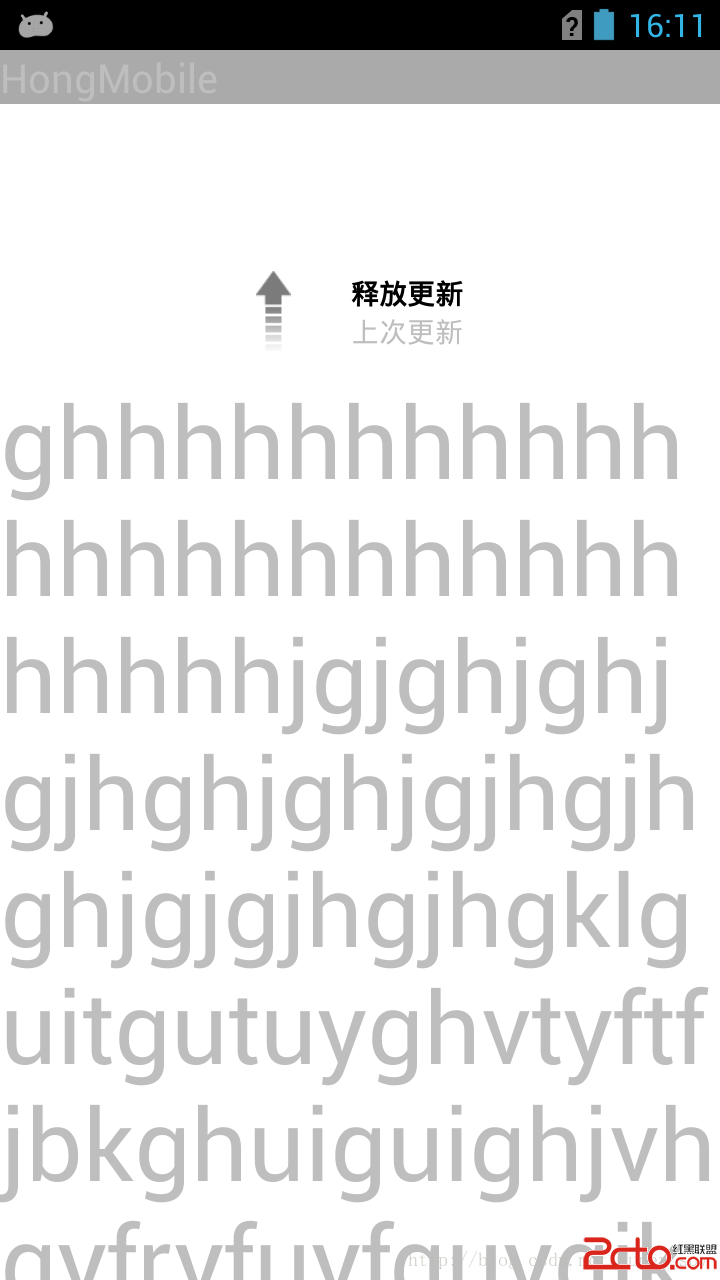
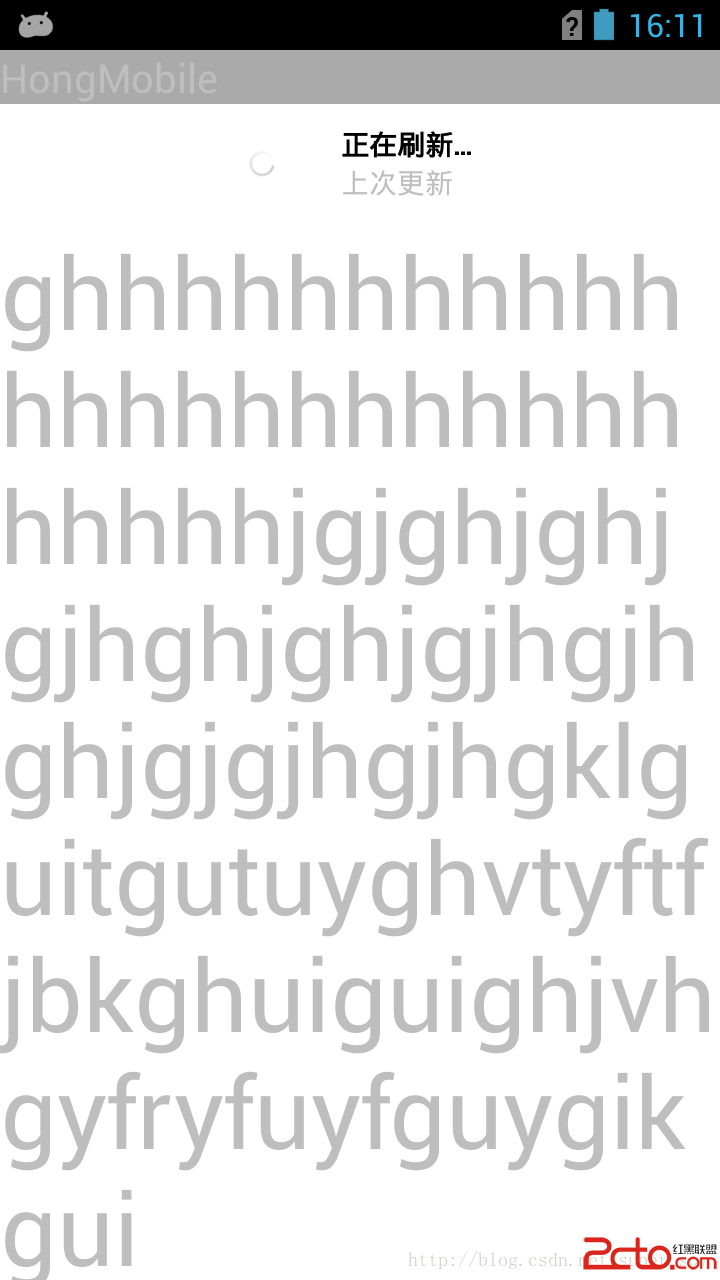
源碼下載地址:http://download.csdn.net/detail/super_spy/7642641
 解析Android 如何獲得已安裝應用大小
應用層面如何獲得已經安裝應用的大小?網上找了一下有兩種方法:1、直接拿到data目錄下對應的包,然後用File.length()方法獲得。然後會發現和設置裡顯示的大小不同
 Android Studio 基本設置
一般來說,Android開發者最初開發都是使用的Eclipse,到後面會用Android Studio工具來開發,使用前一般要做一些簡單設置。以下是Studio中常見的設
 Android Demo之旅 ListView底部添加加載更多按鈕實現數據分頁
在我們的實際項目中,數據應該說是很多的,我們的ListView不可能一下子把數據全部加載進來,我們可以當滾動條滾動到ListView的底部的時候,給一個更多的提示,當我們
 Android生命周期中的onPause()和onStop()
我不知道大家有沒有這樣問題,項目做多了,就容易忽略最最基礎的知識,其實我也是在最近發現了自己也存在這樣的問題。因此打算做一些最基礎的知識的調研來重新學習和回顧這些容易被忽