編輯:關於Android編程
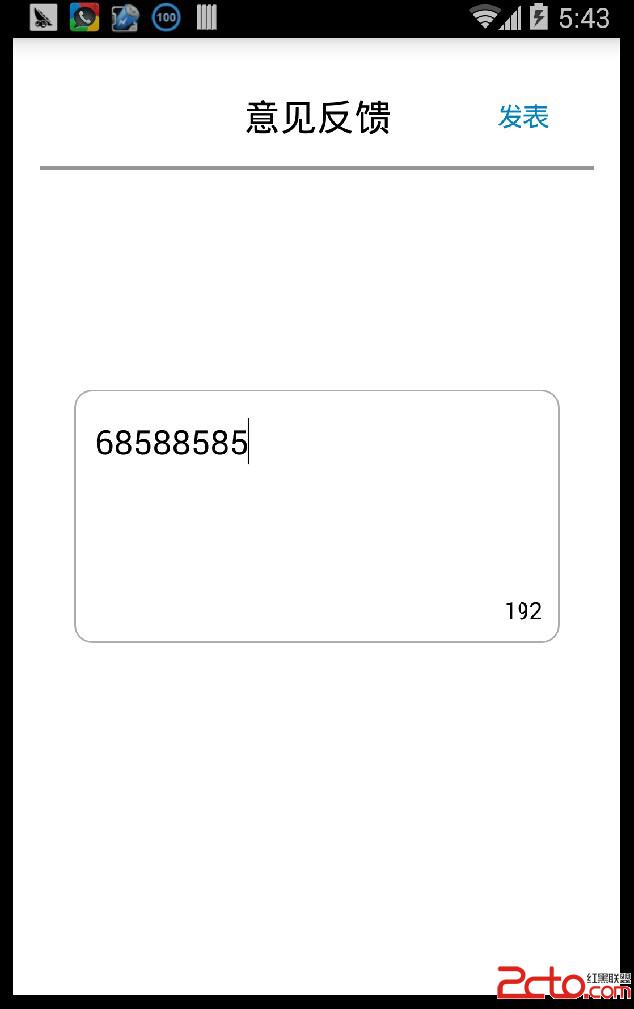
EditText可以通過layer-list來繪制背景:
          //用白色來填充裡面

          //邊框的圓角的弧度
private EditText mCustom_edittext;
	private TextView left_word_num;
	private static final int MAX_INPUT_NUM = 200;
	private TextView other_char_hint;

	@Override
	protected void onCreate(Bundle savedInstanceState) {
		super.onCreate(savedInstanceState);
		requestWindowFeature(Window.FEATURE_NO_TITLE);
		setContentView(R.layout.edittext);
		mCustom_edittext = (EditText)findViewById(R.id.custom_edittext);
		other_char_hint = (TextView)findViewById(R.id.other_char_hint);
		other_char_hint.setText(only enlish accepted);
		left_word_num = (TextView) findViewById(R.id.left_word_num);
		mCustom_edittext.addTextChangedListener(new TextWatcher() {

			private CharSequence temp;
			private int selectionStart;
			private int selectionEnd;

			@Override
			public void onTextChanged(CharSequence s, int start, int before, int count) {
			}

			@Override
			public void beforeTextChanged(CharSequence s, int start, int count, int after) {
				temp = s;
			}

			@Override
			public void afterTextChanged(Editable s) {
				selectionStart = mCustom_edittext.getSelectionStart();
				selectionEnd = mCustom_edittext.getSelectionEnd();

				String lastword = s.toString().trim();
				if (lastword.length() > 0) {
					lastword = lastword.substring(lastword.length() - 1, lastword.length());
					if(!isContentValid(temp.toString())) {
						other_char_hint.setVisibility(View.VISIBLE);
						for(int i=0;i < temp.toString().length();i++) {
							String temp1 = temp.toString().substring(i, i+1);
							if(!isInputValid(temp1)) {
								//使用setSpan使EditText字底下畫黑線
								s.setSpan(new UnderlineSpan(), i, i+1, Spanned.SPAN_EXCLUSIVE_EXCLUSIVE);
							}
						}
					}else{
						other_char_hint.setVisibility(View.GONE);
					}

				}else{
					other_char_hint.setVisibility(View.GONE);
				}
				left_word_num.setText(String.valueOf(MAX_INPUT_NUM - temp.length()));

			}

		});

	}

	private boolean isContentValid(String content) {
		for(int i=0;i < content.length(); i++) {
			String value = content.substring(i,i+1);
			if(!isInputValid(value)) {
				return false;
			}
		}
		return true;
	}

	private boolean isInputValid(String s) {
		byte[] ch_array = s.getBytes();
		if (ch_array.length == 1) {
			return true;
		} else {
			return false;
		}
	}
 Android Listview多tab上滑懸浮效果
樣例 近期要做一個含有兩個tab切換頁面,兩個頁面有公共的描述信息區域,兩個tab都是listvi
 Android使用SQLite數據庫的示例
一. 簡介 SQLite數據庫是一個輕量級的DBMS(數據庫管理系統)。SQLite使用單個文件存儲數據,Android標准庫包含SQLite庫以及配套使用的一些Java
 Android 計時器 Chronometer or handler+timer+timerTask
可能我們在開發中會時常用到計時器這玩意兒,比如在錄像的時候,我們可能需要在右上角顯示一個計時器。這個東西其實實現起來非常簡單。只需要用一個控件Chronometer,是的
 微信小程序 跳轉頁面的兩種方法詳解
微信小程序 跳轉頁面小程序頁面有2種跳轉,可以在wxml頁面或者js中:1,在wxml頁面中: <navigator url=../index/index>跳