編輯:關於Android編程
(1)程序說明
代碼中的兩個按鈕處理事件,分別進行了文本的讀寫操作。
1)文件寫操作
首先調用Activity的openFileOutPut()方法獲得文本文件的輸出流,第一個參數為文本文件的名字,第二個為文件的打開方式
接著調用Outputstream對象的write()方法將Textview中獲得文本信息寫入outputstream對象,最後調用close()方法完成寫入操作。
2)文件讀操作
首先調用Activity的openFileInPut()方法獲得文本文件的輸入流,
接著調用輸入流對象的read()方法將輸入流中的字節信息讀入一個ByteArrayOutputStream對象,最後將ByteArrayOutputStream轉換為string顯示在Textview中
(2)布局文件
(2)代碼
package com.liuzuyi.file;

import java.io.ByteArrayOutputStream;
import java.io.InputStream;
import java.io.OutputStream;

import android.support.v7.app.ActionBarActivity;
import android.support.v7.app.ActionBar;
import android.support.v4.app.Fragment;
import android.app.Activity;
import android.content.Context;
import android.os.Bundle;
import android.util.Log;
import android.view.LayoutInflater;
import android.view.Menu;
import android.view.MenuItem;
import android.view.View;
import android.view.View.OnClickListener;
import android.view.ViewGroup;
import android.widget.Button;
import android.widget.EditText;
import android.widget.TextView;
import android.widget.Toast;
import android.os.Build;

public class MainActivity extends Activity {

	private  EditText filename;
	private  EditText context;
	private TextView textcontent;
	private static final String TAG="simplefile";

	protected void onCreate(Bundle savedInstanceState) {
		super.onCreate(savedInstanceState);
		setContentView(R.layout.activity_main);
		filename=(EditText)findViewById(R.id.filename);
		context=(EditText)findViewById(R.id.content);
		textcontent=(TextView)findViewById(R.id.textcontent);
		Button savebtn=(Button)this.findViewById(R.id.savebutton);
		Button viewbtn=(Button)this.findViewById(R.id.readbutton);
		savebtn.setOnClickListener(l);
		viewbtn.setOnClickListener(l);

	}
   private View.OnClickListener l =new OnClickListener() {
	public void onClick(View v) {

		 Button button =(Button)v;

		 String namestr = filename.getText().toString().trim();

		 String contentstr =context.getText().toString();

		 switch ( button.getId() ) {
		case R.id.savebutton:
			String resid_s ="success";
			OutputStream filsos= null;
			try {
				filsos=MainActivity.this.openFileOutput(namestr+".txt", Context.MODE_APPEND) ;
				filsos.write(contentstr.getBytes());
				filsos.close();
			} catch (Exception e) {
				 resid_s = "faile";
				 e.printStackTrace();
			}
			Toast.makeText(MainActivity.this,  resid_s,Toast.LENGTH_LONG).show();
			Log.i(TAG, namestr);
			Log.i(TAG, contentstr);
			break;
		case R.id.readbutton:
			String resid_v ="success";
			InputStream filsIs= null;
			String contentst = null;
			try {
				filsIs=MainActivity.this.openFileInput(namestr+".txt") ;
				ByteArrayOutputStream oStream = new ByteArrayOutputStream();

			byte[] buffer = new byte[1024];
			int len = -1;
			  while( (len = filsIs.read(buffer)) != -1 )
			    {oStream.write(buffer,0,len);}
			  contentst=oStream.toString();
			  oStream.close();
			  filsIs.close();
			} catch (Exception e) {
				 resid_v ="faile";
				 e.printStackTrace();
			}
			textcontent.setText( contentst);
			Log.i(TAG, contentst);
			Toast.makeText(MainActivity.this, resid_v,Toast.LENGTH_LONG).show();

			Log.i(TAG,namestr);
			break;
		}
	  }
    };
}
 Android中dp,px,sp概念梳理
今天又開始我的App開發,因為之前一直做的是SDK,所以涉及到界面UI很少,剛開始做Android應用的時候,沒有對dp,px,sp等概念有一個深入的了解,只知道他們之間
 Android開發之ListView、GridView 詳解及示例代碼
ListView與GridView是Android開發中的常用控件,它們和Adapter配合使用能夠實現很多界面效果。下面分別以實例
 AndroidUI組件之AdapterViewFilpper
package com.gc.adapterviewflipperdemo; /** * 功能:自動播放的圖片庫 * @author Android將軍 */ /*
 Android之okHttpClient+handler+LruCache緩存網絡圖片學習筆記(通用MVP模式)
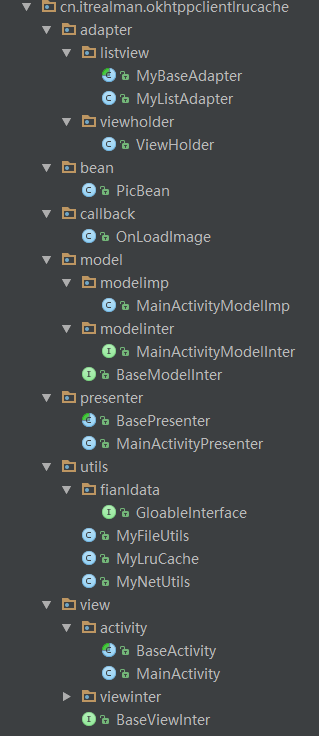
上一次我在學習過程中,寫了一篇關於緩存網絡圖片的學習筆記,在那一篇博客中使用的是AsyncTask異步任務請求的方式緩存的,這一次我從學習中,學會了一種新的緩存方法,就是