編輯:關於Android編程
1.Android中使用Matrix對圖像進行縮放、旋轉、平移、斜切等變換的。
Matrix是一個3*3的矩陣,其值對應如下:
下面給出具體坐標對應變形的屬性
|scaleX, skewX, translateX|
|skewY, scaleY, translateY|
|0 ,0 , scale |
Matrix提供了一些方法來控制圖片變換:
setTranslate(float dx,float dy):控制Matrix進行位移。
setSkew(float kx,float ky):控制Matrix進行傾斜,kx、ky為X、Y方向上的比例。
setSkew(float kx,float ky,float px,float py):控制Matrix以px、py為軸心進行傾斜,kx、ky為X、Y方向上的傾斜比例。
setRotate(float degrees):控制Matrix進行depress角度的旋轉,軸心為(0,0)。
setRotate(float degrees,float px,float py):控制Matrix進行depress角度的旋轉,軸心為(px,py)。
setScale(float sx,float sy):設置Matrix進行縮放,sx、sy為X、Y方向上的縮放比例。
setScale(float sx,float sy,float px,float py):設置Matrix以(px,py)為軸心進行縮放,sx、sy為X、Y方向上的縮放比例。
注意:以上的set方法,均有對應的post和pre方法,Matrix調用一系列set,pre,post方法時,可視為將這些方法插入到一個隊列.當然,按照隊列中從頭至尾的順序調用執行.其中pre表示在隊頭插入一個方法,post表示在隊尾插入一個方法.而set表示把當前隊列清空,並且總是位於隊列的最中間位置.當執行了一次set後:pre方法總是插入到set前部的隊列的最前面,post方法總是插入到set後部的隊列的最後面
Demo
package com.example.testaa;

import org.androidannotations.annotations.AfterViews;
import org.androidannotations.annotations.Click;
import org.androidannotations.annotations.EActivity;
import org.androidannotations.annotations.UiThread;
import org.androidannotations.annotations.ViewById;

import android.app.Activity;
import android.graphics.Bitmap;
import android.graphics.BitmapFactory;
import android.graphics.Matrix;
import android.util.Log;
import android.widget.Button;
import android.widget.ImageView;
import android.widget.Toast;

@EActivity(R.layout.activity_main)
public class MainActivity extends Activity {

	@ViewById
	ImageView iv1;

	@ViewById
	ImageView iv2;

	@ViewById
	Button btn1;

	@ViewById
	Button btn2;

	@ViewById
	Button btn3;

	@ViewById
	Button btn4;

	@ViewById
	Button btn5;

	Bitmap bitmap = null;

	/**
	 * 加載完View之後進行的處理
	 */
	@AfterViews
	void afterViewProcess() {
		bitmap = BitmapFactory.decodeResource(getResources(), R.drawable.lena);

	}

	/**
	 * 縮小
	 */
	@Click
	void btn1() {
		Matrix matrix = new Matrix();
		matrix.setScale(0.5f, 0.5f);
		Bitmap bm = Bitmap.createBitmap(bitmap, 0, 0, bitmap.getWidth(),
				bitmap.getHeight(), matrix, true);
		iv2.setImageBitmap(bm);
		showToast(matrix);
	}

    /**
     * 先縮小後旋轉
     */
	@Click
	void btn2() {
		Matrix matrix = new Matrix();
		matrix.setScale(0.5f, 0.5f);// 縮小為原來的一半
		matrix.postRotate(45.0f);// 旋轉45度 == matrix.setSinCos(0.5f, 0.5f);
		Bitmap bm = Bitmap.createBitmap(bitmap, 0, 0, bitmap.getWidth(),
				bitmap.getHeight(), matrix, true);
		iv2.setImageBitmap(bm);
		showToast(matrix);
	}

	/**
	 * 平移
	 */
	@Click
	void btn3() {
		Matrix matrix = new Matrix();
		matrix.setTranslate(bitmap.getWidth() / 2, bitmap.getHeight() / 2);// 向左下平移
		Bitmap bm = Bitmap.createBitmap(bitmap, 0, 0, bitmap.getWidth(),
				bitmap.getHeight(), matrix, true);
		iv2.setImageBitmap(bm);
		showToast(matrix);
	}

	/**
	 * 斜切
	 */
	@Click
	void btn4() {
		Matrix matrix = new Matrix();
		matrix.setSkew(0.5f, 0.5f);// 斜切
		matrix.postScale(0.5f, 0.5f);// 縮小為原來的一半
		Bitmap bm = Bitmap.createBitmap(bitmap, 0, 0, bitmap.getWidth(),
				bitmap.getHeight(), matrix, true);
		iv2.setImageBitmap(bm);
		showToast(matrix);
	}

	/**
	 * 相當於自由變換
	 * 由一個矩形變成四邊形
	 */
	@Click
	void btn5() {
		Matrix matrix = new Matrix();
		float[] src = new float[] { 0, 0, // 左上
				bitmap.getWidth(), 0,// 右上
				bitmap.getWidth(), bitmap.getHeight(),// 右下
				0, bitmap.getHeight() };// 左下
		float[] dst = new float[] { 0, 0,
				bitmap.getWidth(), 30,
				bitmap.getWidth(), bitmap.getHeight() - 30,
				0,bitmap.getHeight() };
		matrix.setPolyToPoly(src, 0, dst, 0, src.length/2);
		Bitmap bm = Bitmap.createBitmap(bitmap, 0, 0, bitmap.getWidth(),
				bitmap.getHeight(), matrix, true);
		iv2.setImageBitmap(bm);
		showToast(matrix);
	}

	/**
	 * 顯示矩陣中的值
	 * @param matrix
	 */
	@UiThread
	void showToast(Matrix matrix) {
		String string = "";
		float[] values = new float[9];
		matrix.getValues(values);
		for (int i = 0; i < values.length; i++) {
			string += "matrix.at" + i + "=" + values[i];
		}
		Toast.makeText(this, string, Toast.LENGTH_SHORT).show();
		Log.d("TEST", string);
	}
}
以下是分別對圖像進行如下操作的結果:
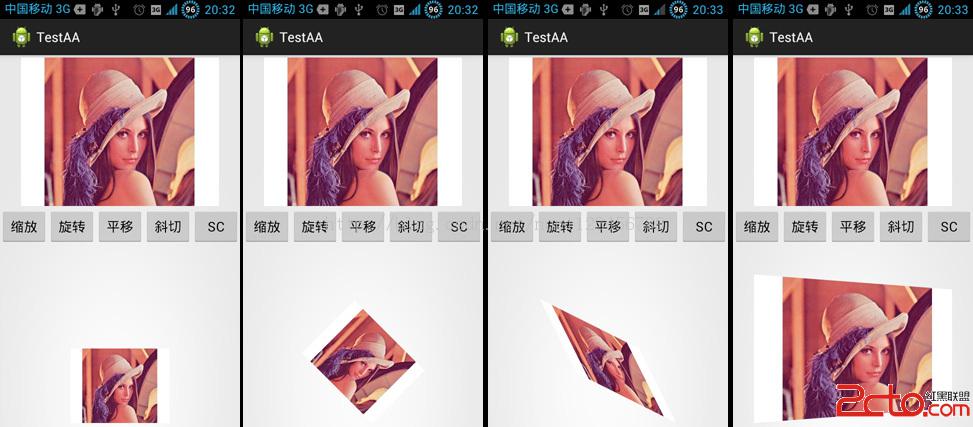
整個項目的下載地址:http://download.csdn.net/detail/nuptboyzhb/7261933
 對現有的控件進行拓展,以TextView為例
1.自定義控件有一個方法是在原生控件的基礎上進行的拓展,增加新的功能,修改顯示的UI等,一般我們可以子啊onDraw()方法中隊原生的控件進行的拓展。2.下面以為text
 淺談android中圖片處理之圖形變換特效Matrix(四)
今天,我們就來談下android中圖片的變形的特效,在上講博客中我們談到android中圖片中的色彩特效來實現的。改變它的顏色主要通過ColorMatrix類來實現。現在
 Android基礎之Activity生命周期
子曰:溫故而知新,可以為師矣。《論語》學習技術也一樣,對於技術文檔或者經典的技術書籍來說,指望看一遍就完全掌握,那基本不大可能,所以我們需要經常回過頭再仔細研讀幾遍,以領
 Android ListView適配器(Adapter)優化方法詳解
Android ListView的優化,在做Android項目的時候,在用到ListView 界面及數據顯示,這個時候如果資源過大,對項目來說,用戶體驗肯定是不好的,這裡