編輯:關於Android編程
現在,市場上android的機型太多,如何讓自己的應用更多的適配不同的機型,這是一個非常現實的並且是要處理解決的問題。android官方給出的解決文檔是從三個方向來分析處理的。
1.1 合理使用wrap_content,match_parent
1.2 盡可能的使用 RelativeLayout
1.3 針對不同的機型,使用不同的布局文件(Use Size Qualifiers):
res/layout/main.xml
res/layout-large/main.xml
1.4 盡量使用點9圖片(Use Nine-patch Bitmaps)
2.1 使用與密度無關的相素單位(Use Density-independent Pixels)-----dp,sp
不同分辨率之間的比例關系:
xhdpi: 2.0
hdpi: 1.5
mdpi: 1.0 (baseline)
ldpi: 0.75
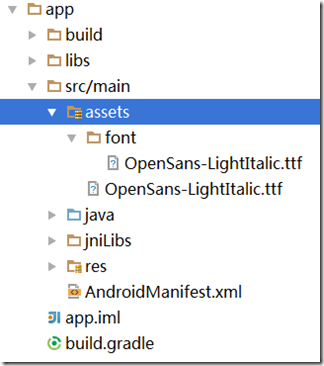
awesomeimage.png圖片位置的放置:
MyProject/
res/
drawable-xhdpi/
awesomeimage.png
drawable-hdpi/
awesomeimage.png
drawable-mdpi/
awesomeimage.png
drawable-ldpi/
awesomeimage.png
3.1 識別當前的布局文件是那個(Determine the Current Layout):這個主要是采用標志位的方式來得到當前使用的布局文件
public class NewsReaderActivity extends FragmentActivity {
    boolean mIsDualPane;

    @Override
    public void onCreate(Bundle savedInstanceState) {
        super.onCreate(savedInstanceState);
        setContentView(R.layout.main_layout);

        View articleView = findViewById(R.id.article);
        mIsDualPane = articleView != null &&
                        articleView.getVisibility() == View.VISIBLE;
    }
}Button catButton = (Button) findViewById(R.id.categorybutton);
OnClickListener listener = /* create your listener here */;
if (catButton != null) {
catButton.setOnClickListener(listener);
}3.2 根據當前布局,使用不同的響應操作(React According to Current Layout)
public void onHeadlineSelected(int index) {
    mArtIndex = index;
    if (mIsDualPane) {
        /* display article on the right pane */
        mArticleFragment.displayArticle(mCurrentCat.getArticle(index));
    } else {
        /* start a separate activity */
        Intent intent = new Intent(this, ArticleActivity.class);
        intent.putExtra("catIndex", mCatIndex);
        intent.putExtra("artIndex", index);
        startActivity(intent);
    }
}
final String CATEGORIES[] = { "Top Stories", "Politics", "Economy", "Technology" };
public void onCreate(Bundle savedInstanceState) {
....
if (mIsDualPane) {
/* use tabs for navigation */
actionBar.setNavigationMode(android.app.ActionBar.NAVIGATION_MODE_TABS);
int i;
for (i = 0; i < CATEGORIES.length; i++) {
actionBar.addTab(actionBar.newTab().setText(
CATEGORIES[i]).setTabListener(handler));
}
actionBar.setSelectedNavigationItem(selTab);
}
else {
/* use list navigation (spinner) */
actionBar.setNavigationMode(android.app.ActionBar.NAVIGATION_MODE_LIST);
SpinnerAdapter adap = new ArrayAdapter(this,
R.layout.headline_item, CATEGORIES);
actionBar.setListNavigationCallbacks(adap, handler);
}
}在這一部分,android提供了一個解決同一操作,不同響應的解決方案,就是在父類中提供一個interface,在子類中實現interface,以實現不同的操作:
public class HeadlinesFragment extends ListFragment {
    ...
    OnHeadlineSelectedListener mHeadlineSelectedListener = null;

    /* Must be implemented by host activity */
    public interface OnHeadlineSelectedListener {
        public void onHeadlineSelected(int index);
    }
    ...

    public void setOnHeadlineSelectedListener(OnHeadlineSelectedListener listener) {
        mHeadlineSelectedListener = listener;
    }
}
public class HeadlinesFragment extends ListFragment {
...
@Override
public void onItemClick(AdapterView parent,
View view, int position, long id) {
if (null != mHeadlineSelectedListener) {
mHeadlineSelectedListener.onHeadlineSelected(position);
}
}
...
}
原始資料:
1.Designing for Multiple Screens:
http://developer.android.com/training/multiscreen/index.html
2.Supporting Different Screen Sizes:
http://developer.android.com/training/multiscreen/screensizes.html
3.Supporting Different Screen Densities:
http://developer.android.com/training/multiscreen/screendensities.html
4.Implementing Adaptative UI Flows:
http://developer.android.com/training/multiscreen/adaptui.html
參考資料:
1.
http://blog.csdn.net/hfreeman2008/article/details/9351687
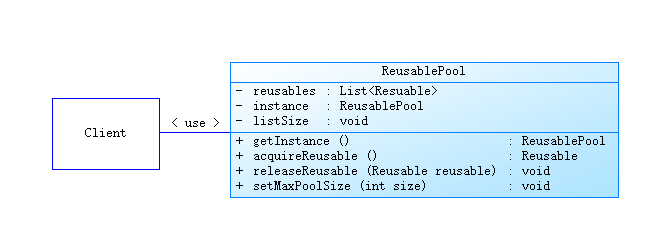 java/android 設計模式學習筆記(5)---對象池模式
這次要介紹一下對象池模式(Object Pool Pattern),這個模式為常見 23 種設計模式之外的設計模式,介紹的初衷主要是在平時的 android 開發中經常會
 【Android】Android動態代理為SurfaceHolder添加Hook
本博客將會介紹動態代理在Android應用中的一種使用場景代理模式 代理模式的作用是為其它對象提供一種代理以控制對這個對象的訪問。比如用戶調用了一個&ldquo
 Android使用Retrofit仿微信多張圖片拍照上傳
Android 仿照微信發說說,既能實現拍照,選圖庫,多圖案上傳,使用Retrofit技術。使用方法:詳見http://www.jb51.net/article/1030
 從零開始學android(數據存儲(4)Sqlite數據庫存儲.三十八.)
從前幾章我們分別學習了屬性文件存儲輸數據,內儲存存儲數據,和外部儲存存儲數據,今天我們來學習一下android 輕量級數據庫Sqlite數據庫的數據存儲 首先必須了解