編輯:關於Android編程
public class listview extends Activity{
	private LinkedHashMap params;
	private List data_set;
	private ListView listview;
	private myadapter2 myadapter;
  public void onCreate(Bundle save){
	  super.onCreate(save);
	  setContentView(R.layout.list);
    listview=(ListView)findViewById(R.id.listView1);
Bundle bundle=listview.this.getIntent().getExtras();
	  String date=null;
	  String from_station=null;
	  String to_station=null;
	 date= bundle.getString("date");
	 from_station=bundle.getString("from_station");
	  to_station=bundle.getString("to_station");
	  date="2014-04-20";
	  //怎麼會有一個空格多出來的不知道
	  from_station="HZH";
	  to_station="CSQ";
		params=new LinkedHashMap();
		params.put(bookInfo.train_date,date);
		params.put(bookInfo.from_station,from_station);
		params.put(bookInfo.to_station, to_station);
		params.put("purpose_codes", "ADULT");
		data_set=new ArrayList();
		//新開一個線程去讀取信息還是?
		/*
		 * 第一步得到response對象
		 * 第二步從response中解析出數據出來
		 */
		/*getbook get=new getbook(bookInfo.get_book,params);
		 * get.init();
		String response=get.getreponse();
		jsontest json=new jsontest(response);
	     json.init();
	     data_set=json.get_data();
		 */
		String[] value={"D105","18:25","長沙","杭州東","08:15","10:10","無","有","125"};
		LinkedHashMap map;
		  for(int j=0;j<3;j++){
			  map=new LinkedHashMap();
				for(int i=0;i<9;i++){
					map.put(trainInfo.t_query[i], value[i]);
				}
			  data_set.add(map);
		  }
	     myadapter=new myadapter2(this, data_set);
	     int size=data_set.size();
	     if(myadapter==null)
	    	 Log.e("adapter", "null");
	     Log.i("size",""+size);
	     if(listview==null)
	    	 Log.e("listview","null");
	     //if(size>0)
	     listview.setAdapter(myadapter);
	  //data_set=main.
  }

  private class myadapter2 extends BaseAdapter{
    private Context context;
    private List data_set;
    private String []id;
	public myadapter2(Context context,List data){
		this.context=context;
		this.data_set=data;
		id=new String[7];
		for(int i=0;i<=5;i++)
			id[i]=trainInfo.t_query[i];
		id[6]="seat";
	}
	public int getCount() {
		// TODO Auto-generated method stub
		return data_set.size();
	}

	@Override
	public Object getItem(int i) {
		// TODO Auto-generated method stub
		return data_set.get(i);
	}

	@Override
	public long getItemId(int i) {
		// TODO Auto-generated method stub
		return i;
	}

	@Override
	public View getView(int i, View arg1, ViewGroup parant) {
		// TODO Auto-generated method stub
		/*
		 * "station_train_code","arrive_time","to_station_name","from_station_name","lishi","start_time",
		"yw_num","yz_num","wz_num"
		7num
		 */
		View v=arg1;
		if(v==null){
			LayoutInflater m_layout=LayoutInflater.from(context);
			v=m_layout.inflate(R.layout.item, null);
		}
		LinkedHashMap  map=data_set.get(i);
		TextView textview=null;
		String str=null;
		String seat="seat";
		textview=(TextView) v.findViewById(R.id.arrive_time);
		str=map.get("arrive_time");
		textview.setText(str);
		textview=(TextView) v.findViewById(R.id.lishi);
		textview.setText(map.get("lishi"));
		textview=(TextView)v.findViewById(R.id.from_station_name);
		textview.setText(map.get("from_station_name"));
		textview=(TextView) v.findViewById(R.id.start_time);
		textview.setText(map.get("start_time"));
		textview=(TextView)v.findViewById(R.id.station_train_code);
		textview.setText(map.get("station_train_code"));
		textview=(TextView)v.findViewById(R.id.to_station_name);
		textview.setText(map.get("to_station_name"));
		str+="硬座:"+map.get("yz_num")+"硬臥:"+map.get("yw_num")+"無座:"+map.get("wz_num");
		textview=(TextView) v.findViewById(R.id.seat);
		textview.setText(str);
		return v;
	}

  }

}  Android 控件的觸摸事件傳遞與處理
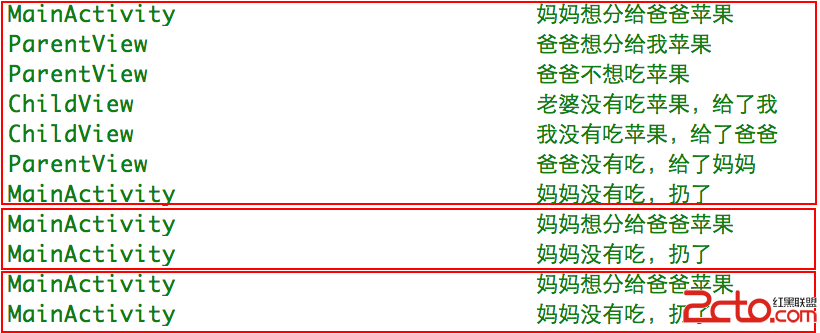
了解Android控件的觸摸事件傳遞與處理對我們日常開發中自定義控件和觸摸事件沖突解決有重大意義。Android控件的觸摸事件傳遞和處理主要有以下幾個方法,下面一一介紹。
 RecycleView(一):實現ListView的功能
1 RecycleView實現ListView的功能相關方法:RecyclerView的方法: 方法 含義 setLayoutManager(&hellip
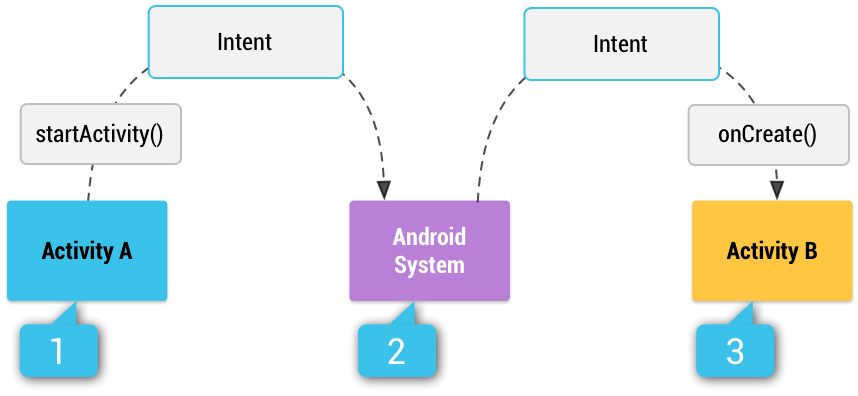 Android官方文檔之App Components(Intents and Intent Filters)
Android應用框架鼓勵開發者在開發應用時重用組件,本文將闡述如何用組件構建應用程序以及如何用intent將組件聯系起來。如需閱讀官方原文,請您點擊這個鏈接:《App
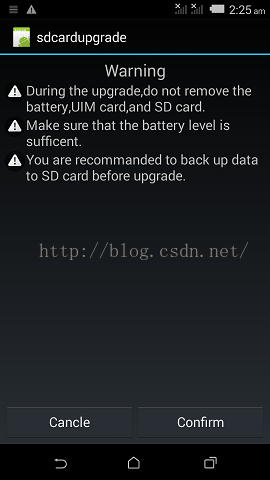 Android系統SD卡升級
一般在本地進行OTA升級時,將升級包拷貝到SD卡,然後進入recovery模式選擇升級包進行升級,但不是很方便,於是做了一個小應用,通過調用RecoverySystem類