編輯:關於Android編程
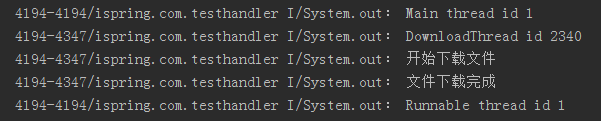
上一章講到Service在後台啟動後不會自動銷毀掉,其銷毀的方式有兩種一個是在外部使用stopService()方法,一個就是在繼承Service的類下調用stopSelf(),那麼應該何時調用stopself()方法呢,如果不調用的話,service在後台會一直處在連接網絡的狀態,其內耗是可想而知的。這篇博文就會向大家介紹如果使用handle的信息傳送機制來停止service的後台運行。‘
MainActivity
package com.example.f21_service01;

import android.os.Bundle;
import android.app.Activity;
import android.content.Intent;
import android.view.Menu;
import android.view.View;
import android.widget.Button;

public class MainActivity extends Activity {
   private Button button;
	@Override
	protected void onCreate(Bundle savedInstanceState) {
		super.onCreate(savedInstanceState);
		setContentView(R.layout.activity_main);
		button=(Button)this.findViewById(R.id.button1);
		button.setOnClickListener(new View.OnClickListener() {

			@Override
			public void onClick(View v) {
				// TODO Auto-generated method stub
				Intent intent=new Intent(MainActivity.this,DownLoadService.class);
				startService(intent);//通過intent啟動service
			}
		});
	}

	@Override
	public boolean onCreateOptionsMenu(Menu menu) {
		// Inflate the menu; this adds items to the action bar if it is present.
		getMenuInflater().inflate(R.menu.main, menu);
		return true;
	}

}DownloadService的代碼
package com.example.f21_service01;

import java.io.IOException;

import org.apache.http.HttpResponse;
import org.apache.http.client.ClientProtocolException;
import org.apache.http.client.HttpClient;
import org.apache.http.client.methods.HttpPost;
import org.apache.http.impl.client.DefaultHttpClient;
import org.apache.http.util.EntityUtils;

import android.app.Service;
import android.content.Intent;
import android.os.Handler;
import android.os.IBinder;
import android.os.Message;

public class DownLoadService extends Service {
	private static final String path = "http://my.csdn.net/u013900875";
	private Handler handler = new Handler() {
		public void handleMessage(Message msg) {
			if (msg.what == 1) {
				stopSelf(); //當系統接收到消息後,關閉service
			}

		};
	};

	@Override
	public IBinder onBind(Intent intent) {
		// TODO Auto-generated method stub
		return null;
	}

	@Override
	public int onStartCommand(Intent intent, int flags, int startId) {
		// TODO Auto-generated method stub
		new Thread(new MyThread()).start();//啟動線程
		return super.onStartCommand(intent, flags, startId);
	}

	@Override
	public void onCreate() {
		// TODO Auto-generated method stub
		super.onCreate();
	}

	public class MyThread implements Runnable {
		@Override
		public void run() {
			// TODO Auto-generated method stub
			HttpClient client = new DefaultHttpClient();
			HttpPost httpPost = new HttpPost(path);
			try {
				HttpResponse httpResponse = client.execute(httpPost);
				byte[] result = EntityUtils.toByteArray(httpResponse
						.getEntity());//使用http協議下載圖片
				boolean flag = SDcardtoFile.WriteToFile("hello", result);//當成功寫入內存卡後,將標志設為true
				if (flag) {

					handler.sendEmptyMessage(1);//通過handler發送消息
				}
			} catch (ClientProtocolException e) {
				// TODO Auto-generated catch block
				e.printStackTrace();
			} catch (IOException e) {
				// TODO Auto-generated catch block
				e.printStackTrace();
			}

		}
	}

}最後再來回顧下之前前的sdcard的存入方法的書寫
package com.example.f21_service01;

import java.io.File;
import java.io.FileNotFoundException;
import java.io.FileOutputStream;
import java.io.IOException;

import android.os.Environment;

public class SDcardtoFile {
	public static boolean WriteToFile(String name, byte[] data) {
		boolean flag = false;
		String state = Environment.getExternalStorageState();
		FileOutputStream fileOutputStream = null;
		if (state.equals(Environment.MEDIA_MOUNTED)) {
			File file = new File(Environment.getExternalStorageDirectory(),
					name);
			try {
				fileOutputStream=new FileOutputStream(file);
				try {
					fileOutputStream.write(data, 0, data.length);
					flag=true;
				} catch (IOException e) {
					// TODO Auto-generated catch block
					e.printStackTrace();
				}
			} catch (FileNotFoundException e) {
				// TODO Auto-generated catch block
				e.printStackTrace();
			}finally{
				if (fileOutputStream!=null) {
					try {
						fileOutputStream.close();
					} catch (IOException e) {
						// TODO Auto-generated catch block
						e.printStackTrace();
					}

				}
			}
		}
		return flag;
	}

}
 unity的 斷言 Unity 5.1 Assertion Library
當你建立Unity 的手機游戲你最可能渴望設置Script Call Optimization為Fast But No Exceptions,只要你相信你能做到。Fast
 詳解Android中Handler的使用方法
在Android開發中,我們經常會遇到這樣一種情況:在UI界面上進行某項操作後要執行一段很耗時的代碼,比如我們在界面上點擊了一個”下載“按鈕,那麼我們需要執行網絡請求,這
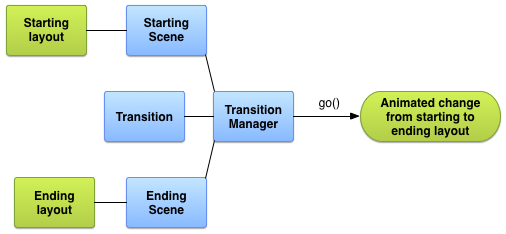 Android官方開發文檔Training系列課程中文版:動畫視圖之轉場框架介紹
原文地址:http://android.xsoftlab.net/training/transitions/index.html引言Activity所呈現的UI經常會由用
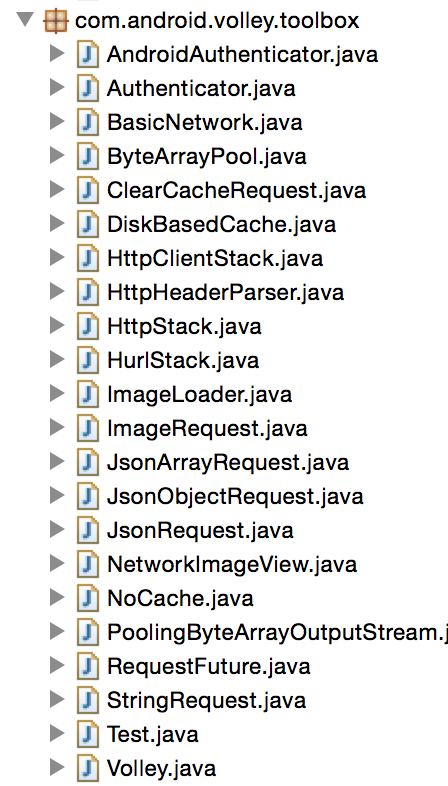 Android Volley分析(二)——實現
在Android Volley分析(一)——結構中主要分析了Volley的基本組件和框架結構,組件主要是定義的接口,也就是說我們可以實現這些接口來定制自己的Volley版