編輯:關於Android編程
在《Android基於IIS的APK下載(三)用JSON傳輸更新數據》一文中已經從服務器中拿到了更新數據,並且呈現到了UI中,結合前面的文章及效果圖(參見下圖),可以看到UI中的更新列表一行一行的呈現,而每一行的末尾有一個行為按鈕,對應著不同的行為,這個行為要如何實現呢?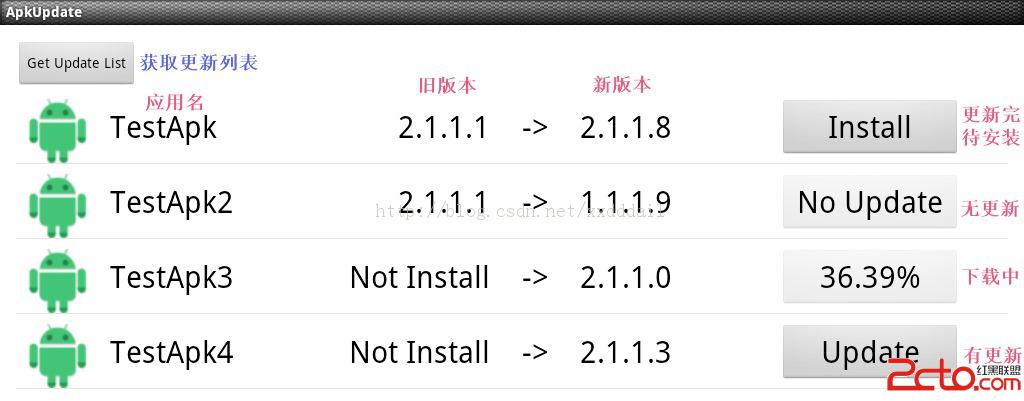
我們再看一下UpdateItemsAdapter中getView的部分代碼
updateItem.SetBehavior(isNewVersion ? UPDATE_BEHAVIORS.UPDATE
				: UPDATE_BEHAVIORS.NO_UPDATE);

		behavior_button.setEnabled(isNewVersion);
		behavior_button.setText(updateItem.GetBehavior());
		behavior_button.setTag(updateItem);

		behavior_button.setOnClickListener(new OnClickListener() {

			@Override
			public void onClick(View v) {
				ExecuteBehavior(behavior_button);
			}
});private void ExecuteBehavior(final Button behavior_button) {
try {
UpdateItem updateItem = (UpdateItem) behavior_button.getTag();
if (updateItem == null) {
return;
}
if (updateItem.GetBehavior() == UPDATE_BEHAVIORS.INSTALL) {
if (updateItem.GetSavePath() == null
|| updateItem.GetSavePath().length() <= 0) {
return;
}
InstallApk(updateItem.GetSavePath());
return;
} else if (updateItem.GetBehavior() == UPDATE_BEHAVIORS.NO_UPDATE) {
return;
}
final String url = updateItem.GetUrl();
final String savePath = FetchSavePath(url);
final Handler downloadHandler =InitDownloadHandler(behavior_button);
String aysncDownloadThreadName = RequestSp.DownLoadFileAsync(url, savePath, downloadHandler);
if (aysncDownloadThreadName != null
&& aysncDownloadThreadName.length() > 0) {
_aysncDownloadThreadNames.add(aysncDownloadThreadName);
}
} catch (Exception e) {
behavior_button.setEnabled(true);
}
}
private Handler InitDownloadHandler(final Button behavior_button)
{
Handler _downloadHandler = new Handler() {
@Override
public void handleMessage(Message msg) {
UpdateItem updateItem = (UpdateItem) behavior_button
.getTag();
switch (msg.what) {
case REQUEST_MESSAGES.DOWNLOAD_START: {
behavior_button.setEnabled(false);
break;
}
case REQUEST_MESSAGES.DOWNLOAD_PERCENT: {
Bundle bundle = msg.getData();
float downloadPercent = bundle
.getFloat(REQUEST_KEYS.DOWNLOAD_PERCENT);
behavior_button.setText(String.format("%1$.2f",
downloadPercent) + "%");
break;
}
case REQUEST_MESSAGES.DOWNLOAD_COMPLETED: {
Bundle bundle = msg.getData();
String savePath = bundle
.getString(REQUEST_KEYS.DOWNLOAD_SAVE_PATH);
behavior_button.setEnabled(true);
behavior_button
.setText(UPDATE_BEHAVIORS.INSTALL);
if (updateItem != null) {
updateItem.SetBehavior(UPDATE_BEHAVIORS.INSTALL);
updateItem.SetSavePath(savePath);
}
break;
}
case REQUEST_MESSAGES.DOWNLOAD_EXCEPTION: {
behavior_button.setEnabled(true);
String info = "Download " + updateItem.GetUrl() + " Fail";
MessageBoxSp.Show(_context, info);
break;
}
default: {
behavior_button.setEnabled(true);
String info = "Download " + updateItem.GetUrl() + " Fail";
MessageBoxSp.Show(_context, info);
break;
}
}
behavior_button.setTag(updateItem);
}
};
return _downloadHandler;
}
private String FetchSavePath(String url) {
String saveDir = Environment.getExternalStorageDirectory()
+ "/download/";
File saveDirfile = new File(saveDir);
if (!saveDirfile.exists()) {
saveDirfile.mkdirs();
}
int fileNameStart = url.lastIndexOf("/");
String fileName = url.substring(fileNameStart + 1);
return saveDir + fileName;
}
private void InstallApk(String filePath) {
IntentSp.StartActivity(_context, Uri.fromFile(new File(filePath)),
"application/vnd.android.package-archive", false);
}
注:
1、從behavior_button的tag中獲取updateItem,然後獲取相應的行為進行操作。
2、如果是INSTALL行為,將會調用InstallApk。如果不是INSTALL行為,而是NO_UPDATE行為,則不執行任何動作。如果這兩個動作都不是,則是UPDATE行為,即認為是要下載數據。所以會提取URL,並根據URL獲取相應的savePath。
3、在數據下載時,每一個下載都會開啟一個線程,並不斷更新下載數據的百分比。由於要在線程中更新UI,所以要用到handler來處理。在InitDownloadHandler中實現了下載的handler.
4、由於每一個下載都會開啟一個線程,所以在RequestSp.DownLoadFileAsync中返回了線程的名字(采用UUID來命名以保證唯一性),並將該名字記錄起來,在UpdateItemsAdapter釋放的時候(即在finalize函數中),關閉線程,以更好的控制下載線程。下面是finalize的代碼。
private List_aysncDownloadThreadNames=null; public UpdateItemsAdapter(List updateItems, Context context) { _updateItems = updateItems; _context = context; _aysncDownloadThreadNames=new ArrayList (); } @Override protected void finalize() throws Throwable { // TODO Auto-generated method stub super.finalize(); if (_aysncDownloadThreadNames == null || _aysncDownloadThreadNames.size() <= 0) { return; } while (_aysncDownloadThreadNames.size() > 0) { String asyncDownloadThreadName = _aysncDownloadThreadNames.get(0); RequestSp.AbortAsyncDownload(asyncDownloadThreadName); _aysncDownloadThreadNames.remove(0); } }
package com.kitsp.httpsp;

import java.io.File;
import java.io.FileOutputStream;
import java.io.IOException;
import java.io.InputStream;
import java.net.HttpURLConnection;
import java.net.MalformedURLException;
import java.net.URL;
import java.util.HashMap;
import java.util.UUID;

import org.apache.http.HttpEntity;
import org.apache.http.HttpResponse;
import org.apache.http.client.HttpClient;
import org.apache.http.client.methods.HttpGet;
import org.apache.http.impl.client.DefaultHttpClient;

import android.os.Bundle;
import android.os.Handler;
import android.os.Message;

public class RequestSp {
	private final static int HTTP_200 = 200;
	private static HashMap _asyncDownloadFlags = new HashMap();

	public static InputStream Get(String url) throws Exception {

		HttpEntity httpEntity = GetHttpEntity(url);
		if (httpEntity == null) {
			return null;
		}

		return httpEntity.getContent();
	}

	public static HttpEntity GetHttpEntity(String url) throws Exception {


		HttpGet httpGet = new HttpGet(url);

		HttpClient httpClient = new DefaultHttpClient();

		HttpResponse httpResp = httpClient.execute(httpGet);


		if (httpResp.getStatusLine().getStatusCode() == HTTP_200) {
			//Get back data.
			// String result = EntityUtils.toString(httpResp.getEntity(),
			// "UTF-8");
			// return result;
			return httpResp.getEntity();
		} else {
			return null;
		}

	}

	public static boolean DownLoadFile(String httpUrl, String savePath) {

		final File file = new File(savePath);

		try {
			URL url = new URL(httpUrl);
			try {
				HttpURLConnection conn = (HttpURLConnection) url
						.openConnection();

				if (conn.getResponseCode() >= 400) {
					return false;
				}

				InputStream is = conn.getInputStream();
				FileOutputStream fos = new FileOutputStream(file);
				long length = conn.getContentLength();
				byte[] buf = new byte[1024];
				conn.connect();
				int readCount = 0;
				while (true) {

					if (is == null) {
						break;
					}

					readCount = is.read(buf);

					if (readCount <= 0) {
						break;
					}

					fos.write(buf, 0, readCount);
				}

				conn.disconnect();
				fos.close();
				is.close();
			} catch (IOException e) {
				// TODO Auto-generated catch block
				e.printStackTrace();
				return false;
			}
		} catch (MalformedURLException e) {
			// TODO Auto-generated catch block
			e.printStackTrace();
			return false;
		}
		return true;
	}

	/**
	 *
	 * @param httpUrl
	 * @param savePath
	 * @param handler
	 *            :Async handler
	 * @return Handler:Control thread in outer.
	 */
	public static String DownLoadFileAsync(final String httpUrl,
			final String savePath, final Handler handler) {

		if (handler == null) {
			return null;
		}

		final String threadName = UUID.randomUUID().toString();
		Thread downloadThread = new Thread(new Runnable() {
			@Override
			public void run() {
				DownloadDataAsync(httpUrl, savePath, handler, threadName);
			}
		});
		downloadThread.setName(threadName);
		_asyncDownloadFlags.put(threadName, true);
		downloadThread.start();
		return threadName;
	}

	public static void AbortAsyncDownload(String asyncDownloadThreadName) {
		if (asyncDownloadThreadName == null
				|| asyncDownloadThreadName.length() <= 0) {
			return;
		}

		_asyncDownloadFlags.remove(asyncDownloadThreadName);
	}

	private static void DownloadDataAsync(String httpUrl,
			final String savePath, final Handler handler,
			final String threadName) {
		File file = new File(savePath);

		HttpURLConnection conn;
		try {
			final URL url = new URL(httpUrl);
			conn = (HttpURLConnection) url.openConnection();

			if (conn.getResponseCode() >= 400) {
				handler.sendEmptyMessage(REQUEST_MESSAGES.DOWNLOAD_EXCEPTION);
				return;
			}
			InputStream is = conn.getInputStream();
			FileOutputStream fos = new FileOutputStream(file);
			long totalCount = conn.getContentLength();
			byte[] buf = new byte[1024];
			conn.connect();
			int readCount = 0;
			int downloadedCount = 0;
			float percent = 0;
			Message msg = null;
			Bundle bundle = null;
			handler.sendEmptyMessage(REQUEST_MESSAGES.DOWNLOAD_START);

			while (true) {

				if(_asyncDownloadFlags.isEmpty()){
					break;
				}

				if(!_asyncDownloadFlags.get(threadName)){
					break;
				}

				if (is == null) {
					break;
				}

				readCount = is.read(buf);
				downloadedCount += readCount;
				percent = (float) (downloadedCount * 1.0 / totalCount * 100);
				msg = new Message();
				msg.what = REQUEST_MESSAGES.DOWNLOAD_PERCENT;
				bundle = new Bundle();
				bundle.putFloat(REQUEST_KEYS.DOWNLOAD_PERCENT, percent);
				msg.setData(bundle);
				handler.sendMessage(msg);

				if (readCount <= 0) {
					break;
				}

				fos.write(buf, 0, readCount);
			}

			conn.disconnect();
			fos.close();
			is.close();

			msg = new Message();
			msg.what = REQUEST_MESSAGES.DOWNLOAD_COMPLETED;
			bundle = new Bundle();
			bundle.putString(REQUEST_KEYS.DOWNLOAD_SAVE_PATH, savePath);
			msg.setData(bundle);
			handler.sendMessage(msg);

		} catch (IOException e) {
			// TODO Auto-generated catch block
			e.printStackTrace();
			handler.sendEmptyMessage(REQUEST_MESSAGES.DOWNLOAD_EXCEPTION);
			return;
		}
	}
}
2、在AbortAsyncDownload中會根據線程的名字移除相應的項。這樣在該項移除後,線程就無法獲取到該標志,從而結束。當然如果要確保線程安全,這裡的_asyncDownloadFlags以及前文的_aysncDownloadThreadNames需要使用線程安全的對象來代替,不然有可能會引發競態等不可預料的結果。
REQUEST_MESSAGES.java
package com.kitsp.httpsp;

public class REQUEST_MESSAGES {
	public final static int DOWNLOAD_START=1001;
	public final static int DOWNLOAD_PERCENT=1002;
	public final static int DOWNLOAD_COMPLETED=1003;
	public final static int DOWNLOAD_EXCEPTION=1004;
	public final static int DOWNLOAD_ABORT=1005;
}
package com.kitsp.httpsp;

public class REQUEST_KEYS {
	public final static String DOWNLOAD_PERCENT="DOWNLOAD_PERCENT";
	public final static String DOWNLOAD_SAVE_PATH="DOWNLOAD_SAVE_PATH";
	public final static String DOWNLOAD_CONTROL="DOWNLOAD_CONTROL";
}
package com.kitsp.contentsp;

import android.app.Activity;
import android.content.ComponentName;
import android.content.Context;
import android.content.Intent;
import android.net.Uri;

public class IntentSp {

	/**
	 *
	 * @param activity
	 * @param isSaveActivityToHistory
	 *            true:save activity to history.System may back to the activity
	 *            when other activity finish. false:no save.
	 */
	public static void RestartActivity(Activity activity,
			boolean isSaveActivityToHistory) {
		if (activity == null) {
			return;
		}
		Intent intent = new Intent();
		String packageName = activity.getPackageName();
		String className = activity.getLocalClassName();
		String componentClassName = packageName + "." + className;
		if (className != null && className.split(".").length > 0) {
			componentClassName = className;
		}
		ComponentName componentName = new ComponentName(packageName,
				componentClassName);

		intent.setComponent(componentName);
		if (!isSaveActivityToHistory) {
			intent.addFlags(Intent.FLAG_ACTIVITY_NO_HISTORY);
		}
		activity.startActivity(intent);
		activity.finish();
		return;
	}

	/**
	 *
	 * @param context
	 * @param cls
	 * @param isSaveActivityToHistory
	 *            true:save activity to history.System may back to the activity
	 *            when other activity finish. false:no save.
	 */
	public static void StartActivity(Context context, Class cls,
			boolean isSaveActivityToHistory) {
		if (context == null || cls == null) {
			return;
		}

		Intent intent = new Intent();
		if (!isSaveActivityToHistory) {
			intent.addFlags(Intent.FLAG_ACTIVITY_NO_HISTORY);
		}
		intent.setClass(context, cls);
		context.startActivity(intent);
	}

	/**
	 *
	 * @param context
	 * @param action
	 * @param isSaveActivityToHistory
	 *            true:save activity to history.System may back to the activity
	 *            when other activity finish. false:no save.
	 */
	public static void StartActivity(Context context, String action,
			boolean isSaveActivityToHistory) {
		if (context == null || action == null) {
			return;
		}

		Intent intent = new Intent(action);
		if (!isSaveActivityToHistory) {
			intent.addFlags(Intent.FLAG_ACTIVITY_NO_HISTORY);
		}
		context.startActivity(intent);
	}

	/**
	 *
	 * @param context
	 * @param packageName
	 * @param className
	 * @param isSaveActivityToHistory
	 *            true:save activity to history.System may back to the activity
	 *            when other activity finish. false:no save.
	 */
	public static void StartActivity(Context context, String packageName,
			String className, boolean isSaveActivityToHistory) {
		if (context == null) {
			return;
		}

		if (packageName == null || packageName == "") {
			return;
		}

		if (className == null || className == "") {
			return;
		}

		Intent intent = new Intent();
		if (!isSaveActivityToHistory) {
			intent.addFlags(Intent.FLAG_ACTIVITY_NO_HISTORY);
		}
		ComponentName cn = new ComponentName(packageName, className);
		if (cn != null) {
			intent.setComponent(cn);
			context.startActivity(intent);
		}
	}

	public static void StartActivity(Context context, Uri data, String type,
			boolean isSaveActivityToHistory) {
		if (context == null) {
			return;
		}

		if(data==null)
		{
			return;
		}

		if(type==null||type.length()<=0)
		{
			return;
		}

		Intent intent = new Intent(Intent.ACTION_VIEW);
		intent.setDataAndType(data, type);
		if (!isSaveActivityToHistory) {
			intent.addFlags(Intent.FLAG_ACTIVITY_NO_HISTORY);
		}
		context.startActivity(intent);
	}

}
附上JSON的數據格式
{

	"Items":[
	{
		"Name":"TestApk",
		"FeaturePackage":"com.example.apkupdate",
		"Version":2.1.1.8,
		"Url":"http://192.168.1.5:9000/TestApk.apk"
	},
  	{
		"Name":"TestApk2",
		"FeaturePackage":"com.example.apkupdate",
		"Version":1.1.1.9,
		"Url":"http://192.168.1.5:9000/TestApk2.apk"
	},
	{
		"Name":"TestApk3",
		"FeaturePackage":"com.example.apkupdate3",
		"Version":2.1.1.0,
		"Url":"http://192.168.1.5:9000/TestApk3.apk"
	},
	{
		"Name":"TestApk4",
		"FeaturePackage":"com.example.apkupdate3",
		"Version":2.1.1.3,
		"Url":"http://192.168.1.5:9000/TestApk4.apk"
	}
	]

}
轉載請注明出處 Android基於IIS的APK下載(四)數據下載
完整代碼在此處下載https://github.com/sparkleDai/ApkUpdate
 [Android]簡略的Android消息機制源碼分析
相關源碼framework/base/core/java/andorid/os/Handler.javaframework/base/core/java/andorid/
 Android實現自定義的衛星式菜單(弧形菜單)詳解
一、前言Android 實現衛星式菜單也叫弧形菜單,主要要做的工作如下:1.動畫的處理2.自定義ViewGroup來實現衛星式菜單View(1)自定義屬性 &n
 Unity3D+moba+技能指示器(一)
1 功能描述類似王者榮耀,按下的技能如果是需要預判的或者是可以選擇單一目標,產生一個搖桿,在地形上顯示輔助的UI提示。存在以下幾種情況:1.扇形范圍技能 2.方
 AndroidUI組件之AdapterViewFilpper
package com.gc.adapterviewflipperdemo; /** * 功能:自動播放的圖片庫 * @author Android將軍 */ /*