編輯:關於Android編程
寫程序的過程中,想法總會不斷地變,有時候會很糾結,到底做哪種效果好,怎麼做好呢?
就比如這個音樂播放器,我原來的想法是把列表頁面跟歌詞頁面放在同一個Activity中的兩個Fragment,然後通過左右滑動來進行頁面的切換。
但是看了酷狗的播放器,它是在啟動頁面點擊了左下角的按鈕,就會把歌詞頁面從右下角斜切上來,我覺得也挺帥的呀,又想做這個效果了。
不管怎麼樣,先做出一個來再說吧。
下面先看一下效果動態圖,是用4.4的AVD來播放的,因為那個斜切上來的動畫,會用到一些屬性是3.0才支持的,所以2.3的機器做不出來。機器有點差,開個模擬器真是慢到死。
做得比較匆忙,其實還是有不少Bug的,還有一些功能,比如歌詞也還沒實現,請各位多包涵。
 vcC0vbKjujwvcD4KPGgxPr3nw+ajujwvaDE+CsS/x7DWu9PQwb249r3nw+ajrMHQse2958PmTWFpbkFjdGl2aXR5us246LTKRGV0YWlsQWN0aXZpdHmhowrB0LHtvefD5tKyt9bBvbK/t9ajrMnPw+bKx9K7uPZMaXN0VmlldyzPwsPmysfSu7j2UmVsYXRpdmVMYXlvdXSjrMDvw+a3xcHL0ru49rC0xaWjqMiluOi0yr3nw+ajqaOs0ru49r34tsjM9aOs0ru49lRleHRWaWV3yKXP1Mq+uOjD+6Oswb249r/Y1sawtMWlo6yypbfFus3HsL34o6i/4bm3vs3Kx9a709DV4sG9uPawtMWlo6zT0LXjusPG5snovMa1xMDtxO7Kx8qyw7SjrM6qyrLDtLK7vNPHsNK7ytejv6Opo6zV4rj2v7SyvL7WtcR4bWy+zdK7xL/By8i7wcuhowpccmVzXGxheW91dFxhY3Rpdml0eV9tYWluLnhtbDxicj4KCjxwcmUgY2xhc3M9"brush:java;">
這裡面有三部分: 上端的是一個TextView,用來顯示歌曲名的。 中間的是一個歌詞顯示,目前還沒實現,所以顯示了“To Continue...”。 最下面是五個自定義按鈕(上網找圖標真是很麻煩的,自定義按鈕的實現,請看前一篇博文 Android 音樂播放器的實現(一)自定義按鈕的實現
public class MainActivity extends Activity implements OnClickListener{

	public static final String TAG = "com.example.nature.MAIN_ACTIVITY";

	private ListView lvSongs;
	private SeekBar pbDuration;
	private TextView tvCurrentMusic;
	private List musicList;
	private int currentMusic; // The music that is playing.
	private int currentPosition; //The position of the music is playing.
	private int currentMax;

	private Button btnStartStop;
	private Button btnNext;
	private Button btnDetail;

	private ProgressReceiver progressReceiver;
	private NatureBinder natureBinder;

	private ServiceConnection serviceConnection = new ServiceConnection() {

		@Override
		public void onServiceDisconnected(ComponentName name) {

		}

		@Override
		public void onServiceConnected(ComponentName name, IBinder service) {
			natureBinder = (NatureBinder) service;
		}
	};

	private void connectToNatureService(){
		Intent intent = new Intent(MainActivity.this, NatureService.class);
		bindService(intent, serviceConnection, BIND_AUTO_CREATE);
	}


	@Override
	protected void onCreate(Bundle savedInstanceState) {
		Log.v(TAG, "OnCreate");
		super.onCreate(savedInstanceState);
		setContentView(R.layout.activity_main);
		MusicLoader musicLoader = MusicLoader.instance(getContentResolver());
		musicList = musicLoader.getMusicList();
		connectToNatureService();
		initComponents();
	}

	public void onResume(){
		Log.v(TAG, "OnResume register Progress Receiver");
		super.onResume();
		registerReceiver();
		if(natureBinder != null){
			if(natureBinder.isPlaying()){
				btnStartStop.setBackgroundResource(R.drawable.pause);
			}else{
				btnStartStop.setBackgroundResource(R.drawable.play);
			}
			natureBinder.notifyActivity();
		}
	}

	public void onPause(){
		Log.v(TAG, "OnPause unregister Progress Receiver");
		super.onPause();
		unregisterReceiver(progressReceiver);
	}

	public void onStop(){
		Log.v(TAG, "OnStop");
		super.onStop();
	}

	public void onDestroy(){
		Log.v(TAG, "OnDestroy");
		super.onDestroy();
		if(natureBinder != null){
			unbindService(serviceConnection);
		}
	}

	private void initComponents(){
		pbDuration = (SeekBar) findViewById(R.id.pbDuration);
		pbDuration.setOnSeekBarChangeListener(new OnSeekBarChangeListener() {

			@Override
			public void onStopTrackingTouch(SeekBar seekBar) {}

			@Override
			public void onStartTrackingTouch(SeekBar seekBar) {}

			@Override
			public void onProgressChanged(SeekBar seekBar, int progress,
					boolean fromUser) {
				if(fromUser){
					natureBinder.changeProgress(progress);
				}
			}
		});

		tvCurrentMusic = (TextView) findViewById(R.id.tvCurrentMusic);

		btnStartStop = (Button)findViewById(R.id.btnStartStop);
		btnStartStop.setOnClickListener(this);

		btnNext = (Button)findViewById(R.id.btnNext);
		btnNext.setOnClickListener(this);

		btnDetail = (Button) findViewById(R.id.btnDetail);
		btnDetail.setOnClickListener(this);

		MusicAdapter adapter = new MusicAdapter();
		lvSongs = (ListView) findViewById(R.id.lvSongs);
		lvSongs.setAdapter(adapter);
		lvSongs.setOnItemClickListener(new OnItemClickListener() {
			@Override
			public void onItemClick(AdapterView parent, View view,
					int position, long id) {
				currentMusic = position;
				natureBinder.startPlay(currentMusic,0);
				if(natureBinder.isPlaying()){
					btnStartStop.setBackgroundResource(R.drawable.pause);
				}
			}
		});
	}

	private void registerReceiver(){
		progressReceiver = new ProgressReceiver();
		IntentFilter intentFilter = new IntentFilter();
		intentFilter.addAction(NatureService.ACTION_UPDATE_PROGRESS);
		intentFilter.addAction(NatureService.ACTION_UPDATE_DURATION);
		intentFilter.addAction(NatureService.ACTION_UPDATE_CURRENT_MUSIC);
		registerReceiver(progressReceiver, intentFilter);
	}

	class MusicAdapter extends BaseAdapter{

		@Override
		public int getCount() {
			return musicList.size();
		}

		@Override
		public Object getItem(int position) {
			return musicList.get(position);
		}

		@Override
		public long getItemId(int position) {
			return musicList.get(position).getId();
		}

		@Override
		public View getView(int position, View convertView, ViewGroup parent) {
			ViewHolder viewHolder;
			if(convertView == null){
				convertView = LayoutInflater.from(MainActivity.this).inflate(R.layout.music_item, null);
				ImageView pImageView = (ImageView) convertView.findViewById(R.id.albumPhoto);
				TextView pTitle = (TextView) convertView.findViewById(R.id.title);
				TextView pDuration = (TextView) convertView.findViewById(R.id.duration);
				TextView pArtist = (TextView) convertView.findViewById(R.id.artist);
				viewHolder = new ViewHolder(pImageView, pTitle, pDuration, pArtist);
				convertView.setTag(viewHolder);
			}else{
				viewHolder = (ViewHolder) convertView.getTag();
			}

			viewHolder.imageView.setImageResource(R.drawable.audio);
			viewHolder.title.setText(musicList.get(position).getTitle());
			viewHolder.duration.setText(FormatHelper.formatDuration(musicList.get(position).getDuration()));
			viewHolder.artist.setText(musicList.get(position).getArtist());

			return convertView;
		}
	}

	class ViewHolder{
		public ViewHolder(ImageView pImageView, TextView pTitle, TextView pDuration, TextView pArtist){
			imageView = pImageView;
			title = pTitle;
			duration = pDuration;
			artist = pArtist;
		}

		ImageView imageView;
		TextView title;
		TextView duration;
		TextView artist;
	}

	@Override
	public boolean onCreateOptionsMenu(Menu menu) {
		// Inflate the menu; this adds items to the action bar if it is present.
		getMenuInflater().inflate(R.menu.main, menu);
		return true;
	}

	@Override
	public void onClick(View v) {
		switch (v.getId()) {
		case R.id.btnStartStop:
			play(currentMusic,R.id.btnStartStop);
			break;
		case R.id.btnNext:
			natureBinder.toNext();
			break;
		case R.id.btnDetail:
			Intent intent = new Intent(MainActivity.this,DetailActivity.class);
			intent.putExtra(DetailActivity.MUSIC_LENGTH, currentMax);
			intent.putExtra(DetailActivity.CURRENT_MUSIC, currentMusic);
			intent.putExtra(DetailActivity.CURRENT_POSITION, currentPosition);
			startActivity(intent);
			break;
		}
	}

	private void play(int position, int resId){
		if(natureBinder.isPlaying()){
			natureBinder.stopPlay();
			btnStartStop.setBackgroundResource(R.drawable.play);
		}else{
			natureBinder.startPlay(position,currentPosition);
			btnStartStop.setBackgroundResource(R.drawable.pause);
		}
	}


	class ProgressReceiver extends BroadcastReceiver{

		@Override
		public void onReceive(Context context, Intent intent) {
			String action = intent.getAction();
			if(NatureService.ACTION_UPDATE_PROGRESS.equals(action)){
				int progress = intent.getIntExtra(NatureService.ACTION_UPDATE_PROGRESS, 0);
				if(progress > 0){
					currentPosition = progress; // Remember the current position
					pbDuration.setProgress(progress / 1000);
				}
			}else if(NatureService.ACTION_UPDATE_CURRENT_MUSIC.equals(action)){
				//Retrive the current music and get the title to show on top of the screen.
				currentMusic = intent.getIntExtra(NatureService.ACTION_UPDATE_CURRENT_MUSIC, 0);
				tvCurrentMusic.setText(musicList.get(currentMusic).getTitle());
			}else if(NatureService.ACTION_UPDATE_DURATION.equals(action)){
				//Receive the duration and show under the progress bar
				//Why do this ? because from the ContentResolver, the duration is zero.
				currentMax = intent.getIntExtra(NatureService.ACTION_UPDATE_DURATION, 0);
				int max = currentMax / 1000;
				Log.v(TAG, "[Main ProgressReciver] Receive duration : " + max);
				pbDuration.setMax(currentMax / 1000);
			}
		}

	}

}
	public void onResume(){
		Log.v(TAG, "OnResume register Progress Receiver");
		super.onResume();
		registerReceiver();
		if(natureBinder != null){
			...
			natureBinder.notifyActivity();
		}
	}
在Service中的Binder也提供了這樣一個接口,來讓Activity告訴Service,我想知道當前在播哪一首歌。。。
所以在Service中的Binder類,其實我們要實現比較多的接口來跟Activity中交互的,先列舉一下,下一篇文章會詳細說一下Service
class NatureBinder extends Binder{

		public void startPlay(int currentMusic, int currentPosition){
			play(currentMusic,currentPosition);
		}

		public void stopPlay(){
			stop();
		}

		public void toNext(){
			playNext();
		}

		public void toPrevious(){
			playPrevious();
		}

		/**
		 * MODE_ONE_LOOP = 1;
		 * MODE_ALL_LOOP = 2;
		 * MODE_RANDOM = 3;
		 * MODE_SEQUENCE = 4;
		 */
		public void changeMode(){
			currentMode = (currentMode + 1) % 4;
			Log.v(TAG, "[NatureBinder] changeMode : " + currentMode);
			Toast.makeText(NatureService.this, MODE_DESC[currentMode], Toast.LENGTH_SHORT).show();
		}

		/**
		 * return the current mode
		 * MODE_ONE_LOOP = 1;
		 * MODE_ALL_LOOP = 2;
		 * MODE_RANDOM = 3;
		 * MODE_SEQUENCE = 4;
		 * @return
		 */
		public int getCurrentMode(){
			return currentMode;
		}

		/**
		 * The service is playing the music
		 * @return
		 */
		public boolean isPlaying(){
			return isPlaying;
		}

		/**
		 * Notify Activities to update the current music and duration when current activity changes.
		 */
		public void notifyActivity(){
			toUpdateCurrentMusic();
			toUpdateDuration();
		}

		/**
		 * Seekbar changes
		 * @param progress
		 */
		public void changeProgress(int progress){
			...
		}
public class DetailActivity extends Activity implements OnClickListener{

	private static final String TAG = "com.example.natrue.DetailActivity";

	public static final String MUSIC_LENGTH = "com.example.nature.DetailActivity.MUSIC_LENGTH";
	public static final String CURRENT_POSITION = "com.example.nature.DetailActivity.CURRENT_POSITION";
	public static final String CURRENT_MUSIC = "com.example.nature.DetailActivity.CURRENT_MUSIC";

	private SeekBar pbDuration;
	private TextView tvTitle,tvTimeElapsed, tvDuration;
	private List musicList;
	private int currentMusic;

	private int currentPosition;

	private ProgressReceiver progressReceiver;

	private NatureBinder natureBinder;

	private int[] btnResIds = new int[] {
			R.id.btnMode,
			R.id.btnPrevious,
			R.id.btnStartStop,
			R.id.btnNext,
			R.id.btnExit
	};

	private ServiceConnection serviceConnection = new ServiceConnection() {

		@Override
		public void onServiceDisconnected(ComponentName name) {

		}

		@Override
		public void onServiceConnected(ComponentName name, IBinder service) {
			natureBinder = (NatureBinder) service;
			if(natureBinder.isPlaying()){
				CustomAudioIcon btnStartStop = (CustomAudioIcon)findViewById(R.id.btnStartStop);
				btnStartStop.setFlagStart(false);
			}
			CustomAudioIcon btnMode = (CustomAudioIcon)findViewById(R.id.btnMode);
			btnMode.setCurrentMode(natureBinder.getCurrentMode());
		}
	};

	private void connectToNatureService(){
		Intent intent = new Intent(DetailActivity.this, NatureService.class);
		bindService(intent, serviceConnection, BIND_AUTO_CREATE);
	}


	@Override
	public void onCreate(Bundle savedInstanceState){
		Log.v(TAG, "OnCreate");
		super.onCreate(savedInstanceState);
		overridePendingTransition(R.anim.push_right_in,R.anim.hold);
		MusicLoader musicLoader = MusicLoader.instance(getContentResolver());
		musicList = musicLoader.getMusicList();
		setContentView(R.layout.detail_layout);
		connectToNatureService();
		initComponents();
	}

	public void onResume(){
		Log.v(TAG, "OnResume");
		super.onResume();
		initReceiver();
	}

	public void onPause(){
		Log.v(TAG, "OnPause unregister progress receiver");
		super.onPause();
		unregisterReceiver(progressReceiver);
		overridePendingTransition(R.anim.hold, R.anim.push_right_out);
	}

	public void onStop(){
		Log.v(TAG, "OnStop");
		super.onStop();
	}

	public void onDestroy(){
		Log.v(TAG, "Destroy");
		super.onDestroy();
		if(natureBinder != null){
			unbindService(serviceConnection);
		}
	}

	private void initComponents(){
		tvTitle = (TextView) findViewById(R.id.tvTitle);
		currentMusic = getIntent().getIntExtra(CURRENT_MUSIC,0);
		tvTitle.setText(musicList.get(currentMusic).getTitle());

		tvDuration = (TextView) findViewById(R.id.tvDuration);
		int max = getIntent().getIntExtra(MUSIC_LENGTH, 0);
		tvDuration.setText(FormatHelper.formatDuration(max));

		pbDuration = (SeekBar) findViewById(R.id.pbDuration);
		pbDuration.setOnSeekBarChangeListener(new OnSeekBarChangeListener() {

			@Override
			public void onStopTrackingTouch(SeekBar seekBar) {}

			@Override
			public void onStartTrackingTouch(SeekBar seekBar) {}

			@Override
			public void onProgressChanged(SeekBar seekBar, int progress,
					boolean fromUser) {
				if(fromUser){
					natureBinder.changeProgress(progress);
				}
			}
		});
		pbDuration.setMax(max/1000);

		currentPosition = getIntent().getIntExtra(CURRENT_POSITION,0);
		pbDuration.setProgress(currentPosition / 1000);

		tvTimeElapsed = (TextView) findViewById(R.id.tvTimeElapsed);
		tvTimeElapsed.setText(FormatHelper.formatDuration(currentPosition));

		for(int resId : btnResIds){
			CustomAudioIcon icon = (CustomAudioIcon)findViewById(resId);
			icon.setOnClickListener(this);
		}
	}

	private void initReceiver(){
		progressReceiver = new ProgressReceiver();
		IntentFilter intentFilter = new IntentFilter();
		intentFilter.addAction(NatureService.ACTION_UPDATE_PROGRESS);
		intentFilter.addAction(NatureService.ACTION_UPDATE_DURATION);
		intentFilter.addAction(NatureService.ACTION_UPDATE_CURRENT_MUSIC);
		registerReceiver(progressReceiver, intentFilter);
	}

	@Override
	public void onClick(View v) {
		switch (v.getId()) {
		case R.id.btnStartStop:
			play(currentMusic,R.id.btnStartStop);
			break;
		case R.id.btnNext:
			natureBinder.toNext();
			break;
		case R.id.btnPrevious:
			natureBinder.toPrevious();
			break;
		case R.id.btnExit:
			finish();
			break;
		case R.id.btnMode:
			natureBinder.changeMode();
			break;
		default:
			break;
		}
	}

	private void play(int currentMusic, int resId){
		CustomAudioIcon btnStartStop = (CustomAudioIcon) findViewById(resId);
		if(btnStartStop.isStartStatus()){
			natureBinder.stopPlay();
		}else{
			natureBinder.startPlay(currentMusic,currentPosition);
		}
	}


	class ProgressReceiver extends BroadcastReceiver{

		@Override
		public void onReceive(Context context, Intent intent) {
			String action = intent.getAction();
			if(NatureService.ACTION_UPDATE_PROGRESS.equals(action)){
				int progress = intent.getIntExtra(NatureService.ACTION_UPDATE_PROGRESS, currentPosition);
				if(progress > 0){
					currentPosition = progress; // Remember the current position
					tvTimeElapsed.setText(FormatHelper.formatDuration(progress));
					pbDuration.setProgress(progress / 1000);
				}
			}else if(NatureService.ACTION_UPDATE_CURRENT_MUSIC.equals(action)){
				//Retrieve the current music and get the title to show on top of the screen.
				currentMusic = intent.getIntExtra(NatureService.ACTION_UPDATE_CURRENT_MUSIC, 0);
				tvTitle.setText(musicList.get(currentMusic).getTitle());
			}else if(NatureService.ACTION_UPDATE_DURATION.equals(action)){
				//Receive the duration and show under the progress bar
				//Why do this ? because from the ContentResolver, the duration is zero.
				int duration = intent.getIntExtra(NatureService.ACTION_UPDATE_DURATION, 0);
				tvDuration.setText(FormatHelper.formatDuration(duration));
				pbDuration.setMax(duration / 1000);
			}
		}

	}
實現的功能也是類似的,不過為了實現動畫效果斜切入的一個功能,我們可以看到在OnCreate函數和OnPause函數中,分別有如下兩行代碼:
    @Override
    public void onCreate(Bundle savedInstanceState){
        ...
        overridePendingTransition(R.anim.push_right_in,R.anim.hold);
        ...
    }
    @Override
    public void onPause(){
        ...
        overridePendingTransition(R.anim.hold, R.anim.push_right_out)
        ;
}public void overridePendingTransition(int enterAnim, int exitAnim) { try { ActivityManagerNative.getDefault().overridePendingTransition( mToken, getPackageName(), enterAnim, exitAnim); } catch (RemoteException e) { } }
我們再來看一下動畫效果的設置,是利用xml來設置的, res/anim/push_right_in.xml
res/anim/push_right_out.xml
res/anim/hold.xml
其中push_right_in 和 push_right_out實現的是相反的效果,一個是從右邊斜切進來,一個是斜切出去,而hold是為了保證MainActivity不動的。 而rotate效果中的,pivotX和pivotY是3.0之後才支持的,所以在2.X中的沒辦法實現這個效果的。
關於界面顯示的大概就是這麼多了,有一些邏輯是跟Service相關的,下一篇講Service的實現的時候再提一些。
源代碼下載
 Android幾種消息推送方案總結
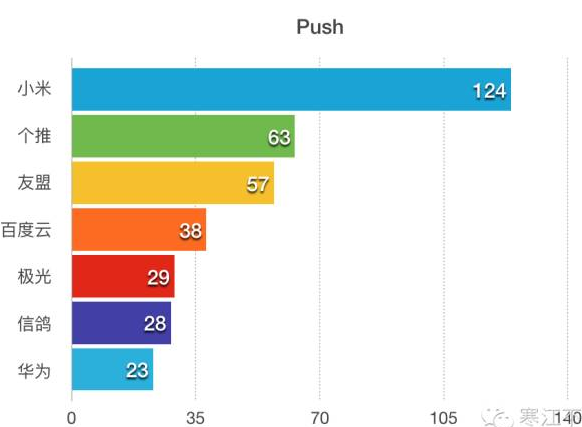
首先看一張國內Top500 Android應用中它們用到的第三方推送以及所占數量:現在總結下Android平台下幾種推送方案的基本情況以及優缺點:一、使用GCM(Goog
 Android之Http通信——4.Android HTTP請求方式:HttpClient
本節引言: 上節講了HttpURLConnection,本節就到HttpClient了,Apache給我們提供的HttpClient(簡單的Http客戶端), 不過畢竟不
 對MobSF的源碼進行分析
前言首先我們需要分析MobSF的源碼,明白一個apk的靜態分析的步驟是什麼。經過分析,如何將apk文件解壓就是進行apk行為分析的第一步,確切的說應該是第二步,第一步應該
 Android Api Component---翻譯Fragment組件(一)
Fragment代表了在Activity中的一種或者一部分行為,你可以在單個的activity中連接多個fragment來構建一個多面板的UI,並且在多個activit