編輯:關於Android編程
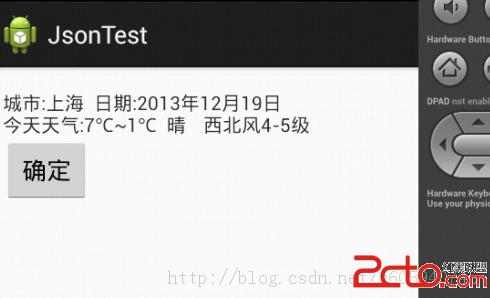
實例:
package com.android.xiong.jsontest;

import java.util.concurrent.Callable;
import java.util.concurrent.ExecutionException;
import java.util.concurrent.FutureTask;

import org.apache.http.HttpResponse;
import org.apache.http.client.HttpClient;
import org.apache.http.client.methods.HttpGet;
import org.apache.http.impl.client.DefaultHttpClient;
import org.apache.http.util.EntityUtils;

public class HttUtil {

	// 創建HttpClient對象
	public static HttpClient httpClient = new DefaultHttpClient();

	/**
	 *
	 * @param url
	 *            請求地址
	 * @return 服務器響應的字符串
	 * @throws InterruptedException
	 * @throws ExecutionException
	 */
	public static String getRequest(final String url)
			throws InterruptedException, ExecutionException {
		FutureTask task = new FutureTask(
				new Callable() {

					@Override
					public String call() throws Exception {
						// 創建HttpGet對象
						HttpGet get = new HttpGet(url);
						// 發送get請求
						HttpResponse httpResponse = httpClient.execute(get);
						// 如果服務器成功返回響應
						if (httpResponse.getStatusLine().getStatusCode() == 200) {
							// 獲取服務器響應的字符串
							return EntityUtils.toString(httpResponse
									.getEntity());
						}
						return null;
					}
				});
		new Thread(task).start();
		return task.get();
	}

}
package com.android.xiong.jsontest;

import java.util.concurrent.ExecutionException;

import org.json.JSONException;
import org.json.JSONObject;

import android.os.Bundle;
import android.app.Activity;
import android.content.BroadcastReceiver;
import android.content.Context;
import android.content.Intent;
import android.content.IntentFilter;
import android.view.Menu;
import android.widget.TextView;

public class ActivityMian extends Activity {

	public final static String RECI_COAST = com.android.xiong.HTTUTIL;
	TextView show;

	@Override
	protected void onCreate(Bundle savedInstanceState) {
		super.onCreate(savedInstanceState);
		setContentView(R.layout.activity_mian);
		show = (TextView) findViewById(R.id.show);
		// 注冊廣播
		IntentFilter filter = new IntentFilter(RECI_COAST);
		BroadcastReceiver myrecive = new MyRecive();
		registerReceiver(myrecive, filter);
		new Thread() {

			@Override
			public void run() {
				Intent intent = new Intent(RECI_COAST);
				try {
					//獲取服務器返回的信息
					String reslut = HttUtil
							.getRequest(http://m.weather.com.cn/data/101020100.html);
					intent.putExtra(weatherinfo, reslut);
					//發送廣播
					sendBroadcast(intent);
				} catch (InterruptedException e) {
					e.printStackTrace();
				} catch (ExecutionException e) {
					e.printStackTrace();
				}
			}

		}.start();
	}

	// 定義BroadcastReceiver 接收返回的信息
	private class MyRecive extends BroadcastReceiver {

		@Override
		public void onReceive(Context context, Intent intent) {
			try {
				//獲取JSONObject對象
				JSONObject jsonobject = new JSONObject(
						intent.getStringExtra(weatherinfo));
				JSONObject jsoncity = new JSONObject(
						jsonobject.getString(weatherinfo));
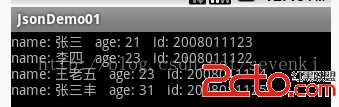
				show.setText(城市: + jsoncity.getString(city) +
						+ 日期: + jsoncity.getString(date_y) +
 + 今天天氣:
						+ jsoncity.getString(temp1) +
						+ jsoncity.getString(weather1)+	+jsoncity.getString(wind1));
			} catch (JSONException e) {
				e.printStackTrace();
			}
		}

	}

	@Override
	public boolean onCreateOptionsMenu(Menu menu) {
		// Inflate the menu; this adds items to the action bar if it is present.
		getMenuInflater().inflate(R.menu.activity_mian, menu);
		return true;
	}

}
轉載請注明出處:http://blog.csdn.net/x605940745
源代碼下載地址:http://download.csdn.net/detail/x605940745/6739893
 ListView
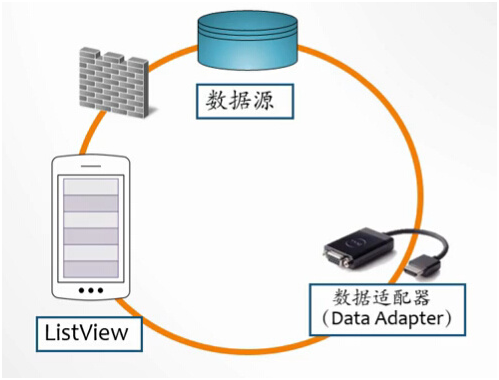
1.ListView和Adapter1)ListView就是一個能數據集合以動態滾動的方式展示到用戶界面上的View,即:以列表的形式展示具體內容,並且能夠根據數據的長度
 Android HTTP發送請求和接收響應的實例代碼
添加權限 首先要在manifest中加上訪問網絡的權限: 復制代碼 代碼如下: <manifest ... > <uses-permission and
 Android開發模擬器啟動失敗的解決方法
1. 錯誤提示信息 錯誤大概意思:連接到adb(android debug bridge)出現了一個嚴重的錯誤,你必須重啟adb和Eclipse工具,請確保在位置…
 achartengine/MPAndroidChart——圖表實現之Java
關於android的圖表,這裡就換作chart吧,如果要自己實現的話,那工作量可是很大的,好在有好幾個開源的框架可以拿來使用,首先是achartengin