編輯:關於Android編程
package com.example.intentphone;

import android.app.Activity;
import android.content.CursorLoader;
import android.content.Intent;
import android.database.Cursor;
import android.net.Uri;
import android.os.Bundle;
import android.provider.ContactsContract;
import android.view.Menu;
import android.view.View;
import android.view.View.OnClickListener;
import android.widget.Button;
import android.widget.EditText;

public class MainActivity extends Activity {
    EditText ed1;
    EditText ed2;
    Button bt1;

    @Override
    protected void onCreate(Bundle savedInstanceState) {
        super.onCreate(savedInstanceState);
        setContentView(R.layout.activity_main);
        ed1 = (EditText) findViewById(R.id.ed1);
        ed2 = (EditText) findViewById(R.id.ed2);
        bt1 = (Button) findViewById(R.id.bt1);
        // 啟動系統應用程序組件
        bt1.setOnClickListener(new OnClickListener() {

            @Override
            public void onClick(View v) {
                // TODO Auto-generated method stub
                // 創建Intent對象
                Intent intent = new Intent();
                // 設置Intent的Action屬性
                intent.setAction(Intent.ACTION_GET_CONTENT);
                // 顯示指定Intent的數據類型
                intent.setType("vnd.android.cursor.item/phone");
                // 啟動系統Activity,請求碼為零
                startActivityForResult(intent, 0);
            }
        });

    }

    @Override
    protected void onActivityResult(int requestCode, int resultCode, Intent data) {
        // TODO Auto-generated method stub
        super.onActivityResult(requestCode, resultCode, data);
        if (requestCode == 0) {
            if (resultCode == Activity.RESULT_OK) {
                // 獲取返回的數據
                Uri contactData = data.getData();
                CursorLoader cursorLoader = new CursorLoader(this, contactData,
                        null, null, null, null);
                // 查詢聯系人信息
                Cursor cursor = cursorLoader.loadInBackground();
                // 如果查詢到指定的聯系人
                if (cursor.moveToFirst()) {
                    String contactId = cursor.getString(cursor
                            .getColumnIndex(ContactsContract.Contacts._ID));
                    // 獲取指定的聯系人查詢該聯系人的信息
                    String name = cursor
                            .getString(cursor
                                    .getColumnIndexOrThrow(ContactsContract.Contacts.DISPLAY_NAME));
                    String phoneNumbere = "此聯系人暫時未輸入電話號碼";
                    Cursor phones = getContentResolver().query(
                            ContactsContract.CommonDataKinds.Phone.CONTENT_URI,
                            null,
                            ContactsContract.CommonDataKinds.Phone.CONTACT_ID
                                    + "=" + contactId, null, null);
                    if (phones.moveToFirst()) {
                        // 取出電話號碼
                        phoneNumbere = phones
                                .getString(phones
                                        .getColumnIndex(ContactsContract.CommonDataKinds.Phone.NUMBER));
                    }
                    //關閉游標
                    phones.close();
                    //顯示聯系人與聯系電話
                    ed1.setText(name);
                    ed2.setText(phoneNumbere);

                }

            }
        }
    }

    @Override
    public boolean onCreateOptionsMenu(Menu menu) {
        // Inflate the menu; this adds items to the action bar if it is present.
        getMenuInflater().inflate(R.menu.main, menu);
        return true;
    }

}
<LinearLayout xmlns:android="http://schemas.android.com/apk/res/android"
    xmlns:tools="http://schemas.android.com/tools"
    android:layout_width="match_parent"
    android:layout_height="match_parent"
    android:orientation="vertical"
    tools:context=".MainActivity" >


    <EditText
        android:id="@+id/ed1"
        android:layout_width="match_parent"
        android:layout_height="wrap_content"
        android:cursorVisible="false"
        android:editable="false" />

    <EditText
        android:id="@+id/ed2"
        android:layout_width="match_parent"
        android:layout_height="wrap_content"
        android:cursorVisible="false"
        android:editable="false" />

    <Button
        android:id="@+id/bt1"
        android:layout_width="match_parent"
        android:layout_height="wrap_content"
        android:text="查看聯系人" />


</LinearLayout>
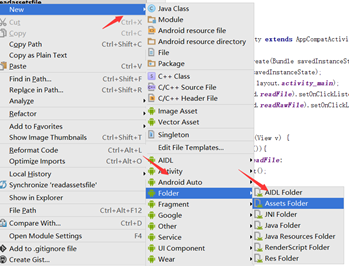 Android 讀取assets和raw文件內容實例代碼
android之文件操作——讀取assets和raw文件下的內容1.分別創建assets文件夾和res/raw文件夾:(要注意的raw文件是在res下new,然後創建一個
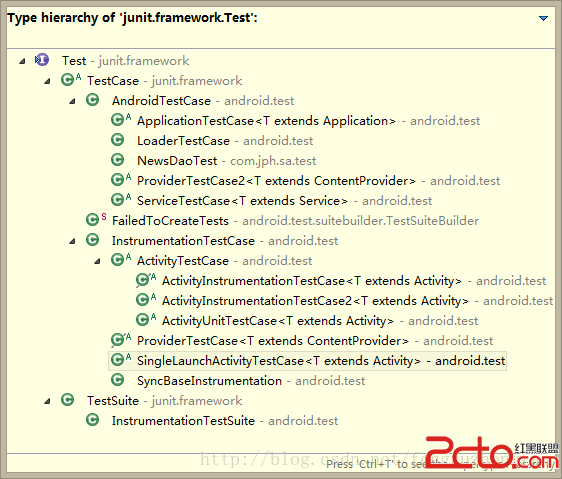 Android開發之單元測試(一)
Android開發之單元測試(一) 請尊重他人的勞動成果,轉載請注明出處 : Android開發之單元測試(一) http://blog.csdn.net/fengy
 用原生VideoView進行全屏播放時的問題
之前參加了一個課程,裡面有一節講到了用視頻作為啟動界面。講師用的是自定義VideoView,重寫onMeasure方法,因為原生的VideoView在那情況下不能實現全屏
 Android顯式意圖、隱式意圖、意圖過濾器(intent-filter)、意圖間傳值
intent主要包括隱式意圖和顯式意圖。顯式意圖通常主要是啟動本應用中的Activity之間的數據,而隱式意圖則常見於啟動系統中的某些特定的動作,比如打電話,發短信,或者