編輯:關於Android編程
在實際開發中,常常需要監聽應用本身是否被卸載或相近的需求。在網上淘了很久都沒有看到實際的做法,最多就給出一個思路,可以通過捕捉系統日志來檢測到這個應用是否被卸載,繼而做相關的操作。
通過監聽Intent.ACTION_PACKAGE_REMOVED意圖只能監聽到其他應用程序是否被卸載,無法監聽自身!
本例子也是通過監聽系統日志,來監聽應用本身是否被卸載。
LogcatObserver.java
public interface LogcatObserver {

    public void handleLog(String info);
}

public interface LogcatObserver {

    public void handleLog(String info);
}
LogcatScannerService.java
import java.io.DataInputStream;
import java.io.IOException;
import java.io.InputStream;
import android.app.Service;
import android.content.Intent;
import android.os.IBinder;

public class LogcatScannerService extends Service implements LogcatObserver {
    @Override
    public void onStart(Intent intent, int startId) {
        super.onStart(intent, startId);
        new AndroidLogcatScannerThread(this).start();
    }

    @Override
    public void handleLog(String info) {
        if (info.contains("android.intent.action.DELETE")
                && info.contains(getPackageName())) {
            //do something yourself
        }
    }

    private class AndroidLogcatScannerThread extends Thread {

        private LogcatObserver mObserver;

        public AndroidLogcatScannerThread(LogcatObserver observer) {
            mObserver = observer;
        }

        @Override
        public void run() {
            String[] cmds = { "logcat", "-c" };
            String shellCmd = "logcat";
            Process process = null;
            InputStream is = null;
            DataInputStream dis = null;
            String line = "";
            Runtime runtime = Runtime.getRuntime();
            try {
                mObserver.handleLog(line);
                int waitValue;
                waitValue = runtime.exec(cmds).waitFor();
                mObserver.handleLog("waitValue=" + waitValue
                        + "\n Has do Clear logcat cache.");
                process = runtime.exec(shellCmd);
                is = process.getInputStream();
                dis = new DataInputStream(is);
                while ((line = dis.readLine()) != null) {
                    if (mObserver != null)
                        mObserver.handleLog(line);

                }
            } catch (InterruptedException e) {
                e.printStackTrace();
            } catch (IOException ie) {
            } finally {
                try {
                    if (dis != null) {
                        dis.close();
                    }
                    if (is != null) {
                        is.close();
                    }
                    if (process != null) {
                        process.destroy();
                    }
                } catch (Exception e) {
                }
            }
        }
    }

    @Override
    public IBinder onBind(Intent intent) {
        return null;
    }

}

import java.io.DataInputStream;
import java.io.IOException;
import java.io.InputStream;
import android.app.Service;
import android.content.Intent;
import android.os.IBinder;

public class LogcatScannerService extends Service implements LogcatObserver {
    @Override
    public void onStart(Intent intent, int startId) {
        super.onStart(intent, startId);
        new AndroidLogcatScannerThread(this).start();
    }

    @Override
    public void handleLog(String info) {
        if (info.contains("android.intent.action.DELETE")
                && info.contains(getPackageName())) {
            //do something yourself
        }
    }

    private class AndroidLogcatScannerThread extends Thread {

        private LogcatObserver mObserver;

        public AndroidLogcatScannerThread(LogcatObserver observer) {
            mObserver = observer;
        }

        @Override
        public void run() {
            String[] cmds = { "logcat", "-c" };
            String shellCmd = "logcat";
            Process process = null;
            InputStream is = null;
            DataInputStream dis = null;
            String line = "";
            Runtime runtime = Runtime.getRuntime();
            try {
                mObserver.handleLog(line);
                int waitValue;
                waitValue = runtime.exec(cmds).waitFor();
                mObserver.handleLog("waitValue=" + waitValue
                        + "\n Has do Clear logcat cache.");
                process = runtime.exec(shellCmd);
                is = process.getInputStream();
                dis = new DataInputStream(is);
                while ((line = dis.readLine()) != null) {
                    if (mObserver != null)
                        mObserver.handleLog(line);

                }
            } catch (InterruptedException e) {
                e.printStackTrace();
            } catch (IOException ie) {
            } finally {
                try {
                    if (dis != null) {
                        dis.close();
                    }
                    if (is != null) {
                        is.close();
                    }
                    if (process != null) {
                        process.destroy();
                    }
                } catch (Exception e) {
                }
            }
        }
    }

    @Override
    public IBinder onBind(Intent intent) {
        return null;
    }

}
調用時只需startService(this,LogcatScannerService.class)既可。
例子本身,經過測試確定可以監聽到應用本身被卸載的動作,但是在handleLog()方法中我能只能做些省時的操作,撸主測試可以發出短信,但是無法完成http的發送!
例子本身是通過不斷的讀日志來監聽應用本身是否被卸載,因而是非常好電和性能的!如果廣大網友有更好的想法可以一起討論下啊!
 ANDROID-當網絡發生變化時使用BroadcastReceiver和service通知
Android 中的 Service按運行地點分類:1、本地服務(Local) 該服務依附在主進程上, 服務依附在主進程上而不是獨立的進程,這樣在一定程度上節約了資源,另
 Android動畫之視圖動畫和屬性動畫
Android 動畫分為兩大類,分別是視圖動畫(View Animation)和屬性動畫(Property Animation)。對於這兩種動畫,都能夠使用xml和代碼的
 Android學習筆記 - BitmapFun解析
如果圖片資源是靜態的,當我們要在View上顯示圖片時,只需要簡單的將圖片賦值給ImageView就可以了,但如果需要浏覽網絡上的圖片時該如何做呢?有可能圖片很大,有可能網
 java/android 設計模式學習筆記(19)---狀態模式
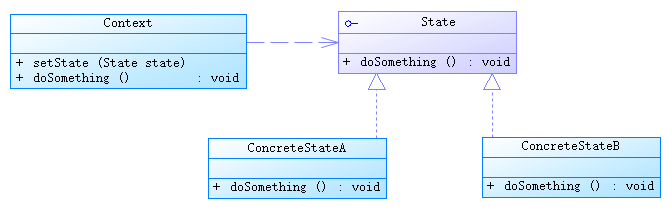
這篇博客我們來介紹一下狀態模式(State Pattern),也是行為型設計模式之一。狀態模式的行為是由狀態來決定的,不同的狀態下有不同的行為。狀態模式和策略模式的結構類