編輯:關於Android編程
原本只是想模仿一下我魂牽夢萦的StoreHouse效果,沒想到意外撸出來一個工具庫。
最簡單用法,給我一個path(可以有多段),我還你一個動畫。
I have a path.I have a view. (Oh~),Path(Anim)View.
    Path sPath = new Path();
    sPath.moveTo(0, 0);
    sPath.addCircle(40, 40, 30, Path.Direction.CW);
    pathAnimView1.setSourcePath(sPath);
先看效果圖:(真機效果更棒哦,我自己的手機是去年某款599的手機,算是低端的了,6個View一起動畫,不會卡,查看GPU呈現模式,95%時間都處於16ms線以下。性能還可以的)

其中
圖1 是普通逐漸填充的效果,無限循環。
圖2 是仿StoreHouse 殘影流動效果。(但與原版並不是完全一模一樣,估計原版不是用Path做的)
圖3 是逐漸填充的效果,設置了只執行一次。
圖4 是仿StoreHouse效果。數據源來自R.array.xxxx
圖5 是另一種自定義PathAnimHelper實現的自定義動畫效果。類似Android L+ 系統進度條效果。
圖6 是仿StoreHouse效果,但是將動畫時長設置的很大,所以能看到它逐漸的過程。
目前可配參數:
1 繪制方面,支持繪制Path的前景 背景色。
    //設置顏色
    fillView2.setColorBg(Color.WHITE).setColorFg(Color.BLACK);
2 動畫方面,目前支持設置動畫的時長,是否無限循環等。
    //設置了動畫總時長,只執行一次的動畫
    fillView2.setAnimTime(3000).setAnimInfinite(false).startAnim();
3 仿StoreHouse風格的View,還支持設置殘影的長度。
//設動畫時長,設置了stoneHouse殘影長度
    storeView3.setPathMaxLength(1200).setAnimTime(20000).startAnim();
4 當然你可以拿到Paint自己搞事情:
    //當然你可以自己拿到Paint,然後搞事情,我這裡設置線條寬度
    pathAnimView1.getPaint().setStrokeWidth(10);
PathAnimView的數據源是Path。(給我一個Path,還你一個動畫View)
所以內置了幾種將別的資源->Path的方法。
1 直接傳string。 StoreHouse風格支持的A-Z,0-9 “.” “- ” ” “
    //根據String 轉化成Path
    setSourcePath(PathParserUtils.getPathFromArrayFloatList(StoreHousePath.getPath("ZhangXuTong", 1.1f, 16)));
2 定義在R.array.xxx裡
    //動態設置 從StringArray裡取
    storeView2.setSourcePath(PathParserUtils.getPathFromStringArray(this, R.array.storehouse, 3));
3 簡單的SVG(半成品)
以前從gayHub上找了一個SVG-PATH的轉換類:SvgPathParser,現在派上了用場,簡單的SVG-PATH,可以,復雜的還有問題,還需要繼續尋找更加方案。
        //SVG轉-》path
        //還在完善中,我從github上找了如下工具類,發現簡單的SVG可以轉path,復雜點的 就亂了
/*        SvgPathParser svgPathParser = new SvgPathParser();
        try {
            Path path = svgPathParser.parsePath("M1,1 L1,50 L50,50 L50,50 L50,1 Z");
            storeView3.setSourcePath(path);
        } catch (ParseException e) {
            e.printStackTrace();
        }*/
普通PathAnimView
效果如圖1 3。動畫是 進度填充直到滿的效果。
高仿StoreHouse風格AnimView:
這種View顯示出來的效果如圖2 4 6 。動畫是 殘影流動的效果。
fillView1.startAnim();
fillView1.stopAnim();
fillView1.clearAnim();
看到這裡細心的朋友可能會發現,上一節,我沒有提第5個圖View是怎麼定義的, 而且第五個View的效果,貌似和其他的不一樣,仔細看動畫是不是像Android L+的系統自帶進度條ProgressBar的效果?
那說明它的動畫效果和我先前提到的兩種不一樣,是的,一開始我撸是照著StoreHouse那種效果撸的,這是我第二天才擴展的。
高級的用法,就是本控件動畫的擴展性。
你完全可以通過繼承PathAnimHelper類,重寫onPathAnimCallback()方法,擴展動畫,圖5就是這麼來的。
先講用法預覽,稍後章節會詳解。
用法:
對任意一個普通的PathAnimView,設置一個自定義的PathAnimHelper類即可:
        //代碼示例 動態對path加工,通過Helper
        pathAnimView1.setPathAnimHelper(new CstSysLoadAnimHelper(pathAnimView1, pathAnimView1.getSourcePath(), pathAnimView1.getAnimPath()));
自定義的PathAnimHelper類:
/**
 * 介紹:自定義的PathAnimHelper,實現類似Android L+ 進度條效果
 * 作者:zhangxutong
 * 郵箱:zhangxutong@imcoming.com
 * 時間: 2016/11/3.
 */

public class CstSysLoadAnimHelper extends PathAnimHelper {
    public CstSysLoadAnimHelper(View view, Path sourcePath, Path animPath) {
        super(view, sourcePath, animPath);
    }

    public CstSysLoadAnimHelper(View view, Path sourcePath, Path animPath, long animTime, boolean isInfinite) {
        super(view, sourcePath, animPath, animTime, isInfinite);
    }

    @Override
    public void onPathAnimCallback(View view, Path sourcePath, Path animPath, PathMeasure pathMeasure, ValueAnimator animation) {
        float value = (float) animation.getAnimatedValue();
        //獲取一個段落
        float end = pathMeasure.getLength() * value;
        float begin = (float) (end - ((0.5 - Math.abs(value - 0.5)) * pathMeasure.getLength()));
        animPath.reset();
        animPath.lineTo(0, 0);
        pathMeasure.getSegment(begin, end, animPath, true);
    }
}
伸手黨看到這裡如果感興趣,就可以直接一步gayhub了
(https://github.com/mcxtzhang/PathAnimView)
後文比較長,需要自帶耐心觀看。
這裡我簡單畫了一下本文介紹的幾個類的類圖:
對於重要方法和屬性標注了一下。
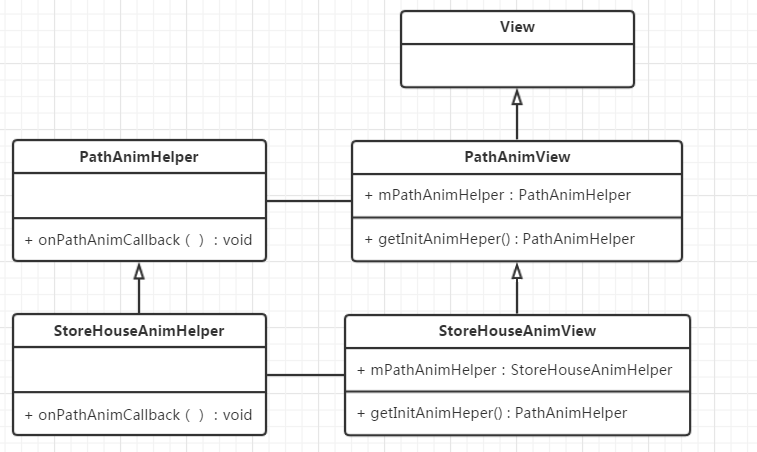
我們的主角PathAnimView繼承自View,是一個自定義View。
它內部持有一個PathAnimHelper,專注做Path動畫。它默認的實現是 逐漸填充 的動畫效果。
一般情況下只需要更換PathAnimHelper,PathAnimView即可做出不同的動畫。(圖1第5個View)
但是如果需要擴充一些動畫屬性供用戶設置,例如仿StoreHouse風格的動畫View,想暴露 殘影長度 屬性供設置。
我這裡采用的是:繼承自PathAnimView,並增加屬性get、set 方法,並重寫getInitAnimHeper()方法,返回自定義的PathAnimHelper。
如StoreHouseAnimView繼承自PathAnimView,增加了殘影長度的get、set方法。並重寫getInitAnimHeper()方法,返回StoreHouseAnimHelper對象。 StoreHouseAnimHelper類繼承的是PathAnimHelper。
基礎類是PathAnimView和PathAnimHelper。
先看PathAnimView:
這裡我將一些不重要的get、set方法和構造方法剔除,留下比較重要的方法。
一個做路徑動畫的View
* 利用源Path繪制“底”
* 利用動畫Path 繪制 填充動畫
* 通過mPathAnimHelper 對SourcePath做動畫:
* 一個SourcePath 內含多段Path,循環取出每段Path,並做一個動畫
代碼本身不難,注釋也比較詳細,核心的話,就是onDraw()方法咯:
我這裡用平移做的paddingLeft、paddingTop。
先利用源Path(mSourcePath)繪制底邊的樣子。
再利用變化的animPath(mAnimPath)繪制前景,這樣animPath不斷變化,並且重繪View->onDraw(),前景就會不斷變化,形成動畫效果。
那麼核心就是animPath的的變化了,animPath的變化交由 mPathAnimHelper去做。
核心源碼如下:
public class PathAnimView extends View {
    protected Path mSourcePath;//需要做動畫的源Path
    protected Path mAnimPath;//用於繪制動畫的Path
    protected Paint mPaint;
    protected int mColorBg = Color.GRAY;//背景色
    protected int mColorFg = Color.WHITE;//前景色 填充色
    protected PathAnimHelper mPathAnimHelper;//Path動畫工具類

    protected int mPaddingLeft, mPaddingTop;

    public PathAnimView(Context context, AttributeSet attrs, int defStyleAttr) {
        super(context, attrs, defStyleAttr);
        init();
    }

    /**
     * 這個方法可能會經常用到,用於設置源Path
     *
     * @param sourcePath
     * @return
     */
    public PathAnimView setSourcePath(Path sourcePath) {
        mSourcePath = sourcePath;
        initAnimHelper();
        return this;
    }

    /**
     * INIT FUNC
     **/
    protected void init() {
        //Paint
        mPaint = new Paint();
        mPaint.setAntiAlias(true);
        mPaint.setStyle(Paint.Style.STROKE);

        //動畫路徑只要初始化即可
        mAnimPath = new Path();

        //初始化動畫幫助類
        initAnimHelper();

    }

    /**
     * 初始化動畫幫助類
     */
    protected void initAnimHelper() {
        mPathAnimHelper = getInitAnimHeper();
        //mPathAnimHelper = new PathAnimHelper(this, mSourcePath, mAnimPath, 1500, true);
    }

    /**
     * 子類可通過重寫這個方法,返回自定義的AnimHelper
     *
     * @return
     */
    protected PathAnimHelper getInitAnimHeper() {
        return new PathAnimHelper(this, mSourcePath, mAnimPath);
    }

    /**
     * draw FUNC
     **/
    @Override
    protected void onDraw(Canvas canvas) {
        super.onDraw(canvas);
        //平移
        canvas.translate(mPaddingLeft, mPaddingTop);

        //先繪制底,
        mPaint.setColor(mColorBg);
        canvas.drawPath(mSourcePath, mPaint);

        //再繪制前景,mAnimPath不斷變化,不斷重繪View的話,就會有動畫效果。
        mPaint.setColor(mColorFg);
        canvas.drawPath(mAnimPath, mPaint);
    }

    /**
     * 設置動畫 循環
     */
    public PathAnimView setAnimInfinite(boolean infinite) {
        mPathAnimHelper.setInfinite(infinite);
        return this;
    }

    /**
     * 設置動畫 總時長
     */
    public PathAnimView setAnimTime(long animTime) {
        mPathAnimHelper.setAnimTime(animTime);
        return this;
    }

    /**
     * 執行循環動畫
     */
    public void startAnim() {
        mPathAnimHelper.startAnim();
    }

    /**
     * 停止動畫
     */
    public void stopAnim() {
        mPathAnimHelper.stopAnim();
    }

    /**
     * 清除並停止動畫
     */
    public void clearAnim() {
        stopAnim();
        mAnimPath.reset();
        mAnimPath.lineTo(0, 0);
        invalidate();
    }
}
看看最基礎的PathAnimHelper類是怎麼做的,一樣省略一些代碼:
它是一個PathAnimView的Path動畫的工具類
* 一個SourcePath 內含多段(一段)Path,循環取出每段Path,並做一個動畫,
* 默認動畫時間1500ms,無限循環
* 可以通過構造函數修改這兩個參數
* 對外暴露 startAnim() 和 stopAnim()兩個方法
* 子類可通過重寫onPathAnimCallback()方法,對animPath進行再次操作,從而定義不同的動畫效果
值得一提的是,這裡的動畫時間,是指循環取出SourcePath裡的N段Path的總時間。
startAnim()方法是入口,這個方法會在PathAnimView裡被調用。
在startAnim()方法裡,先初始化一個PathMeasure,以及重置animPath。
然後利用PathMeasure.nextContour()方法,循環一遍SourcePath的Path段數count,
利用這個count求出每段小Path應該執行的動畫時間:totalDuaration / count。
然後便調用loopAnim()方法,循環取出每一段path ,並執行動畫。
loopAnim()方法裡,定義一個無限循環的屬性動畫mAnimator,
為其設置AnimatorUpdateListener和onAnimationRepeat,監聽動畫的更新和重復。
重點就在這兩個監聽器裡:
            public void onAnimationUpdate(ValueAnimator animation) {
                //增加一個callback 便於子類重寫搞事情
                onPathAnimCallback(view, sourcePath, animPath, pathMeasure, animation);
                //通知View刷新自己
                view.invalidate();
            }
動畫每次Update的時候,回調onPathAnimCallback()方法,在裡面對animPath做處理。
對AnimPath處理以後,就可以讓View繪制新animPath形成動畫了:
然後就是讓View重繪,這樣就會重走onDraw()方法,就是上一節提到的內容。
onPathAnimCallback()方法也很簡單,按動畫進度值,取出當前這一小段的path的部分路徑,賦值給animPath。
    public void onPathAnimCallback(View view, Path sourcePath, Path animPath, PathMeasure pathMeasure, ValueAnimator animation) {
        float value = (float) animation.getAnimatedValue();
        //獲取一個段落
        pathMeasure.getSegment(0, pathMeasure.getLength() * value, animPath, true);
    }
在Repeat監聽器裡:
            public void onAnimationRepeat(Animator animation) {
                //繪制完一條Path之後,再繪制下一條
                pathMeasure.nextContour();
                //長度為0 說明一次循環結束
                if (pathMeasure.getLength() == 0) {
                    if (isInfinite) {//如果需要循環動畫
                        animPath.reset();
                        animPath.lineTo(0, 0);
                        pathMeasure.setPath(sourcePath, false);
                    } else {//不需要就停止(因為repeat是無限 需要手動停止)
                        animation.end();
                    }
                }
            }
因為SourcePath裡是可能含有1+段Path的,這裡是合適的時機,利用pathMeasure.nextContour();循環取出下一段Path, 判斷一下新Path的長度,如果為0,說明這一次大循環結束,即用戶視覺上的一次動畫進度100%了。
這裡判斷我們設置的isInfinite屬性,
如果是true,說明是循環動畫,那麼做初始化工作:
清空我們的animPath,初始化pathMeasure。(和startAnim()方法裡的初始化工作一致)。
如果是false,說明動畫需要停止,那麼手動調用animation.end()停止動畫。(圖1,第三個動畫)
核心源碼如下:
public class PathAnimHelper {
    protected static final long mDefaultAnimTime = 1500;//默認動畫總時間

    protected View mView;//執行動畫的View
    protected Path mSourcePath;//源Path
    protected Path mAnimPath;//用於繪制動畫的Path
    protected long mAnimTime;//動畫一共的時間
    protected boolean mIsInfinite;//是否無限循環

    protected ValueAnimator mAnimator;//動畫對象

    public PathAnimHelper(View view, Path sourcePath, Path animPath, long animTime, boolean isInfinite) {
        if (view == null || sourcePath == null || animPath == null) {
            Log.e(TAG, "PathAnimHelper init error: view 、sourcePath、animPath can not be null");
            return;
        }
        mView = view;
        mSourcePath = sourcePath;
        mAnimPath = animPath;
        mAnimTime = animTime;
        mIsInfinite = isInfinite;
    }

    /**
     * 執行動畫
     */
    public void startAnim() {
        startAnim(mView, mSourcePath, mAnimPath, mAnimTime, mIsInfinite);
    }

    /**
     * 一個SourcePath 內含多段Path,循環取出每段Path,並做一個動畫
     * 自定義動畫的總時間
     * 和是否循環
     *
     * @param view           需要做動畫的自定義View
     * @param sourcePath     源Path
     * @param animPath       自定義View用這個Path做動畫
     * @param totalDuaration 動畫一共的時間
     * @param isInfinite     是否無限循環
     */
    protected void startAnim(View view, Path sourcePath, Path animPath, long totalDuaration, boolean isInfinite) {
        if (view == null || sourcePath == null || animPath == null) {
            return;
        }
        PathMeasure pathMeasure = new PathMeasure();
        //先重置一下需要顯示動畫的path
        animPath.reset();
        animPath.lineTo(0, 0);
        pathMeasure.setPath(sourcePath, false);
        //這裡僅僅是為了 計算一下每一段的duration
        int count = 0;
        while (pathMeasure.getLength() != 0) {
            pathMeasure.nextContour();
            count++;
        }
        //經過上面這段計算duration代碼的折騰 需要重新初始化pathMeasure
        pathMeasure.setPath(sourcePath, false);
        loopAnim(view, sourcePath, animPath, totalDuaration, pathMeasure, totalDuaration / count, isInfinite);
    }


    /**
     * 循環取出每一段path ,並執行動畫
     *
     * @param animPath    自定義View用這個Path做動畫
     * @param pathMeasure 用於測量的PathMeasure
     */
    protected void loopAnim(final View view, final Path sourcePath, final Path animPath, final long totalDuaration, final PathMeasure pathMeasure, final long duration, final boolean isInfinite) {
        //動畫正在運行的話,先stop吧。萬一有人要使用新動畫呢,(正經用戶不會這麼用。)
        stopAnim();

        mAnimator = ValueAnimator.ofFloat(0.0f, 1.0f);
        mAnimator.setInterpolator(new LinearInterpolator());
        mAnimator.setDuration(duration);
        mAnimator.setRepeatCount(ValueAnimator.INFINITE);
        mAnimator.addUpdateListener(new ValueAnimator.AnimatorUpdateListener() {
            @Override
            public void onAnimationUpdate(ValueAnimator animation) {
                //增加一個callback 便於子類重寫搞事情
                onPathAnimCallback(view, sourcePath, animPath, pathMeasure, animation);
                //通知View刷新自己
                view.invalidate();
            }
        });

        mAnimator.addListener(new AnimatorListenerAdapter() {
            @Override
            public void onAnimationRepeat(Animator animation) {
                //每段path走完後,要補一下 某些情況會出現 animPath不滿的情況
                pathMeasure.getSegment(0, pathMeasure.getLength(), animPath, true);

                //繪制完一條Path之後,再繪制下一條
                pathMeasure.nextContour();
                //長度為0 說明一次循環結束
                if (pathMeasure.getLength() == 0) {
                    if (isInfinite) {//如果需要循環動畫
                        animPath.reset();
                        animPath.lineTo(0, 0);
                        pathMeasure.setPath(sourcePath, false);
                    } else {//不需要就停止(因為repeat是無限 需要手動停止)
                        animation.end();
                    }
                }
            }
        });
        mAnimator.start();
    }

    /**
     * 停止動畫
     */
    public void stopAnim() {
        if (null != mAnimator && mAnimator.isRunning()) {
            mAnimator.end();
        }
    }

    /**
     * 用於子類繼承搞事情,對animPath進行再次操作的函數
     *
     * @param view
     * @param sourcePath
     * @param animPath
     * @param pathMeasure
     */
    public void onPathAnimCallback(View view, Path sourcePath, Path animPath, PathMeasure pathMeasure, ValueAnimator animation) {
        float value = (float) animation.getAnimatedValue();
        //獲取一個段落
        pathMeasure.getSegment(0, pathMeasure.getLength() * value, animPath, true);
    }
}
至此兩個最基礎的類就講完了,如此簡單就可實現圖1第1、3個動畫效果。
我們前面提過,擴展動畫,核心是繼承PathAnimHelper 重寫onPathAnimCallback()方法即可,所以實現StoreHouse風格,核心類就是StoreHouseAnimHelper。
核心代碼如下:
public class StoreHouseAnimHelper extends PathAnimHelper {
    private final static long MAX_LENGTH = 400;

    private long mPathMaxLength;//殘影路徑最大長度
    Path mStonePath;//暫存一下路徑,最終要復制給animPath的
    PathMeasure mPm;
    private ArrayList mPathLengthArray;//路徑長度array
    private SparseArray mPathNeedAddArray;//路徑是否需要被全部Add的Array
    private int partIndex;//殘缺的index
    private float partLength;//殘缺部分的長度

    public StoreHouseAnimHelper(View view, Path sourcePath, Path animPath, long animTime, boolean isInfinite) {
        super(view, sourcePath, animPath, animTime, isInfinite);
        mPathMaxLength = MAX_LENGTH;
        mStonePath = new Path();
        mPm = new PathMeasure();
        mPathLengthArray = new ArrayList<>();//順序存放path的length
        mPathNeedAddArray = new SparseArray<>();
    }

    @Override
    public void onPathAnimCallback(View view, Path sourcePath, Path animPath, PathMeasure pathMeasure, ValueAnimator animation) {
        super.onPathAnimCallback(view, sourcePath, animPath, pathMeasure, animation);
        //仿StoneHouse效果 ,現在的做法很挫
        //重置變量
        mStonePath.reset();
        mStonePath.lineTo(0, 0);
        mPathLengthArray.clear();

        //循環一遍AnimPath,記錄裡面每一段小Path的length。
        mPm.setPath(animPath, false);
        while (mPm.getLength() != 0) {
            mPathLengthArray.add(mPm.getLength());
            mPm.nextContour();
        }

        //逆序遍歷AnimPath,記錄哪些子Path是需要add的,並且記錄那段需要部分add的path的下標
        mPathNeedAddArray.clear();
        float totalLength = 0;
        partIndex = 0;
        partLength = 0;
        for (int i = mPathLengthArray.size() - 1; i >= 0; i--) {
            if (totalLength + mPathLengthArray.get(i) <= mPathMaxLength) {//加上了也沒滿
                mPathNeedAddArray.put(i, true);
                totalLength = totalLength + mPathLengthArray.get(i);
            } else if (totalLength < mPathMaxLength) {//加上了滿了,但是不加就沒滿
                partIndex = i;
                partLength = mPathMaxLength - totalLength;
                totalLength = totalLength + mPathLengthArray.get(i);
            }
        }
        //循環Path,並得到最終要顯示的AnimPath
        mPm.setPath(animPath, false);
        int i = 0;
        while (mPm.getLength() != 0) {
            if (mPathNeedAddArray.get(i, false)) {
                mPm.getSegment(0, mPm.getLength(), mStonePath, true);
            } else if (i == partIndex) {
                mPm.getSegment(mPm.getLength() - partLength, mPm.getLength(), mStonePath, true);
            }
            mPm.nextContour();
            i++;
        }

        animPath.set(mStonePath);
    }
}
直接上碼了,得益於我們的設計,很簡單:
重寫getInitAnimHeper() 返回我們的StoreHouseAnimHelper,並增加殘影長度的get、set方法。
public class StoreHouseAnimView extends PathAnimView {

    public StoreHouseAnimView(Context context) {
        this(context, null);
    }

    public StoreHouseAnimView(Context context, AttributeSet attrs) {
        this(context, attrs, 0);
    }

    public StoreHouseAnimView(Context context, AttributeSet attrs, int defStyleAttr) {
        super(context, attrs, defStyleAttr);
    }

    /**
     * GET SET FUNC
     **/
    public long getPathMaxLength() {
        return ((StoreHouseAnimHelper) mPathAnimHelper).getPathMaxLength();
    }

    /**
     * 設置殘影最大長度
     *
     * @param pathMaxLength
     * @return
     */
    public StoreHouseAnimView setPathMaxLength(long pathMaxLength) {
        ((StoreHouseAnimHelper) mPathAnimHelper).setPathMaxLength(pathMaxLength);
        return this;
    }

    @Override
    protected PathAnimHelper getInitAnimHeper() {
        return new StoreHouseAnimHelper(this, mSourcePath, mAnimPath);
    }
}
前面提過,如圖1第五個動畫的效果,就是後期我加入擴展的,分析一下這種效果,它和普通的PathAnimView的效果只有動畫不同,也不需要額外引入屬性暴露出去供設置,所以這種場景,我們只需要重寫一個PathAnimHelper類,set給PathAnimView即可。
代碼第一章節也提過,
一點注意的地方就是,這裡沒有同第四章節那樣調用super.onPathAnimCallback(view, sourcePath, animPath, pathMeasure, animation);。
因為第四章仿StoreHouse的效果,是在第三章的效果基礎之上加工而成的。所以需要PathAnimHeper先處理一下。
而我們這裡實現的仿系統ProgressBar的效果,則是完全重寫的。
核心方法如下重寫,很簡單,不再贅述:
    @Override
    public void onPathAnimCallback(View view, Path sourcePath, Path animPath, PathMeasure pathMeasure, ValueAnimator animation) {
        float value = (float) animation.getAnimatedValue();
        //獲取一個段落
        float end = pathMeasure.getLength() * value;
        float begin = (float) (end - ((0.5 - Math.abs(value - 0.5)) * pathMeasure.getLength()));
        animPath.reset();
        animPath.lineTo(0, 0);
        pathMeasure.getSegment(begin, end, animPath, true);
    }
總結起來就是 I have a path.I have a view. (Oh~),Path(Anim)View.
利用這條褲子,只要傳一個Path進去,就可以實現多姿多彩的酷炫Path動畫,如果對動畫不滿意,還可以自己動態擴展。
目前最急需完善的:
SVG->Android PATH的轉換,
希望有知道的兄弟可以告知一下,多謝。
代碼傳送門:喜歡的話,隨手點個star。多謝
https://github.com/mcxtzhang/PathAnimView
 android 控制控件的位置和大小
方法一:Android的界面布局可以用兩種方法,一種是在xml中布局,一種是和JAVA中Swing一樣在JAVA代碼中實現Ui界面的布局,用xml的布局管理器布局是很方便
 Android 應用的安裝過程詳解
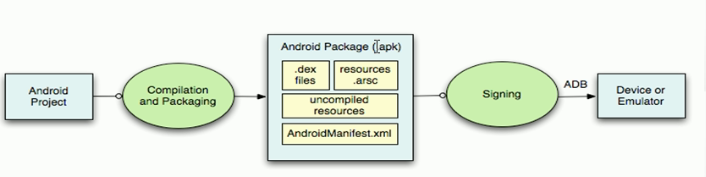
Android 應用安裝過程:首先一個android項目,然後編譯和打包,將.java文件編譯為.class,.class編譯為.dex,將所有文件打包為一個apk,只編
 Android Studio NDK 入門教程(5)--Java對象的傳遞與修改
概述本文主要Java與C++之間的對象傳遞與取值。包括傳遞Java對象、返回Java對象、修改Java對象、以及性能對比。通過JNIEnv完成數據轉換Java對象是存在於
 android實現藍牙文件發送,支持多種機型
最近項目上需要實現藍牙傳輸apk的一個功能,能夠搜索周圍的藍牙手機並分享文件。從需求上講android手機自帶的藍牙傳輸模塊就可以滿足需要了,實現也很簡單。不過讓人頭疼的