編輯:關於Android編程
package com.example.xh.myapplication;

import android.content.ComponentName;
import android.content.Intent;
import android.content.ServiceConnection;
import android.os.Bundle;
import android.os.IBinder;
import android.support.v7.app.AppCompatActivity;
import android.util.Log;
import android.view.View;
import android.widget.Button;
//MainActivity.java
public class MainActivity extends AppCompatActivity implements View.OnClickListener{
    private Button btnStart,btnStop;
    private Button btnBind,btnUnBind;
    private ServiceConnection conn = new ServiceConnection() {
        @Override
        public void onServiceConnected(ComponentName name, IBinder service) {
            //連接成功,自動調用
            Log.i("Activity","onServiceConnected");
        }

        @Override
        public void onServiceDisconnected(ComponentName name) {
            //連接無效時調用
        }
    };
    @Override
    protected void onCreate(Bundle savedInstanceState) {
        super.onCreate(savedInstanceState);
        setContentView(R.layout.activity_main);
        init();
    }
    private void init() {
        btnStart =(Button)findViewById(R.id.btnStart);
        btnStop =(Button)findViewById(R.id.btnStop);
        btnStart.setOnClickListener(this);
        btnStop.setOnClickListener(this);
        btnBind=(Button)findViewById(R.id.btnBind);
        btnUnBind=(Button)findViewById(R.id.btnUnBind);
        btnBind.setOnClickListener(this);
        btnUnBind.setOnClickListener(this);
    }

    @Override
    public void onClick(View v) {
        Intent intent = new Intent(MainActivity.this,MyService.class);
        switch(v.getId()){
            case R.id.btnStart:
                startService(intent);//onCreate>>onStartCommand
                break;
            case R.id.btnStop:
                stopService(intent);
                break;
            case R.id.btnBind:
                bindService(intent,conn,BIND_AUTO_CREATE);//bindService必須要有一個連接存在 onCreate>>onBind
                break;
            case R.id.btnUnBind:
                unbindService(conn);
                break;
        }
    }
}
package com.example.xh.myapplication;
import android.app.Service;
import android.content.Intent;
import android.os.Binder;
import android.os.IBinder;
import android.util.Log;
//MyService.java
public class MyService extends Service {
    private static final String TAG = "MyService";
    /*
     只在生命周期第一次被調用
     */
    @Override
    public void onCreate(){
        super.onCreate();
        Log.i(TAG,"onCreate");
    }
    @Override
    public void onDestroy() {
        Log.i(TAG,"onDestroy");
        super.onDestroy();
    }
    /*
     每次startService啟用時會被調用
    */
    @Override
    public int onStartCommand(Intent intent, int flags, int startId) {
        Log.i(TAG,"onStartCommand");
        return super.onStartCommand(intent, flags, startId);
    }
    /*
     bingService啟動時調用,在整個生命周期中只被調用一次
     */
    @Override
    public IBinder onBind(Intent intent) {
        Log.i(TAG,"onBind");
        return new MyBinder();
    }
    class  MyBinder extends Binder{

    }
}
AndroidManifest.xml
activity_main.xml
—————————————————————————————————————————————————————————————————————————
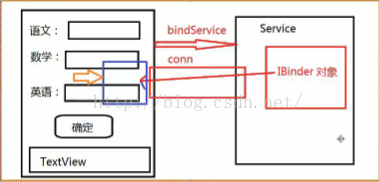
DemoActivity.java
package com.example.xh.serviceapp;

import android.app.Activity;
import android.content.ComponentName;
import android.content.Intent;
import android.content.ServiceConnection;
import android.os.Bundle;
import android.os.IBinder;
import android.util.Log;
import android.view.View;
import android.widget.Button;
import android.widget.EditText;
import android.widget.TextView;

/**
 * Created by XH on 2016/8/17.
 */
public class DemoActivity extends Activity {
    private EditText etChinese,etMath,etEnglish;
    private TextView tvResult;
    private Button btnCK;
    private ComputeService.ComputeBinder binder =null;
    private ServiceConnection conn=new ServiceConnection() {
        @Override
        public void onServiceConnected(ComponentName name, IBinder service) {
                 Log.i("TEST","onServiceConnected");
                 binder=(ComputeService.ComputeBinder)service;
        }

        @Override
        public void onServiceDisconnected(ComponentName name) {

        }
    };
    @Override
    protected void onCreate(Bundle savedInstanceState) {
        super.onCreate(savedInstanceState);
        setContentView(R.layout.activity_main);
        Intent service = new Intent(DemoActivity.this,ComputeService.class);
        bindService(service,conn,BIND_AUTO_CREATE);
        init();
    }

    @Override
    protected void onDestroy() {
        unbindService(conn);
        super.onDestroy();
    }

    private void init() {
        etChinese=(EditText)findViewById(R.id.etChinese);
        etMath=(EditText)findViewById(R.id.etMath);
        etEnglish=(EditText)findViewById(R.id.etEnglish);
        tvResult=(TextView)findViewById(R.id.tvResult);
        btnCK=(Button)findViewById(R.id.btnCK);
        btnCK.setOnClickListener(new View.OnClickListener() {
            @Override
            public void onClick(View v) {
                try {
                    //從文本框中讀取輸入的成績
                    double chinese = Double.parseDouble(etChinese.getText().toString());
                    double math = Double.parseDouble(etMath.getText().toString());
                    double english = Double.parseDouble(etEnglish.getText().toString());
                    //請求對象完成工作
                    if(binder != null){
                          double result = binder.calcAvg(chinese, math, english);
                          //顯示
                          tvResult.setText("三門課平均成績為:" + result);}
                }catch (NumberFormatException ex){

                }catch (Exception ex){

                }
            }
        });
    }
}
ComputeService.java
package com.example.xh.serviceapp;

import android.app.Service;
import android.content.Intent;
import android.os.Binder;
import android.os.IBinder;

public class ComputeService extends Service {
    @Override
    public IBinder onBind(Intent intent) {
        return new ComputeBinder();
    }
    public class ComputeBinder extends Binder{
        /*
         計算平均值
          scores可變數組,參數可以是0~N個
          retur   n
         */
        public double calcAvg(double...scores){
            int count = scores.length;
            if (count==0){
                return 0;
            }
            double sum = 0;
            for (double s:scores){
                sum+=s;
            }
            return sum/count;
        }
    }
}
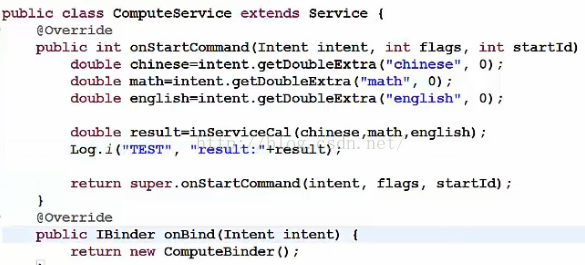 onStartCommand測試:在service裡面獲取成績
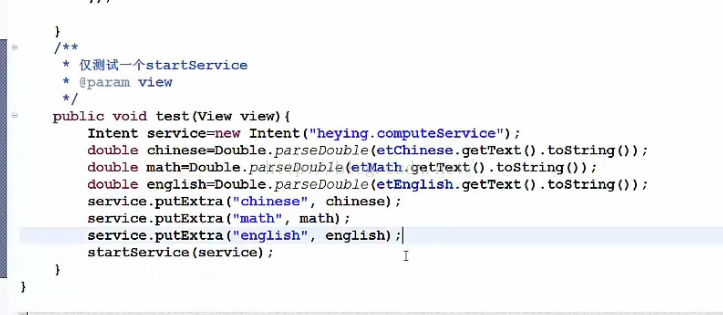 將成績傳給service
 Android開發系列(二十八):使用SubMenu創建選項菜單
大部分手機上邊都會有一個“MENU”鍵,在一個應用安裝到手機上之後,可以通過“MENU”顯示該應用關聯的菜單。 但是,從Android 3.0開始,Android不再要求
 Android自定義控件之圓形/圓角的實現代碼
一、問題在哪裡?問題來源於app開發中一個很常見的場景——用戶頭像要展示成圓的: 二、怎麼搞?機智的我,第一想法就是,切一張中間圓形透明、四周與底色相同、尺寸與
 android異步加載
本篇博客總結了慕課網關於異步加載圖片的知識要點,和大家一起分享,有感覺聽得不連貫的可以來看看。看完本篇博客,你將學習到下面的知識:1.怎樣將一個url(也可以說是一個In
 android 圖片閱讀 之 穹の思念
資源是好不容易下載到的,關於代碼,沒什麼好說的。 說點這期間遇到的問題。 漫畫 的每一話大概有20幾個頁面,實際都是jpg圖片,