編輯:關於Android編程
自己研究的安卓app簽核系統,目前公司內部用著好像也相對穩定,就用這篇文章記錄一下
工具環境:
Eclipse4.2 ADT23.0 JDK1.8.0 服務端vs2010
簡單介紹一下功能,後面會把源碼貼上
此App只做查看及簽核,數據庫是公司內部簽核系統
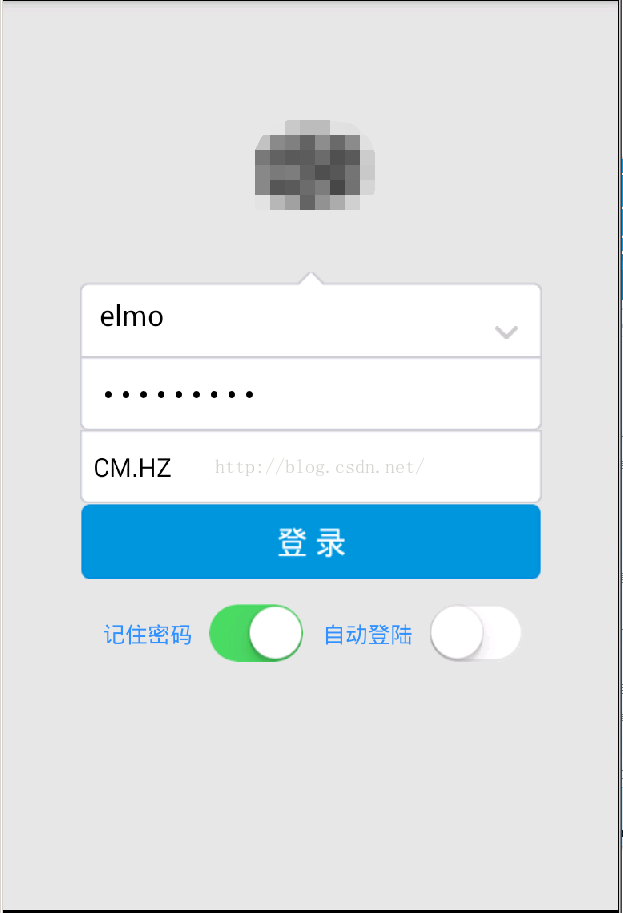
1.登陸界面
賬號密碼及網域選擇,
記住密碼是將登陸成功後的資訊存在SharedPreferences裡,後面源碼內會有
自動登陸是啟動app檢測SharedPreferences是否有,有的話檢查通過後直接執行登陸事件
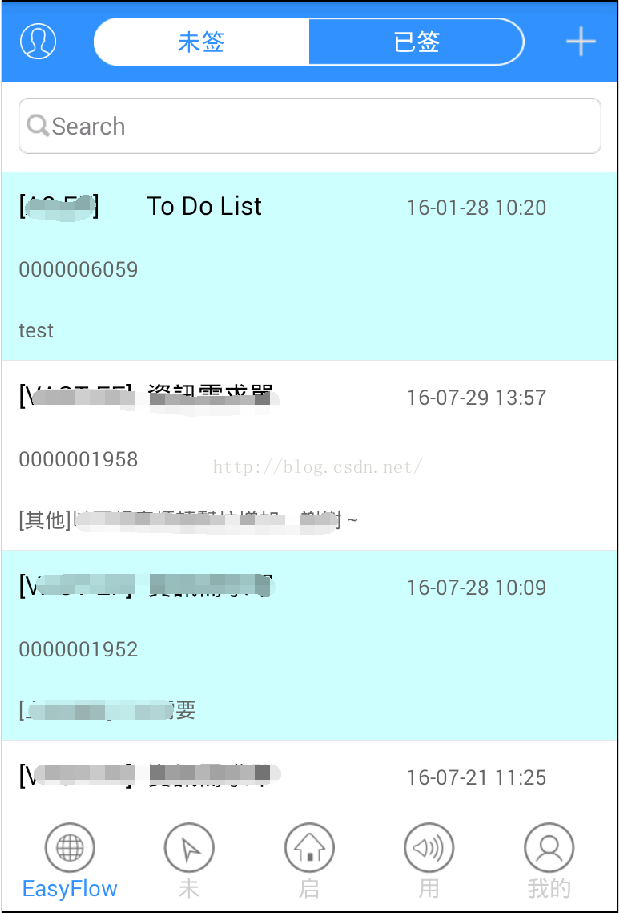
2.主界面,簽核List
ListView展示數據庫內未簽及已簽表單明細,點擊進入詳細界面
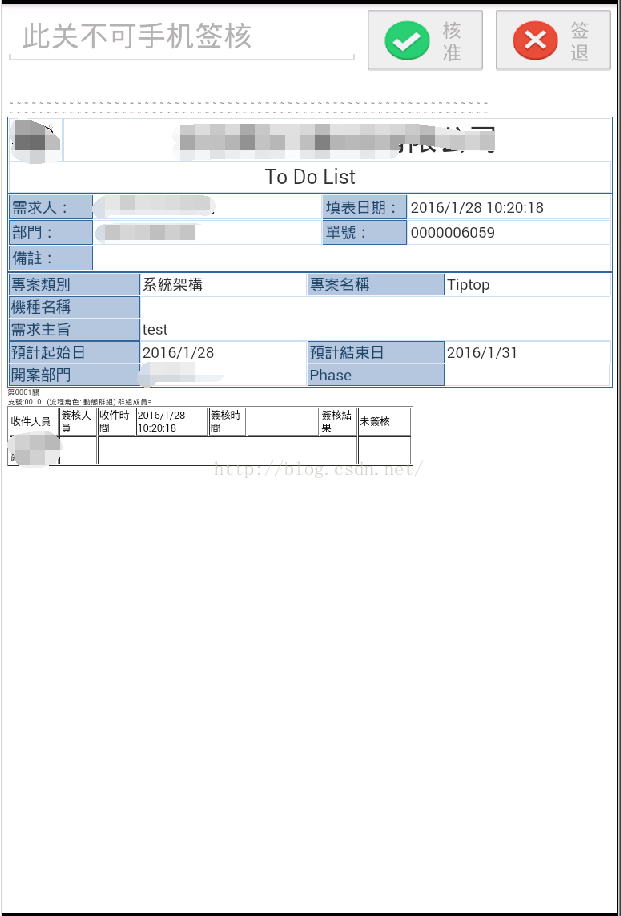
3.簽核表單畫面
webview裝載放在服務端的asp檔案,核准及簽核按鈕都只是執行url,一樣是在服務端執行
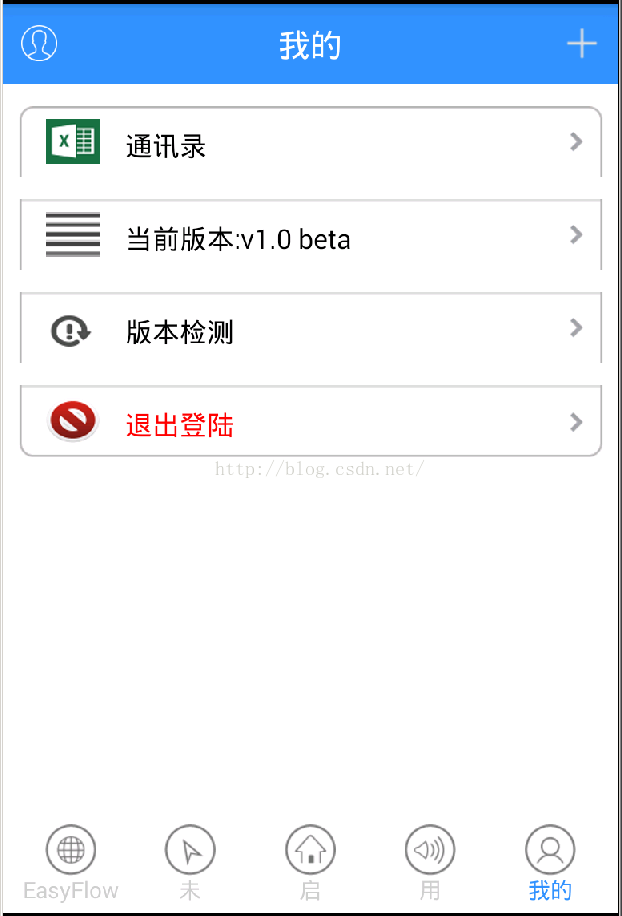
4.個人設定界面
畫面大概就這幾個,接下來貼一貼源碼
登陸界面XML畫面
登陸界面.Java源文件
有做一些簡單的輸入特殊字符檢查,密碼輸錯3次自動退出的卡關
public class LoginActivity extends Activity implements OnClickListener{
	private String url;
       //private String url="http://192.168.2.66:1295/Handler/Elmo20160527.ashx"; 這個是服務端url
	private ImageView btn;
	private Animation my_Translate;// 位移動畫
	private Animation my_Rotate;// 旋轉動畫
	private RelativeLayout rl;
	private LinearLayout ll;
	private Button btn_login;
	private TextView txt=null;
	private TextView txtpwd=null;
	private ToggleButton rem_pwd;
	private ToggleButton auto_login;
	private SharedPreferences sp;
	private Spinner sr;
	private String isauto;
    ImageView imageview;
    int count = 0;
    private TelephonyManager telephonyManager;


	private Handler handler=new Handler(){
		@Override
		public void handleMessage(Message msg) {
			// TODO Auto-generated method stub
			if (msg.what==1) {
				//txt.setText(msg.obj.toString());
				btn_login.setTextColor(0xFFFFFFFF);
                		btn_login.setEnabled(true);
                		txt.setEnabled(true);
				txtpwd.setEnabled(true);
				sr.setEnabled(true);
				rem_pwd.setEnabled(true);
				auto_login.setEnabled(true);
				if (msg.obj.toString().contains("3"))
				{
					Toast.makeText(getBaseContext(), "賬號密碼輸錯3次,程序自動退出..", Toast.LENGTH_LONG).show();
					finish();
				}else{
					Toast.makeText(getBaseContext(), msg.obj.toString(), Toast.LENGTH_LONG).show();
				}
			}
		}
	};
// 初始化 JPush。如果已經初始化,但沒有登錄成功,則執行重新登錄。
	private void init(){
		 JPushInterface.init(getApplicationContext());
	}
	@Override
	protected void onResume() {
		super.onResume();
		JPushInterface.onResume(this);
	}
	@Override
    protected void onPause() {
        super.onPause();
        JPushInterface.onPause(this);
    }
	@Override
	protected void onCreate(Bundle savedInstanceState) {
		super.onCreate(savedInstanceState);
		requestWindowFeature(Window.FEATURE_NO_TITLE);
		setContentView(R.layout.login);
		CloseActivityClass.activityList.add(this);
		url=getResources().getString(R.string.webservice);
		//CloseActivityClass.activityList.add(this);
		Bundle bundle = this.getIntent().getExtras();
		isauto="N";
		if(bundle != null){
			isauto = bundle.getString("YN");
			if(isauto==null||!isauto.equals("Y"))
		    {
				isauto="N";
		    }
		}

		UpdateManager mUpdateManger = new UpdateManager(LoginActivity.this);
		mUpdateManger.checkUpdateInfo();
		initview();
		anim();
		rl.startAnimation(my_Translate);// 載人時的動畫
		ll.startAnimation(my_Translate);
	}

	private void initview() {
		rl = (RelativeLayout) findViewById(R.id.rl);
		ll = (LinearLayout) findViewById(R.id.ll);
		txt=(TextView)this.findViewById(R.id.multi_txt);
		txtpwd=(TextView)this.findViewById(R.id.passwd_txt);
		btn = (ImageView) findViewById(R.id.btn);
		btn.setOnClickListener(this);
		btn_login = (Button) findViewById(R.id.login);
		btn_login.setOnClickListener(this);
		sr = (Spinner) super.findViewById(R.id.domain_txt);
		/*記住密碼功能*/
		sp = getSharedPreferences("config", MODE_PRIVATE);
		String uid = sp.getString("uid", "");
        String password = sp.getString("password", "");
        int srcnt =sp.getInt("domain", 0);

        txt.setText(uid);
        txtpwd.setText(password);
        sr.setSelection(srcnt,true);
		rem_pwd = (ToggleButton) findViewById(R.id.mTogBtn); // 獲取到控件
		auto_login = (ToggleButton) findViewById(R.id.mTogBtn1); // 獲取到控件
		rem_pwd.setChecked(sp.getBoolean("chk",false));
		rem_pwd.setOnCheckedChangeListener(new OnCheckedChangeListener() {
		    @Override
		    public void onCheckedChanged(CompoundButton buttonView,boolean isChecked) {
		        // TODO Auto-generated method stub
		        if(isChecked){
		            //選中
		        	Toast.makeText(getBaseContext(), "記住密碼", Toast.LENGTH_LONG).show();

		        }else{
		            //未選中
		        	Toast.makeText(getBaseContext(), "取消記住密碼", Toast.LENGTH_LONG).show();
		        }
		    }
		});// 添加監聽事件
		auto_login.setChecked(sp.getBoolean("auto",false));
		auto_login.setOnCheckedChangeListener(new OnCheckedChangeListener() {
		    @Override
		    public void onCheckedChanged(CompoundButton buttonView,boolean isChecked) {
		        // TODO Auto-generated method stub
		        if(isChecked){
		            //選中
		        	Toast.makeText(getBaseContext(), "自動登陸", Toast.LENGTH_LONG).show();
		        }else{
		            //未選中
		        	Toast.makeText(getBaseContext(), "取消自動登陸", Toast.LENGTH_LONG).show();
		        }
		    }
		});// 添加監聽事件
		//自動登陸
		if(rem_pwd.isChecked()&&auto_login.isChecked()&&isauto.equals("N"))
		{
			btnPost();
		}
	}

	private void anim() {
		my_Translate = AnimationUtils.loadAnimation(this, R.anim.my_translate);
		my_Rotate = AnimationUtils.loadAnimation(this, R.anim.my_rotate);
	}

	@Override
	public void onClick(View v) {
		boolean flag = false;
		switch (v.getId()) {
		case R.id.btn:
			Toast.makeText(getBaseContext(), "旋轉", Toast.LENGTH_LONG).show();
			btn.startAnimation(my_Rotate);
			break;
		case R.id.login:
			//Toast.makeText(getBaseContext(), "登錄", Toast.LENGTH_LONG).show();

			if(txt.getText().toString().equals("")||txtpwd.getText().toString().equals(""))
			{
				Toast.makeText(getBaseContext(), "請輸入賬號及密碼", Toast.LENGTH_LONG).show();
			}else{
				if (txt.getText().toString().matches("[A-Za-z0-9_]+")) {
					txt.setEnabled(false);
					txtpwd.setEnabled(false);
					sr.setEnabled(false);
					btn_login.setTextColor(0xFFD0EFC6);
	                btn_login.setEnabled(false);
	                rem_pwd.setEnabled(false);
	                auto_login.setEnabled(false);

					btnPost();
	                /*Intent intent = new Intent(LoginActivity.this,MainActivity.class);
	                LoginActivity.this.startActivity(intent);
					overridePendingTransition(R.anim.zoomin, R.anim.zoomout);*/
				}else{

					Toast.makeText(getBaseContext(), "賬號只可輸入字母/數字/下劃線", Toast.LENGTH_LONG).show();
				}

			}
			break;
		default:
			break;
		}
	}
	private void btnPost()
	{
		new Thread(new Runnable() {

			@Override
			public void run() {
				// TODO Auto-generated method stub

				List list=new ArrayList();
				list.add(new BasicNameValuePair("action", "login"));
				list.add(new BasicNameValuePair("para", "[{\"uid\":\""+txt.getText()+"\",\"pwd\":\""+txtpwd.getText()+"\",\"domain\":\""+sr.getSelectedItem().toString()+"\"}]"));
				String result= NetUtils.postRequest(url, list);
				//String result="OK";
				if (result.equals("OK")) {
					Editor editor = sp.edit();
					String uid = txt.getText().toString();
	                String password = txtpwd.getText().toString();
	                int domain=sr.getSelectedItemPosition();
					if (rem_pwd.isChecked()) {
	                    editor.putString("uid", uid);
	                    editor.putString("password",password);
	                    editor.putInt("domain", domain);
	                    editor.putBoolean("chk", true);
	                    if(auto_login.isChecked())
	                    {
	                    	editor.putBoolean("auto", true);
	                    }else{
	                    	editor.putBoolean("auto", false);
	                    }
	                    // 把數據給保存到sp裡面
	                    editor.commit();
					}else{
						editor.putString("uid", uid);
	                    editor.putString("password","");
	                    editor.putBoolean("chk", false);
	                    editor.putBoolean("auto", false);
	                    // 把數據給保存到sp裡面
	                    editor.commit();
					}
					Intent intent = new Intent(LoginActivity.this,MainActivity.class);
				    //用Bundle攜帶數據
				    Bundle bundle=new Bundle();
				    //傳遞name參數為tinyphp
				    bundle.putString("uid", txt.getText().toString());
				    bundle.putString("pwd", txtpwd.getText().toString());
				    bundle.putString("domain", sr.getSelectedItem().toString());
				    intent.putExtras(bundle);
				    LoginActivity.this.startActivity(intent);
					overridePendingTransition(R.anim.zoomin, R.anim.zoomout);
					//Toast.makeText(getBaseContext(), result, Toast.LENGTH_LONG).show();
				}
				else{
					if(++count >= 3){
						result=count+"";
					}
					Message msg=Message.obtain(handler, 1, result);
					handler.sendMessage(msg);
				}
			}
		}).start();

	}


}
登陸界面對應的服務端ASHX驗證代碼,只要打開VS新增專案再貼進去就可以用,AD域驗證要注意的就是要改成實際的域跟IP
public void ProcessRequest(HttpContext context)
        {
            context.Response.ContentType = "text/plain";
            string action = context.Request["action"];
            if (string.IsNullOrEmpty(action))
            {
                context.Response.Write("not action");
            }
            else
            {
                switch (action)
                {
                    case "login":
                        context.Response.Write(Log());
                        break;
                    default:
                        break;
                }
            }
        }
public string Log()
        {
            string uid = "";
            string pwd = "";
            string domain = "";
            string phone = "";
            string paras = "";
            try
            {
                paras = HttpContext.Current.Request["para"];
                if (string.IsNullOrEmpty(paras))
                {
                    return "Null";
                }
                //return paras;
                HttpContext context = HttpContext.Current;
                List users = new List();
                users = Newtonsoft.Json.JsonConvert.DeserializeObject>(paras);
                Users user = new Users();
                for (int i = 0; i < users.Count; i++)
                {
                    user = users[i];
                }
                uid = user.uid;
                pwd = user.pwd;
                domain = user.domain;
                phone = user.phonenumber;
                string ComputerName="";

                Regex reg = new Regex(@"^\w+$");
                if (!reg.IsMatch(uid))
                {
                    applog(uid, domain, "登陸", "失敗:登陸賬號有特殊字符");
                    return "失敗:登陸賬號有特殊字符";
                }
                if (domain == "XX.XX") //域名
                {
                    ComputerName = "192.168.1.1"; //域服務器IP
                }
                else if (domain == "ZZ.ZZ")
                {
                    ComputerName = "10.170.0.1";
                }
                else if (domain == "YY.YY")
                {
                    ComputerName = "192.168.168.168";
                }
                string[] alldc = domain.Split(new string[] { "." }, StringSplitOptions.RemoveEmptyEntries);
                string Dc = "/dc=" + string.Join(",dc=", alldc);

                DirectoryEntry AD = new DirectoryEntry("LDAP://"+ComputerName+Dc, uid, pwd);
                AD.RefreshCache();
            }
            catch (Exception e)
            {
                applog(uid, domain, "登陸", "失敗:"+ e.Message);
                return "登陸失敗:賬號或密碼錯誤";

            }
            applog(uid, domain, "登陸", "成功");
            return "OK";

        }
NetUtils.postRequest部分關鍵代碼
public static String postRequest(String urlString,Listparams) { String rmsg=""; try { HttpClient client = getNewHttpClient(); client.getParams().setParameter(CoreConnectionPNames.CONNECTION_TIMEOUT,8000); client.getParams().setParameter(CoreConnectionPNames.SO_TIMEOUT,10000); HttpPost postMethod = new HttpPost(urlString); postMethod.setEntity(new UrlEncodedFormEntity(params, HTTP.UTF_8)); HttpResponse response = client.execute(postMethod); //RequestConfig requestConfig = RequestConfig.custom().setSocketTimeout(2000).setConnectTimeout(2000).build();//設置請求和傳輸超時時間 int statueCode = response.getStatusLine().getStatusCode(); if (statueCode == 200) { System.out.println(statueCode); return EntityUtils.toString(response.getEntity()); } } catch (Exception e) { rmsg="Err:"+e.getMessage(); return rmsg; } return "登陸失敗,請檢查網絡或是否正常"; }
以上登陸的部分就全部完成,其他部分參考文章開頭的UI框架,要依照公司內部不同需求做客制化了
 Android之Web篇:Day01Html與Css基礎入門
Day01 html與css基礎入門 1.html的常見標簽和實戰 1.1 a標簽 點我送福利哦! // target屬性值_blank表示另取空白頁打開網
 Android UI之Tab
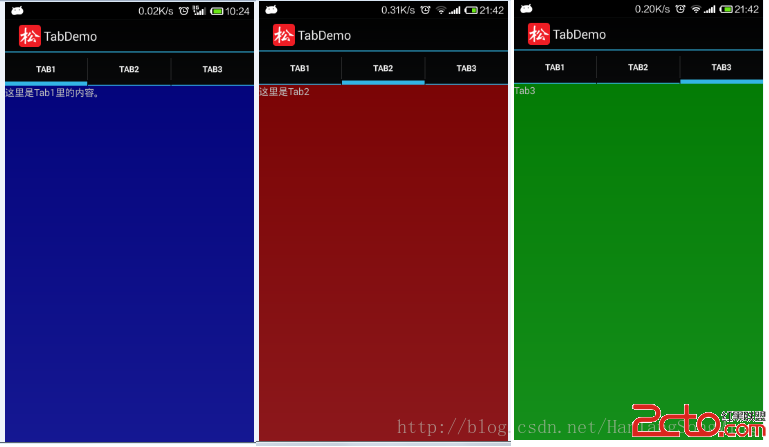
Tab標簽頁是UI設計時經常使用的UI控件,可以實現多個分頁之間的快速切換,每個分頁可以顯示不同的內容。 TabHost相當於浏覽器中標簽頁分布的集合,而Tabspec
 Android使用Notification實現寬視圖通知欄(二)
Notification是在你的應用常規界面之外展示的消息。當app讓系統發送一個消息的時候,消息首先以圖表的形式顯示在通知欄。要查看消息的詳情需要進入通知抽屜(noti
 Android中如何為ListView設置靜態數據
有的時候我們需要為一個listview設置固定的數據,下邊就是如何設置靜態的數據布局文件listview 的主頁面 然後的一個布局文件為每一個listview的item,