編輯:關於Android編程
Android日期選擇控件效果如下:
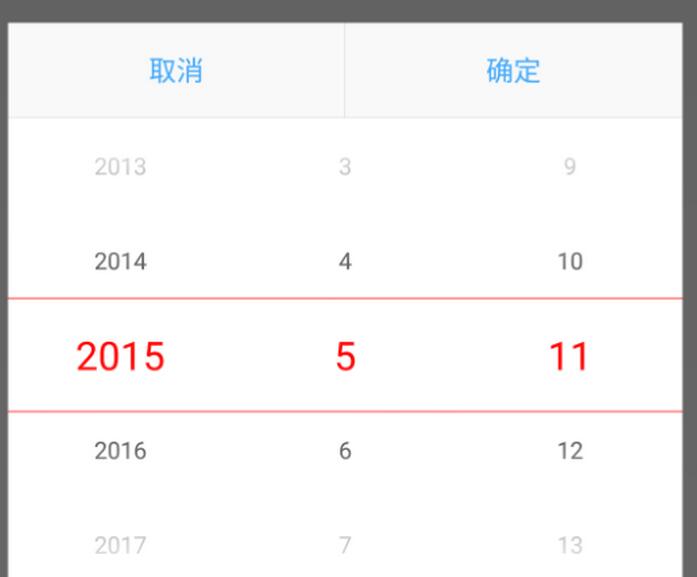
調用的代碼:
@OnClick(R.id.btn0)
 public void btn0() {
 final AlertDialog dialog = new AlertDialog.Builder(context).create();
 dialog.show();
 Window window = dialog.getWindow();
 window.setContentView(R.layout.dialog_change_date);
 window.setBackgroundDrawable(new ColorDrawable(0x00000000)); // 處理5.0以上對話框的白邊問題
 window.setGravity(Gravity.BOTTOM);
 final DatePickerView datePickerView = (DatePickerView) window.findViewById(R.id.datePickerView);

 //打開頁面時需要選中的日期 TODO
 datePickerView.setDate(2015, 5, 11);
 // datePickerView.setDate(birthdayArray[0], birthdayArray[1], birthdayArray[2]);

 final int[] birthdayArray = new int[3];
 datePickerView.addOnSelectedChangingListener(new DatePickerView.OnSelectedChangedListener() {
  @Override
  public void OnSelectedChanged(int[] oldValue, int[] newValue) {
  birthdayArray[0] = newValue[0];
  birthdayArray[1] = newValue[1];
  birthdayArray[2] = newValue[2];
  }
 });
 window.findViewById(R.id.tvCancel).setOnClickListener(new View.OnClickListener() {
  @Override
  public void onClick(View view) {
  dialog.dismiss();
  }
 });
 window.findViewById(R.id.tvOK).setOnClickListener(new View.OnClickListener() {
  @Override
  public void onClick(View view) {
  dialog.dismiss();

  btn0.setText(birthdayArray[0] + "年" + birthdayArray[1] + "月" + birthdayArray[2] + "日");
  }
 });

 }
1.WheelView 源碼(有修改)
2.xml布局文件
<?xml version="1.0" encoding="utf-8"?>
<!--widget_date_picker.xml-->
<!--注意修改頁面自定義控件的包名-->
<LinearLayout xmlns:android="http://schemas.android.com/apk/res/android"
    android:layout_width="match_parent"
    android:layout_height="wrap_content"
    android:orientation="horizontal">

 <de.bvb.rxdemo.widget.DateSelectWidget.wheelview.WheelView
  android:id="@+id/wheelViewYear"
  android:layout_width="0dp"
  android:layout_height="match_parent"
  android:layout_gravity="center"
  android:layout_weight="1"/>

 <de.bvb.rxdemo.widget.DateSelectWidget.wheelview.WheelView
  android:id="@+id/wheelViewMonth"
  android:layout_width="0dp"
  android:layout_height="match_parent"
  android:layout_gravity="center"
  android:layout_weight="1"/>

 <de.bvb.rxdemo.widget.DateSelectWidget.wheelview.WheelView
  android:id="@+id/wheelViewDay"
  android:layout_width="0dp"
  android:layout_height="match_parent"
  android:layout_gravity="center"
  android:layout_weight="1"/>

</LinearLayout>
<?xml version="1.0" encoding="utf-8"?>
<!--dialog_change_date.xml-->
<!--注意修改頁面自定義控件的包名-->
<LinearLayout xmlns:android="http://schemas.android.com/apk/res/android"
    android:layout_width="match_parent"
    android:layout_height="match_parent"
    android:background="@android:color/transparent"
    android:gravity="bottom"
    android:orientation="vertical">

 <LinearLayout
  android:layout_width="match_parent"
  android:layout_height="wrap_content"
  android:background="@android:color/white"
  android:orientation="vertical">

  <LinearLayout
   android:layout_width="match_parent"
   android:layout_height="48dp"
   android:orientation="horizontal">

   <TextView
    android:id="@+id/tvCancel"
    android:layout_width="0dp"
    android:layout_height="match_parent"
    android:layout_weight="1"
    android:background="#F9F9F9"
    android:gravity="center"
    android:text="取消"
    android:textColor="#43AAFC"/>

   <View
    android:layout_width="1px"
    android:layout_height="match_parent"
    android:background="#D7D7D7"/>

   <TextView
    android:id="@+id/tvOK"
    android:layout_width="0dp"
    android:layout_height="match_parent"
    android:layout_weight="1"
    android:background="#F9F9F9"
    android:gravity="center"
    android:text="確定"
    android:textColor="#43AAFC"/>

  </LinearLayout>

  <View
   android:layout_width="match_parent"
   android:layout_height="1px"
   android:background="#D7D7D7"/>

  <de.bvb.rxdemo.widget.DateSelectWidget.DatePickerView
   android:id="@+id/datePickerView"
   android:layout_width="match_parent"
   android:layout_height="wrap_content"/>

 </LinearLayout>
</LinearLayout>
3.java文件
package de.bvb.rxdemo.widget.DateSelectWidget;

import android.content.Context;
import android.util.AttributeSet;
import android.view.LayoutInflater;
import android.view.View;
import android.widget.LinearLayout;
import android.widget.TextView;

import java.util.ArrayList;

import de.bvb.rxdemo.R;
import de.bvb.rxdemo.widget.DateSelectWidget.wheelview.OnWheelChangedListener;
import de.bvb.rxdemo.widget.DateSelectWidget.wheelview.OnWheelScrollListener;
import de.bvb.rxdemo.widget.DateSelectWidget.wheelview.WheelView;
import de.bvb.rxdemo.widget.DateSelectWidget.wheelview.adapter.AbstractWheelTextAdapter1;


public class DatePickerView extends LinearLayout {


 private static final int YEAR_MIN = 1950;
 private static final int YEAR_MAX = 2020;

 private int year = YEAR_MIN;
 private int month = 1;
 private int day = 1;


 private ArrayList<Integer> yearList = new ArrayList<>(YEAR_MAX - YEAR_MIN + 1);
 private ArrayList<Integer> monthList = new ArrayList<>(12);
 private ArrayList<Integer> dayList = new ArrayList<>(31);

 private DateTextAdapter yearAdapter;
 private DateTextAdapter monthAdapter;
 private DateTextAdapter dayAdapter;

 private Context context;
 private WheelView wheelViewYear;
 private WheelView wheelViewMonth;
 private WheelView wheelViewDay;

 public DatePickerView(Context context) {
 this(context, null);
 }

 public DatePickerView(Context context, AttributeSet attrs) {
 this(context, attrs, 0);
 }

 public DatePickerView(Context context, AttributeSet attrs, int defStyleAttr) {
 super(context, attrs, defStyleAttr);
 this.context = context;
 init();
 }

 private void init() {
 for (int i = YEAR_MIN; i < YEAR_MAX + 1; i++) {
  yearList.add(i);
 }
 for (int i = 1; i < 13; i++) {
  monthList.add(i);
 }
 for (int i = 1; i < 32; i++) {
  dayList.add(i);
 }

 LayoutInflater.from(context).inflate(R.layout.widget_date_picker, this);
 // View.inflate(context, R.layout.widget_date_picker, this);

 wheelViewYear = (WheelView) findViewById(R.id.wheelViewYear);
 wheelViewMonth = (WheelView) findViewById(R.id.wheelViewMonth);
 wheelViewDay = (WheelView) findViewById(R.id.wheelViewDay);

 wheelViewYear.setCyclic(true);// 可循環滾動
 wheelViewMonth.setCyclic(true);// 可循環滾動
 wheelViewDay.setCyclic(true);// 可循環滾動

 yearAdapter = new DateTextAdapter(context);
 monthAdapter = new DateTextAdapter(context);
 dayAdapter = new DateTextAdapter(context);

 yearAdapter.setList(yearList);
 monthAdapter.setList(monthList);
 dayAdapter.setList(dayList);

 wheelViewYear.setViewAdapter(yearAdapter);
 wheelViewMonth.setViewAdapter(monthAdapter);
 wheelViewDay.setViewAdapter(dayAdapter);

 wheelViewYear.addChangingListener(new OnWheelChangedListener() {
  @Override
  public void onChanged(WheelView wheel, int oldValue, int newValue) {
  year = YEAR_MIN + newValue;
  int days = calcDay(year, month); // days=28
  dayList = getDayList(days);
  dayAdapter.setList(dayList);
  if (day > days) {
   dayAdapter.currentIndex = days - 1;
   wheelViewDay.setCurrentItem(dayAdapter.currentIndex);
  } else {
   dayAdapter.currentIndex = day - 1; // day = 30
  }

  if (onSelectedChangedListener != null) {
   onSelectedChangedListener.OnSelectedChanged(parseInt2Array(YEAR_MIN + oldValue, month, day), getSelectDate());
  }
  }
 });

 wheelViewMonth.addChangingListener(new OnWheelChangedListener() {
  @Override
  public void onChanged(WheelView wheel, int oldValue, int newValue) {
  month = 1 + newValue;
  int days = calcDay(year, month); // days=28
  dayList = getDayList(days);
  dayAdapter.setList(dayList);
  if (day > days) {
   dayAdapter.currentIndex = days - 1;
   wheelViewDay.setCurrentItem(dayAdapter.currentIndex);
  } else {
   dayAdapter.currentIndex = day - 1; // day = 30
  }

  if (onSelectedChangedListener != null) {
   onSelectedChangedListener.OnSelectedChanged(parseInt2Array(year, 1 + oldValue, day), getSelectDate());
  }
  }
 });

 wheelViewDay.addChangingListener(new OnWheelChangedListener() {
  @Override
  public void onChanged(WheelView wheel, int oldValue, int newValue) {
  day = 1 + newValue;
  if (onSelectedChangedListener != null) {
   onSelectedChangedListener.OnSelectedChanged(parseInt2Array(year, month, oldValue + 1), getSelectDate());
  }
  }
 });

 wheelViewYear.addScrollingListener(onWheelScrollListener);
 wheelViewMonth.addScrollingListener(onWheelScrollListener);
 wheelViewDay.addScrollingListener(onWheelScrollListener);
 }

 OnWheelScrollListener onWheelScrollListener = new OnWheelScrollListener() {
 @Override
 public void onScrollingStarted(WheelView wheel) {

 }

 @Override
 public void onScrollingFinished(WheelView wheel) {
  setTextViewStyle();
 }
 };

 private void setTextViewStyle() {
 setTextViewSize(year + "", yearAdapter);
 setTextViewSize(month + "", monthAdapter);
 setTextViewSize(day + "", dayAdapter);
 }

 private void setTextViewSize(String currentItemText, AbstractWheelTextAdapter1 adapter) {
 ArrayList<View> arrayList = adapter.getTextViews();
 int size = arrayList.size();
 String currentText;
 TextView textView;
 boolean current;
 for (int i = 0; i < size; i++) {
  textView = (TextView) arrayList.get(i);
  currentText = textView.getText().toString();
  current = currentItemText.equals(currentText);
  textView.setTextColor(current ? adapter.selected_text_color : adapter.un_selected_text_color);
  textView.setTextSize(current ? adapter.selected_text_size : adapter.un_selected_text_size);
 }
 }

 /**
 * 設置控件的初始值
 *
 * @param year
 * @param month
 * @param day
 */
 public void setDate(int year, int month, int day) {
 //驗證合法性
 if (year > YEAR_MAX || year < YEAR_MIN) {
  year = YEAR_MIN;
//  throw new RuntimeException("年份必須在[" + YEAR_MIN + "," + YEAR_MAX + "]之間");
 }
 if (month > 12 || month < 1) {
  month = 1;
//  throw new RuntimeException("月份份必須在[" + 1 + "," + 12 + "]之間");
 }
 final int days = calcDay(year, month);
 if (day > days || day < 1) {
  day = 1;
//  throw new RuntimeException("日期份必須在[" + 1 + "," + days + "]之間");
 }

 this.year = year;
 this.month = month;
 this.day = day;

 yearAdapter.currentIndex = DatePickerView.this.year - YEAR_MIN;
 monthAdapter.currentIndex = DatePickerView.this.month - 1;
 dayAdapter.currentIndex = DatePickerView.this.day - 1;

 wheelViewYear.setCurrentItem(yearAdapter.currentIndex);
 wheelViewMonth.setCurrentItem(monthAdapter.currentIndex);
 wheelViewDay.setCurrentItem(dayAdapter.currentIndex);
 }

 public void addOnSelectedChangingListener(OnSelectedChangedListener onSelectedChangedListener) {
 this.onSelectedChangedListener = onSelectedChangedListener;
 }

 private OnSelectedChangedListener onSelectedChangedListener;

 public interface OnSelectedChangedListener {
 void OnSelectedChanged(int[] oldValue, int[] newValue);
 }

 private int[] parseInt2Array(int year, int month, int day) {
 return new int[]{year, month, day};
 }

 private int[] getSelectDate() {
 return new int[]{year, month, day};
 }

 private ArrayList<Integer> getDayList(int days) {
 if (days <= 0) {
  return null;
 }
 ArrayList<Integer> list = new ArrayList(days);
 for (int i = 1; i < days + 1; i++) {
  list.add(i);
 }
 return list;
 }

 private int calcDay(int year, int month) {
 int days = 0;
 switch (month) {
  case 1:
  case 3:
  case 5:
  case 7:
  case 8:
  case 10:
  case 12:
  days = 31;
  break;
  case 4:
  case 6:
  case 9:
  case 11:
  days = 30;
  break;
  case 2:
  days = (year % 400 == 0 || (year % 100 != 0 && year % 4 == 0)) ? 29 : 28;
  break;
 }
 return days;
 }

 private class DateTextAdapter extends AbstractWheelTextAdapter1 {
 ArrayList<Integer> list;

 public DateTextAdapter(Context context) {
  super(context, android.R.layout.simple_list_item_1);
//  super(context, R.layout.item_birth_year);
//  setItemTextResource(R.id.tempValue);

//  item_birth_year.xml 內容如下
//  <?xml version="1.0" encoding="utf-8"?>
//  <LinearLayout xmlns:android="http://schemas.android.com/apk/res/android"
//  android:layout_width="match_parent"
//  android:layout_height="35dip"
//  android:gravity="center"
//  android:orientation="horizontal">
//  <TextView
//   android:id="@+id/tempValue"
//   android:layout_width="match_parent"
//   android:layout_height="match_parent"
//   android:gravity="center"
//   android:textColor="#ffff0000"/>
//  </LinearLayout>
 }

 public void setList(ArrayList<Integer> list) {
  this.list = list;
  notifyDataChangedEvent();
 }

 @Override
 protected CharSequence getItemText(int index) {
  return list == null ? "" : String.valueOf(list.get(index));
 }

 @Override
 public int getItemsCount() {
  return list == null ? 0 : list.size();
 }
 }
}
以上就是本文的全部內容,希望對大家的學習有所幫助,也希望大家多多支持本站。
 Android的事件機制
一、理論概述最基本的操作類型:down 手指按下 move 手指在屏幕上移動 up 手指從屏幕上離開觸屏操作的順序:down->move->move->
 Android 快速簡單實現夜間模式
ChangeMode項目地址:ChangeMode Implementation of night mode for Android. 用最簡單的方式實現夜間模式,支持L
 手機怎麼掃描二維碼
手機怎麼掃描二維碼?手機掃描二維碼方法介紹一、通過微信掃描二維碼打開微信,點擊微信右上角的+號,從彈出的菜單中選擇“掃一掃”;在彈出
 Android Studio 2.2
今年的 I/O 2016 Google 放出了 Android Studio 2.2 的預覽版,透露改進了多項功能,只不過為了保證公司項目不受影響,我一般都不安裝預覽版的