

編輯:Android 開發教學
先從最基礎的網路編程實戰開始——用 URL 建立連線。不熟悉這塊的同學可以回去複習 Java 的 URL 編程,原理是完全相通的,這裡不再贅述。
直接上程式碼。
 public class DataActivity extends Activity {
 private EditText imagePathText;
 private static final String TAG="DataActivity";
 private ImageView imageView;

 @Override
 public void onCreate(Bundle savedInstanceState) {
 super.onCreate(savedInstanceState);
 setContentView(R.layout.main);
 imagePathText = (EditText) findViewById(R.id.imagepath);
 imageView=(ImageView)findViewById(R.id.imageView);
 Button button = (Button) findViewById(R.id.button);
 button.setOnClickListener(new View.OnClickListener() {
 @Override
 public void onClick(View v) {
 String path = imagePathText.getText().toString();
 try {
 byte[] data=NetTool.getImage(path);
 Bitmap bm=BitmapFactory.decodeByteArray(data, 0, data.length);
 imageView.setImageBitmap(bm);
 } catch (Exception e) {
 Log.i(TAG, e.toString());
 Toast.makeText(DataActivity.this, "獲得圖片失敗", 1).show();
 }
 }
 });

 // 獲取網頁源代碼
 Button sinaButton = (Button) findViewById(R.id.sinaButton);
 sinaButton.setOnClickListener(new View.OnClickListener() {
 @Override
 public void onClick(View v) {
 Intent intent=new Intent(DataActivity.this,SinaActivity.class);
 startActivity(intent);
 }
 });
 }
 }
 public class SinaActivity extends Activity {
 private TextView textView;
 private static final String TAG="SinaActivity";

 // 獲取網頁源代碼
 public void onCreate(Bundle savedInstanceState) {
 super.onCreate(savedInstanceState);
 setContentView(R.layout.sina);
 textView=(TextView)this.findViewById(R.id.sina);
 try {
 String html=NetTool.getHtml("https://www.sina.com.cn","GBK");
 textView.setText(html);
 } catch (Exception e) {
 Log.i(TAG, e.toString());
 Toast.makeText(SinaActivity.this, "獲得網頁失敗", 1).show();
 }
 }
 }
 public class NetTool {
 /**
 * 獲得url代碼數據
 */
 public static String getHtml(String path,String encoding) throws Exception {
 URL url = new URL(path);
 HttpURLConnection conn = (HttpURLConnection) url.openConnection();
 conn.setRequestMethod("GET");
 conn.setConnectTimeout(6 * 1000); // 別超過6秒
 System.out.println(conn.getResponseCode());
 if(conn.getResponseCode()==200){
 InputStream inputStream=conn.getInputStream();
 byte[] data=readStream(inputStream);
 return new String(data,encoding);
 }
 return null;
 }

 /**
 * 獲取指定路徑的圖片數據
 */
 public static byte[] getImage(String urlpath) throws Exception {
 URL url = new URL(urlpath);
 HttpURLConnection conn = (HttpURLConnection) url.openConnection();
 conn.setRequestMethod("GET");
 conn.setConnectTimeout(6 * 1000); // 別超過6秒
 if(conn.getResponseCode()==200){
 InputStream inputStream=conn.getInputStream();
 return readStream(inputStream);
 }
 return null;
 }

 /**
 * 讀取輸入流並轉為位元組陣列
 */
 public static byte[] readStream(InputStream inStream) throws Exception {
 ByteArrayOutputStream outstream=new ByteArrayOutputStream();
 byte[] buffer=new byte[1024];
 int len=-1;
 while((len=inStream.read(buffer)) !=-1){
 outstream.write(buffer, 0, len);
 }
 outstream.close();
 inStream.close();
 return outstream.toByteArray();
 }
 }
這份程式把網路 I/O 都收攏在 NetTool 裡:getHtml() 負責抓網頁並以指定編碼解碼,getImage() 直接回傳位元組,再交由 BitmapFactory 轉成 Bitmap 顯示。兩個方法都設了 6 秒連線逾時,避免使用者等不到回應。實務上還有一點務必記得:在 AndroidManifest.xml 加上 Internet 權限,否則請不到任何網路資料;另外,真正的專案裡這些網路請求都應該移出主線程,避免造成 ANR。
 Android 系統聯絡人全特效實現(下):字母表快速滾動
在上一篇文章中,我和大家一起實現了類似 Android 系統聯絡人的分組導航與擠壓動畫功能。不過,既然文章名叫《Android 系統聯絡人全特效實現》,那麼少了快速滾動功
 Android GUI 系統之 SurfaceFlinger(13):VSync 信號如何送達 MessageQueue
1.1.1 VSync 信號的處理 經過上一小節的分析,我們已經明白系統如何透過硬體裝置或軟體模擬產生 VSync 信號,也釐清了它的流轉路徑。VSync 最終會由 Ev
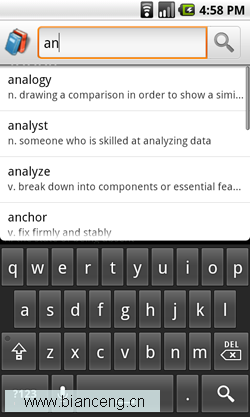 ApiDemos 解析:Invoke Search 搜尋功能
Android Search Framework 可讓應用提供統一搜尋體驗。UI 形式可使用 Search Dialog 或 SearchView。系統會將查詢內容放入
 Xposed 模組開發思路全解:從建專案到成功 Hook 一個方法
別只背步驟,先想清楚每一步為什麼 網路上關於 Xposed 模組的官方教學並不少,但多數只停在「建立專案、宣告 xposed_init、寫一個類」的層面。真正值得弄清的是