

編輯:Android 開發教學
這個示例的主 Activity 定義在 AlertDialogSamples.java 中,用來展示 AlertDialog 的各種形態。它的能力比想像中豐富:
可以顯示訊息並附上一到三顆按鈕(OK、Cancel、Yes、No)供使用者選擇或作為警告;可以顯示一個清單供挑選,清單項目可以是單選的 Radio Button,也可以是多選的 Check box;還可以放入文字框接受使用者輸入。
建立 AlertDialog 一般透過 AlertDialog.Builder:
AlertDialog.Builder ad = new AlertDialog.Builder(context);
接著可以為它設定標題、顯示內容、按鈕等,最後呼叫 ad.show() 把對話框呈現出來。
如果每次顯示都重新 new 一個 Dialog,不僅浪費,也難以在顯示前做調整。為此 Android 提供了 onCreateDialog 與 onPrepareDialog 兩個 callbacks 來管理對話框的生命週期,機制與它管理 Menu 的方式如出一轍。
覆寫 onCreateDialog 時,可依需要建立對話框實例;而對話框實例建立之後,每次 showDialog 之前若還需要修改內容,則覆寫 onPrepareDialog 即可。
由於 onCreateDialog 可能建立多個 Dialog 實例,必須先定義對話框的 ID:
private static final int DIALOG_YES_NO_MESSAGE = 1;
然後在 onCreateDialog 中依 id 分派:
@Override
protected Dialog onCreateDialog(int id) {
  switch (id) {
    case DIALOG_YES_NO_MESSAGE:
      return new AlertDialog.Builder(AlertDialogSamples.this)
        .setIcon(R.drawable.alert_dialog_icon)
        .setTitle(R.string.alert_dialog_two_buttons_title)
        .setPositiveButton(R.string.alert_dialog_ok, new DialogInterface.OnClickListener() {
            public void onClick(DialogInterface dialog, int whichButton) {
               /* 使用者按下 OK 後的處理 */
            }
        })
        .setNegativeButton(R.string.alert_dialog_cancel, new DialogInterface.OnClickListener() {
            public void onClick(DialogInterface dialog, int whichButton) {
               /* 使用者按下 Cancel 後的處理 */
            }
        })
        .create();
    ...
需要時一行 showDialog 即可顯示:
showDialog(DIALOG_YES_NO_MESSAGE);
App->Dialog 透過八個示例說明 AlertDialog 的各種用法:
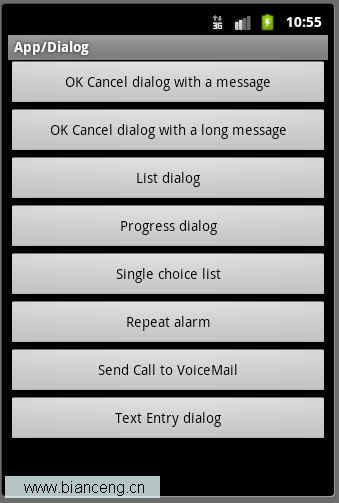
OK Cancel dialog with a message
最後提醒,Activity 管理對話框的這套 callbacks 在後續版本中已被標記為 deprecated,官方建議改用 DialogFragment,因為它能在螢幕旋轉等配置變更時正確保留狀態,而傳統的 Dialog 管理機制在這些情境下容易出錯。
 Android下拉刷新實作解析:自訂Layout與ListView
下拉刷新是許多Android清單頁面常見的互動。若不想依賴過於複雜的第三方元件,也可以用自訂Layout搭配ListView,自己實作一個輕量版本。實作原理先建立一個繼承
 Android Service 服務啟動方式與生命週期
Service 是 Android 四大元件之一,適合在背景執行播放音樂、下載檔案或監聽狀態等任務。startService 與 bindService使用 startS
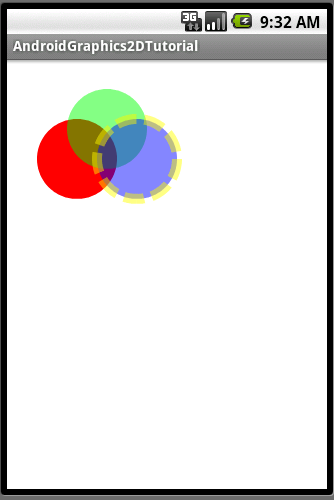 Android 簡明開發教程八:引路蜂二維繪圖範例的功能定義
有了前面對 Android 平台的介紹,基本上就可以開始動手寫應用了。這裡以繪製二維圖形為例,把 Android 開發的一般方法整個走一遍。 這個範例會練到哪些技能 看似
 Skyfire 推出國際版 Horizon Android 瀏覽器擴充
Skyfire 推出 Horizon 行動瀏覽器擴充的國際版本,可安裝於 Android 瀏覽器,提供社群網站快照與內容整合體驗。 對使用者而言,這能減少在不同應用與網頁