

編輯:Android 開發教學
本節整理 Android 中幾種常見的對話框,以及兩類通知機制的用法:
常用對話框:彈出式對話框、日期選擇對話框、時間選擇對話框、進度條對話框。
通知機制:出現在通知列的通知(Notification),以及短暫浮現的提示訊息(Toast)。
先準備主畫面版面配置 res/layout/main.xml,放上一個文字顯示元件與六顆按鈕,分別觸發不同效果:
<?xml version="1.0" encoding="utf-8"?>
<LinearLayout xmlns:android="https://schemas.android.com/apk/res/android"
    android:orientation="vertical"
    android:layout_width="fill_parent"
    android:layout_height="fill_parent">

    <TextView
        android:id="@+id/txtMsg"
        android:layout_width="wrap_content"
        android:layout_height="wrap_content" />

    <Button android:id="@+id/btn1" android:layout_width="wrap_content"
        android:layout_height="wrap_content" />
    <Button android:id="@+id/btn2" android:layout_width="wrap_content"
        android:layout_height="wrap_content" />
    <Button android:id="@+id/btn3" android:layout_width="wrap_content"
        android:layout_height="wrap_content" />
    <Button android:id="@+id/btn4" android:layout_width="wrap_content"
        android:layout_height="wrap_content" />
    <Button android:id="@+id/btn5" android:layout_width="wrap_content"
        android:layout_height="wrap_content" />
    <Button android:id="@+id/btn6" android:layout_width="wrap_content"
        android:layout_height="wrap_content" />

</LinearLayout>
另外準備一個自訂檢視版面 res/layout/view.xml,稍後會把它塞進自訂對話框中當作內容:
<?xml version="1.0" encoding="utf-8"?>
<LinearLayout xmlns:android="https://schemas.android.com/apk/res/android"
    android:orientation="vertical"
    android:layout_width="fill_parent"
    android:layout_height="fill_parent">

    <TextView
        android:text="我是一個 View"
        android:layout_width="wrap_content"
        android:layout_height="wrap_content" />

</LinearLayout>
若是要實作列表選擇型對話框,則需要一份字串陣列資源 res/values/array.xml:
<?xml version="1.0" encoding="utf-8"?>
<resources>
    <!-- 定義一個名為 ary 的字串型別陣列 -->
    <string-array name="ary">
        <item>項目 1</item>
        <item>項目 2</item>
    </string-array>
</resources>
彈出式對話框以 AlertDialog.Builder 建立,可設定標題、訊息、列表、自訂檢視以及正反中立三顆按鈕;日期與時間選擇則分別使用 DatePickerDialog 與 TimePickerDialog;需要長時間等待時,改用 ProgressDialog 顯示進度條。
至於通知,Notification 會常駐通知列,適合表示持續性狀態;Toast 則是短暫浮現、不需使用者互動的提示,兩者的使用時機並不相同,選對工具才能做出自然的操作體驗。
 Android下拉刷新實作解析:自訂Layout與ListView
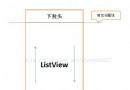
下拉刷新是許多Android清單頁面常見的互動。若不想依賴過於複雜的第三方元件,也可以用自訂Layout搭配ListView,自己實作一個輕量版本。實作原理先建立一個繼承
 ApiDemos 解析(22):AlertDialog 的多種用法
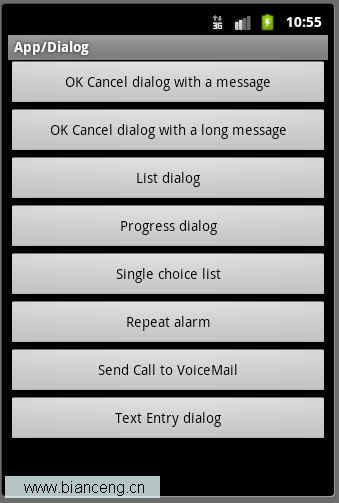
這個示例的主 Activity 定義在 AlertDialogSamples.java 中,用來展示 AlertDialog 的各種形態。它的能力比想像中豐富: 可以顯示
 仿微信風格 Android 引導頁與動畫效果
引導頁常用於介紹應用主要功能。仿微信風格的引導頁通常包含多張圖片、滑動切換與淡入淡出等動畫效果。實作時可使用 ViewPager 或自訂 HorizontalScroll
 Android 簡明開發教程九:建立應用程式框架
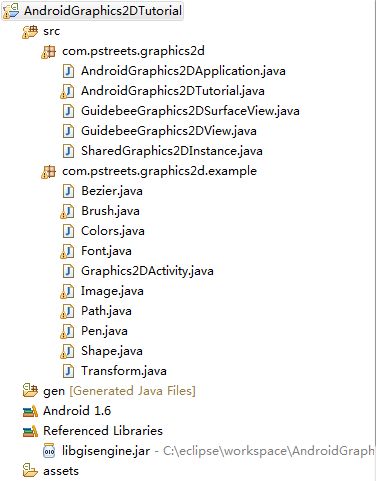
第八篇說明了程式需要實現的功能,現在可以開始建立專案了。請參考教程第三篇建立一個名為 AndroidGraphics2DTutorial 的新專案,並先搭好整體骨架。