

編輯:Android 開發教學
這個範例是上一個的變體:把原本用來切換的 RadioButton 換成 Button,其餘結構大致相同。
在 res/layout 中新增 brush.xml:
<?xml version="1.0" encoding="utf-8"?>
<LinearLayout xmlns:android="https://schemas.android.com/apk/res/android"
    android:orientation="vertical"
    android:background="@drawable/white"
    android:layout_width="fill_parent"
    android:layout_height="fill_parent">

    <com.pstreets.graphics2d.GuidebeeGraphics2DView
        android:id="@+id/graphics2dview"
        android:layout_weight="1"
        android:layout_width="fill_parent"
        android:layout_height="wrap_content"/>

    <LinearLayout xmlns:android="https://schemas.android.com/apk/res/android"
        android:layout_width="wrap_content"
        android:layout_height="wrap_content"
        android:orientation="horizontal" >

        <Button android:text="Pattern"
            android:id="@+id/btnPattern"
            android:layout_width="wrap_content"
            android:textColor="@color/black"
            android:checked="true"
            android:layout_height="wrap_content">
        </Button>

        <Button android:text="Gradients"
            android:id="@+id/btnGradients"
            android:layout_width="wrap_content"
            android:textColor="@color/black"
            android:layout_height="wrap_content">
        </Button>

    </LinearLayout>
</LinearLayout>
表面上看這只是把 RadioButton 替換成 Button,但背後反映的是一個介面設計上的取捨。
RadioButton 放在 RadioGroup 裡,天生就是「單選」語意——使用者一眼就知道這些選項互斥,而且框架會幫你保證同一時間只有一個被選中。
Button 則沒有這層語意。它預設是「按一下就觸發一個動作」,要拿來當切換鈕用,你必須自己維護「目前哪個作用中」的狀態,並手動更新每個按鈕的外觀。
所以這個範例真正在教你的是:當你選擇用 Button 實作切換時,額外的狀態管理責任就落在你身上。
如果你的目標只是視覺風格,其實有更省事的做法:保留 RadioButton 的單選邏輯,改用 style 或自訂 selector 換掉外觀,就能同時拿到「框架保證互斥」與「想要的樣子」。
若堅持用 Button,建議做兩件事:一是用 toggleButton 或自行以 background 的 selector 反映選中狀態,讓使用者有視覺回饋;二是把「切換」這件事集中到一個方法裡處理,避免在每個 setOnClickListener 中重複寫更新邏輯。
另外,這裡的 android:checked="true" 放在 Button 上其實不會有實際效果,因為 Button 並沒有 checked 屬性——這也是從 RadioButton 改寫過來時容易殘留的痕跡,值得留意。
 Android 測試教程(2):測試基礎知識
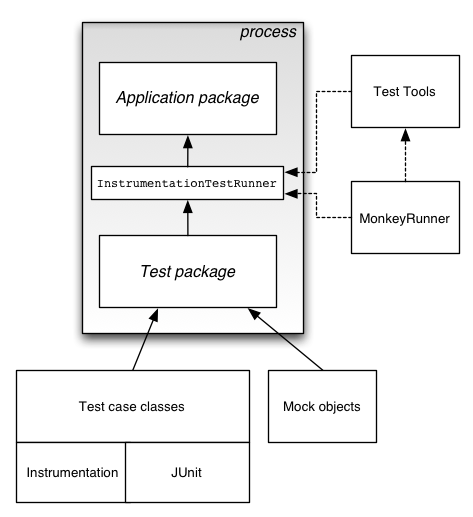
Android 測試框架(Android Testing Framework)是 Android 開發環境的組成部分之一,可用來測試應用的各個層面——從單元測試、框架測試
 Mono for Android 安裝、配置與破解(適用 4.2.5 版)
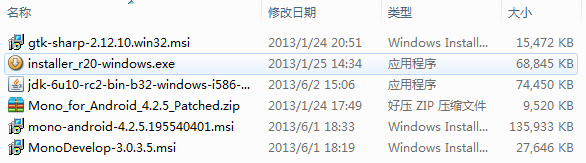
【針對 4.2.5 版本】 我對行動開發一直頗感興趣,只是沒學過 Java。自從聽說了 Mono 專案、網上也有了破解檔,我便決定自己裝一套來學做開發。 Mono for
 Android UI 開發教程 引導頁(四):仿人人網 V5.9.2 動畫式引導頁
這一篇要用人人網的引導頁做為實例來詳細講解。它的做法相當新鮮——不像其他應用那樣千篇一律地靠左右滑動引導使用者,而是用一個個生動的動畫把功能演給你看,頗有令人眼前一亮的感
 Android 簡明開發教程十四:用 Context Menu 切換繪製幾何圖形
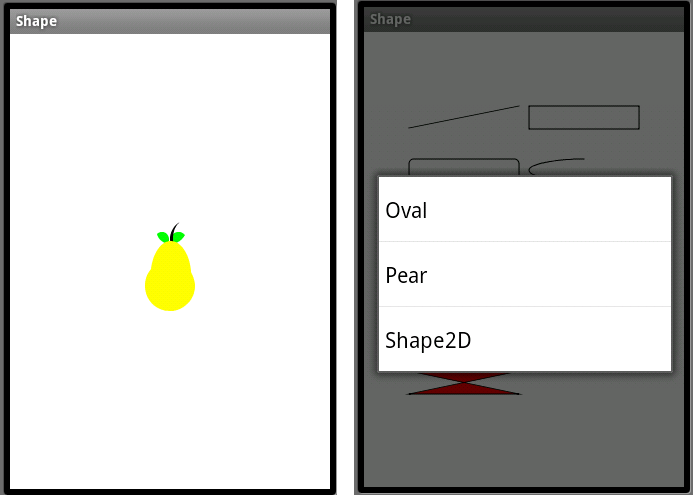
上下文相關菜單(Context Menu)的概念等同於 PC 上按滑鼠右鍵出現的選單。在 Android 平台上,它由長按觸發,通常用來顯示與當前 UI 內容相關的操作選