

編輯:Android 開發教學
Dialog 一般指浮在 Activity 之上的小視窗。顯示時當前 Activity 會失去焦點,改由 Dialog 接收使用者輸入,常用來提示訊息或收集輸入。
實務上很少直接建立 Dialog 類的實例,而是使用它的子類:AlertDialog、ProgressDialog、DatePickerDialog、TimePickerDialog。其中最常用的是 AlertDialog。
本例就用 AlertDialog 來示範三個選擇顯示圖像的範例:DrawMap、JumbleImage、SeeThroughImage。其中 DrawMap 暫不說明,留待後面介紹網路應用與線上地圖時再談。
Dialog 通常作為 Activity 的一部分來建立,也就是在 Activity 的 onCreateDialog(int) 中建立。這樣做的好處是:Android 系統會自動管理 Dialog 的狀態,並把當前 Activity 設為 Dialog 的擁有者。Dialog 也因此繼承了 Activity 的一些屬性,例如 Option Menu。
建立好之後,用 showDialog(int) 顯示,參數是 Dialog 的 ID。如果想在顯示前對 Dialog 做些調整,可以在 onPrepareDialog(int, Dialog) 中補上程式碼。關閉則用 dismiss();在 Activity 中也可以用 dismissDialog(int)。
本例用一個按鈕來觸發 Dialog,在 res/layout 中新增 images.xml:
<?xml version="1.0" encoding="utf-8"?>
<LinearLayout xmlns:android="https://schemas.android.com/apk/res/android"
    android:orientation="vertical"
    android:background="@drawable/white"
    android:layout_width="fill_parent"
    android:layout_height="fill_parent">

    <com.pstreets.graphics2d.GuidebeeGraphics2DView
        android:id="@+id/graphics2dview"
        android:layout_weight="1"
        android:layout_width="fill_parent"
        android:layout_height="wrap_content"/>

    <LinearLayout xmlns:android="https://schemas.android.com/apk/res/android"
        android:layout_width="wrap_content"
        android:layout_height="wrap_content"
        android:orientation="horizontal">

        <Button android:text="Images"
            android:id="@+id/btnImages"
            android:layout_width="wrap_content"
            android:textColor="@color/black"
            android:checked="true"
            android:layout_height="wrap_content">
        </Button>

    </LinearLayout>
</LinearLayout>
關鍵差別在於狀態管理。透過 onCreateDialog 建立的 Dialog,Activity 會記住它;旋轉螢幕導致 Activity 重建時,系統能自動把 Dialog 重新顯示出來。
若你直接 new 一個 AlertDialog 然後 show(),Activity 重建後那個 Dialog 就消失了,而且舊的視窗可能還掛在已銷毀的 Activity 上,造成記憶體洩漏——這就是所謂的 "leaked window" 錯誤。
另外要留意 layout_weight="1" 的用法:讓绘图檢視吃掉剩餘空間,按鈕列則依內容自動收縮。這是 Android 版面配置中對付「不確定高度」最可靠的手段之一。
補充一點:onCreateDialog 與 showDialog 這套 API 在後續版本已被標示為不建議使用,現在通常用 DialogFragment 取代,好處是 Fragment 管理器會自動處理重建時的狀態還原,也不必再自己維護 dialog ID。
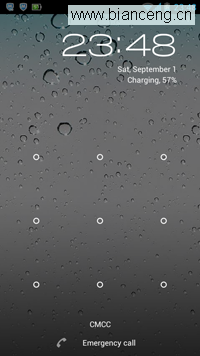 Android 忘記解鎖圖案時的處理方式
若 Android 手機使用圖案鎖定,連續多次解鎖失敗後,系統可能會要求登入 Google 帳號才能解除鎖定。復原思路使用者可嘗試透過帳號密碼重設,或依裝置品牌提供的雲端
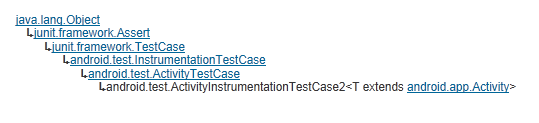 ActivityInstrumentationTestCase2 測試示例
ActivityInstrumentationTestCase2 用於測試單一 Activity。能力可啟動被測 Activity、注入 Intent、在 UI 執行緒執
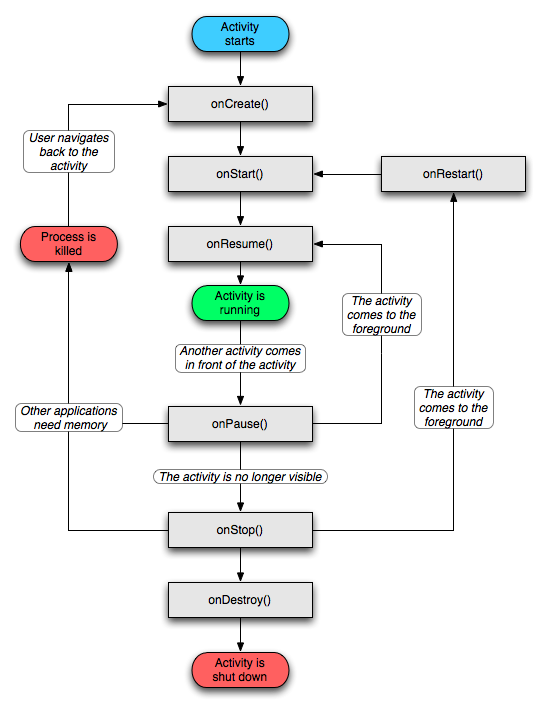 Android 簡明開發教程五:Activity 與它的生命週期
Android 應用中的 Activity 指的是具備螢幕顯示、能與使用者互動的基本模組,角色上近似 Java ME 中的 MIDlet,或 Windows 應用中的 F
 ContentProvider 實戰:讀取系統聯絡人(含版本相容處理)
理解 ContentProvider 最好的方式就是親手做一遍。以下示範如何使用內建的 Contacts Provider。 一、建立專案 新建一個名為 Provider