

編輯:Android 程式設計入門
SimpleAdapter 是 ListView 四種內建 Adapter 中最實用的一個:它能一次搞定「圖片 + 多行文字」的列表項目,不必自己繼承 BaseAdapter 重寫 getView。
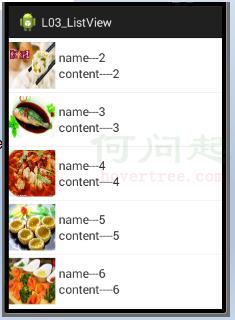
SimpleAdapter 的運作邏輯是「資料 + 對應關係」:你把每一筆資料封裝成一個 Map,再告訴它 Map 裡的哪個 key 對應到項目配置中的哪個控制項 id,剩下的綁定工作它全包。
<?xml version="1.0" encoding="utf-8"?>
<LinearLayout xmlns:android="https://schemas.android.com/apk/res/android"
    android:layout_width="match_parent"
    android:layout_height="120dp" >

    <ImageView
        android:layout_width="80dp"
        android:layout_height="80dp"
        android:src="@drawable/anniu5"
        android:layout_gravity="center_vertical"
        android:id="@+id/iv_1" />

    <LinearLayout
        android:layout_width="match_parent"
        android:layout_height="wrap_content"
        android:orientation="vertical"
        android:layout_gravity="center_vertical"
        android:layout_marginLeft="20dp" >

        <TextView
            android:layout_width="wrap_content"
            android:layout_height="wrap_content"
            android:text="生命可貴"
            android:textSize="20dp"
            android:id="@+id/tv_1" />

        <TextView
            android:layout_width="wrap_content"
            android:layout_height="wrap_content"
            android:text="安全出口"
            android:textSize="20dp"
            android:id="@+id/tv_2" />
    </LinearLayout>
</LinearLayout>
這份配置就是單一列表項目的樣子:左邊一張圖,右邊上下兩行文字。
package com.example.chenshuai.test321;

import android.os.Bundle;
import android.support.v7.app.AppCompatActivity;
import android.widget.ListView;
import android.widget.SimpleAdapter;

import java.util.ArrayList;
import java.util.HashMap;
import java.util.List;
import java.util.Map;

public class Activitysimple extends AppCompatActivity {

    @Override
    protected void onCreate(Bundle savedInstanceState) {
        super.onCreate(savedInstanceState);
        setContentView(R.layout.activity_activitysimple);

        ListView simple_1 = (ListView) findViewById(R.id.simple_1);

        // 準備資料源
        List<Map<String, Object>> im = new ArrayList<Map<String, Object>>();

        Map<String, Object> map = new HashMap<String, Object>();
        map.put("image", R.drawable.anniu3);
        map.put("name", "安全出口1");
        map.put("content", "保護生命1");
        im.add(map);

        map = new HashMap<String, Object>();
        map.put("image", R.drawable.anniu4);
        map.put("name", "安全出口2");
        map.put("content", "保護生命2");
        im.add(map);

        map = new HashMap<String, Object>();
        map.put("image", R.drawable.anniu5);
        map.put("name", "安全出口3");
        map.put("content", "保護生命3");
        im.add(map);

        map = new HashMap<String, Object>();
        map.put("image", R.drawable.anniu6);
        map.put("name", "安全出口4");
        map.put("content", "保護生命4");
        im.add(map);

        map = new HashMap<String, Object>();
        map.put("image", R.drawable.anniu7);
        map.put("name", "安全出口5");
        map.put("content", "保護生命5");
        im.add(map);

        map = new HashMap<String, Object>();
        map.put("image", R.drawable.anniu8);
        map.put("name", "安全出口6");
        map.put("content", "保護生命6");
        im.add(map);

        map = new HashMap<String, Object>();
        map.put("image", R.drawable.anniu9);
        map.put("name", "安全出口7");
        map.put("content", "保護生命7");
        im.add(map);

        map = new HashMap<String, Object>();
        map.put("image", R.drawable.anniu10);
        map.put("name", "安全出口8");
        map.put("content", "保護生命8");
        im.add(map);

        // 1. 資料源中 key 的陣列
        String str[] = { "image", "name", "content" };

        // 2. 項目配置中對應子檢視的 id,順序必須與上面一致
        int[] viewid = { R.id.iv_1, R.id.tv_1, R.id.tv_2 };

        SimpleAdapter simpleAdapter = new SimpleAdapter(
                this, im, R.layout.simple_layout, str, viewid);

        simple_1.setAdapter(simpleAdapter);
    }
}
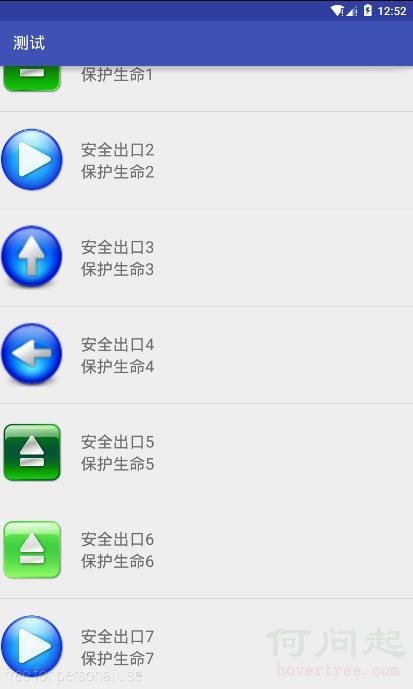
key 陣列與 id 陣列的順序必須嚴格對齊。SimpleAdapter 是按索引配對的,只要其中一邊順序打亂,畫面上就會出現「圖片配錯字」這種難以察覺的錯誤,而且不會有任何編譯或執行期警告。
另外提醒兩點:SimpleAdapter 只支援有限的控制項型別(TextView、ImageView、Button 等),若項目中有自訂 View 或需要複雜的互動邏輯,還是得改用自訂 Adapter;而 SimpleAdapter 預設沒有 view holder 複用最佳化,長列表在低端機上容易卡頓,必要時請自行繼承並實作 convertView 複用。
 Android Studio 如何將本地項目上傳到 git@osc
本文以 Android Studio 1.5 版本為例,介紹如何將本地項目上傳到 git@osc 遠程倉庫: 1、先在 git 上創建一個項目; 2、在 Studio 上
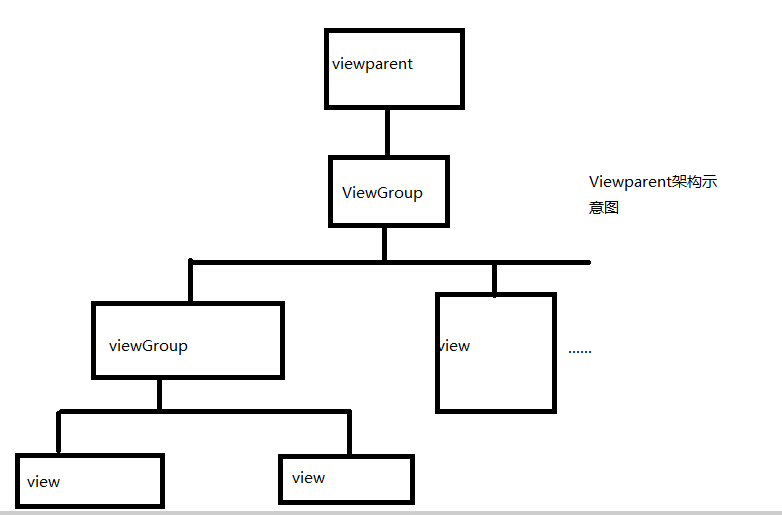 Android 控件架構與界面渲染原理
如果把 Android 上的 App 比作一個有血有肉的人,那麼控件就是把它裝扮得漂漂亮亮的「衣服」。那麼,Android 的控件究竟是如何架構、又如何渲染的呢? 控件
 Android 引導頁實作:ViewPager 圖片滑動與底部小圓點指示器
本篇說明如何製作常見的啟動引導頁(Guide Page):可左右滑動的圖片,加上會跟著換色的底部小圓點,並附一個「跳過」按鈕直接進入主畫面。圖片與小圓點的素材可自行準備。
 Android Activity 生命週期完整解析
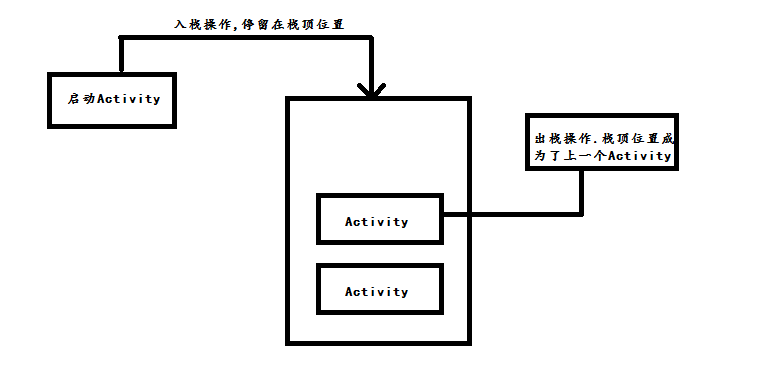
返回棧Android 以返回棧管理 Activity。新啟動的 Activity 會入棧並位於頂端,按返回鍵或 finish 會出棧。狀態運行:可與使用者互動。暫停:仍可