

編輯:Android 程式設計入門
Spinner 是 Android 里最直觀的下拉選擇控件,用法分兩條路:數據寫死在資源文件里,或者在代碼中動態構建。前者適合選項固定的場景(性別、等級),後者適合選項來自接口或數據庫的情況。
先在 res/values/strings.xml 里用 <array> 聲明數據:
<?xml version="1.0" encoding="utf-8"?>
<resources>
    <string name="app_name">spinner</string>
    <string-array name="city">
        <item>上海</item>
        <item>北京</item>
        <item>廣州</item>
    </string-array>
</resources>
然後在布局里用 android:entries 一行搞定,完全不需要寫 Java 代碼:
<Spinner
    android:id="@+id/spinner1"
    android:layout_width="wrap_content"
    android:layout_height="wrap_content"
    android:layout_alignParentLeft="true"
    android:layout_alignParentTop="true"
    android:layout_marginLeft="22dp"
    android:layout_marginTop="49dp"
    android:entries="@array/city" />
通過 ArrayAdapter 把數組灌進去,並監聽選擇變化。這里同時演示了 Spinner 與 Button 的監聽如何共存:
package com.example.spinner;

import android.app.Activity;
import android.os.Bundle;
import android.view.View;
import android.widget.AdapterView;
import android.widget.AdapterView.OnItemSelectedListener;
import android.widget.ArrayAdapter;
import android.widget.Button;
import android.widget.Spinner;
import android.widget.Toast;

public class MainActivity extends Activity {

    private Spinner sp;
    private Button btn;
    private String cardNumber;

    @Override
    protected void onCreate(Bundle savedInstanceState) {
        super.onCreate(savedInstanceState);
        setContentView(R.layout.activity_main);

        sp = (Spinner) findViewById(R.id.spinner1);

        // 動態數據源:也可以換成從接口或數據庫查到的 List
        final String[] roles = { "管理員", "會員", "游客" };
        ArrayAdapter<String> adapter = new ArrayAdapter<String>(
                this, android.R.layout.simple_dropdown_item_1line, android.R.id.text1, roles);
        sp.setAdapter(adapter);

        // Spinner 的選擇監聽
        sp.setOnItemSelectedListener(new OnItemSelectedListener() {
            @Override
            public void onItemSelected(AdapterView<?> parent, View view, int position, long id) {
                // arg2 就是選中項的下標
                cardNumber = getResources().getStringArray(R.array.city)[position];
            }

            @Override
            public void onNothingSelected(AdapterView<?> parent) {
                // 沒有任何選項被選中時回調,通常無需處理
            }
        });

        // 按鈕點擊后把當前選項提示出來
        btn = (Button) findViewById(R.id.button1);
        btn.setOnClickListener(new View.OnClickListener() {
            @Override
            public void onClick(View v) {
                Toast.makeText(MainActivity.this, cardNumber, Toast.LENGTH_SHORT).show();
            }
        });
    }
}
position 就是選中項下標,取值直接用它索引數組即可。onItemSelected,如果需要區分「用戶主動選擇」,得自己加標志位。BaseAdapter 自定義 getView,同時通過 setDropDownViewResource 指定展開后的樣式。 Android Intent與Intent Filter完整解析:元件溝通的核心機制
什麼是Intent? 在Android中,Intent是一種用來描述「要做什麼」的抽象訊息。它可以用來啟動Activity、發送廣播、啟動或綁定Service。Inten
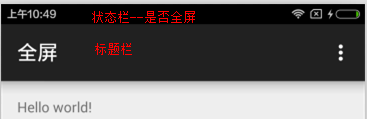 Android 實現全屏、隱藏標題欄與狀態欄的方法
在 Android 中,程序默認會顯示狀態欄(時間、電量、信號等)和標題欄(顯示應用名稱,對應清單文件中 Activity 的 android:label 屬性值)。若需
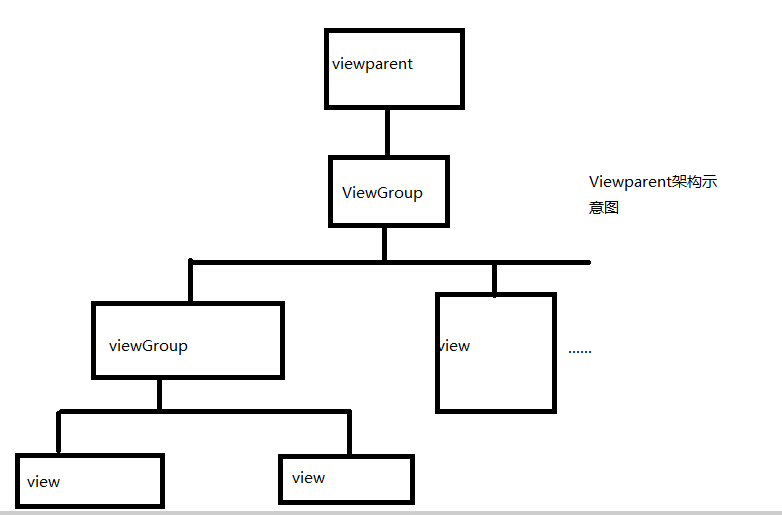 Android 控件架構與界面渲染原理
如果把 Android 上的 App 比作一個有血有肉的人,那麼控件就是把它裝扮得漂漂亮亮的「衣服」。那麼,Android 的控件究竟是如何架構、又如何渲染的呢? 控件
 Android IPC 通訊機制(二):序列化介面與 Binder 原理
本篇談 IPC 的幾個基礎概念:Serializable 介面、Parcelable 介面,以及 Binder。核心在最後那個 IBookManager.java。 一