

編輯:Android 開發實例
本文要說明如何在 Android 上執行 Java 命令,以及如何在 Java 程式碼中執行 shell 命令並解析結果。
Android 程式以 Java 開發,當我們接上除錯器並執行 adb shell 時,可以執行 Linux 命令,卻無法直接執行 Java 命令。那麼在 Android 的 shell 中是否就不能執行 Java 程式了呢?答案是否定的——我們可以透過 app_process 來執行 Java 程式。
先寫一個最簡單的 hello world:
public static class hello { public void main(String args[]){ System.out.println("Hello Android"); } }編譯後得到 hello.class,執行 java hello 可看到輸出。要讓它在 Android 上運行,需要把 .class 轉成 dex,可用 Android SDK 中的 dx 工具:
dx --dex --output=hello.dex hello.class
得到 hello.dex 後,連接手機、開啟 USB 除錯,把檔案推上去:
adb push hello.dex /sdcard/
進入 Android 命令列:
adb shell
用 app_process 運行 hello.dex:
app_process -Djava.class.path=/sdcard/hello.dex /sdcard hello
如此一來,就能在 Android 上運行用記事本寫的 Java 程式了。
在 Android 中,有些系統資訊沒有直接提供 API,這時可以用 shell 指令來取得。這裡主要用到 ProcessBuilder 這個類別:
package com.yin.system_analysis; import java.io.File; import java.io.IOException; import java.io.InputStream; import android.app.Activity; import android.os.Bundle; import android.util.Log; import android.view.View; import android.view.View.OnClickListener; import android.widget.Button; import android.widget.TextView; public class MainActivity extends Activity { private final static String[] ARGS = {"ls","-l"}; private final static String TAG = "com.yin.system"; Button mButton; TextView myTextView; public void onCreate(Bundle savedInstanceState) { super.onCreate(savedInstanceState); setContentView(R.layout.main); mButton = (Button) findViewById(R.id.myButton); myTextView = (TextView) findViewById(R.id.textView); mButton.setOnClickListener(new OnClickListener() { public void onClick(View v) { myTextView.setText(getResult()); } }); } public String getResult(){ ShellExecute cmdexe = new ShellExecute ( ); String result=""; try { result = cmdexe.execute(ARGS, "/"); } catch (IOException e) { Log.e(TAG, "IOException"); e.printStackTrace(); } return result; } private class ShellExecute { /* * args[0] : shell 命令 如"ls" 或"ls -1"; * args[1] : 命令執行路徑 如"/" ; */ public String execute ( String [] cmmand,String directory) throws IOException { String result = "" ; try { ProcessBuilder builder = new ProcessBuilder(cmmand); if ( directory != null ) builder.directory ( new File ( directory ) ) ; builder.redirectErrorStream (true) ; Process process = builder.start ( ) ; //得到命令執行後的結果 InputStream is = process.getInputStream ( ) ; byte[] buffer = new byte[1024] ; while ( is.read(buffer) != -1 ) { result = result + new String (buffer) ; } is.close ( ) ; } catch ( Exception e ) { e.printStackTrace ( ) ; } return result ; } } }透過 ProcessBuilder 指定命令與執行路徑,再把 process 的輸出流讀出來,就能取得命令執行的結果並做後續解析。這在需要取得系統資訊、又缺乏現成 API 時特別好用。
 Android 多媒體播放教學:建立簡易音樂播放器
本範例會建立一個可播放、暫停、快轉與倒退的音樂播放器,重點在於 MediaPlayer 與 Handler 的配合。 核心元件 MediaPlayer:播放音訊。 Se
 Android 音樂播放器實作:MediaPlayer 搭配 SeekBar 的完整流程
Android 想播放一段音訊或影片,最直接的入口就是 MediaPlayer。它站在系統的媒體播放服務之上,把解碼、音訊輸出這些底層細節都收 ourselves 起來,
 Eclipse 中 aapt.exe 停止工作的排查方式
問題現象 在 Eclipse 開發 Android 專案時,若版面配置或 XML 檔有錯誤,可能會突然出現 aapt.exe 停止工作的提示。這類錯誤不一定伴隨明確訊息,
 Android 實現局部界面動態切換:固定骨架 + 可替換區域
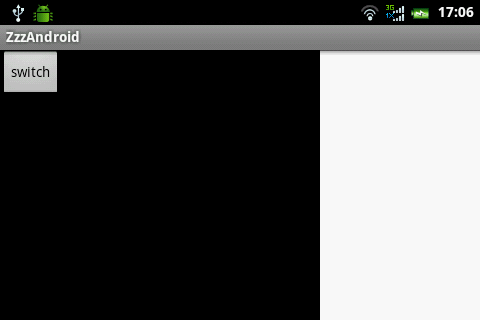
本文示範一個常見的介面結構:外層版面固定不動,其中某塊區域可以動態替換內容。實作效果如下: 整個畫面由三個 layout 檔組成。 main.xml:外層骨架 &