

編輯:Android 開發實例
本文要說明如何實作一個類似 iPhone 桌面「編輯模式」下圖示左右抖動的效果。這種效果常用於提示使用者目前處於可編輯狀態。以下先來看版面配置:
<?xml version="1.0" encoding="utf-8"?> <LinearLayout xmlns:android="https://schemas.android.com/apk/res/android" android:layout_width="fill_parent" android:layout_height="fill_parent" android:orientation="vertical" > <LinearLayout android:layout_width="fill_parent" android:layout_height="wrap_content" android:orientation="horizontal"> <TextView android:id="@+id/tv0" android:layout_width="80dip" android:layout_height="94dip" android:drawableTop="@drawable/ic_launcher" android:text="@string/hello" /> <TextView android:id="@+id/tv1" android:layout_width="80dip" android:layout_height="94dip" android:drawableTop="@drawable/ic_launcher" android:text="@string/hello" /> <TextView android:id="@+id/tv2" android:layout_width="80dip" android:layout_height="94dip" android:drawableTop="@drawable/ic_launcher" android:text="@string/hello" /> <TextView android:id="@+id/tv3" android:layout_width="80dip" android:layout_height="94dip" android:drawableTop="@drawable/ic_launcher" android:text="@string/hello" /> </LinearLayout> <LinearLayout android:layout_width="fill_parent" android:layout_height="wrap_content" android:orientation="horizontal"> <TextView android:id="@+id/tv4" android:layout_width="80dip" android:layout_height="94dip" android:drawableTop="@drawable/ic_launcher" android:text="@string/hello" /> <TextView android:id="@+id/tv5" android:layout_width="80dip" android:layout_height="94dip" android:drawableTop="@drawable/ic_launcher" android:text="@string/hello" /> <TextView android:id="@+id/tv6" android:layout_width="80dip" android:layout_height="94dip" android:drawableTop="@drawable/ic_launcher" android:text="@string/hello" /> <TextView android:id="@+id/tv7" android:layout_width="80dip" android:layout_height="94dip" android:drawableTop="@drawable/ic_launcher" android:text="@string/hello" /> </LinearLayout> <LinearLayout android:layout_width="fill_parent" android:layout_height="wrap_content" android:orientation="horizontal"> <TextView android:id="@+id/tv8" android:layout_width="80dip" android:layout_height="94dip" android:drawableTop="@drawable/ic_launcher" android:text="@string/hello" /> <TextView android:id="@+id/tv9" android:layout_width="80dip" android:layout_height="94dip" android:drawableTop="@drawable/ic_launcher" android:text="@string/hello" /> <TextView android:id="@+id/tv10" android:layout_width="80dip" android:layout_height="94dip" android:drawableTop="@drawable/ic_launcher" android:text="@string/hello" /> <TextView android:id="@+id/tv11" android:layout_width="80dip" android:layout_height="94dip" android:drawableTop="@drawable/ic_launcher" android:text="@string/hello" /> </LinearLayout> <LinearLayout android:layout_width="fill_parent" android:layout_height="wrap_content" android:orientation="horizontal"> <TextView android:id="@+id/tv12" android:layout_width="80dip" android:layout_height="94dip" android:drawableTop="@drawable/ic_launcher" android:text="@string/hello" /> <TextView android:id="@+id/tv13" android:layout_width="80dip" android:layout_height="94dip" android:drawableTop="@drawable/ic_launcher" android:text="@string/hello" /> <TextView android:id="@+id/tv14" android:layout_width="80dip" android:layout_height="94dip" android:drawableTop="@drawable/ic_launcher" android:text="@string/hello" /> <TextView android:id="@+id/tv15" android:layout_width="80dip" android:layout_height="94dip" android:drawableTop="@drawable/ic_launcher" android:text="@string/hello" /> </LinearLayout> <LinearLayout android:layout_width="fill_parent" android:layout_height="wrap_content" android:orientation="horizontal"> <TextView android:id="@+id/tv16" android:layout_width="80dip" android:layout_height="94dip" android:drawableTop="@drawable/ic_launcher" android:text="@string/hello" /> <TextView android:id="@+id/tv17" android:layout_width="80dip" android:layout_height="94dip" android:drawableTop="@drawable/ic_launcher" android:text="@string/hello" /> <TextView android:id="@+id/tv18" android:layout_width="80dip" android:layout_height="94dip" android:drawableTop="@drawable/ic_launcher" android:text="@string/hello" /> <TextView android:id="@+id/tv19" android:layout_width="80dip" android:layout_height="94dip" android:drawableTop="@drawable/ic_launcher" android:text="@string/hello" /> </LinearLayout> </LinearLayout>
程式碼如下:
package com.android.shake; import android.app.Activity; import android.os.Bundle; import android.util.DisplayMetrics; import android.view.animation.Animation; import android.view.animation.Animation.AnimationListener; import android.view.animation.RotateAnimation; import android.widget.TextView; import android.view.View; import android.view.Window; public class ShakeTestActivity extends Activity implements View.OnClickListener { private TextView mtv0; private TextView mtv1; private TextView mtv2; private TextView mtv3; private TextView mtv4; private TextView mtv5; private TextView mtv6; private TextView mtv7; private TextView mtv8; private TextView mtv9; private TextView mtv10; private TextView mtv11; private TextView mtv12; private TextView mtv13; private TextView mtv14; private TextView mtv15; private TextView mtv16; private TextView mtv17; private TextView mtv18; private TextView mtv19; private boolean mNeedShake = false; private boolean mStartShake = false; private static final int ICON_WIDTH = 80; private static final int ICON_HEIGHT = 94; private static final float DEGREE_0 = 1.8f; private static final float DEGREE_1 = -2.0f; private static final float DEGREE_2 = 2.0f; private static final float DEGREE_3 = -1.5f; private static final float DEGREE_4 = 1.5f; private static final int ANIMATION_DURATION = 80; private int mCount = 0; float mDensity; /** Called when the activity is first created. */ @Override public void onCreate(Bundle savedInstanceState) { super.onCreate(savedInstanceState); requestWindowFeature(Window.FEATURE_NO_TITLE); setContentView(R.layout.main); DisplayMetrics dm = new DisplayMetrics(); getWindowManager().getDefaultDisplay().getMetrics(dm); if (dm != null) { mDensity = dm.density; } mtv0 = (TextView) findViewById(R.id.tv0); mtv0.setOnClickListener(this); mtv1 = (TextView) findViewById(R.id.tv1); mtv1.setOnClickListener(this); mtv2 = (TextView) findViewById(R.id.tv2); mtv2.setOnClickListener(this); mtv3 = (TextView) findViewById(R.id.tv3); mtv3.setOnClickListener(this); mtv4 = (TextView) findViewById(R.id.tv4); mtv4.setOnClickListener(this); mtv5 = (TextView) findViewById(R.id.tv5); mtv5.setOnClickListener(this); mtv6 = (TextView) findViewById(R.id.tv6); mtv6.setOnClickListener(this); mtv7 = (TextView) findViewById(R.id.tv7); mtv7.setOnClickListener(this); mtv8 = (TextView) findViewById(R.id.tv8); mtv8.setOnClickListener(this); mtv9 = (TextView) findViewById(R.id.tv9); mtv9.setOnClickListener(this); mtv10 = (TextView) findViewById(R.id.tv10); mtv10.setOnClickListener(this); mtv11 = (TextView) findViewById(R.id.tv11); mtv11.setOnClickListener(this); mtv12 = (TextView) findViewById(R.id.tv12); mtv12.setOnClickListener(this); mtv13 = (TextView) findViewById(R.id.tv13); mtv13.setOnClickListener(this); mtv14 = (TextView) findViewById(R.id.tv14); mtv14.setOnClickListener(this); mtv15 = (TextView) findViewById(R.id.tv15); mtv15.setOnClickListener(this); mtv16 = (TextView) findViewById(R.id.tv16); mtv16.setOnClickListener(this); mtv17 = (TextView) findViewById(R.id.tv17); mtv17.setOnClickListener(this); mtv18 = (TextView) findViewById(R.id.tv18); mtv18.setOnClickListener(this); mtv19 = (TextView) findViewById(R.id.tv19); mtv19.setOnClickListener(this); } @Override public void onClick(View v) { if (!mStartShake) { mStartShake = true; mNeedShake = true; shakeAnimation(mtv0); shakeAnimation(mtv1); shakeAnimation(mtv2); shakeAnimation(mtv3); shakeAnimation(mtv4); shakeAnimation(mtv5); shakeAnimation(mtv6); shakeAnimation(mtv7); shakeAnimation(mtv8); shakeAnimation(mtv9); shakeAnimation(mtv10); shakeAnimation(mtv11); shakeAnimation(mtv12); shakeAnimation(mtv13); shakeAnimation(mtv14); shakeAnimation(mtv15); shakeAnimation(mtv16); shakeAnimation(mtv17); shakeAnimation(mtv18); shakeAnimation(mtv19); } } private void shakeAnimation(final View v) { float rotate = 0; int c = mCount++ % 5; if (c == 0) { rotate = DEGREE_0; } else if (c == 1) { rotate = DEGREE_1; } else if (c == 2) { rotate = DEGREE_2; } else if (c == 3) { rotate = DEGREE_3; } else { rotate = DEGREE_4; } final RotateAnimation mra = new RotateAnimation(rotate, -rotate, ICON_WIDTH * mDensity / 2, ICON_HEIGHT * mDensity / 2); final RotateAnimation mrb = new RotateAnimation(-rotate, rotate, ICON_WIDTH * mDensity / 2, ICON_HEIGHT * mDensity / 2); mra.setDuration(ANIMATION_DURATION); mrb.setDuration(ANIMATION_DURATION); mra.setAnimationListener(new AnimationListener() { @Override public void onAnimationEnd(Animation animation) { if (mNeedShake) { mra.reset(); v.startAnimation(mrb); } } @Override public void onAnimationRepeat(Animation animation) { } @Override public void onAnimationStart(Animation animation) { } }); mrb.setAnimationListener(new AnimationListener() { @Override public void onAnimationEnd(Animation animation) { if (mNeedShake) { mrb.reset(); v.startAnimation(mra); } } @Override public void onAnimationRepeat(Animation animation) { } @Override public void onAnimationStart(Animation animation) { } }); v.startAnimation(mra); } @Override public void onBackPressed() { if (!mNeedShake) { super.onBackPressed(); } else { mNeedShake = false; mCount = 0; mStartShake = false; } } } 原理是:用兩個方向相反的 RotateAnimation(一正一反)互相串接,在各自的 onAnimationEnd 中觸發另一個動畫,形成持續來回擺動的效果。而每次擺動的角度會依 mCount % 5 在五組角度間輪替,讓每個圖示的抖動些微錯開,看起來更自然、生動,也更貼近 iPhone 的質感。按下返回鍵時,則透過 mNeedShake 旗標停止抖動。
希望本文的說明能對你的 Android 開發有所幫助。
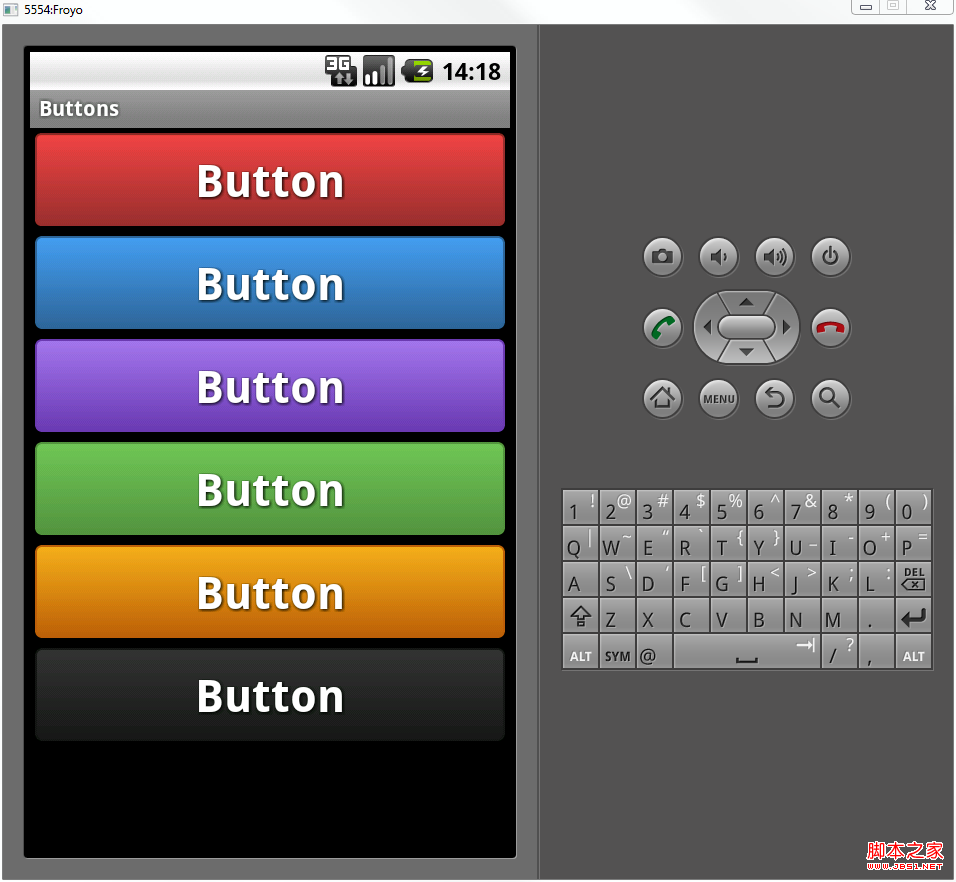 Android 自定義格式 Button 的布局思路
在 Android 中,可以完全透過 XML 自定義 Button 的外觀,而不依賴圖片素材。常見做法是使用 selector 搭配 shape,定義按壓狀態、漸層、邊框
 Android 載入 Spinner:實作不知何時結束的等待提示
當 App 執行某項工作時,若能給使用者一個「正在處理中」的視覺回饋,體驗會好很多。Android 的進度條有兩種型態:一種是 Hamburg 風格的水平進度列,會顯示百
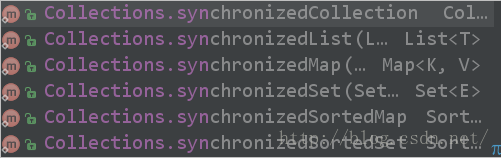 Android 性能優化實戰:緩存、數據結構與延遲加載
性能優化是 Android 開發中恆久的話題。除了佈局優化,代碼細節對程式運行效率的影響同樣不容小覷。本文從緩存、數據、延遲加載三個角度,梳理日常編碼中值得注意的性能要點
 Android 登入介面實作:安全提示與按鈕禁用
登入介面的組成登入介面通常需要讓使用者輸入帳號與密碼。為了保護輸入內容,密碼欄位應設定為密碼模式,讓畫面只顯示遮罩字元。登入流程當使用者按下登入鈕,程式會讀取帳號與密碼,